Locker Management Systems UK: Allocation, Access Control and Operational Infrastructure
May 12, 2026
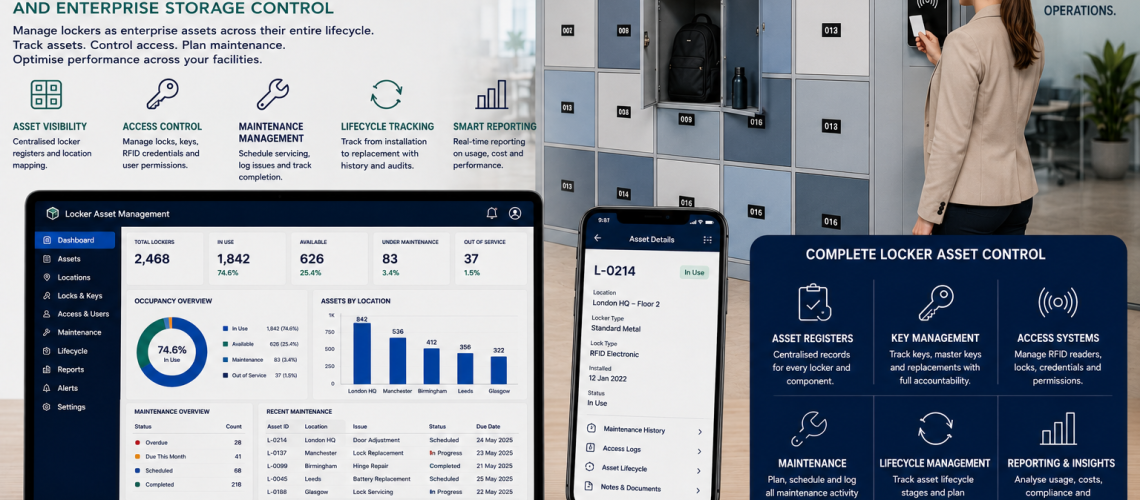
Locker management systems help organisations control how lockers are allocated, accessed, monitored, maintained and governed across workplaces, schools, NHS sites, leisure centres, industrial facilities and multi-site estates. A modern locker system is not just storage hardware. It is operational infrastructure.
Many organisations start by looking for lockers, locks or replacement keys. However, the bigger requirement is usually a managed system that controls users, access, occupancy, audits, maintenance, reporting and lifecycle planning.
This guide explains how locker management systems work in the UK, including allocation, occupancy management, access control, administration, facilities operations and smart locker integration.
What Is a Locker Management System?
A locker management system is the complete operational framework used to manage lockers across an organisation.
- Locker allocation
- Access control
- Key systems
- RFID and PIN access
- App-based credentials
- Occupancy tracking
- Audit trails
- User administration
- Facilities workflows
- Maintenance records
- Lifecycle planning
- Smart locker software
The purpose is to move locker management away from isolated hardware and into a controlled infrastructure system.
Why Locker Management Systems Matter
Organisations do not only buy locks. They buy storage systems that need to work every day for staff, students, visitors, contractors, shift workers and facilities teams.
- Reduces unused locker space
- Improves access accountability
- Supports hybrid working
- Improves facilities control
- Reduces lost key problems
- Supports audit and compliance needs
- Improves maintenance planning
- Supports multi-site estates
- Connects lockers with wider workplace operations
This makes locker management a facilities, governance and infrastructure issue rather than a simple product choice.
Locker Allocation
Locker allocation decides who uses each locker, when they use it and when the locker becomes available again.
Assigned Lockers
Assigned lockers are allocated to one person, role or department for ongoing use. They are common in schools, staff changing rooms, healthcare sites and industrial facilities.
- Permanent user assignment
- Clear ownership
- Key or credential issue records
- Useful for long-term storage
- Requires offboarding controls
Temporary Lockers
Temporary lockers support short-term use by visitors, contractors, agency workers, hybrid staff, event users or shift workers.
- Time-limited access
- Temporary PINs or credentials
- Visitor and contractor support
- Automatic expiry where supported
- Reduced permanent allocation pressure
For short-term access planning, see temporary locker access systems UK.
Hot Lockers
Hot lockers allow users to select available lockers when needed rather than keeping a permanent locker.
- Useful for hybrid offices
- Supports desk sharing
- Improves locker utilisation
- Reduces unused assigned lockers
- Works well with smart booking systems
Shared-Use Locker Systems
Shared-use systems allow lockers to serve different users at different times. They are common in leisure centres, public facilities, universities and flexible workplaces.
- Session-based use
- High turnover
- Shared access model
- PIN, RFID or app access
- Requires clear reset and release procedures
For a dedicated allocation layer, see locker allocation systems UK.
Occupancy Management
Occupancy management helps organisations understand how lockers are actually used.
- Usage tracking
- Vacant locker management
- Locker turnover
- Peak-demand planning
- Underused locker identification
- Department-level demand
- Temporary allocation reporting
Occupancy data helps facilities teams avoid unnecessary locker purchases and improve space efficiency.
| Occupancy Issue | Management Response |
|---|---|
| Unused assigned lockers | Review allocation and offboarding records |
| Peak-time shortages | Use temporary or hot locker allocation |
| High turnover | Use shared-use or timed access systems |
| Unknown demand | Introduce occupancy reporting |
| Multi-site inconsistency | Use central dashboards and reporting |
Access Management
Access management controls how users open lockers and how permissions are issued, changed and revoked.
Keys
Keyed systems remain useful for assigned lockers and simple environments. They require strong key issue records, spare key control and lost key procedures.
For wider key governance, see locker key management systems UK.
RFID
RFID locker systems use contactless credentials such as staff cards, student cards, wristbands or fobs.
- Reduces physical key handling
- Supports central credential control
- Useful for staff cards and student cards
- Works well in leisure with wristbands
- Can support audit-ready access records
For digital access planning, see RFID locker systems UK.
PIN Access
PIN systems support shared-use lockers, temporary access and environments where physical keys are inconvenient.
- User-selected codes
- Temporary PINs
- Forgotten-code support
- Reset procedures
- Supervisor override requirements
App Credentials
App-based credentials support modern smart locker systems, hybrid offices and mobile-first workplace environments.
- Mobile booking
- Digital credentials
- Remote assignment
- Temporary access
- Self-service user workflows
Hybrid Estates
Many organisations operate mixed locker estates with keyed locks, RFID, PIN systems and smart lockers working together during phased upgrades.
For retrofit and migration planning, see hybrid locker estates UK.
Administration
Locker administration is the day-to-day control layer that keeps the system accurate and manageable.
- User onboarding
- Staff offboarding
- Student allocation
- Temporary user approval
- Contractor access
- Audit records
- Permissions
- Reporting
- Credential revocation
- Incident logging
Onboarding
Onboarding assigns lockers, keys, cards, PINs or app credentials to new users. This process should define who approves access and how records are created.
Offboarding
Offboarding removes access when a user leaves, changes role, changes department or no longer needs storage. Poor offboarding can leave lockers occupied or credentials active.
Audits and Permissions
Audits confirm who has access, which lockers are active, which credentials are live and which areas require review.
For governance detail, see locker access permissions and governance UK and locker access audit systems UK.
Facilities Operations
Locker management systems should connect directly with facilities operations.
- Maintenance planning
- Cleaning schedules
- Damage reporting
- Replacement scheduling
- Battery replacement
- Spare part control
- Inspection records
- Lifecycle planning
This is especially important for NHS sites, schools, industrial facilities, leisure centres and large workplaces where lockers are used every day.
Maintenance
Maintenance may include lock servicing, hinge repairs, battery checks, door alignment, replacement locks and software support.
Cleaning
Cleaning schedules are important in changing areas, healthcare sites, leisure centres and high-turnover shared-use environments.
Replacement Scheduling
Replacement scheduling helps organisations avoid reactive failures and plan locker upgrades around budget, condition and operational need.
For lifecycle control, see locker asset management UK.
Smart Integration
Smart integration brings locker management into software, dashboards, analytics and remote administration.
- Management dashboards
- Cloud software
- Occupancy analytics
- Remote administration
- Mobile access
- Audit reporting
- Maintenance alerts
- Multi-site reporting
- Credential management
Smart integration is most valuable where organisations need visibility, scalability and operational reporting.
For the software layer, see smart locker management software UK.
Locker Management System Layers
| Layer | What It Controls | Why It Matters |
|---|---|---|
| Allocation | Who uses each locker | Prevents wasted capacity |
| Occupancy | How lockers are used | Improves space planning |
| Access | How lockers are opened | Controls security and convenience |
| Administration | User records and permissions | Supports governance |
| Facilities operations | Maintenance and lifecycle | Reduces disruption |
| Smart integration | Dashboards and reporting | Supports enterprise management |
Locker Management by Environment
Workplaces
Workplaces often need hybrid working storage, desk-sharing lockers, hot lockers, visitor lockers and occupancy reporting.
See workplace locker management UK.
Schools
Schools need student allocation, safeguarding controls, key management, corridor flow and term-end procedures.
See school locker access systems UK.
NHS and Healthcare
NHS sites need staff lockers, changing area access, shift allocation, auditability and controlled healthcare workflows.
See NHS locker access systems UK.
Industrial Sites
Industrial sites need PPE storage, workforce rotation, contractor access, supervisor override and harsh-environment durability.
See industrial locker access systems UK.
Leisure Facilities
Leisure sites need RFID wristbands, public lockers, temporary use, wet-area access and high-turnover locker management.
See leisure locker access systems UK.
Common Locker Management Problems
- No central locker register
- Unused lockers remain assigned
- Lost keys create administration work
- Access permissions are unclear
- Temporary users are not removed
- Occupancy is not measured
- Maintenance is reactive
- Cleaning schedules are inconsistent
- Smart systems are disconnected
- No lifecycle replacement plan exists
The solution is not just better locks. The solution is a managed locker infrastructure model.
Locker Management System Checklist
- Are lockers assigned, temporary, hot or shared-use?
- Can vacant lockers be identified quickly?
- Is occupancy tracked?
- Which access methods are used?
- Are keys, RFID cards, PINs or app credentials controlled?
- Are onboarding and offboarding workflows clear?
- Are access permissions reviewed?
- Are audit trails available where needed?
- Are cleaning and maintenance schedules defined?
- Is replacement scheduling planned?
- Can the system scale across multiple sites?
- Is smart dashboard reporting required?
Related Locker Management Guides
- Locker Access Control Systems UK
- Locker Allocation Systems UK
- Workplace Locker Management UK
- Smart Locker Management Software UK
- Locker Asset Management UK
- Enterprise Locker Access Control UK
- Locker Access Compliance UK
- How to Specify Locker Access Systems UK
- Locker Locks
- Lockers UK
Frequently Asked Questions
What is a locker management system?
A locker management system is the operational framework used to control locker allocation, access, occupancy, administration, maintenance and reporting.
How is locker management different from locker access control?
Locker access control manages how lockers are opened. Locker management covers the wider system, including allocation, occupancy, administration, maintenance and lifecycle planning.
What are hot lockers?
Hot lockers allow users to choose available lockers when needed rather than keeping a permanently assigned locker.
Can locker management systems use RFID?
Yes. RFID can be used for staff cards, student cards, leisure wristbands, contractor credentials and managed access systems.
Why is occupancy management important?
Occupancy management helps organisations identify unused lockers, plan capacity, reduce wasted space and improve temporary allocation.
Are smart lockers part of locker management systems?
Yes. Smart lockers can form part of a wider locker management system when they connect with dashboards, analytics, credentials, audit reporting and remote administration.
Discover more from Blog Total Locker Service
Subscribe to get the latest posts sent to your email.