Ronis Locker Keys UK: Key Codes, Identification and Replacement
May 14, 2026
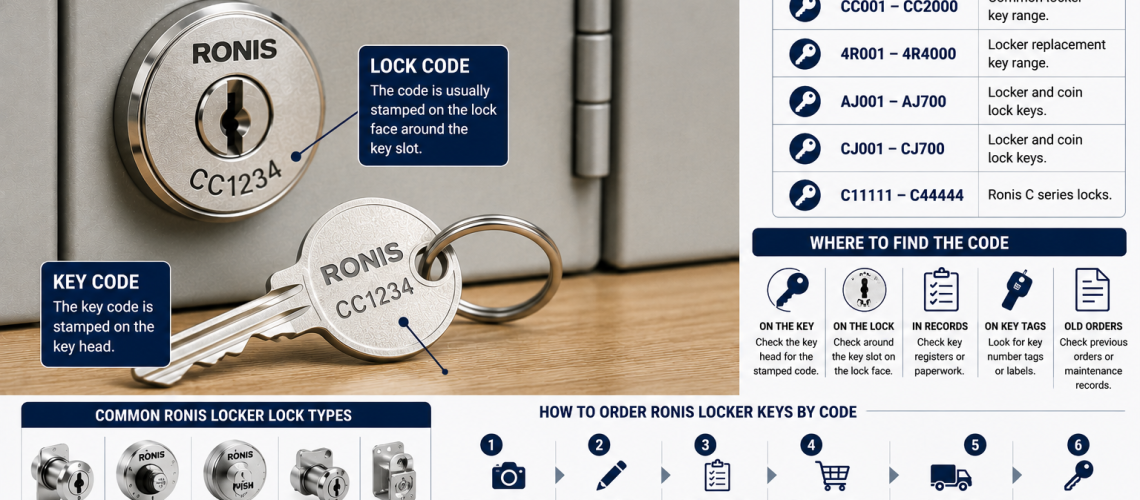
Ronis locker keys are used on many commercial lockers, cabinets and storage units across UK workplaces, schools, leisure centres and changing rooms. When a Ronis key is lost, damaged or missing, a replacement may be possible if the correct key code and key series can be identified.
This guide explains how to identify a Ronis locker key, where to look for the key code, how common Ronis code families are used, and when it is better to replace the lock instead of ordering another key.
If you already know the correct code and simply need a replacement, go directly to our replacement locker keys page.
Quick Answer: Can Ronis Locker Keys Be Replaced?
In many cases, yes. A replacement Ronis key can often be supplied when the correct key code and key series are known. The code may be stamped or engraved on the original key, shown on the lock face, recorded in a site key register or retained on previous order paperwork.
The visible locker number is not automatically the replacement key code. Always identify the actual Ronis code before ordering.
| Detail to check | Why it matters |
|---|---|
| Full Ronis key code | Identifies the replacement key |
| Code prefix or series | Helps confirm the correct key family |
| Lock-face marking | May help when the original key is missing |
| Locker number | Useful for site records, but not necessarily the key code |
| Lock condition | Shows whether replacing the key alone is sensible |
What Are Ronis Locker Keys?
Ronis keys are used with Ronis cylinders and locks fitted to lockers, cabinets, office furniture and other commercial storage products. A replacement key must match the correct key profile, code and lock family.
Two keys can look very similar while belonging to different series. For that reason, the full code should be recorded exactly rather than relying on appearance alone.
Where to Find a Ronis Locker Key Code
The most useful information is the complete Ronis key or lock code. Check all available sources before placing an order.
- the head of the original key;
- the front face of the lock barrel;
- a spare key tag;
- a locker or key register;
- previous replacement-key orders;
- installation or handover records;
- maintenance records where lock changes have been documented.
If you are unsure where the number is located or whether you are looking at the correct code, use our How to Find a Locker Key Code UK guide.
Locker Number vs Ronis Key Code
The locker number and the Ronis key code serve different purposes.
| Number type | What it identifies | Useful for ordering? |
|---|---|---|
| Locker number | The physical locker or compartment | Only if a reliable site register links it to the key code |
| Ronis key code | The key or lock combination | Yes |
| Lock-face marking | The code shown on the lock cylinder | Often useful |
| Master/pass-key reference | Authorised management access | Only after the system is correctly identified |
A common ordering mistake is to send the door number instead of the lock or key code. Unless the site has a reliable key register linking the two, the locker number alone does not identify the replacement key.
Common Ronis Key Code Families
Ronis produces several key-code families that may appear on lockers, furniture locks, coin locks and other storage applications. Examples encountered in locker servicing can include CC, 4R, AJ, CJ and C-series codes.
The presence of a particular prefix does not by itself prove the exact lock application. Always confirm the complete code and, where possible, the lock type before ordering.
| Ronis code family | What to check |
|---|---|
| CC series | Record the complete CC-prefixed code exactly as shown |
| 4R series | Retain the full 4R prefix and number |
| AJ series | Check the key or lock face and confirm whether the lock is a standard or specialist application |
| CJ series | Check the complete CJ code and lock type |
| C series | Confirm the full lock-face or key marking before ordering |
If the code is worn or difficult to read, take clear photographs of both the key and the front of the lock before guessing.
How to Read a Ronis Key Code Correctly
Small reading errors can result in the wrong key being supplied. Check every character carefully, particularly where letters and numbers look similar.
| Possible mistake | How to reduce the risk |
|---|---|
| Missing the prefix | Record all letters and numbers exactly as shown |
| O confused with 0 | Photograph the marking clearly |
| I confused with 1 | Check under good lighting and from another angle |
| S confused with 5 | Compare the marking with known Ronis code formats |
| Locker number mistaken for key code | Check the key or lock face rather than the door number |
| Wrong key family assumed | Confirm the prefix and lock type before ordering |
How to Order a Replacement Ronis Locker Key
Before ordering, collect as much reliable information as possible. This reduces delays and helps avoid the cost of supplying an incorrect key.
- record the full Ronis code exactly;
- retain all letters and prefixes;
- photograph the original key if available;
- photograph the lock face;
- record the locker number separately;
- confirm the number of keys required;
- check whether the lock still operates correctly;
- confirm whether you need an ordinary user key or a management/pass key;
- note whether the lock has previously been changed.
When the code is confirmed, use our replacement locker keys page to start the ordering process.
What If the Original Ronis Key Is Lost?
Losing the original key does not automatically mean the lock needs replacing. Start by checking the front of the lock barrel for a readable code.
- Check the lock face for a code.
- Check spare keys or key tags.
- Review the site’s key register.
- Check previous replacement-key invoices or paperwork.
- Compare records against the physical locker number.
- If the code remains uncertain, photograph the lock for identification.
For the wider lost-key process, see How to Find a Locker Key Code UK and the replacement locker keys hub.
When a Replacement Key Is the Right Solution
Replacing the key alone is usually the simplest option when the lock is still mechanically sound and the correct code can be identified with confidence.
- the original key is lost;
- a spare key is required;
- the existing key is worn or bent;
- a staff member has left without returning a key;
- the lock turns and secures the door normally;
- the correct code is known;
- the organisation wants to retain the existing Ronis lock system.
When the Ronis Lock Should Be Replaced Instead
A new key will not solve a mechanical lock problem. Replace or service the lock if the mechanism itself is damaged or unreliable.
- the lock is seized or unusually stiff;
- the cylinder has been forced or vandalised;
- the cam or latch does not secure the door;
- a broken key remains inside and cannot be removed safely;
- the code cannot be identified reliably;
- the lock is obsolete or no longer supported;
- the site is intentionally changing to another locking method.
For replacement mechanisms and alternative locker locking options, see our locker locks range.
User Keys, Pass Keys and Master Keys
Not every Ronis key associated with a locker has the same role. A normal user key opens an individual locker, while some systems may also use pass or master keys for authorised management access.
Management keys should be controlled separately from ordinary user keys. Record who is authorised to hold them, where spares are stored and which lock groups they operate.
For wider master-key and key-governance guidance, use the Master Key Locker Systems UK guide.
Ronis Keys in Schools
Schools may encounter Ronis locks on pupil lockers, staff lockers, sports changing areas and general storage. The key-management priority is usually accurate records rather than changing working locks every time a pupil or member of staff loses a key.
- record locker number and key code separately;
- retain controlled spare keys where appropriate;
- update the register whenever a lock is replaced;
- check damaged locks during planned maintenance periods;
- avoid relying on handwritten locker-door numbers as key references.
Ronis Keys in Workplaces
Workplaces can use Ronis locks on staff lockers, uniform storage, changing-room lockers and other commercial storage units. Replacement by code can be more efficient than replacing a working lock, particularly where several lockers use the same established lock family.
For larger staff estates, link the visible locker number, Ronis code and user allocation in a controlled record so keys can be identified without dismantling working lockers unnecessarily.
Ronis Keys in Gyms and Leisure Centres
Leisure facilities may encounter Ronis locks on standard changing-room lockers as well as some coin-operated or managed locker systems. Before ordering, confirm whether the required key is an ordinary user key, management key or a key associated with a coin-lock mechanism.
Where the lock operates differently from a straightforward user-key lock, send photographs and identify the locker or lock model before assuming that a standard replacement key is sufficient.
Build a Ronis Locker Key Register
A simple key register makes future Ronis replacement orders much easier and helps distinguish between locker numbers, key codes and lock changes.
| Register field | Purpose |
|---|---|
| Locker number | Identifies the physical locker |
| Location | Identifies site, room or locker bank |
| Ronis key code | Supports replacement-key identification |
| Code family/prefix | Helps confirm the correct Ronis series |
| Lock type | Distinguishes ordinary keyed locks from coin or specialist mechanisms |
| Spare keys held | Shows whether an immediate replacement is already available |
| Management key information | Supports controlled authorised access |
| Lock changed date | Prevents old code information being reused |
For general guidance on organising and identifying keys across a locker estate, see How to Label and Organise Locker Keys.
Information to Send When the Ronis Code Is Unclear
If you cannot confidently identify the Ronis code, provide as much visual and site information as possible.
- clear photograph of the key head, front and back;
- close-up photograph of the lock face;
- photograph of the complete locker door;
- locker manufacturer if known;
- visible markings or part numbers;
- whether the lock is standard keyed, coin-operated or another type;
- locker number and site location;
- any old paperwork showing previous key codes.
If the lock itself is uncertain, use our How to Identify a Locker Lock guide before ordering.
Related Ronis and Locker Key Guides
- Replacement Locker Keys – main ordering and replacement-key hub.
- How to Find a Locker Key Code UK – locating and reading key or lock codes.
- How to Identify a Locker Lock – identify the lock before ordering keys or parts.
- How to Label and Organise Locker Keys – key registers, labels and administration.
- Master Key Locker Systems UK – master, pass and override-key control.
- Locker Locks – replacement locks and locker-locking options.
Ronis Locker Keys FAQs
Can I get a replacement Ronis locker key?
In many cases, yes. A replacement Ronis key may be possible when the correct key or lock code and the appropriate Ronis key family can be identified.
Where is the Ronis key code?
The code may appear on the original key, on the front face of the lock barrel, in a key register or on previous replacement-key paperwork.
Is the locker number the same as the Ronis key code?
Not necessarily. The locker number identifies the physical door or compartment, while the Ronis key code identifies the key or lock combination. Only use the locker number for ordering if a reliable site register links it to the correct code.
What should I do if my Ronis key code is unreadable?
Take clear close-up photographs of the key, the lock face and the complete locker door. Check site key registers and previous orders before guessing the code.
Should I replace the Ronis key or the whole lock?
Replace the key when the lock works correctly and the code can be identified. Consider replacing or servicing the lock if it is seized, damaged, forced, unreliable or impossible to identify confidently.
Do Ronis locker systems use master or pass keys?
Some Ronis systems can include management, pass or master-key arrangements. These should be identified carefully and controlled separately from ordinary user keys.
Need a Replacement Ronis Locker Key?
Total Locker Service can help identify replacement locker keys and replacement locker locks where sufficient code and lock information is available. Before ordering, record the full Ronis code, photograph the key and lock face, and confirm how many replacement keys are required.
Discover more from Blog Total Locker Service
Subscribe to get the latest posts sent to your email.