Locker Management Systems UK: Onboarding, Reassignment & Offboarding
May 12, 2026
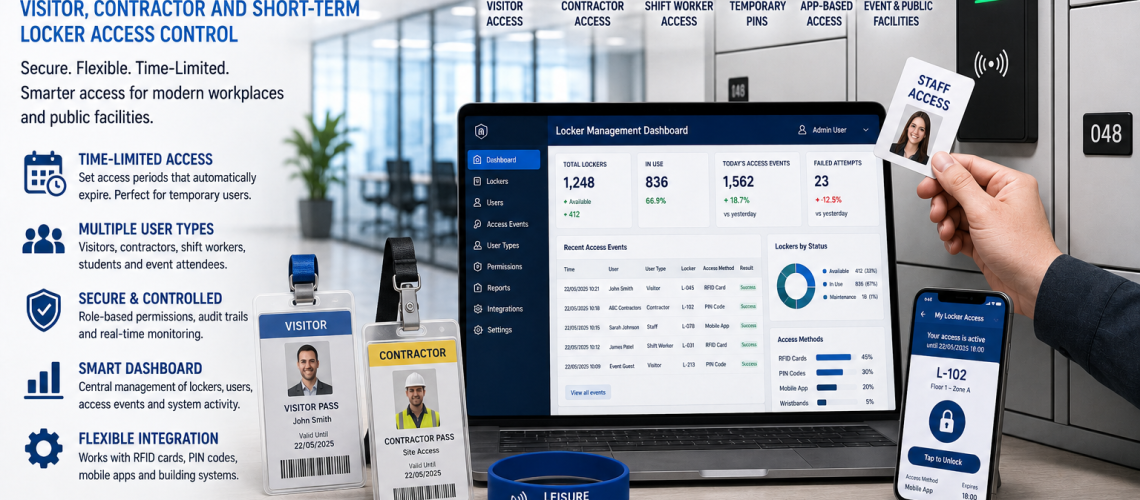
Locker management systems control the day-to-day relationship between users and lockers: choosing and applying the allocation model, creating allocations, keeping them current, managing changes and closing them cleanly so lockers can return to service.
A locker management system does not have to be smart software. Schools, workplaces, healthcare sites, factories and changing rooms can manage lockers effectively with numbered compartments, reliable records, controlled access and consistent procedures. Software becomes more useful when allocation changes, shared use, bookings or multiple sites make manual administration inefficient.
This guide owns the user-to-locker operational layer: assigned, shared, hot, temporary, shift-based, departmental, role-based and booking-led allocation; onboarding; reassignment; offboarding; return to availability; overheld lockers; allocation records and everyday administration.
Locker Management controls the user-to-locker relationship. Occupancy measures actual use. Access Control owns the locking technology. Governance controls privileged authority.
Quick Answer: What Is a Locker Management System?
A locker management system is the process used to decide how locker capacity is allocated and then create, maintain, change and close the resulting user-to-locker relationships.
- Who should receive a locker?
- Should the locker be assigned, shared, hot, temporary or booked?
- Which locker or pool should be used?
- When does the allocation begin?
- Is there an expiry or review point?
- What happens when the user changes department, role or location?
- How is the locker reassigned?
- What happens when the user leaves?
- When can the locker return to the available pool?
- What happens when access fails, belongings remain or the locker is damaged?
What Locker Management Owns, and What It Hands Off
| Subject | Owner |
|---|---|
| Assigned, shared, hot, temporary, shift, departmental, role-based and booking-led allocation | This guide |
| User onboarding, reassignment and offboarding | This guide |
| Allocation records and statuses | This guide |
| Overheld or abandoned allocations | This guide |
| Return to availability | This guide |
| Actual use, vacancy and utilisation | Locker Occupancy Management Systems UK |
| Key, PIN, RFID and digital access technology | Locker Access Control Systems UK |
| Who may perform privileged resets, overrides or revocations | Locker Access Permissions & Governance UK |
| Access-event evidence | Locker Access Audit Systems UK |
| Handling identifiable locker data | Locker Access Compliance UK |
| Dashboards, APIs and connected administration | Smart Locker Management Software UK |
| Physical locker asset records | Locker Asset Register UK |
| Estate-wide physical coordination | Locker Estate Management UK |
| Faults and work orders | Locker CAFM Integration UK |
| Repair, refurbishment or replacement decision | Locker Lifecycle Management UK |
Choose the Locker Allocation Model
The operating model should be chosen before software or lock technology. Different user populations may need different approaches even where the physical lockers are identical.
| Allocation model | Typical pattern | Main question |
|---|---|---|
| Assigned | One user over a longer period | Does the user genuinely need dedicated storage? |
| Shared | Different users at different times | Can the locker return reliably to the available pool? |
| Hot | User selects an available locker when required | Is on-demand storage appropriate? |
| Temporary | Storage provided for a defined period | When should the allocation expire? |
| Shift-based | Storage linked to working pattern | Can lockers genuinely be reused between shifts? |
| Departmental | Capacity reserved for a team or area | Will local control trap unused capacity? |
| Role-based | Storage follows a job function | Should the locker belong to the role rather than an individual? |
| Booked | User reserves storage in advance | Does reservation improve availability or create no-show waste? |
Assigned Locker Management
Assigned lockers remain with one user, role or department for a continuing period. They can suit schools, healthcare changing rooms, factories, warehouses and workplaces where users regularly store clothing, PPE, equipment or personal belongings.
- Create one clear user-to-locker relationship.
- Record the start date.
- Keep the locker reference stable.
- Review the allocation after relevant role or location changes.
- Close the relationship when responsibility ends.
- Return the locker to availability only after the return process is complete.
Assigned capacity can become inefficient where attendance or working patterns change. Use occupancy evidence to review apparently inactive allocations rather than assuming assignment proves use.
Shared and Hot Locker Management
Shared lockers are used by different people at different times. Hot lockers are selected from an available pool when required rather than being permanently assigned in advance.
- Create a valid allocation before or when use begins.
- Use a defined release event or end point.
- Close the user-to-locker relationship when use ends.
- Reset the access state where required.
- Resolve belongings left behind through the authorised procedure.
- Remove faulty lockers from the available pool.
- Return only genuinely ready lockers to service.
Hot and shared lockers can improve effective capacity, but only where users release them reliably and peak demand remains manageable.
Temporary Locker Allocation
Temporary allocation gives a user storage for a defined period rather than continuing ownership.
- Visitors.
- Contractors.
- Agency workers.
- Short projects.
- Events.
- Temporary staff or pupils.
A temporary allocation should normally include a user or authorised reference, locker reference, start point, expiry or review point, allocation status and closure state.
The management process decides when temporary access should begin and end. The technical credential may be a key, PIN, RFID credential, mobile identity or another supported access method. That technology belongs in Locker Access Control Systems UK.
Who may approve, extend or revoke privileged access belongs in Locker Access Permissions & Governance UK.
Shift-Based Locker Allocation
Shift-based allocation links locker use to working patterns rather than assuming permanent individual ownership.
- One shift may retain permanently assigned lockers.
- Different shifts may use separate pools.
- Some lockers may be shared between genuinely non-overlapping groups.
- Temporary or agency staff may use a separate flexible pool.
- Some roles may still require permanent storage for PPE or equipment.
Do not assume outgoing and incoming shifts never overlap. Handover periods, overtime, early arrivals and late departures can increase simultaneous demand.
Departmental Locker Allocation
Departmental allocation reserves a pool for a team, floor or operational area rather than managing the entire estate as one common pool.
- Can simplify local administration.
- Can keep storage close to the users who need it.
- Can support different requirements between departments.
- Can give local teams responsibility for defined capacity.
The main risk is trapped capacity. One department can have unused lockers while another experiences shortages because the pools are administratively separated.
Role-Based Locker Allocation
Role-based allocation ties storage to a job function rather than permanently to one named person.
- Security and reception roles.
- Maintenance teams.
- PPE-dependent functions.
- Specialist equipment roles.
- Shift supervisors.
Where accountability is required, the management record should still identify who currently holds or uses the role-based locker.
Locker Booking and Reservation
Booking is an allocation method, not a complete locker-management system. It lets a user reserve storage before arriving rather than selecting a locker on demand.
- Advance reservation.
- Timed booking.
- Recurring booking.
- Locker and desk pairing.
- Department-specific booking pools.
- Automatic release after a booking period where supported.
A booking is not proof of physical use. No-shows can make capacity appear unavailable even when lockers are unused. Compare booking information with actual occupancy where possible.
Software implementation belongs in Smart Locker Management Software UK.
Mixed Locker Allocation Models
Many organisations need more than one allocation model.
A workplace might use assigned lockers for employees who store uniforms, hot lockers for hybrid staff, temporary lockers for contractors and role-based lockers for facilities personnel.
A school might use assigned pupil lockers alongside a smaller temporary pool for new starters, transfers or exceptional requirements.
Define each pool clearly so users and administrators understand which rules apply.
Locker Allocation Pools
- Permanent staff pool.
- Hybrid staff pool.
- Visitor pool.
- Contractor pool.
- Departmental pool.
- Accessible locker pool.
- Shift-specific pool.
- Emergency or contingency pool.
Separate pools can improve clarity, but too many small pools can trap unused capacity. A technically vacant locker has little operational value if the people who need storage cannot use that pool.
The Locker Management Lifecycle
- Entitlement confirmed. The relevant process establishes that the user or role should receive storage.
- Allocation model identified. Assigned, shared, hot, temporary or another model is selected.
- Locker selected. A suitable available locker is chosen from the correct pool.
- Allocation record created. The user or role is linked to the locker.
- Access associated. The required key or credential reference is connected where needed.
- Allocation becomes active. Responsibility has a clear start point.
- Changes are managed. Department moves, extensions, relocation or reassignment are recorded.
- Allocation closes. Offboarding or release ends the user-to-locker relationship.
- Locker is checked. Contents, access state and obvious faults are resolved.
- Locker returns to service. Only a genuinely ready locker returns to the available pool.
Minimum Locker Allocation Record
The operational record should identify responsibility without becoming a duplicate asset register, HR database or audit log.
| Field | Purpose |
|---|---|
| User, role or authorised reference | Shows who currently holds the allocation |
| Locker reference | Identifies the physical compartment |
| Allocation model | Shows which operating rules apply |
| Start date | Shows when responsibility began |
| Review or expiry date | Prevents temporary or conditional use becoming indefinite |
| Access reference | Links the allocation to a key or credential where required |
| Allocation status | Shows whether the relationship is pending, active, under review or closed |
| Responsible administrator or team | Shows who manages operational changes |
Manufacturer, model, dimensions and other stable physical fields belong in Locker Asset Register UK. Access-event histories belong in Locker Access Audit Systems UK.
Use Clear Allocation Statuses
| Allocation status | Meaning |
|---|---|
| Pending | Prepared but responsibility has not yet begun |
| Active | User or role currently holds the locker |
| Review due | Allocation remains active but needs an administrative decision |
| Pending return | User responsibility is ending but the locker is not ready for reuse |
| Closed | The previous user-to-locker relationship has ended |
Do not use allocation status to describe physical condition. A closed allocation does not prove the locker is empty, serviceable or ready for reissue.
Keep Allocation, Occupancy and Physical Status Separate
| State | Primary owner | Example |
|---|---|---|
| Allocation status | Locker Management | Active, review due, pending return, closed |
| Occupancy / use | Occupancy Management | Occupied, vacant, low use, unknown |
| Physical availability | Estate / CAFM | Available, unavailable, under repair |
| Lifecycle status | Lifecycle Management | Monitor, repair, refurbish, replacement review |
These states can legitimately disagree. A locker can have an active allocation while being temporarily unavailable because its lock is under repair.
Locker User Onboarding
- Confirm that the user or role is entitled to storage.
- Choose the correct allocation model.
- Select a locker from the appropriate pool.
- Create the user-to-locker record.
- Associate the required access reference.
- Record the start date.
- Add a review or expiry point where required.
- Provide relevant user rules and reporting routes.
The management process does not choose the lock technology. Key, PIN, RFID and digital access selection belongs in Locker Access Control Systems UK.
Managing Active Allocations
- Update records when a user’s department or location changes.
- Review allocations that reach a scheduled review point.
- Extend time-limited use only through the approved process.
- Route access failures without creating duplicate user records.
- Remove faulty lockers from the allocatable pool.
- Use occupancy evidence as a review signal rather than silently deleting an apparently inactive allocation.
Reassigning a Locker
Reassignment should preserve the boundary between the previous and new user. Do not simply overwrite one name with another.
- Close the previous allocation.
- Recover, expire or revoke the previous access method where required.
- Resolve remaining belongings through the authorised procedure.
- Record obvious faults or damage.
- Reset the access state where required.
- Confirm that the locker is available for reuse.
- Create the new allocation.
- Issue or associate the new access method.
Locker User Offboarding
- Confirm that the allocation should end.
- Recover physical keys or reusable credentials where applicable.
- Revoke or expire electronic access where applicable.
- Resolve remaining contents through the site’s authorised process.
- Record obvious faults.
- Reset the access state where required.
- Close the allocation record.
- Return the locker to the available pool only when it is ready for another user.
If a fault prevents reuse, route it into CAFM or maintenance rather than marking the locker available.
Return to Availability
Closing an allocation and returning a locker to availability are related but different actions.
- The previous allocation has ended.
- Previous access has been resolved.
- Belongings have been dealt with under the site’s procedure.
- The access state is ready for the next user.
- No known fault prevents use.
- Any required cleaning or local preparation is complete.
This prevents false capacity, where a locker appears free in the register but cannot actually be issued.
Overheld Lockers and Abandoned Use
Shared, hot and temporary locker arrangements need a defined process for allocations that do not end as expected.
- The user may need an authorised extension.
- Belongings may remain after the allocation ends.
- A physical key or credential may not have been returned.
- The locker may still contain items even though electronic access has expired.
- A fault may prevent normal release.
- The administrative record may be wrong.
Do not automatically reassign a locker simply because its nominal end time has passed. Move it into an exception state until entitlement, contents and physical readiness are resolved.
Locker Reset: Management Trigger vs Technical Process
Locker Management decides when an access state needs to be reset as part of reassignment or return to service. The technical reset depends on the lock or software.
- A public-use combination lock may need to be cleared.
- An electronic PIN may need to be reset.
- An RFID association may need to be removed.
- A software allocation may need to be closed.
- A keyed locker may need the correct key returned or a key-control problem resolved.
Who is authorised to perform privileged resets or overrides belongs in Locker Access Permissions & Governance UK.
Lost Access and Fault Routing
| Problem | Management action | Specialist route |
|---|---|---|
| Lost user key | Verify the allocation and route the replacement request | Locker Key Management |
| Forgotten PIN | Verify the allocation and initiate the authorised reset process | Access Control |
| Failed RFID credential | Confirm the user-to-locker relationship and route the access issue | Access Control |
| Lock or door fault | Remove the locker from the available pool | CAFM / Maintenance |
| Repeated or uneconomic failure | Escalate beyond routine administration | Lifecycle Management |
| Disputed override | Preserve the relevant records and escalate | Governance / Audit |
Use Occupancy as Management Evidence
Occupancy data can prompt an administrative review, but it should not silently rewrite an allocation.
| Occupancy signal | Possible management response |
|---|---|
| Assigned but apparently inactive | Review the allocation before changing it |
| Temporary use beyond expiry | Check whether an authorised extension exists |
| Shared locker held too long | Apply the overheld-locker process |
| Locker repeatedly unavailable | Check physical fault or maintenance status |
| Vacant locker identified | Confirm physical readiness before returning it to the pool |
Occupied, vacant, available and utilised are defined in Locker Occupancy Management Systems UK.
Manual vs Software-Assisted Locker Management
| Approach | Can suit | Typical tool |
|---|---|---|
| Manual administration | Small, stable assigned estates | Allocation register, numbered lockers and controlled keys |
| Electronic standalone | Keyless or shared installations with local management | Local lock programming plus allocation records |
| Connected management | Dynamic, high-turnover or multi-site estates | Central administration platform |
The most complex system is not automatically the best. Administration should remain understandable and accurate whether it uses a controlled spreadsheet, database or connected locker platform.
When Smart Locker Software Adds Value
- High numbers of allocation changes.
- Frequent shared or hot-locker use.
- Large temporary-user populations.
- Booking-led allocation.
- Multiple buildings or sites.
- Automatic expiry requirements.
- Remote administrators.
- Central search and reporting requirements.
- Integration with identity, workplace or facilities systems.
Dashboard design, APIs, integrations and deployment architecture belong in Smart Locker Management Software UK.
Multi-Site Locker Management
- Use consistent allocation statuses.
- Use common minimum onboarding fields.
- Use a common offboarding sequence.
- Use clear temporary expiry and extension rules.
- Define how responsibility passes between local administrators.
- Use a common exception route.
- Keep physical status separate from allocation status.
Central versus local physical estate responsibility belongs in Multi-Site Locker Estate Management UK.
When Should the Allocation Model Change?
- Large numbers of assigned lockers appear inactive.
- Peak attendance is substantially below total headcount.
- Users increasingly attend only on particular days or shifts.
- Temporary populations are growing.
- Shared lockers remain unavailable at peak periods.
- Departmental pools show large differences in utilisation.
- Booking no-shows regularly remove capacity.
- Administrative workload is increasing disproportionately.
Change the allocation model because evidence shows the current arrangement no longer fits the operating pattern, not simply because newer technology is available.
Locker Management in Schools
School locker management commonly involves pupil onboarding, year-group changes, replacement access, pupil moves and preparation for the next cohort.
- Use stable locker numbers.
- Create allocations against the chosen pupil or year-group process.
- Keep keys or credentials linked to the correct allocation where needed.
- Process pupil moves as controlled changes.
- Close allocations when pupils leave or move.
- Do not reissue a locker until previous contents and access have been resolved.
For the wider education requirement, use School Lockers UK.
Locker Management in Workplaces
Workplaces may combine assigned staff lockers with hybrid, visitor, contractor, shift-based and booking-led storage.
- Separate continuing and temporary allocations.
- Use hot or shared pools where justified by attendance patterns.
- Record department and location changes.
- Close leaver allocations promptly.
- Use reliable return-to-availability procedures.
- Use occupancy evidence to review apparently unused capacity.
For workplace storage requirements, use Workplace Lockers UK.
Locker Management in Healthcare
Healthcare estates may combine permanent employees, rotating teams, bank staff, agency workers, contractors and department-specific changing facilities.
- Distinguish continuing staff allocations from temporary use.
- Use review or expiry points where assignments are not permanent.
- Process department transfers as controlled changes.
- Close allocations when placements or employment end.
- Keep privileged authority separate from ordinary administration.
- Return lockers to service only after access, contents and faults are resolved.
For uniforms, shift flow and changing-room planning, use NHS & Healthcare Changing Room Planning UK.
How to Implement a Locker Management System
- Define user groups.
- Choose the appropriate allocation model or models.
- Define allocation pools.
- Define the minimum operational record.
- Define allocation statuses.
- Create the onboarding sequence.
- Create reassignment and change procedures.
- Create the offboarding sequence.
- Define return-to-availability conditions.
- Define overheld and abandoned-use handling.
- Define exception routing for lost access and faults.
- Define the occupancy handoff.
- Define the maintenance handoff.
- Choose administration technology last.
Common Locker Management Mistakes
- Using permanent allocation by default. Some users may only need occasional storage.
- Treating assigned as occupied. Allocation does not prove use.
- Using shared lockers where users need overnight storage.
- No expiry on temporary allocations.
- Assuming booking equals use.
- Fragmenting the estate into too many small pools.
- Ignoring shift overlap.
- Overwriting the previous user during reassignment.
- Leaving former users active.
- Returning a damaged locker to the available pool.
- Confusing a closed allocation with an empty locker.
- Duplicating asset records inside the allocation record.
- Duplicating audit logs inside the management record.
- Using occupancy signals to remove allocations automatically.
- Letting lock technology determine the allocation model.
- Choosing software before defining the process.
- Mixing ordinary administration with privileged override authority.
Locker Management Checklist
- Which users genuinely need dedicated storage?
- Which users need occasional or temporary storage?
- Do users need to leave items overnight?
- Are shared or hot lockers suitable?
- Do shifts overlap?
- Would departmental pools trap capacity?
- Does booking solve a genuine problem?
- Does every active allocation have a user or role reference?
- Is every allocation linked to the correct locker?
- Are start dates recorded?
- Are expiry or review dates used where needed?
- Are allocation statuses clearly defined?
- Is onboarding consistent?
- Are reassignment and offboarding controlled?
- Is previous access resolved before reissue?
- Are remaining belongings resolved before return to availability?
- Are damaged lockers removed from the allocatable pool?
- Are occupancy signals kept separate from allocation status?
- Are privileged reset and override decisions handed to Governance?
- Are event records handed to Access Audit?
- Does software solve a real administration problem?
Related Locker Management Guides
- Locker Occupancy Management Systems UK – actual use, vacancy and utilisation.
- Locker Access Control Systems UK – keys, PINs, RFID and digital access technology.
- Locker Access Permissions & Governance UK – administrator authority, resets and overrides.
- Locker Access Audit Systems UK – event evidence and access logs.
- Locker Access Compliance UK – handling identifiable locker and access data.
- Smart Locker Management Software UK – dashboards, remote administration, APIs and integrations.
- Smart Locker Analytics UK – trends, comparisons and analytical interpretation.
- Locker Estate Management UK – wider physical-estate coordination.
- Locker Asset Register UK – stable physical asset IDs and fields.
- Locker CAFM Integration UK – faults, work orders and facilities workflows.
- Locker Lifecycle Management UK – repair, refurbishment and replacement decisions.
Locker Management Systems UK FAQs
What is a locker management system?
A locker management system is the operational process used to choose and apply allocation models, create and maintain user-to-locker relationships, manage changes and return lockers to the available pool when allocations end.
What locker allocation models are available?
Common models include assigned, shared, hot, temporary, shift-based, departmental, role-based and booking-led allocation. Different models can be combined within the same organisation.
Does locker management require smart software?
No. Small or stable estates can use an accurate allocation register and consistent procedures. Software becomes more useful where allocations change frequently, lockers are shared or booked, or several sites require central administration.
What is the difference between locker management and occupancy management?
Locker Management records who should have which locker and administers that relationship. Occupancy Management measures whether and how the locker is actually being used.
What is a hot locker?
A hot locker is selected from an available pool when required rather than being permanently assigned to one user in advance.
Can different locker allocation models be used together?
Yes. An organisation may use assigned lockers for permanent users, hot lockers for hybrid staff, temporary lockers for visitors and role-based lockers for operational functions.
What should a locker allocation record contain?
A practical record can include the user or role reference, locker reference, allocation model, start date, review or expiry date where required, access reference, allocation status and responsible administrator or team.
What should happen when a locker user leaves?
The allocation should end, previous access and remaining contents should be resolved, obvious faults should be recorded and the locker should return to availability only when it is ready for another user.
Should an apparently unused assigned locker be removed automatically?
No. Low apparent use should trigger a review rather than automatic removal. Confirm the user’s requirement and the organisation’s allocation rules before changing the relationship.
Is a locker booking the same as actual locker use?
No. A booking reserves capacity but does not prove that the user attended or physically used the locker. Booking information and measured occupancy should be treated separately.
Summary
Locker Management should answer one main question: what is the current operational relationship between this user or role and this locker, and what should happen when that relationship changes?
The page now also owns the allocation models themselves: assigned, shared, hot, temporary, shift-based, departmental, role-based and booking-led use. This removes the unnecessary split between allocation design and day-to-day locker administration.
Keep actual use with Occupancy Management, access technology with Access Control, privileged authority with Access Permissions & Governance, event evidence with Access Audit, data handling with Compliance, physical faults with CAFM and platform capability with Smart Locker Management Software.
For complete locker products, browse our Commercial Locker range.
Discover more from Blog Total Locker Service
Subscribe to get the latest posts sent to your email.