Smart Locker Management Software UK: Cloud Dashboards, Analytics and Enterprise Integration
May 12, 2026
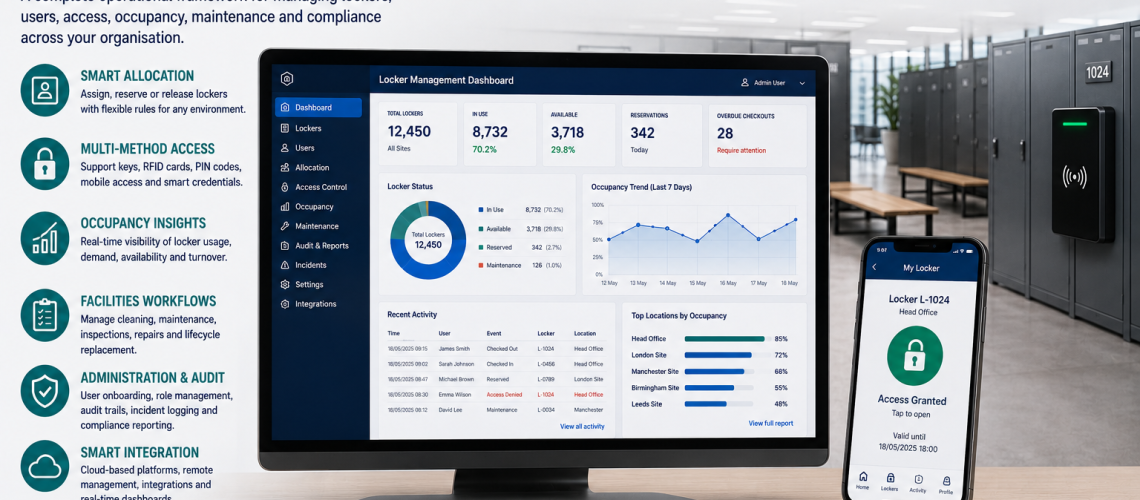
Smart locker management software is the digital platform used to configure, administer, monitor and connect compatible smart locker systems through dashboards, remote controls, reports, alerts, integrations and multi-site management tools.
The software layer should implement an organisation’s operating model rather than define that model by accident. Allocation rules, permission authority, occupancy definitions, audit requirements and maintenance processes should be agreed first. The platform then provides the tools used to apply, automate, display and connect those decisions.
Smart Locker Management Software owns the digital platform and its capabilities. Locker Management defines the operating process. Smart Locker Analytics interprets the data. Access Permissions & Governance decides who may use privileged functions.
The software provides the tools. The organisation decides the rules, permissions and actions those tools support.
Quick Answer: What Is Smart Locker Management Software?
Smart locker management software is a digital application used to view, configure and administer compatible connected lockers. Depending on the platform, it may provide a web dashboard, administrator tools, remote actions, alerts, reporting interfaces, data exports, APIs, integrations, site hierarchy and software-based permission controls.
| Software capability | What it does |
|---|---|
| Dashboard | Displays locker, site, user and system information |
| Administration | Provides tools for authorised configuration and operational actions |
| Remote actions | Allows supported changes without standing beside the locker bank |
| Reporting interface | Provides searchable views, filters, summaries and exports |
| Alerts | Surfaces defined faults, exceptions or status changes |
| Integrations | Connects locker software with other systems |
| APIs | Allow controlled exchange of data or supported actions |
| Multi-site control | Provides central visibility with site-specific configuration |
| Configuration | Applies supported settings, roles and workflows |
What This Page Owns, and What It Hands Off
| Question | Owner |
|---|---|
| How should the dashboard, administrator interface and software platform work? | This guide |
| Should lockers be assigned, shared, hot, temporary, booked or role-based? | Locker Management Systems UK |
| How are users onboarded, reassigned and offboarded? | Locker Management Systems UK |
| How should occupancy, availability and utilisation be defined? | Locker Occupancy Management Systems UK |
| How should trends, baselines and exceptions be interpreted? | Smart Locker Analytics UK |
| Which estate KPIs and reporting rules should management use? | Locker Estate Management UK |
| Who may administer, reset, override or revoke access? | Locker Access Permissions & Governance UK |
| Which access events should be recorded? | Locker Access Audit Systems UK |
| Which key, PIN, RFID or digital access technology should be used? | Locker Access Control Systems UK |
| How should locker faults enter facilities workflows? | Locker CAFM Integration UK |
| How should personal data and retention be handled? | Locker Access Compliance UK |
| How should multi-site physical standards and local exceptions be coordinated? | Multi-Site Locker Estate Management UK |
Software Layer vs Operating Policy
A platform can make a rule easy to enforce, but that does not mean the software should decide the rule.
| Operational decision | Software role |
|---|---|
| Who is allowed to administer access? | Enforce approved administrator roles and scopes |
| Which allocation model should be used? | Implement supported assigned, shared, hot or temporary workflows |
| What counts as occupied? | Display or process data using the agreed definition |
| Which events should be audited? | Store, search and report supported event records |
| How long should personal data be retained? | Provide retention, deletion or export tools where supported |
| How should maintenance be handled? | Surface faults and pass them into the appropriate workflow |
Smart Locker Dashboard
The dashboard is the main software interface for many connected locker systems. Its job is to present useful platform information without forcing administrators to interpret every raw event generated by the system.
- Locker or bank status.
- Current allocation status.
- Site and location.
- User or credential status where supported.
- Temporary-access status.
- Fault and exception indicators.
- Recent administrator actions.
- System or device connectivity status.
- Reporting shortcuts.
The dashboard can display occupancy information, but the definition of occupied, vacant, unavailable and usable capacity belongs in Locker Occupancy Management Systems UK.
Remote Locker Administration
Remote administration allows authorised users to perform supported actions without being physically beside the locker bank.
- View locker status.
- Change a supported allocation.
- Issue or revoke a supported credential.
- Reset a supported user or lock state.
- Release a locker.
- Apply a temporary-access change.
- Review faults and exceptions.
- Change site or bank configuration.
The software exposes the function. Governance decides who is authorised to use it.
Administrator authority belongs in Locker Access Permissions & Governance UK.
Web, Desktop, Mobile and Kiosk Interfaces
A smart locker platform may provide administration through a browser, desktop application, mobile application, local touchscreen or a combination of interfaces.
| Interface | Can suit | Check before selection |
|---|---|---|
| Web dashboard | Central and multi-site administration | Browser support, authentication and remote-access requirements |
| Desktop application | Locally managed systems | Installation, updates and workstation dependency |
| Mobile administration | Facilities teams working around buildings | Device security, permissions and available functions |
| Kiosk or touchscreen | User self-service or local interaction | Accessibility, resilience and support |
| User app or portal | Booking, selection or self-service | Authentication, adoption and support burden |
Administrator Interface Design
Administrator screens should make routine work clear and reduce the risk of accidental or unauthorised changes.
- Search by locker, bank, location or user reference.
- Clear distinction between ordinary and privileged actions.
- Confirmation before higher-impact actions.
- Visible current status before changes are applied.
- Filters for site, department or locker bank.
- Clear fault and exception states.
- Ability to distinguish unavailable lockers from unallocated lockers.
- Controlled access to reports and exports.
Software Roles as an Enforcement Mechanism
Many platforms can enforce role-based permissions through software. Typical roles might include local administrator, facilities administrator, security user, reporting-only user and central system administrator.
This page owns the technical ability to create and enforce software roles. It does not decide which organisational roles should receive those permissions.
That decision belongs in Locker Access Permissions & Governance UK.
Platform Configuration
Connected locker software usually requires configuration before it reflects the organisation’s agreed operating model.
- Sites and buildings.
- Locker banks and identifiers.
- User or credential sources.
- Software roles.
- Supported allocation modes.
- Temporary-access parameters.
- Notification rules.
- Reporting views.
- External integrations.
Configuration should implement already-agreed rules rather than allowing software defaults to become policy by accident.
Alerts and Notifications
Software can surface exceptions that require attention. The available alerts depend on the connected hardware and platform.
- Locker or controller offline.
- Low battery where the hardware reports battery state.
- Door or lock fault.
- Credential or access exception.
- Temporary access reaching expiry.
- Locker held beyond an expected period.
- Integration failure.
- Unprocessed administrative action.
An alert should have an owner and response route. The dashboard should not become a holding area for unresolved exceptions.
| Alert type | Typical handoff |
|---|---|
| Allocation or overheld locker | Locker Management |
| Occupancy or availability anomaly | Occupancy Management |
| Access or credential problem | Access Control |
| Physical fault | CAFM / Maintenance |
| Repeated physical failures | Lifecycle Management |
Reporting Interfaces
A software reporting interface allows administrators to search, filter and summarise information already produced by the locker system.
- Locker status reports.
- User or allocation reports.
- Temporary-access reports.
- Fault and exception reports.
- Administrator activity reports.
- Site or building reports.
- Access-event reports.
- Usage or occupancy reports.
Software owns the presentation layer: search, filters, views, exports and scheduled reports.
Smart Locker Analytics UK owns interpretation of trends, baselines, comparisons and exceptions. Locker Estate Management UK owns estate KPI definitions and management reporting rules.
Data Export
Exports can be useful when locker data needs to be analysed, reconciled, archived or transferred to another process.
- CSV exports.
- Spreadsheet exports.
- Scheduled reports.
- PDF reports where supported.
- API-based extraction.
- Site-specific reports.
- Filtered exception reports.
Check whether exports preserve stable locker, site and event identifiers. Also consider whether administrators can export more personal information than their role requires.
Privacy, retention and data-handling requirements belong in Locker Access Compliance UK.
APIs and Locker Software Integrations
An API can allow locker software to exchange data or supported actions with other systems. Integration should solve a defined operational problem rather than being added merely because both systems expose an API.
- Identity and directory systems.
- HR or workforce systems.
- Building access-control systems.
- Visitor-management systems.
- Hybrid workplace and desk-booking platforms.
- CAFM and helpdesk platforms.
- Single sign-on or identity providers.
- Reporting and analytics platforms.
What to Define Before Integrating Systems
- Source of truth. Decide which system owns each field.
- Direction of flow. Define whether information moves one way or both ways.
- Trigger. Decide what event causes the exchange.
- Stable identifiers. Ensure users, lockers and sites can be matched reliably.
- Failure handling. Define what happens when the integration is unavailable.
- Correction. Decide where inaccurate information is fixed.
- Deletion. Define how removed users or records propagate.
- Permissions. Limit what the integration is authorised to read or change.
The software platform owns the connector or API capability. Wider operational design should not be dictated by one vendor’s interface.
Identity and Single Sign-On Integration
Some smart locker platforms can use an existing organisational identity source rather than maintaining a separate account for every administrator or user.
- Single sign-on for administrators.
- User-directory synchronisation.
- Automated activation or deactivation.
- Department or group attributes.
- Role mapping.
Identity integration can reduce duplicate administration, but the organisation should still decide which imported attributes are allowed to affect locker allocation or permissions.
CAFM and Helpdesk Integration
Locker software can pass faults and stable asset references into facilities-management workflows rather than becoming the organisation’s full maintenance system.
- Fault detected or reported.
- Locker reference passed to CAFM or helpdesk.
- Work order created.
- Repair status maintained in the facilities system.
- Locker returned to service after resolution.
Detailed work-order and maintenance workflow design belongs in Locker CAFM Integration UK.
Multi-Site Smart Locker Software
Multi-site software can provide central platform visibility without requiring every local administrator to have access to every location.
- Central organisation view.
- Regional or site-level views.
- Site-specific administrator scope.
- Common configuration templates.
- Site comparison reports.
- Central software updates where supported.
- Remote platform support.
- Common software data structures.
This is a software capability. The physical estate hierarchy, local exceptions and central-vs-local estate responsibility belong in Multi-Site Locker Estate Management UK.
Site, Building and Locker Hierarchy
Good software should make the physical locker estate easy to navigate.
Organisation → Site → Building → Floor / Area → Locker Bank → Locker / Compartment
The platform should be capable of representing the agreed hierarchy and preserving stable references when data is exported or integrated.
The authoritative physical hierarchy itself belongs with the estate and asset-record processes rather than being invented independently inside each software platform.
Cloud, Local and Hybrid Deployment
Smart locker software can be cloud hosted, locally managed or use a mixed architecture. The useful question is not which label sounds more modern, but which architecture supports the required administration, resilience, security and support model.
| Question | Cloud platform | Local / on-premises platform |
|---|---|---|
| Remote administration | Often straightforward | Depends on network design |
| Multi-site visibility | Often strong | May require additional architecture |
| Software updates | Often vendor-managed | May require local management |
| Internet dependency | Varies by system | Can be lower |
| Local infrastructure | Potentially lower | Potentially higher |
| Data location and control | Depends on service design | Depends on local architecture |
| Support model | Often remote or vendor-led | May involve more local IT support |
Cloud is not automatically better than local, and local is not automatically more resilient. Compare the actual architecture and failure modes.
Software Availability and Offline Operation
Before choosing a platform, establish what users and administrators can still do if part of the system becomes unavailable.
- Can authorised users still open lockers if the network fails?
- Can already-issued credentials continue to work?
- Are access events stored locally and uploaded later?
- Can critical administrator actions be performed locally?
- What happens if the cloud service is unavailable?
- What happens if a controller fails?
- How are queued changes reconciled after service returns?
- How does the system show that information may be stale or incomplete?
Software Updates, Support and Lifecycle
Locker software can become an operational dependency, so the support model matters beyond the initial installation.
- Who supplies software updates?
- Are updates automatic or scheduled?
- Can updates interrupt locker use?
- How long is the platform supported?
- What happens when compatible hardware reaches end of support?
- Who supports integrations after connected systems change?
- How are administrator issues escalated?
- Is configuration backed up and recoverable?
Data Ownership, Export and Supplier Exit
Before committing to a platform, understand how the organisation can retrieve useful operational data if it changes supplier, replaces hardware or retires the system.
- Can locker and site configuration be exported?
- Can allocation data be exported where appropriate?
- Can audit data be exported in a usable format?
- Are stable locker identifiers preserved?
- Is API access included or separately licensed?
- What happens to hosted data at contract end?
- Can configuration be migrated to replacement hardware or software?
Personal-data handling and deletion obligations belong in Locker Access Compliance UK.
Smart Locker Software and Occupancy Data
Software can display occupancy and utilisation information where the system has a reliable source for those measures. The platform is the processing and presentation layer; it does not automatically make the underlying measure valid.
- Define what counts as occupied.
- Separate unavailable lockers from vacant lockers.
- Distinguish allocation from actual use.
- Understand whether occupancy is inferred from access events, lock state, sensors or another source.
- Make data gaps visible rather than treating them as zero use.
For the underlying definitions, use Locker Occupancy Management Systems UK. For interpretation of trends and comparisons, use Smart Locker Analytics UK.
Smart Locker Software and Audit Data
Software may provide searchable event histories, filters and reports. That is a platform capability rather than the definition of what the organisation should audit.
Locker Access Audit Systems UK owns which events matter, what an event record can prove and how audit records should be interpreted.
Smart Locker Software and Access Credentials
Software may administer RFID cards, PINs, mobile credentials or other digital identities where the connected hardware supports them.
That does not make this the page for choosing credential technology. Lock compatibility and access method belong in Locker Access Control Systems UK.
When Smart Locker Software Is Worth Considering
- Locker administration changes frequently.
- Several sites need central platform visibility.
- Remote administration would materially reduce support effort.
- Temporary or shared use creates significant manual administration.
- Searchable reporting is required.
- Integration with identity, workplace or facilities systems would remove duplicate work.
- The organisation needs configurable dashboards or reports.
- Manual spreadsheets have become difficult to keep synchronised.
A small, stable assigned-locker estate may not need a connected platform. Software should solve a real administration, visibility or integration problem rather than add complexity without a clear operational benefit.
Smart Locker Software Selection Checklist
- Does the platform support the actual locker hardware?
- Is the administrator interface clear and usable?
- Can software roles be scoped by site or function?
- Can it operate across the required number of sites?
- Which remote actions are supported?
- What happens during internet, server or controller failure?
- Are alerts configurable and actionable?
- Can reports be filtered and exported?
- Can raw data be exported for independent analytics?
- Is there a documented API or supported integration method?
- Which identity and workplace integrations are supported?
- Can faults be handed to CAFM or helpdesk workflows?
- Can existing user, site and locker data be imported?
- How are software updates handled?
- What is the support and escalation model?
- Can the organisation export usable data at contract end?
- Where is hosted data processed and controlled?
- Can administrator actions be reported where required?
- Does licensing change with users, lockers, sites or features?
- Can the platform scale without redesigning the whole estate?
Common Smart Locker Software Mistakes
- Choosing software before defining the operating model. Product defaults should not become policy accidentally.
- Treating allocation as only a software feature. Allocation belongs in Locker Management.
- Assuming a dashboard means accurate occupancy. Check how occupancy is defined and measured.
- Treating software reports as analytics. Software presents the information; Analytics interprets it.
- Letting software define estate KPIs. KPI ownership belongs in Estate Management.
- Buying integrations without defining a source of truth. Decide which system owns each field.
- No offline or failure plan. Understand what happens when connectivity or a controller fails.
- Overloading the locker platform with facilities workflows. Hand maintenance into CAFM.
- Uncontrolled administrator scope. Use software roles to enforce approved governance.
- Ignoring export and supplier-exit requirements. Data portability matters before procurement.
- Collecting every available report. Reporting should serve a defined operational or management need.
- Assuming cloud is automatically better. Compare the actual architecture and resilience.
Related Smart Locker Software Guides
- Smart Locker Systems UK – the complete connected locker solution including hardware, access and software.
- Locker Management Systems UK – allocation, onboarding, offboarding and operational administration.
- Locker Occupancy Management Systems UK – occupancy, vacancy and utilisation definitions.
- Smart Locker Analytics UK – trends, comparisons, baselines and analytical interpretation.
- Locker Estate Management UK – estate KPIs and management reporting.
- Multi-Site Locker Estate Management UK – cross-site standards and local-vs-central estate responsibilities.
- Locker Access Permissions & Governance UK – administrator, reset and override authority.
- Locker Access Audit Systems UK – access-event records and auditing.
- Locker Access Control Systems UK – key, PIN, RFID and digital access technology.
- Locker CAFM Integration UK – maintenance and helpdesk workflow integration.
- Locker Access Compliance UK – personal-data handling, retention and compliance.
Smart Locker Management Software UK FAQs
What is smart locker management software?
Smart locker management software is the digital platform used to configure, view and administer compatible connected lockers through dashboards, remote actions, reports, alerts, integrations and multi-site controls.
Does smart locker software decide how lockers should be allocated?
No. Software can implement supported allocation workflows, but the operating model should be defined in Locker Management before the platform is configured.
What is the difference between smart locker software and smart locker analytics?
Software provides the platform used to collect, display, filter and export supported data. Smart Locker Analytics interprets trends, baselines, comparisons and exceptions within that data.
Can smart locker software manage several sites?
Many platforms support multi-site administration, site-specific software roles, central reporting and remote configuration. The exact capability depends on the product.
Can smart locker software integrate with other systems?
Depending on the platform, integrations may connect locker software with identity, HR, building access, visitor management, workplace, CAFM or analytics systems through APIs or supported connectors.
Does smart locker software provide occupancy analytics?
Some platforms can display occupancy and utilisation information, but the organisation should understand how the underlying measure is produced. Occupancy definitions belong in Occupancy Management and trend interpretation belongs in Smart Locker Analytics.
Does smart locker software need to be cloud based?
No. Platforms may be cloud hosted, locally managed or use a hybrid architecture. The suitable approach depends on remote administration, connectivity, IT requirements, resilience and support.
What happens if smart locker software goes offline?
Behaviour varies by system. Before selection, confirm whether authorised users can still access lockers, whether events are stored locally and how queued changes are reconciled when connectivity returns.
When is smart locker software worth considering?
It is most useful where administration changes frequently, several sites need central visibility, remote management is valuable, integrations can remove duplicate work or manual records have become difficult to keep synchronised.
Summary
Smart Locker Management Software should stay focused on the digital platform: dashboards, administrator interfaces, remote actions, alerts, reporting interfaces, exports, APIs, integrations, configuration, software-enforced roles, resilience and multi-site control.
Keep allocation and day-to-day administration with Locker Management, occupancy definitions with Occupancy Management, interpretation with Smart Locker Analytics, KPI definitions and management reporting with Estate Management, authority with Access Permissions & Governance, event design with Access Audit, personal-data handling with Compliance and maintenance workflows with CAFM Integration.
For the wider connected locker solution, including lockers, electronic locks, credentials, software and connectivity, use Smart Locker Systems UK. For physical locker ranges, visit Commercial Lockers.
Discover more from Blog Total Locker Service
Subscribe to get the latest posts sent to your email.