Locker Access System Cost Guide UK: RFID, Software, Maintenance and Lifecycle Costs
May 12, 2026
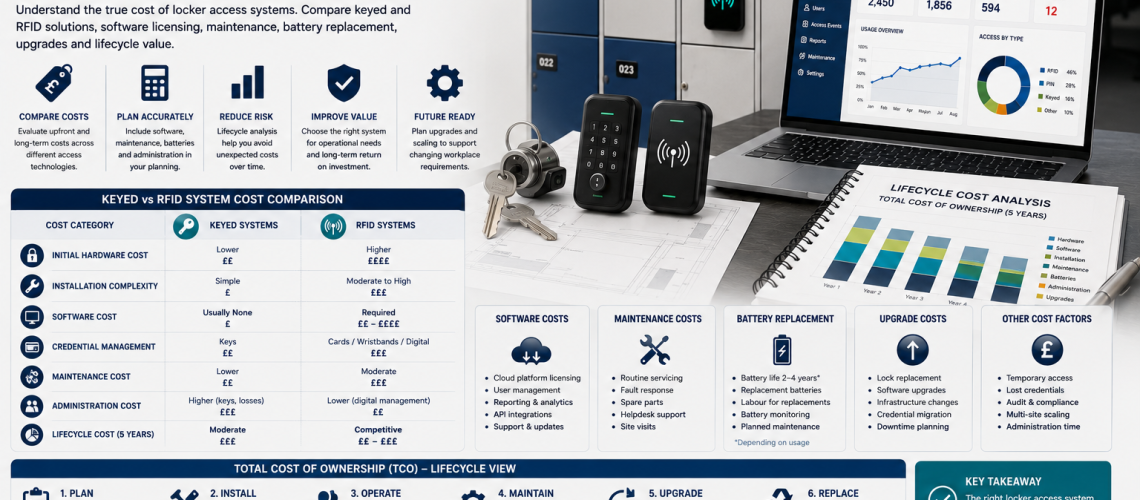
Locker access system cost should be compared on a like-for-like whole-life basis, not by lock price alone. The true cost can include hardware, installation, door modification, credentials, batteries, software, licences, integration, maintenance, internal administration, support and eventual migration or exit.
This guide focuses on the costing layer. It does not decide which access technology is best, whether smart lockers are worth the investment or whether a locker should be repaired, refurbished or replaced. Those decisions belong in their dedicated guides.
For access technology selection, use Locker Access Control Systems UK. For the smart-locker business case, use Smart Lockers UK: Investment Guide.
Specification = what must be supplied. Cost Guide = what each option costs. Investment Guide = whether paying the extra is justified. Capital Planning = when the organisation expects to fund it.
Quick Answer: What Should Locker Access Costing Include?
A useful locker access cost comparison should include all material costs over the same comparison period.
| Cost area | Examples |
|---|---|
| Hardware | Lock, reader, controller, gateway, management key or reset device |
| Installation | Fitting, drilling, door modification, wiring and commissioning |
| Credentials | Keys, cards, fobs, wristbands or digital credentials |
| Software | Setup, licences, subscriptions, hosting and support |
| Integration | Identity, building access, workplace or other system interfaces |
| Maintenance | Batteries, lock replacement, repairs and planned servicing |
| Administration | Key issue, credential issue, resets, reassignment and helpdesk time |
| Downtime | Measurable operational disruption where relevant |
| Exit / migration | Replacement, data export, retraining or migration to another system |
What This Page Owns, and What It Hands Off
- Hardware, installation, software, maintenance, administration and whole-life cost comparison: this page
- Which access technology should be selected: Locker Access Control Systems UK
- Technical procurement specification: How to Specify Locker Access Systems UK
- Physical retrofit compatibility: Locker Lock Compatibility Guide UK
- Whether smart lockers justify the extra investment: Smart Lockers UK: Investment Guide
- Smart software architecture: Smart Locker Management Software UK
- Enterprise rollout: Enterprise Locker Access Control UK
- Repair, refurbish or replace decision: Locker Lifecycle Management Systems UK
- Future budget timing and funding forecast: Locker Capital Planning & Replacement Forecasting UK
Use the Same Cost Period for Every Option
A keyed system priced at installation and an RFID system priced over five years cannot be compared fairly. Every option should use the same cost period and the same cost categories.
- State the comparison period.
- State whether figures include VAT where relevant to the organisation.
- Use the same locker quantity.
- Use the same installation scope.
- Include recurring costs for every option.
- State which internal labour costs are included.
- State whether inflation or future price changes are modelled.
The aim is not to predict every future cost perfectly. It is to make assumptions visible and comparable.
Create a Cost Assumptions Register
Every whole-life cost model should record its assumptions.
| Assumption | Example entry |
|---|---|
| Locker quantity | Number of doors or compartments being costed |
| Comparison period | Agreed number of years |
| Installation scope | New lockers, retrofit or lock-only replacement |
| Credential quantity | Number of keys, cards, fobs or users |
| Battery interval | Supplier assumption or local service assumption |
| Software pricing | Annual licence, subscription or support basis |
| Internal labour rate | Local cost used for administration time where measured |
| Support level | Included supplier support or separate contract |
| Exit cost | Migration, replacement or data-export allowance where relevant |
Where an assumption is uncertain, mark it as uncertain rather than presenting it as a fixed fact.
Hardware Cost
Hardware cost is normally the easiest element to identify, but it may still include more than the visible lock.
- Locker lock
- Cam or latch hardware
- Reader
- Controller
- Gateway
- Wiring interface
- Management key
- Reset tool
- Programming device
- Replacement or spare hardware
For like-for-like comparison, separate hardware from installation and software.
Installation Cost
Installation cost can vary substantially between new lockers and retrofit work.
- Removing existing locks
- Fitting new locks
- Door drilling or modification
- Changing cams or fixings
- Wiring
- Power supplies
- Controller installation
- Network points where required
- Commissioning
- Site access or out-of-hours working
Where retrofit is involved, physical compatibility should be confirmed before relying on the installation estimate. Use Locker Lock Compatibility Guide UK.
Door Modification and Retrofit Labour
A low-cost lock can become expensive if each existing locker door needs modification.
- Enlarging lock openings
- Drilling fixing holes
- Changing cam geometry
- Adding reinforcement
- Creating battery-access clearance
- Removing obsolete hardware
- Making good after previous lock fittings
Retrofit labour should therefore be costed separately from the hardware itself.
Credential Cost
Credentials create both initial and replacement cost.
| Credential | Possible cost items |
|---|---|
| Key | Initial key, spare key, replacement cutting and administration |
| Padlock | User-supplied or organisation-supplied padlock and replacement |
| PIN | Usually no physical credential cost, but reset administration may apply |
| RFID card / fob | Credential supply, replacement and administration |
| Wristband | Issue, replacement and compatibility cost |
| Mobile credential | Software, licensing or account-management cost where applicable |
Do not assume digital credentials are free simply because there is no physical key.
Battery Cost
Battery-powered locks should include the cost of both batteries and labour.
- Battery type
- Number of batteries per lock
- Expected replacement frequency
- Labour time per locker
- Travel or site-access time
- Out-of-hours servicing where required
- Disposal arrangements
- Emergency battery replacement
Large estates can accumulate substantial labour even where individual battery cost is low.
Software Setup and Licence Cost
Connected systems may introduce costs that continue beyond installation.
- Initial setup
- Configuration
- Per-user licence
- Per-locker licence
- Site licence
- Annual subscription
- Cloud hosting
- Premium reporting modules
- Mobile application charges
- Support agreement
The cost guide should record these charges neutrally. Whether the software is worth paying for belongs in the Smart Locker Investment Guide.
Integration Cost
Integration can become one of the less visible costs in larger projects.
- Identity or HR integration
- Building-access credential integration
- Visitor-management integration
- Workplace booking integration
- CAFM or helpdesk integration
- API setup
- Data mapping
- Testing
- Ongoing interface support
Record both initial implementation and recurring support where applicable.
Commissioning and Training Cost
Commissioning and training are often excluded from headline lock prices but should be visible in the comparison.
- Testing user credentials
- Testing management override
- Software configuration checks
- Integration testing
- Administrator training
- Local support training
- Handover documentation
- Initial defect rectification
For what should be included in the procurement requirement, use How to Specify Locker Access Systems UK.
Maintenance Cost
Maintenance cost should be estimated from the actual technology being considered rather than broad labels such as “mechanical” or “smart”.
| Cost source | Examples |
|---|---|
| Mechanical wear | Barrels, cams, keys, hinges or related lock hardware |
| Electronic maintenance | Batteries, electronic locks, readers and controllers |
| Software support | Updates, troubleshooting and administrator support |
| Credential support | Replacement cards, fobs or reset tasks |
| Site labour | Facilities time spent inspecting, resetting or replacing components |
Maintenance cost is an input to whole-life cost, not a reason on its own to select or reject a technology.
Internal Administration Cost
Administration can be significant, but it should be measured rather than assumed.
- Issuing keys
- Cutting replacement keys
- Issuing RFID credentials
- Resetting PINs
- Changing allocations
- Onboarding users
- Offboarding users
- Handling override requests
- Responding to helpdesk tickets
- Reconciling inactive users
If labour cost is included, state the local labour rate and the measured time assumption. Avoid claiming that one technology automatically reduces administration.
Downtime Cost
Downtime should only be monetised where the organisation has a credible way to measure its effect.
- Locker bank unavailable during installation
- Users unable to access stored items
- Staff time lost resolving access problems
- Temporary locker provision
- Out-of-hours remedial work
If the effect cannot be measured reliably, keep it as an operational risk rather than inventing a financial value.
Support and Supplier Cost
- Annual support agreement
- Remote support
- On-site callout
- Software support
- Replacement-parts carriage
- Programming support
- Emergency access support
Where support is optional, compare the same support level across suppliers.
Exit and Migration Cost
Connected systems can create end-of-life or supplier-change costs that simpler mechanical systems may not have in the same form.
- Removing existing locks
- Replacing proprietary hardware
- Exporting data
- Moving users to another platform
- Retraining administrators
- Replacing credentials
- Reconfiguring integrations
- Disposal or recycling
Exit cost does not mean connected technology is poor value. It simply belongs in the total cost model where it is material.
CAPEX vs OPEX
Locker access costs may fall into capital or operating budgets depending on the organisation’s accounting policy and the nature of the expenditure.
| Typical cost category | Planning view |
|---|---|
| Initial hardware | Upfront project cost |
| Installation | Upfront project cost |
| Software subscription | Recurring operating cost |
| Support agreement | Recurring operating cost |
| Batteries | Recurring maintenance cost |
| Replacement credentials | Recurring operating cost |
| Major future replacement | Future capital-planning input |
Exact accounting treatment should follow the organisation’s finance policy. For future funding and budget timing, use Locker Capital Planning & Replacement Forecasting UK.
Whole-Life Cost Formula
A practical whole-life cost model can be expressed as:
Whole-life cost = initial hardware + installation + credentials + software + integration + maintenance + administration + support + measurable downtime + migration / exit cost
Use the same formula and period for every option being compared.
Cost per Locker
Cost per locker can be useful where systems are being compared at the same scale.
Cost per locker = total whole-life cost ÷ number of lockers included in the model
This measure can become misleading if one option includes software or infrastructure that supports several future phases while another is priced only for the current installation. State the scope clearly.
Cost per User
Where user numbers are the main cost driver, a cost-per-user view can also help.
Cost per user = total whole-life cost ÷ supported user population
Again, use the same population definition for each option.
Compare Like With Like
| Comparison field | Option A | Option B |
|---|---|---|
| Locker quantity | Same scope | Same scope |
| Installed hardware | Included | Included |
| Credentials | Included | Included |
| Software | Included if required | Included if required |
| Integration | Included if required | Included if required |
| Maintenance period | Same period | Same period |
| Administration | Measured on same basis | Measured on same basis |
| Support level | Equivalent | Equivalent |
| Exit assumptions | Visible | Visible |
Do Not Use Costing to Decide Whether Smart Is Worth It
The cost guide should show what smart functionality costs. It should not conclude that the extra cost is justified because administration or reporting “may improve”.
That decision belongs in Smart Lockers UK: Investment Guide, where expected benefits can be tested against local evidence.
Do Not Use Costing to Decide Repair vs Replacement
A retrofit option may appear cheaper than full replacement, but cost alone does not determine whether the physical locker remains suitable.
Use Locker Lifecycle Management Systems UK for the intervention decision. The cost guide then compares the approved options financially.
Environment-Based Cost Inputs
Different environments can change installation and maintenance cost, but the effect should be measured locally rather than assumed from sector labels.
- Wet-area corrosion exposure
- Industrial dust or impact
- Heavy public turnover
- High-frequency shift use
- Cleaning requirements
- Restricted installation access
- Out-of-hours working
Multi-Site Costing
Multi-site programmes may create economies or additional costs depending on the actual project.
- Central software licence
- Shared support agreement
- Volume purchasing
- Travel between sites
- Different site conditions
- Different legacy hardware
- Regional installation labour
- Phased commissioning
Do not assume standardisation automatically reduces cost. Model the actual portfolio. For rollout structure, use Enterprise Locker Access Control UK.
Supplier Cost Return Template
Request the same financial fields from every supplier.
| Cost-return field | Supplier response |
|---|---|
| Lock / hardware cost | £ |
| Installation | £ |
| Door modification | £ |
| Credentials | £ |
| Controllers / gateways | £ |
| Software setup | £ |
| Annual software licence | £ per year |
| Integration | £ |
| Commissioning | £ |
| Training | £ |
| Support agreement | £ per year |
| Recommended spares | £ |
| Battery assumption | Type / interval / cost |
| Warranty | Period / scope |
| Known migration / exit cost | £ or explanation |
This works particularly well alongside the response schedule in How to Specify Locker Access Systems UK.
Example Whole-Life Cost Structure
| Cost category | Conventional option | Managed electronic option |
|---|---|---|
| Hardware | Enter quoted value | Enter quoted value |
| Installation | Enter quoted value | Enter quoted value |
| Credentials | Enter local assumption | Enter local assumption |
| Software | Usually none | Enter quoted recurring cost |
| Integration | Usually none | Enter quoted value if required |
| Maintenance | Enter local assumption | Enter local assumption |
| Administration | Enter measured labour cost | Enter measured / pilot labour cost |
| Support | Enter support cost | Enter support cost |
| Exit | Enter assumption if material | Enter assumption if material |
The table deliberately contains no invented prices. Supplier pricing, site conditions and internal labour rates should populate the model.
Common Locker Access Costing Mistakes
- Comparing lock price only. Include installed and recurring costs.
- Using different comparison periods. Use the same period for each option.
- Ignoring retrofit labour. Door modification can materially change cost.
- Assuming RFID lowers administration. Measure the local baseline first.
- Assuming software is justified because reporting is useful. That belongs in the investment case.
- Ignoring battery labour. Labour can exceed battery material cost.
- Ignoring internal staff time. Administration should be measured where material.
- Inventing downtime costs. Only monetise them where evidence exists.
- Ignoring recurring licences. Include the full comparison period.
- Ignoring supplier dependence and exit cost.
- Mixing CAPEX and OPEX without labelling them.
- Using cost to make a lifecycle decision. Cost is an input, not the decision owner.
- Comparing supplier bids with different included scope.
Locker Access Cost Checklist
- Is the locker quantity fixed?
- Is the comparison period fixed?
- Is the installation scope the same?
- Are hardware costs separated?
- Are retrofit costs included?
- Are credentials included?
- Are batteries included?
- Are software setup costs included?
- Are recurring licences included?
- Are integrations included?
- Are commissioning and training included?
- Are maintenance costs included?
- Is internal administration measured?
- Is support cost included?
- Are downtime assumptions evidenced?
- Is migration / exit cost considered?
- Are CAPEX and recurring OPEX separated?
- Are cost assumptions documented?
- Are all suppliers returning the same fields?
- Are smart-locker benefits assessed separately from this cost model?
Where Locker Access Cost Questions Go Next
| Question | Next guide |
|---|---|
| Which access technology should be used? | Locker Access Control Systems UK |
| What should suppliers be asked to provide? | How to Specify Locker Access Systems UK |
| Will the lock physically fit? | Locker Lock Compatibility Guide UK |
| Is smart technology worth paying more for? | Smart Lockers UK: Investment Guide |
| What does smart locker software require? | Smart Locker Management Software UK |
| How should a large rollout be structured? | Enterprise Locker Access Control UK |
| Should the physical locker be repaired, refurbished or replaced? | Locker Lifecycle Management Systems UK |
| When should future expenditure be funded? | Locker Capital Planning & Replacement Forecasting UK |
Locker Access System Cost UK FAQs
What should be included in locker access system cost?
Include hardware, installation, door modification, credentials, batteries, software, integration, commissioning, maintenance, administration, support and any material migration or exit costs.
Are RFID locker systems always more expensive than keyed systems?
RFID commonly introduces additional hardware, credential and sometimes software costs, but the correct comparison should use supplier pricing and the same whole-life cost period for both options.
Should administration savings be included in the cost model?
Yes, where the current and proposed administration workload can be measured credibly. Do not assume a digital system automatically reduces administration.
How should battery cost be calculated?
Include battery material, replacement frequency, labour, travel or site-access time and any emergency replacement requirement over the chosen comparison period.
What is whole-life locker access cost?
Whole-life cost combines initial and recurring costs over an agreed period so different access options can be compared on the same basis.
Should software subscriptions be included?
Yes. Include licences, hosting, support or subscriptions for the same period used to compare the hardware and maintenance costs.
Does the cheapest access system have the lowest whole-life cost?
Not necessarily. Installation, maintenance, administration, software and support can change the total cost. The result should come from the local cost model rather than a general assumption.
Summary
Locker access system costing should remain neutral and evidence-based. Compare hardware, installation, credentials, batteries, software, integration, maintenance, administration, support and exit costs over the same period.
Keep technology selection with Access Control Systems, procurement requirements with the Specification Guide, smart-locker justification with the Investment Guide, physical intervention decisions with Lifecycle Management and future funding with Capital Planning.
The strongest cost comparison does not assume keyed, RFID or smart access is better value. It makes every material cost and assumption visible so the organisation can compare options consistently.
Discover more from Blog Total Locker Service
Subscribe to get the latest posts sent to your email.