Locker Access Audit Systems UK: Audit Trails, Accountability and Access Governance
May 11, 2026
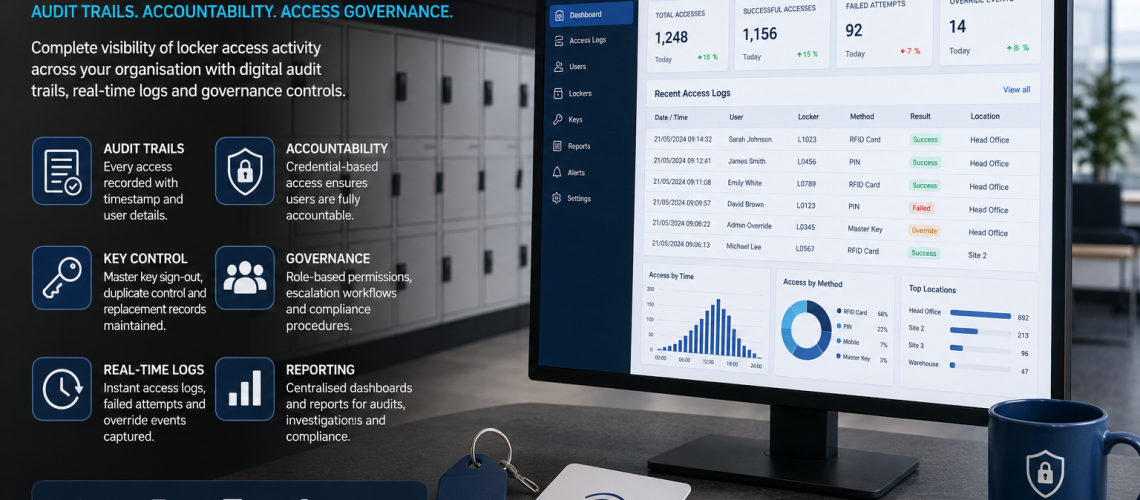
Locker access audit systems create evidence of what happened within a locker access process: which locker was involved, when an event occurred, which credential or administrator was used and whether the event was a normal opening, failed attempt, override, reset, credential change or manual key action.
The audit layer is different from access governance. Governance defines who is authorised to act; Audit records evidence of what actually happened. Compliance controls how user-linked records are handled and retained, while Analytics looks for patterns across multiple events.
This guide owns locker access logs, override records, failed attempts, resets, credential events, manual key records, administrator actions, event sequencing, audit completeness, evidence limitations and incident reconstruction.
Governance decides who may act. Audit records evidence of what happened. Compliance controls how the records are handled. Analytics interprets patterns across many records.
Quick Answer: What Is a Locker Access Audit System?
A locker access audit system records evidence of locker access and related administrative events. Depending on the access system, evidence may be created manually through key registers and authorised-opening records or automatically through electronic locks, RFID, PIN, mobile credentials and smart locker software.
| Audit event | Possible evidence |
|---|---|
| Successful access | Locker reference, credential reference, date, time and result |
| Failed access | Unsuccessful attempt, reason or credential where supported |
| Override | Administrator, master credential or emergency-opening event |
| Reset | PIN, credential or lock state changed |
| Credential issued | Key, card, PIN or digital credential became active |
| Credential revoked | Access deliberately removed or disabled |
| Temporary expiry | Time-limited access reached its configured end |
| Manual key event | Master, spare or replacement key issued or returned |
| Administrative change | Access state or locker relationship changed where the system logs it |
What Locker Access Audit Owns
- Successful locker-access events.
- Failed access attempts.
- Override and emergency openings.
- PIN, combination and credential resets.
- Credential issue, replacement, expiry and revocation events.
- Administrator actions.
- Master-key and spare-key issue records.
- Manual access records.
- Event timestamps and sequencing.
- Locker and credential references.
- Audit completeness and known blind spots.
- Evidence used during incident investigation.
- The limits of what an audit record can establish.
What Access Audit Hands Off
| Question | Owner |
|---|---|
| Who may approve, reset, override or revoke access? | Locker Access Permissions & Governance UK |
| Which key, PIN, RFID or electronic access technology should be used? | Locker Access Control Systems UK |
| How are physical locker keys controlled? | Locker Key Management Systems UK |
| How are temporary users allocated and expired? | Locker Management Systems UK |
| How should user-linked audit records be retained and protected? | Locker Access Compliance UK |
| How are event logs searched, filtered and exported? | Smart Locker Management Software UK |
| What trends exist across access events? | Smart Locker Analytics UK |
| Does an access event prove occupancy? | Locker Occupancy Management Systems UK |
Why Locker Access Auditing Matters
When a user reports that a locker opened unexpectedly, a key was issued incorrectly, an administrator reset a lock or access occurred outside the expected process, useful audit evidence can help reconstruct what the available systems recorded.
- Confirm whether a recorded access event occurred.
- Identify failed or repeated attempts.
- Show whether an override was used.
- Trace credential issue, replacement and revocation.
- Review administrator actions.
- Reconcile master-key and spare-key handling.
- Identify gaps between digital and manual access.
- Support incident investigation.
- Provide evidence for governance review.
An audit system should produce evidence that can actually be interpreted. Recording large volumes of events has little value if the organisation cannot identify the locker, event type, time or relevant access reference afterwards.
What Should a Locker Access Audit Trail Record?
The exact fields depend on the technology and operating model, but a useful event record commonly includes:
| Field | Purpose |
|---|---|
| Locker reference | Identifies the compartment or locker involved |
| Site / location | Identifies where the event occurred |
| Event type | Separates ordinary access, failure, override, reset and credential events |
| Date and time | Places the event in sequence |
| Credential or user reference | Links access to the relevant identity where supported |
| Administrator reference | Identifies management activity where supported |
| Result | Shows success, failure or blocked access |
| Reason / exception | Adds context where the system or process provides it |
| Source | Identifies whether the record came from a lock, software platform, key register or manual form |
Not every locker system can provide every field. The important requirement is to understand what evidence genuinely exists rather than assume that a particular lock or platform records more than it does.
Successful Locker Access Events
An electronic system may create an event when an authorised credential successfully operates a locker.
- Locker opened.
- Credential accepted.
- Date and time recorded.
- User or credential reference recorded where available.
- Site or system reference retained.
A successful opening usually demonstrates that the access system accepted the credential or instruction. It does not automatically prove who physically presented the credential, what was placed inside the locker or how long the locker remained in use.
Failed Locker Access Attempts
Failed attempts can provide useful evidence around rejected credentials, incorrect PINs, expired permissions or system problems.
- Incorrect PIN.
- Unrecognised card or RFID credential.
- Expired temporary permission.
- Revoked credential.
- Attempt to access the wrong locker.
- Attempt outside an authorised period.
- Access rejected because of system state.
- Hardware or communications fault where distinguishable.
Where possible, distinguish an actual permission refusal from a hardware, battery, software or communications problem. Otherwise several very different causes can appear as the same failed-access event.
Override and Emergency Access Records
Override activity deserves particular attention because it operates outside normal user access.
- Master-key opening.
- Manager or supervisor credential.
- Administrator PIN.
- RFID management credential.
- Remote software opening.
- Emergency opening.
- Maintenance access.
A useful record may identify the locker, time, access method and administrator or management credential involved.
The audit system records the event. The question of who should be allowed to perform an override belongs in Locker Access Permissions & Governance UK.
Reset Events
A reset changes the access state of a locker and should ideally be distinguishable from an ordinary opening.
- PIN reset.
- Combination cleared.
- User credential removed.
- RFID credential reassigned.
- Public-use locker released.
- Administrator reset.
- Lock returned to a defined default state.
Where supported, the audit trail should record when the reset occurred and which administrator or management credential initiated it.
Credential Issue, Replacement, Expiry and Revocation
Access auditing can include events that change who or what is able to open a locker.
| Credential event | Evidence |
|---|---|
| Issued | A key, card, PIN or digital credential became active |
| Replaced | An earlier credential was superseded |
| Reassigned | A credential or locker relationship changed |
| Extended | A time-limited access period changed |
| Expired | Temporary permission reached its defined end |
| Revoked | Access was deliberately disabled |
| Lost / compromised | The previous credential was marked unusable and replacement action began |
The user-allocation process associated with temporary or expiring storage belongs in Locker Management Systems UK. Audit owns the evidence that the access state changed.
Manual Locker Access Audit Trails
A mechanical locker does not create a digital event simply because it was opened, but organisations can still create useful evidence around controlled access.
- Master-key sign-out record.
- Spare-key issue register.
- Replacement-key record.
- Locker-opening authorisation.
- Maintenance-access record.
- Incident record.
- Lock-change record.
- Manual reset record.
The weakness of a manual audit trail is usually not that it is manual. It is that the process depends on people recording events consistently. A disciplined manual record can provide useful evidence; a register that is regularly bypassed cannot.
Master-Key and Spare-Key Audit Records
Master and spare keys can provide wider access than an ordinary user’s key, making their issue and return particularly useful events to record.
- Key identifier.
- Person or role receiving the key.
- Date and time issued.
- Date and time returned.
- Reason for issue where required.
- Locker or area involved where known.
- Outstanding or unreturned status.
For the wider operational control of physical locker keys, use Locker Key Management Systems UK.
Digital Locker Access Audit Trails
Electronic and connected locker systems may generate access evidence automatically.
- RFID access.
- PIN access.
- Mobile credential access.
- Successful opening.
- Failed attempt.
- Remote administrator action.
- Override.
- Reset.
- Credential issue.
- Credential revocation.
- Temporary-access expiry.
- Locker release.
- System exception.
Do not assume that every electronic or smart lock records all of these events. Audit capability should be verified against the actual lock, firmware, controller and software platform.
Manual vs Digital Locker Audit Evidence
| Characteristic | Manual evidence | Digital evidence |
|---|---|---|
| Capture | Requires a person to record the action | May be automatic |
| Timestamp | Entered manually | Usually system-generated |
| Credential linkage | Depends on the register | Can be generated automatically |
| Override records | Require sign-out or incident documentation | May be captured automatically |
| Search | Can be slow in paper records | Usually easier to filter and search |
| Multi-site consolidation | Requires manual consolidation | May be centralised |
| Typical weakness | Recording discipline | System blind spots or over-interpretation |
What a Locker Audit Trail Can and Cannot Prove
Audit logs are evidence, but the strength of that evidence depends on what the access system actually records.
| Record | What it may support | What it does not necessarily prove |
|---|---|---|
| Credential accepted | A valid credential was presented or invoked | Which individual physically possessed it |
| Locker opened | The access mechanism opened | What was removed or deposited |
| Override event | An override function was used | Why it was used unless separately recorded |
| PIN event | The correct PIN was entered | Who knew or entered the PIN |
| Reset | The lock or credential state changed | Whether the change was authorised or appropriate |
| No digital event | No event was recorded in that source | That no access occurred through another route |
This distinction is critical during investigation. Interpret the event according to what the technology genuinely records, not what an investigator hopes it records.
Locker Audit Trails and Incident Investigation
When an incident involves a locker, audit evidence can help reconstruct the sequence without automatically determining responsibility.
- Identify the exact locker. Confirm the compartment rather than relying on a general area description.
- Define the relevant period. Use the narrowest useful time range.
- Retrieve normal access events.
- Retrieve failed attempts.
- Check overrides and resets.
- Check credential issue, replacement, expiry and revocation.
- Check manual records. Master keys and maintenance access may not appear digitally.
- Check known system blind spots.
- Compare the sequence with the expected permission model.
- Preserve relevant evidence through the organisation’s normal investigation process.
The audit trail helps establish what the available systems recorded. It should not be used to infer motive, intent or responsibility beyond what the evidence supports.
Audit Completeness and Blind Spots
A strong audit system should make its limitations visible.
- Can the locker be opened mechanically without a digital event?
- Can a master key bypass the electronic system?
- Is master-key use recorded separately?
- Can credentials be shared?
- Are offline events stored and uploaded later?
- Can battery failure interrupt logging?
- Can lost connectivity delay records?
- Are timestamps synchronised?
- Can administrators edit or delete records?
- Are all sites using the same event definitions?
- Are manual records reconciled with digital logs?
An incomplete audit trail can still be useful. The important point is knowing where evidence may be absent.
Mechanical Override Blind Spots
An electronic locker may still have a mechanical emergency or service override. If that route does not report back to the electronic system, a locker can be opened without generating the same digital event as RFID, PIN or software access.
Where mechanical override exists, consider whether a separate master-key or emergency-access record is required.
Shared Credentials Weaken Attribution
An event may identify a credential without uniquely identifying a person if several people share the same PIN, card, administrator account or physical key.
For example, an event showing use of a shared administrator account provides weaker individual attribution than an event linked to a unique named credential.
This does not make the record useless. It changes what can reasonably be concluded from it.
Time Synchronisation Matters
Audit investigations often depend on event order. If locker controllers, servers, administrator devices or separate sites use inconsistent clocks, apparently precise timestamps can become misleading.
- Use a consistent time source where practical.
- Record the timezone used by exported logs.
- Account for UK daylight-saving changes when reviewing historical records.
- Identify whether offline events retain the original event time or later upload time.
- Do not treat manually entered times as having the same precision as system-generated timestamps.
Use Consistent Locker Audit Event Names
Consistent event categories make investigation, reporting and multi-site comparison easier.
- ACCESS_SUCCESS
- ACCESS_FAILED
- OVERRIDE_OPEN
- EMERGENCY_OPEN
- RESET
- CREDENTIAL_ISSUED
- CREDENTIAL_REPLACED
- CREDENTIAL_REVOKED
- TEMP_ACCESS_EXPIRED
- KEY_ISSUED
- KEY_RETURNED
- LOCKER_RELEASED
The exact terminology is less important than consistency. Two sites should not use the same event label to describe different actions.
Locker Access Auditing Across Multiple Sites
Multi-site organisations may combine several generations of locker technology. One site may use manual key records while another uses RFID or connected electronic locks.
- Use stable site references.
- Use stable locker or compartment references.
- Use common event definitions.
- Record the source system.
- Distinguish central and local administrator actions.
- Flag locations where digital logs are supplemented by manual records.
- Record known blind spots for each access technology.
For the wider coordination of locker estates across locations, use Multi-Site Locker Estate Management UK.
Audit Evidence During Locker System Migration
Migration between locker technologies can create temporary evidence gaps where old and new systems record different events.
- The legacy system may rely on manual key records.
- The new system may create automatic access events.
- Time-limited credentials may operate during conversion.
- Mechanical overrides may remain available during commissioning.
- Administrators may operate both systems during transition.
The migration process should identify where the available evidence changes so that an apparent gap is not mistaken for an absence of activity.
Locker Access Audit vs Occupancy Data
| Access Audit | Occupancy / Utilisation |
|---|---|
| Records an access-related event | Describes whether or how locker capacity is being used |
| May identify credential and timestamp | May measure occupied, vacant or usable capacity |
| Useful for event reconstruction | Useful for capacity and utilisation analysis |
| An opening may create an event | An opening does not necessarily indicate continuing occupancy |
An access event should not automatically be treated as an occupancy measurement. Occupancy definitions belong in Locker Occupancy Management Systems UK.
Locker Access Audit vs Live Monitoring
| Audit | Monitoring |
|---|---|
| Historical evidence | Current or near-real-time status |
| Reconstructs events | Supports immediate operational awareness |
| Can be manual or digital | Usually requires connected systems |
| Focuses on what was recorded | Focuses on what appears to be happening now |
Dashboard and live-status capability belongs in Smart Locker Management Software UK. Access Audit remains the evidence layer.
Locker Access Audit vs Smart Locker Analytics
Audit records individual events. Analytics looks across many records to identify patterns.
| Audit question | Analytics question |
|---|---|
| Was an override recorded on this locker? | Are overrides increasing across this site? |
| Did this credential fail at 14:32? | Are failed-access events rising over time? |
| Was a reset performed? | Are resets concentrated in one locker family? |
| Which administrator account performed the action? | Are administrator actions unusually concentrated in one location? |
Trend comparison and exception analysis belong in Smart Locker Analytics UK.
Locker Access Audit vs Compliance
Audit and compliance are connected but different.
- Audit asks what event evidence should exist and what the record can prove.
- Compliance asks how personal or user-linked data should be accessed, retained, protected, exported and deleted.
For retention, privacy and handling of access records, use Locker Access Compliance UK.
Review Exceptions Rather Than Every Normal Event
Connected systems can generate large numbers of routine events. Reviewing every ordinary opening manually can create noise rather than useful oversight.
Events that may justify closer review include:
- Repeated failed attempts.
- Unexpected overrides.
- Unusual administrator actions.
- Unexpected reset activity.
- Access using a credential expected to be inactive.
- Master key issued but not recorded as returned.
- Activity involving an unexpected locker or site.
- Unexpected event sequences.
- Gaps in records during a known incident period.
An unusual event is a reason to inspect the evidence more closely. It is not, by itself, proof of misuse.
School Locker Access Audit Trails
Schools may use mechanical or electronic locker access, so the available evidence can vary substantially.
- Pupil key issue.
- Replacement-key issue.
- Master-key sign-out.
- Authorised locker opening.
- Electronic access event where supported.
- Reset event.
- Lock change.
- Time-limited credential expiry where relevant.
The audit system records evidence of the event. Authority to open a pupil locker belongs in the organisation’s policy and governance process. For the wider education requirement, use School Lockers UK.
Healthcare Staff Locker Audit Trails
Healthcare staff lockers may produce manual or digital audit evidence depending on the access system used.
- Staff credential access.
- Temporary staff or contractor credential events.
- Department administrator actions.
- Override access.
- Reset events.
- Failed attempts.
- Credential revocation.
Ordinary staff locker audit should not be confused with audit requirements applying to medicines storage, controlled clinical storage or other specialist regulated systems. For healthcare changing facilities, use NHS & Healthcare Changing Room Planning UK.
Workplace Locker Access Audit Trails
Shared and hybrid workplaces can generate more credential and administrative events than traditional permanently assigned locker systems.
- Shared-locker access.
- Visitor credential events.
- Contractor access.
- Administrator resets.
- Credential expiry.
- Locker release.
- Remote administrator action.
- Override access.
For user allocation, visitor and contractor locker administration, use Locker Management Systems UK. For the broader workplace requirement, use Workplace Lockers UK.
Industrial and Warehouse Locker Audit Trails
Industrial sites may combine permanently assigned lockers, contractor access, shift-based users, master keys and electronic access.
- Master-key issue and return.
- Contractor credential use.
- Shift-linked access where supported.
- Override opening.
- Replacement-key issue.
- Lock reset or replacement.
- Failed access attempts.
The audit model should follow the real access system rather than assume that every industrial locker estate requires connected digital logging.
Common Locker Access Audit Failures
- Assuming access proves occupancy. Opening a locker does not establish continuing use.
- Assuming a credential uniquely identifies a person. Credentials may sometimes be shared.
- Ignoring mechanical override routes. Not every opening necessarily reaches the digital log.
- Ignoring master-key records. Manual access may sit outside the electronic system.
- Shared administrator credentials. Individual attribution becomes weaker.
- Reset events mixed with ordinary access. Important administrative actions become difficult to identify.
- Unreliable timestamps. Event sequencing becomes harder to reconstruct.
- Different sites using different event definitions. Portfolio evidence becomes inconsistent.
- Logging large volumes without a purpose. More data does not automatically create better evidence.
- Assuming smart means complete auditability. Verify actual product capability.
- Treating absence of a digital event as proof that no access occurred. Other routes may exist.
- Using an unusual event as proof of wrongdoing. Audit evidence requires context.
- Turning individual event records into trend conclusions. Trend interpretation belongs in Analytics.
- Keeping user-linked audit records indefinitely without a defined reason. Retention belongs in Compliance.
Locker Access Audit Checklist
- Which locker events are actually recorded?
- Can successful and failed access be distinguished?
- Can normal access be distinguished from override access?
- Are resets recorded separately?
- Can credential issue, replacement and revocation be traced?
- Are expiry events visible where time-limited access is used?
- How are master keys and spare keys recorded?
- Can mechanical override bypass the digital audit trail?
- Are manual and digital records reconciled where necessary?
- Are timestamps reliable and consistent?
- Are event definitions consistent between sites?
- Can administrator actions be attributed?
- Are shared credentials identified as a limitation?
- Can records be searched by locker, credential and event?
- Are audit blind spots documented?
- Does the organisation understand what each record can and cannot prove?
- Are migration-related audit gaps understood?
- Is the retention owner clear where records contain personal data?
- Are trend questions handed to Analytics rather than inferred from individual records?
Related Locker Access Guides
- Locker Access Permissions & Governance UK – who may issue, reset, override and revoke access.
- Locker Access Control Systems UK – key, PIN, combination, RFID and electronic locker access.
- Locker Key Management Systems UK – physical locker key and master-key control.
- Locker Management Systems UK – temporary users, allocation, expiry, onboarding and offboarding.
- Locker Access Compliance UK – privacy, retention and handling of user-linked access records.
- Smart Locker Management Software UK – search, filtering, reporting and event-export capability.
- Smart Locker Analytics UK – trends, comparisons and exception analysis across multiple records.
- Locker Occupancy Management Systems UK – actual use, vacancy and utilisation.
- Multi-Site Locker Estate Management UK – cross-site structures and standards.
Locker Access Audit Systems UK FAQs
What is a locker access audit system?
A locker access audit system records evidence of locker access and administrative events such as successful openings, failed attempts, overrides, resets, credential changes and manual key actions.
What is the difference between locker access governance and locker access audit?
Governance defines who is authorised to perform an action. Audit records evidence of the actions that occurred and, where supported, which credential or administrator was involved and when.
What is the difference between access audit and smart locker analytics?
Access Audit records individual events. Smart Locker Analytics compares many records to identify trends, changes, concentrations and exceptions over time or between locations.
Can mechanical lockers have an audit trail?
Yes. Mechanical locker systems can use master-key registers, spare-key issue records, replacement-key records, authorised-opening forms and other manual records to create an audit trail.
What can an electronic locker audit trail record?
Depending on the system, electronic audit trails may record successful and failed access, PIN or RFID events, administrator overrides, resets, credential issue, revocation and other access-related events.
Does a locker access event prove who opened the locker?
Not necessarily. An event may identify the credential or account used, but shared credentials, PIN sharing or other access routes can limit certainty about the individual physically present.
Can a locker be opened without creating a digital audit event?
Potentially. Some systems have mechanical master-key or emergency overrides that may not create the same digital event as normal electronic access. The actual product capability should be checked.
Are locker access audit logs the same as occupancy data?
No. Access Audit records openings and related administrative events. Occupancy information describes whether and how locker capacity is being used over time.
How should personal data in locker audit logs be handled?
Where audit records contain identifiable user or administrator information, the organisation should apply its appropriate privacy, access, retention and deletion controls. Those requirements belong in the access-compliance process rather than the event model itself.
What should be checked when investigating a locker access incident?
Confirm the locker and relevant time period, then review successful access, failed attempts, overrides, resets, credential changes and any manual master-key or maintenance records while accounting for known audit blind spots.
Summary
Locker Access Audit should remain focused on evidence of events: successful and failed access, overrides, resets, credential changes, administrator actions and manual key activity.
The most important requirement is not simply to collect more data. It is to know which events are recorded, where evidence may be missing and what each record can reasonably establish.
Keep authority with Access Permissions & Governance, technology choice with Access Control, key control with Key Management, user allocation with Locker Management, record handling with Compliance, software interfaces with Smart Locker Management Software and trend interpretation with Smart Locker Analytics.
For physical locker systems, see Commercial Lockers. For mechanical, combination and electronic replacement options, see Locker Locks.
Discover more from Blog Total Locker Service
Subscribe to get the latest posts sent to your email.