Locker Access Control Systems UK: Keys, PIN, RFID & Smart Access
May 11, 2026
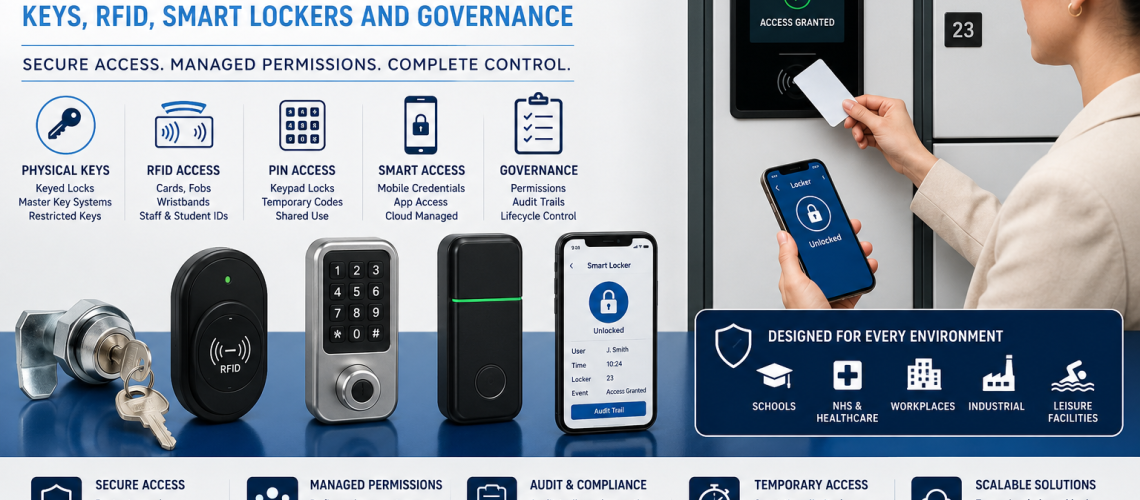
Locker access control systems determine how an authorised user opens and secures a locker. The access method may use a physical key, padlock, coin or token, mechanical code, electronic PIN, RFID card, fob, wristband, mobile credential or a connected smart-locker system.
The correct access technology depends on how the lockers are managed, how frequently users change, the installation environment, the level of administration available and whether the locks need to operate independently or as part of a connected system.
This guide owns locker access technology selection: keyed locks, hasp and padlock fittings, coin systems, mechanical combination locks, electronic PIN locks, RFID credentials, digital credentials, private-use and public-use operation, technical management capability, power requirements, credential compatibility and standalone versus connected access. It does not own allocation policy, privileged-access authority, event logging, personal-data governance, software administration or the physical retrofit procedure.
Locker Management decides the operating model. Access Control chooses the technology that supports it. Governance decides who may use privileged functions. Audit records what happened. Software administers connected capabilities.
Where the issue is a failed existing lock rather than technology selection, use Locker Lock Replacement Guide UK or Locker Parts & Servicing Guide. Where the locker must be physically altered to accept another lock family, use Retrofit Locker Locks UK.
If you are comparing current products, browse our locker locks. For the wider connected architecture, use Smart Locker Systems UK.
Quick Answer: How Do You Choose a Locker Access Control System?
Start with the way the lockers need to operate, then choose the least complex access technology that reliably supports that requirement.
- Define whether lockers are assigned, shared, hot, temporary, booked or otherwise managed.
- Identify what users can realistically carry or remember: key, padlock, code, card, wristband or mobile credential.
- Decide whether the lock requires private-use or public-use operation.
- Identify the technical management, reset or override capability required.
- Decide whether standalone operation is sufficient or connected management is justified.
- Check the installation environment, including moisture, dust, cleaning and physical use.
- Consider batteries, wired power and network dependencies where electronic systems are involved.
- Confirm that the proposed lock physically suits the locker door.
- Test credential compatibility where existing RFID cards, fobs or wristbands are to be reused.
- Compare administration and maintenance requirements as well as initial cost.
The allocation model itself belongs in Locker Management Systems UK. This page starts with the next question: which access technology best supports that operating model?
What Is a Locker Access Control System?
A locker access control system is the physical or electronic method used by an authorised user to secure and open a locker.
- Conventional locker key.
- User or organisation-supplied padlock.
- Coin or token.
- Mechanical combination.
- Electronic PIN.
- RFID card.
- RFID fob.
- RFID wristband.
- Mobile or digital credential.
- Credential administered through a connected smart-locker system.
The access technology may also provide a technical management route such as a master key, manager key, reset tool, administrator code, management RFID credential or software command.
The existence of that capability does not determine who is allowed to use it. Authority belongs in Locker Access Permissions & Governance UK.
What This Page Owns, and What It Hands Off
| Question | Owner |
|---|---|
| Which locker access technology should be used? | This guide |
| Should the lock use a key, padlock, combination, PIN, RFID or digital credential? | This guide |
| Does the product support private-use or public-use operation? | This guide |
| What technical master, reset or override capability exists? | This guide |
| Does an RFID credential work with the proposed lock? | This guide |
| What are the battery, power and environmental requirements? | This guide |
| Should lockers be assigned, shared, hot, temporary or booked? | Locker Management Systems UK |
| Who may approve, reset, override or revoke access? | Locker Access Permissions & Governance UK |
| Which access events should be recorded? | Locker Access Audit Systems UK |
| How should identifiable access data be handled? | Locker Access Compliance UK |
| How are connected permissions, dashboards and remote actions administered? | Smart Locker Management Software UK |
| How does the complete connected locker architecture work? | Smart Locker Systems UK |
| How is an existing lock physically replaced? | Locker Lock Replacement Guide UK |
| How is an existing locker modified for another lock type? | Retrofit Locker Locks UK |
| How is a failed lock or component diagnosed? | Locker Parts & Servicing Guide |
| Where is the installed lock family recorded as part of the physical estate? | Locker Asset Register UK |
| How are maintenance tickets and work orders managed? | Locker CAFM Integration UK |
Locker Access Control Options Compared
| Access method | Typical strength | Main consideration |
|---|---|---|
| Keyed lock | Simple access for regular users | Key issue, loss and replacement |
| Hasp and padlock | User-managed mechanical access | Padlock compatibility and lost or abandoned padlocks |
| Coin or token | High-turnover leisure or public-use storage | Coin/token operation and servicing |
| Mechanical combination | Keyless access without batteries | Forgotten codes and reset procedure |
| Electronic PIN | Flexible keyless access | Batteries, reset and management access |
| RFID | Fast credential-based access | Credential compatibility and administration |
| Mobile or digital credential | Flexible connected access | Software, connectivity and user support |
| Connected smart locker system | Central administration across larger or dynamic estates | Infrastructure, software, support and integration |
No access technology is automatically the best choice. A keyed lock can be entirely appropriate for a stable assigned-user installation, while a high-turnover shared environment may justify PIN, RFID or connected access.
The correct choice should be based on the operating model, user behaviour, environment, support capability, physical locker compatibility and whole-life administration rather than on a simple mechanical-versus-digital hierarchy.
Keyed Locker Access
Key-operated locker locks remain a straightforward access method where lockers are normally used by regular or assigned users.
- No battery is required for ordinary operation.
- No software or network connection is required.
- The method is familiar to most users.
- Replacement keys can often be supplied where the manufacturer and key code are known.
- Compatible systems may provide master or management-key capability.
The principal operational burden is physical key control. Where users frequently lose keys, another technology may reduce that particular workload, although it may introduce different administrative requirements.
If the key number is known and the existing lock remains serviceable, replacement of the entire lock may not be necessary. See our replacement locker key service.
Master-Key Capability
Some keyed locker systems support a master or management key that can operate more than one compatible lock.
As a technical feature, this can support authorised user assistance, maintenance and management intervention without requiring every individual user key.
Access Control owns the question of whether the lock family supports master access. Access Permissions & Governance owns the separate question of who may possess or use the master key.
Hasp and Padlock Locker Access
A hasp fitting allows the locker to be secured with a compatible padlock rather than an integrated keyed or electronic lock.
- No locker-specific user key needs to be issued.
- The padlock can travel with the user.
- Mechanical operation avoids batteries and software.
- The organisation can decide whether users provide their own padlock or receive one through the site.
Check shackle dimensions, hasp compatibility and how staff will deal with forgotten combinations, lost keys, damaged locks or abandoned padlocks.
Where an existing locker needs physical modification, use Retrofit Locker Locks UK.
Coin and Token Locker Access
Coin and token locks are commonly used in leisure, changing and public-use environments where users occupy lockers temporarily.
Depending on the mechanism, the coin or token may be returned when the locker is released or retained as part of the operating model.
- Familiar operation in many leisure environments.
- Can suit changing users.
- Can operate without networked software.
- Suitable models may provide management or service access.
Coin systems need appropriate servicing and management arrangements. Check the actual lock model, coin or token specification, service method and environmental suitability rather than treating all coin locks as interchangeable.
Mechanical Combination Locker Locks
Mechanical combination locks remove the ordinary user key while avoiding batteries and electronic components.
- No ordinary user key.
- No battery for normal operation.
- Can suit assigned private-use operation.
- Suitable models can support changing public-use operation.
- Management or reset mechanisms may be available.
Do not specify a mechanical combination lock without checking its operating mode. Two locks using similar dials or buttons can behave very differently where one is designed for one continuing user and another for changing users.
Electronic PIN Locker Access
Electronic PIN or keypad locks provide keyless access using a numerical code. Suitable models can provide flexible reset and management functionality.
- No ordinary user key is required.
- PINs can support private-use or changing-user operation on suitable products.
- Management codes or override mechanisms may be available.
- A locker may sometimes be reset or released without replacing the lock.
- No separate RFID credential is required.
Electronic access introduces power requirements. Before selection, confirm battery type, low-battery behaviour, technical management method, reset procedure and what happens if normal electronic operation becomes unavailable.
RFID Locker Access
RFID locker locks can use a compatible card, fob or wristband as the user credential.
- Existing staff cards may be usable where compatibility is confirmed.
- Student credentials may be usable in suitable education systems.
- Fobs can provide a compact dedicated credential.
- Wristbands can suit leisure environments where the complete system is suitable for the conditions.
- Some RFID locks operate independently.
- Others form part of a centrally managed locker system.
For RFID-specific selection, see RFID Locker Locks UK.
Do Not Assume RFID Credentials Are Compatible
The word RFID does not mean an existing card, fob or wristband will automatically work with a proposed locker lock.
- Credential technology.
- Frequency and credential family.
- Reader compatibility.
- Identifier used by the locker system.
- Encoding or enrolment requirements.
- Standalone or centrally managed operation.
- Software or integration requirements.
- Representative credential testing before rollout.
A card already opening the building entrance is not proof that it will work with the locker system.
Mobile and Digital Locker Credentials
Connected systems may use mobile applications or other digital credentials instead of, or alongside, physical keys, cards and PINs.
- How is the user authenticated?
- Does access require a mobile application?
- What happens if the phone is unavailable?
- Does access require live connectivity?
- Can previously issued access continue during an outage?
- How is the credential activated or removed?
- What user support is required?
Access Control owns the credential technology. User allocation, temporary start and expiry belong in Locker Management Systems UK. Detailed platform administration belongs in Smart Locker Management Software UK.
Private-Use vs Public-Use Locker Locks
The access technology and the operating mode are related but separate decisions.
| Operating mode | How it normally works | Typical application |
|---|---|---|
| Private use | The same user retains the locker and normally uses the same key, code or credential | Assigned staff, pupil or employee lockers |
| Public use | A changing user secures an available locker and releases it after use | Leisure, visitor and day-use storage |
| Managed shared use | The user-to-locker relationship changes under an administrative or software process | Hybrid workplaces and managed shared estates |
A mechanical combination lock can be available in either private-use or public-use form, as can many electronic systems. Check the operating behaviour of the actual product.
The decision about whether the estate itself should use assigned, shared, hot, temporary or booking-led allocation belongs in Locker Management Systems UK.
Technical Management and Override Capability
Managed locker estates normally need some technical route for authorised intervention when ordinary user access is unavailable.
- Master key.
- Manager key.
- Mechanical reset tool.
- Manager code.
- Administrator RFID credential.
- Programming device.
- Local controller.
- Software-based remote action.
This page owns the question: what management capability does the technology provide?
It does not own the question: who is authorised to use that capability? That belongs in Locker Access Permissions & Governance UK.
Standalone vs Connected Locker Access
Electronic does not automatically mean connected. Locker access systems can operate at several levels of technical complexity.
| Architecture | Typical characteristics |
|---|---|
| Mechanical standalone | Key, padlock, coin or mechanical combination with no electronic infrastructure |
| Electronic standalone | PIN or RFID lock configured locally without continuous central connection |
| Locally managed | Electronic locks supported by local programming or controller infrastructure |
| Networked | Locker access connected to central management software or services |
| Integrated | Locker platform exchanges information or actions with other organisational systems |
Use the lowest level of technical complexity that reliably meets the operational requirement. Adding network, server, cloud or integration dependencies is not automatically an improvement.
Where a connected solution is justified, use Smart Locker Systems UK for the complete architecture and Smart Locker Management Software UK for the platform layer.
Electronic Lock vs Smart Locker System
An electronic locker lock does not automatically create a smart locker system.
A standalone keypad or RFID lock may operate electronically while having no central database, network connection, remote administration or external integration.
A smart locker system normally combines several components:
- Electronic locking hardware.
- Controllers or gateways.
- Communications infrastructure.
- Management software.
- User or identity information.
- Allocation logic.
- Remote administration.
- Reporting.
- External integrations where required.
If the requirement is simply keyless access, a standalone electronic lock may be sufficient. If central administration, dynamic allocation, reporting or integration is needed, move to Smart Locker Systems UK.
Battery and Power Requirements
Mechanical keys, padlocks and mechanical combinations avoid the routine battery requirements associated with many electronic systems.
- Battery type.
- Battery access.
- Low-battery warning behaviour.
- Expected servicing approach.
- Behaviour when the battery is exhausted.
- Emergency-power option where supported.
- Wired supply requirements.
- Power requirements for controllers or gateways.
- Behaviour during mains-power failure.
A battery-powered lock may avoid cabling but creates a recurring service task. A wired or connected system may reduce some local battery dependence while increasing infrastructure requirements elsewhere.
Choose Access Hardware for the Environment
| Environment | Access-control considerations |
|---|---|
| Dry office | User convenience, administration, appearance and support |
| School | Durability, ease of use, lost access and supervision |
| Wet changing area | Moisture, corrosion resistance, cleaning and product suitability |
| Industrial | Dust, impact, gloves, contamination and serviceability |
| Healthcare staff area | Shift changes, cleaning, staff turnover and support |
| Public leisure | High user turnover, simple operation and management intervention |
| Outdoor or exposed | Confirm that the complete product is specifically suitable for the actual exposure |
Terms such as electronic, digital or RFID do not demonstrate environmental suitability. Check the specification of the actual lock and credential system.
User Experience and Accessibility
- Can the user easily insert and turn the key?
- Can the padlock be fitted and removed comfortably?
- Are mechanical dials easy to read and operate?
- Is the keypad clear and appropriately positioned?
- Does the RFID reader provide understandable feedback?
- Can users tell whether the locker has locked successfully?
- Does the system create unnecessary dependence on a mobile phone?
- Can staff assist users when normal access fails?
The most technically advanced method is not necessarily the easiest for every user population. Age, dexterity, visual requirements, clothing, gloves and installation position can all affect usability.
Access Control Selection vs Lock Maintenance
Access Control selects the technology. It should not become the maintenance or fault-diagnosis guide for that technology.
| Question | Owner |
|---|---|
| Which access technology should be used? | This guide |
| Which lock is already fitted? | Locker Lock Identification Guide UK |
| Why is the lock not operating correctly? | Locker Parts & Servicing Guide |
| How is the same or compatible lock replaced? | Locker Lock Replacement Guide UK |
| How is the locker altered for another lock family? | Retrofit Locker Locks UK |
| How are work orders and maintenance history recorded? | Locker CAFM Integration UK |
Access Control for New Lockers
A new locker project provides greater freedom because the door and locker configuration can be selected around the intended lock.
- Lock footprint.
- Door material and thickness.
- Fixing pattern.
- Cam or latch arrangement.
- Reader position.
- Battery-service access.
- Rear clearance.
- Wiring route where applicable.
- Controller or gateway requirements.
Where possible, select the access method before the locker specification is finalised, particularly for larger electronic or RFID locks requiring specific door preparation.
For complete products, browse our commercial locker range.
Changing Access Control on Existing Lockers
Existing lockers reduce the available choices because the proposed access hardware must work with the existing door and cabinet.
- Door material.
- Door thickness.
- Existing cut-out.
- Fixing positions.
- Lock footprint.
- Rear clearance.
- Cam or latch geometry.
- Door-to-frame relationship.
- Whether modification is acceptable.
This guide owns access-technology selection, not the physical conversion procedure. For like-for-like or compatible replacement use Locker Lock Replacement Guide UK. For modification to accept another lock type, use Retrofit Locker Locks UK. If the existing hardware cannot yet be identified confidently, route the problem through Locker Parts & Servicing Guide.
Test One Lock Before Large-Scale Rollout
- Confirm physical fit.
- Confirm the intended credential works.
- Confirm private-use or public-use behaviour.
- Confirm management access.
- Check cam or latch engagement.
- Check rear clearance.
- Check user operation.
- Confirm battery or power access.
- Test required local or connected management functions.
A small compatibility issue repeated across hundreds of locker doors can become a substantial installation problem.
Locker Access Control for Schools
School locker access should reflect pupil age, staff support, estate scale and the way lost access will be handled.
- Keyed locks: familiar and straightforward but require key administration.
- Hasp fittings: allow user or school-controlled padlocks.
- Mechanical combinations: remove ordinary keys but require forgotten-code support.
- Electronic PIN: flexible reset capability with battery servicing.
- RFID: potentially useful where compatible student or staff credentials already exist.
For the wider education requirement, use School Lockers UK.
Locker Access Control for Workplaces
Workplaces range from stable permanently assigned staff lockers to high-turnover hybrid environments.
A stable assigned-user installation may need nothing more complex than keyed or private-use combination access. A high-turnover shared workplace may gain more from PIN, RFID or connected access.
- How often do allocations change?
- Do users already carry a suitable credential?
- Are lockers used permanently or only during attendance?
- Does administration need to be local or central?
- Is remote intervention genuinely required?
- Would software remove meaningful manual administration?
For allocation and day-to-day user administration, use Locker Management Systems UK.
Locker Access Control for Healthcare Staff Areas
Healthcare staff changing areas can combine permanent staff, rotating teams, agency workers and contractors.
Keyed, PIN, RFID and managed electronic access can all be appropriate depending on user turnover, the installation environment and the administration available.
Where an existing staff card is proposed as the locker credential, compatibility should be tested rather than assumed. Where cleaners, facilities personnel or supervisors need higher access, the technical mechanism belongs here while the authority model belongs in Access Permissions & Governance.
Locker Access Control for Leisure and Changing Rooms
- Coin or token locks.
- User padlocks.
- Public-use mechanical combinations.
- Public-use electronic PIN locks.
- RFID cards.
- RFID wristbands.
- Connected systems where central management is justified.
Wet and poolside areas require the complete lock, fittings and credential system to suit moisture and cleaning conditions.
Locker Access Control for Industrial Sites
- Can users operate the access method while wearing the expected clothing or gloves?
- Can the lock withstand the working environment?
- Is the system straightforward to service?
- Are batteries practical across the estate?
- Will user turnover create excessive key administration?
- Does connected access solve a real operational problem?
Electronic access should not be selected merely because it appears more modern. Simple mechanical access can remain the more maintainable choice in some environments.
Key vs Combination vs PIN vs RFID
| Question | Key | Mechanical combination | Electronic PIN | RFID |
|---|---|---|---|---|
| User carries something? | Key | No | No | Card, fob or wristband |
| Battery required? | No | No | Usually | Commonly for standalone electronic locks |
| Typical lost-access issue | Lost key | Forgotten code | Forgotten PIN | Lost or incompatible credential |
| Management access possible? | Yes on compatible systems | Model dependent | Model dependent | Model dependent |
| Can suit changing users? | Possible but administratively heavier | Yes on suitable public-use models | Yes on suitable public-use models | Yes on suitable systems |
| Connected software required? | No | No | Not necessarily | Not necessarily |
When Connected Locker Access Is Worth Considering
- Access changes frequently.
- Several sites need central administration.
- Remote intervention would remove significant support work.
- Existing identity systems need to interact with lockers.
- Temporary-user populations are substantial.
- Allocation changes dynamically.
- Access-event reporting is an established requirement.
- Integration would remove duplicate administration.
Once those requirements exist, move from individual lock selection into Smart Locker Systems UK and Smart Locker Management Software UK.
When Simple Locker Access Is Better
A connected system is unnecessary where the requirement is simple and stable.
- Each locker has one regular user.
- Allocation changes rarely.
- Central reporting is unnecessary.
- There is no useful external integration.
- Battery servicing would create unnecessary work.
- Network connectivity adds no operational value.
- The existing mechanical access system already meets the requirement.
Choose complexity because it solves a real problem, not because the technology exists.
Locker Access Control Selection Process
- Define the user population. Employees, pupils, members, visitors, contractors or mixed users.
- Confirm the operating model. Assigned, shared, hot, temporary, booked or another model.
- Decide what users can practically carry or remember.
- Choose private-use or public-use operation where applicable.
- Identify the required technical management mechanism.
- Decide whether standalone operation is sufficient.
- Check the physical environment.
- Check battery, power and connectivity requirements.
- Confirm credential compatibility where existing RFID is proposed.
- Check physical locker-door compatibility.
- Test a representative lock or credential where appropriate.
- Compare maintenance and administration as well as initial cost.
Common Locker Access Control Mistakes
- Choosing technology before defining how the lockers will be managed.
- Assuming electronic automatically means smart or connected.
- Assuming all RFID credentials are compatible.
- Ignoring private-use vs public-use operation.
- Confusing technical administrator capability with governance authority.
- Choosing hardware unsuited to the environment.
- Ignoring battery servicing across a large estate.
- Adding software where it solves no meaningful problem.
- Assuming a new lock will physically fit an existing locker.
- Ordering a large retrofit quantity before testing a representative installation.
- Confusing allocation status with access technology.
- Expecting access-control hardware to define organisational policy.
Where Locker Access Control Questions Go Next
| Question | Next guide |
|---|---|
| Who may approve, reset, override or revoke access? | Locker Access Permissions & Governance UK |
| How should lockers be assigned, shared, hot, booked or temporary? | Locker Management Systems UK |
| Which access events should be recorded? | Locker Access Audit Systems UK |
| How should access data be handled? | Locker Access Compliance UK |
| What should smart locker software provide? | Smart Locker Management Software UK |
| How does a complete smart locker system work? | Smart Locker Systems UK |
| How do I identify the lock already fitted? | Locker Lock Identification Guide UK |
| How do I replace an existing locker lock? | Locker Lock Replacement Guide UK |
| How do I adapt an existing locker for another lock type? | Retrofit Locker Locks UK |
| How do I phase different technologies across an estate? | Hybrid Locker Estates UK |
| How do I diagnose a failed or unidentified lock? | Locker Parts & Servicing Guide |
| Where should the installed lock family be recorded? | Locker Asset Register UK |
| How should lock maintenance work be recorded? | Locker CAFM Integration UK |
Choose Locker Access Control from Total Locker Service
Total Locker Service supplies replacement and new locker locks for schools, workplaces, leisure facilities, healthcare staff areas, industrial sites and other commercial locker installations throughout the UK.
Our locker lock range includes key-operated cam locks, hasp fittings, coin locks, mechanical combination locks, electronic keypad locks and RFID options. The correct choice depends on the locker, users, operating model, environment and required administration.
If an existing keyed system simply needs replacement keys, use our replacement locker key service. For new locker installations, browse our commercial lockers.
For an existing-locker project, send clear photographs of the complete locker door, front and rear of the existing lock, cam or latch and any visible manufacturer or key references before ordering a different lock type.
Locker Access Control Systems UK FAQs
What is a locker access control system?
A locker access control system is the physical or electronic method used by an authorised user to secure and open a locker. It may use a key, padlock, combination, PIN, RFID credential, mobile credential or connected electronic system.
What is the difference between locker access control and locker access governance?
Access Control determines how locker access technically works. Access Governance determines which people or roles are authorised to approve, administer, reset, override or revoke that access.
Does locker access control decide whether lockers are assigned or shared?
No. Locker Management decides whether lockers are assigned, shared, hot, temporary, booked or otherwise allocated. Access Control selects technology capable of supporting that operating model.
Are electronic locker locks the same as smart lockers?
No. An electronic PIN or RFID lock can operate independently without central software. A smart locker system normally combines electronic locking hardware with communications, software, administration or integration capabilities.
Are RFID locker cards interchangeable?
No. An existing card, fob or wristband should not be assumed to work with a proposed RFID locker system. Credential technology and reader compatibility should be confirmed and tested before rollout.
What is the difference between private-use and public-use locker locks?
A private-use lock normally supports one regular user who retains the same key, code or credential. A public-use lock is designed for changing users and releases or resets the access arrangement after use.
Do electronic locker locks always need software?
No. Many electronic PIN and RFID locks operate independently. Others can be locally managed, networked or connected to a smart locker platform.
Are keyed locker locks still suitable for commercial lockers?
Yes. Keyed locker locks remain suitable for many stable assigned-user installations. They require no batteries or software, although the organisation needs a practical process for issuing and replacing keys.
Are combination locker locks better than keys?
Not universally. Combination locks remove ordinary user keys but introduce forgotten-code and reset requirements. The better choice depends on the users, operating model and administration available.
Can existing lockers be upgraded to RFID or electronic locks?
Many existing lockers can be upgraded, but compatibility is not automatic. Door material, thickness, cut-out, fixing points, rear clearance, cam or latch geometry and lock footprint should be checked first.
Should locker access systems always be connected to a network?
No. Mechanical and standalone electronic systems may be more appropriate where requirements are simple and stable. Connected systems are most useful where central administration, dynamic allocation, reporting or integration solves a genuine problem.
What access technology is suitable for shared lockers?
Shared lockers can use suitable public-use mechanical combinations, electronic PIN locks, RFID credentials, coin systems or connected smart access. The correct technology depends on user turnover, operating mode and administration requirements.
Does locker access control include repairing faulty locks?
No. Access Control selects the appropriate access technology. Fault diagnosis belongs in Locker Parts & Servicing, while physical replacement or retrofit work belongs in the relevant lock replacement or retrofit guide.
Summary
Locker Access Control should answer one primary question: how should an authorised user open and secure the locker?
Keyed locks, hasp fittings, coin locks, mechanical combinations, electronic PIN locks, RFID credentials and connected digital systems solve that problem differently. Choose the technology according to the users, operating mode, environment, administration requirement and physical locker rather than treating one method as universally better.
Keep surrounding decisions with their correct owners. Locker Management owns assigned, shared, hot, temporary and booking-led allocation. Governance owns authority. Audit owns access-event evidence. Compliance owns identifiable-data handling. Smart Locker Management Software owns connected platform capability. Parts & Servicing owns fault diagnosis, while lock replacement and retrofit guides own the physical work.
Compare current products in our locker locks section, or move to Smart Locker Systems UK if the requirement has progressed from individual access technology to a fully connected locker system.
Discover more from Blog Total Locker Service
Subscribe to get the latest posts sent to your email.