
Codelocks KL1100 RFID Locker Lock
KL1100 RFID Electronic Locker Lock
 Click to enlarge
KitLock by Codelocks RFID Locker Locks
Locker Parts & Service
Keypad Locks
RFID Locks
Features
Codelocks KL1100 RFID Locker Lock
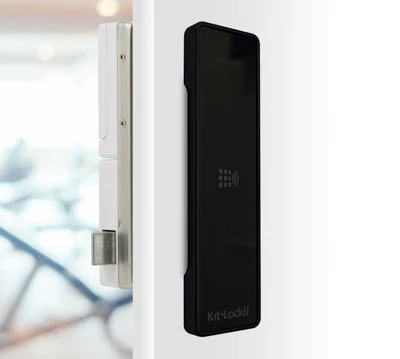
The Codelocks KL1100 RFID is a slimline contactless lock for lockers, cabinets and shared storage doors. Users gain access by presenting a compatible card, fob or wristband rather than entering a code or using a mechanical key.
The lock can be managed individually at the locker or as part of a wider card-management system. This makes it suitable for anything from a small group of staff lockers to a larger installation where credentials are issued and controlled from a reception desk, facilities office or security department.
Benefits of KL1100 Contactless Locker Access
Contactless access removes the need to distribute locker keys or ask users to remember keypad codes. A credential can be presented directly to the front of the lock, providing a familiar access method for regular users, visitors and temporary locker occupants.
- Keyless access using compatible cards, fobs or wristbands
- Suitable for individually assigned and shared-use lockers
- Credentials can be issued from a central reception or facilities desk
- Separate access can be provided for users and authorised staff
- Lost credentials can be removed or blocked without replacing the lock
- Public-use lockers can be released for the next user after opening
- Private-use lockers can remain assigned to regular users
- Optional audit management is available through an RCA installation
- No mechanical keys need to be issued to normal locker users
- Suitable for new installations and compatible upgrade projects
Standalone and Remote Card Authorisation Management
The KL1100 RFID can be operated as an individually managed standalone lock or configured using Remote Card Authorisation, commonly abbreviated to RCA. The correct option depends on the number of locks, the way credentials will be issued and the level of central administration required.
| Management option | How it works | Most suitable for |
|---|---|---|
| Standalone management | The lock is initialised and managed locally using authorised credentials. Routine User Cards can be added or removed at the individual lock. A plug-in Keypad Programmer is used for advanced settings and administrative functions. | Small and medium installations where each lock or locker area can be administered locally. |
| Remote Card Authorisation | Card permissions are created centrally using the Codelocks card management platform and transferred to credentials through a compatible USB card reader. The programmed credential is then presented to the appropriate lock. | Larger locker installations, reception-managed facilities and organisations that need central credential administration. |
Remote Card Authorisation does not mean that each lock is continuously connected to a network. Access permissions and management instructions are carried to the lock by the programmed credential when it is presented.
KL1100 RFID Standalone Management
Standalone management is intended for sites that want contactless access without maintaining a central card-management workstation. Each lock is administered locally using its authorised management credentials.
A Master Card is assigned when the lock is first initialised and should be retained securely. It controls programming and the registration of other authorised credentials.
User credentials can be added or removed locally in private function. Advanced configuration, maintenance commands and the emergency override code require the plug-in KL1100 Keypad Programmer, which is sold separately.
How KL1100 Remote Card Authorisation Works
RCA allows an administrator to prepare and control credentials from a central computer before they are issued to users or taken to the lockers. It is particularly useful where a reception desk or facilities team manages a substantial number of lockers.
- Register the management equipment: set up the supported USB card reader through the Codelocks Portal and card management software.
- Create the lock configuration: define the required locker function and management settings for an individual lock or lock group.
- Prepare the initialisation credential: write the lock configuration to an authorised card using the USB reader.
- Initialise the locks: present the prepared card to the required locks to apply the selected configuration.
- Create user permissions: prepare the required access credentials through the management platform.
- Issue the credentials: write the permissions to the physical cards and provide them to the authorised users.
- Update access when required: prepare replacement, blocking or amended credentials and present them to the affected locks.
The Codelocks Portal account, card-management software, supported USB card reader and suitable credentials should be included when planning an RCA installation. These management items are not necessarily included with each individual lock.
Card Administration, Blocking and Audit Options
The RCA system provides different management credentials for commissioning, user access, maintenance and access control. This allows the administrator to perform specific actions without issuing the primary management credential to day-to-day staff.
| Management task | How it is handled | Practical benefit |
|---|---|---|
| Initialising locks | A prepared initialisation credential transfers the selected configuration to an individual lock or defined group. | Multiple locks can be configured consistently without programming every setting separately at each door. |
| Issuing user access | The administrator prepares an authorised credential and issues it to the required person. | Locker access can be linked to the site's normal credential-issuing process. |
| Blocking lost credentials | A blocking credential can carry an instruction to prevent a lost or withdrawn Card Client from operating affected locks. | Access can be withdrawn without replacing the lock or changing every user's credential. |
| Restoring access | An authorised management credential can remove a previous block where access has been reinstated. | Temporary suspensions can be reversed without recommissioning the complete installation. |
| Collecting audit information | An Audit Card can read available information from a lock and return it to the card-management workstation through the reader. | Authorised administrators can review lock activity without a wired connection to every locker. |
Private and Public RFID Locker Functions
The lock can be configured according to whether a locker is permanently assigned or made available to different users throughout the day.
| Function | How the locker is used | Typical application |
|---|---|---|
| Private function | Previously authorised credentials provide repeated access to the same lock. The locker normally remains assigned to a person, department or defined group. | Employee lockers, departmental cabinets, school lockers and equipment storage allocated to regular users. |
| Public function | A user presents a compatible credential to an available locker to secure it. The same credential releases the locker, which then becomes available to another user. | Leisure centres, gyms, visitor lockers, hot-desking facilities and other short-term shared storage areas. |
In public function, an authorised Technician credential can be used to inspect a locker without unnecessarily removing the current user's access. A primary management credential should be reserved for full administrative actions.
KL1100 RFID Locker Applications
The KL1100 RFID is particularly useful where organisations already issue compatible contactless credentials or want locker access to be administered alongside reception, membership or facilities-management procedures.
- Gym and leisure-centre lockers
- Swimming-pool changing facilities
- Employee and workplace lockers
- Hospital and healthcare staff storage
- School, college and university lockers
- Hotel staff and guest storage
- Office hot-desking lockers
- Visitor and contractor storage
- Retail staff lockers
- Equipment cupboards and shared cabinets
Using Existing Site Cards or Fobs
Do not assume that an existing access-control card will automatically work with the KL1100 RFID. Cards can look identical while using different technologies, memory formats or credential configurations.
Before ordering a larger installation, provide the card manufacturer, technology and any available system information. A sample credential may be required to confirm compatibility.
Compatibility with a locker lock does not automatically mean that the same credential will share data with an existing door-access, membership, cashless-payment or time-and-attendance system. Each application should be checked separately.
RFID, Keypad or NetCode Locker Access?
| Access requirement | Suggested lock type | Reason |
|---|---|---|
| Contactless card, fob or wristband access | KL1100 RFID | Suitable where users already carry compatible credentials or where a central issuing process is required. |
| Access without issuing credentials | KL1100 Keypad | Users operate the lock using locally programmed numeric codes rather than physical cards or fobs. |
| Temporary codes generated away from the lock | KL1000 NetCode | Time-sensitive codes can be generated and sent to temporary users without issuing an RFID credential. |
| Live central control of every access event | Networked locker system | Consider a fully connected system where immediate central updates, live status or real-time remote unlocking are required. |
Information to Check Before Ordering
A clear management plan should be agreed before selecting the locks, credentials and supporting equipment.
- Number of lockers and installation locations
- Private, public or mixed locker use
- Standalone or RCA card management
- Person or department responsible for issuing credentials
- Type and quantity of cards, fobs or wristbands required
- Compatibility with any credentials already used on site
- Requirement for a plug-in Keypad Programmer
- Requirement for the supported USB card reader and management software
- Need for central blocking or audit functions
- New installation or replacement of an existing locker lock
- Locker manufacturer and door construction, where known
- Photographs of the front and rear of an existing lock
Total Locker Service can help identify the correct access method, confirm likely credential compatibility and specify the supporting equipment required for standalone or RCA management.
Call 01284 749211 or email sales@totallocker.co.uk .
Specification
Specification sheetKL1100 RFID Technical Specification
The Codelocks KL1100 RFID is a standalone electronic lock for compatible locker, cabinet and cupboard doors. It uses contactless MIFARE® Classic 1K credentials and a powered latch mechanism.
| Manufacturer | Codelocks |
|---|---|
| Product range | KitLock by Codelocks |
| Model | KL1100 RFID |
| Lock type | Standalone electronic RFID locker and cabinet lock |
| Access technology | Contactless MIFARE® Classic 1K credentials |
| Compatible credential formats | Compatible cards, fobs and wristbands |
| Operating functions | Public function and private function |
| Latch mechanism | Powered latch |
| Power supply | 4 × 1.5 V AA batteries, supplied |
| Maximum stated operations | Up to 100,000 operations under normal operating conditions |
| Low-battery warning | The red LED flashes three times before the lock opens |
| Emergency power | Temporary external power through the micro-USB connection |
| Emergency power source | Compatible 5 V USB power source |
| Memory | Non-volatile memory retains programmed information |
| Ingress protection | IP55 when correctly installed with the specified gasket |
| Maximum door thickness | Suitable for compatible doors up to 25 mm thick |
| Front-unit orientation | Vertical |
| Door handing | Suitable for compatible left-hand and right-hand doors |
| Construction | Mixed plastic and alloy |
| Available finishes | Metallic Silver or Gloss Black |
Actual battery life and total operations depend on battery quality, frequency of use, environmental conditions, door alignment and the effort required to operate the powered latch.
KL1100 RFID Credential Roles
The KL1100 RFID uses different credential roles for normal access, commissioning, maintenance and administrative actions. Management credentials should be stored securely and issued only to authorised personnel.
| Credential role | Technical purpose | Control requirement |
|---|---|---|
| Master credential | Provides primary administrative and programming authority. | Store securely and restrict access to authorised administrators. |
| Technician credential | Provides authorised maintenance or inspection access with more limited permissions than the Master credential. | Issue only to approved service or facilities personnel. |
| User credential | Provides routine access to the locker or cabinet according to its configured operating function. | Issue to the authorised locker user. |
| Initialisation credential | Transfers the required starting configuration to a lock during commissioning. | Control as part of the site's installation records. |
| Block credential | Transfers an instruction preventing a specified credential from operating the affected lock. | Retain a record of the credential and locks affected. |
| Audit credential | Collects supported audit information from a lock for authorised review. | Restrict to personnel responsible for access records. |
Available credential roles and commands depend on the selected configuration and the management equipment used with the installation.
KL1100 RFID Battery and Power Information
| Condition | Indication | Required action |
|---|---|---|
| Normal battery condition | Normal credential reading, LED response and latch operation | Continue routine operation and include the batteries in planned maintenance checks. |
| Low battery | The red LED flashes three times before the lock opens | Replace all four AA batteries as soon as practical. |
| Battery failure | The lock does not respond normally to an authorised credential | Apply a compatible 5 V power source to the micro-USB connection, open the lock using authorised access and replace the batteries. |
| Batteries removed | Non-volatile memory retains programmed information | Fit four matching replacement batteries and test every enabled function before returning the locker to service. |
Replace all four batteries together. Do not mix old and new batteries, different battery types or different brands within the same lock.
The micro-USB connection provides temporary emergency power. It is not intended to recharge the fitted AA batteries or provide permanent power to the lock.
KL1100 RFID Installation Requirements
| Installation detail | Requirement |
|---|---|
| Maximum door thickness | Up to 25 mm, including any cover plate, packing or additional door material |
| Front-unit position | Fit vertically using the correct installation template |
| Door handing | Confirm the appropriate left-hand or right-hand latch arrangement before final fixing |
| Powered latch | The latch must engage and release without binding against the locker frame or strike |
| Rear clearance | Allow sufficient space for the latch unit, batteries, cable and normal door movement |
| Connecting cable | Route the cable without trapping, stretching, crushing or damaging the connector |
| Environmental gasket | Install the specified gasket correctly where IP55 protection is required |
| Existing door aperture | Check whether a cover plate is required when replacing a different style of locker lock |
| Fixing template | Print at 100% actual size and verify the dimensions before drilling |
| Final test | Test authorised access, latch engagement, emergency power and all enabled functions before the locker enters service |
Do not use the powered latch to pull a misaligned or heavily loaded door into position. Adjust the door, hinges and strike so the latch can operate without excessive resistance.
KL1100 RFID Commissioning Checklist
- Confirm the door thickness and available clearance behind the door.
- Check the required left-hand or right-hand latch arrangement.
- Fit the gasket, front unit and powered latch using the correct template.
- Check that the connecting cable is secure and has not been trapped.
- Install four matching 1.5 V AA batteries in the correct orientation.
- Confirm that the latch engages and releases without binding.
- Initialise the lock using the authorised installation procedure.
- Securely record the lock location and responsible Master credential holder.
- Test authorised user and maintenance access.
- Test the micro-USB emergency power procedure before handing the installation over.
KL1100 RFID Inspection and Maintenance
| Component | Recommended check |
|---|---|
| AA batteries | Replace all four batteries when the low-battery warning appears. |
| Micro-USB connection | Keep the connection clean and confirm that authorised staff have access to a compatible 5 V emergency power source. |
| Powered latch | Check that the latch engages and releases freely without pressure from a misaligned door or strike. |
| Door alignment | Check the hinges, door position and closing action if the latch becomes difficult to operate. |
| Fixings | Confirm that the front unit and rear latch remain secure without overtightening the fixing screws. |
| Gasket | Check that the environmental gasket remains correctly positioned and undamaged. |
| Credential response | Test representative authorised credentials and investigate slow, intermittent or failed reads. |
| Management credentials | Review authorised holders when staff or maintenance responsibilities change. |
| Installation records | Keep lock locations, configuration details and administrative responsibilities up to date. |
KL1100 RFID Technical Support
The page template already displays the KL1100 RFID specification PDF from
the configured $Spec[1] value. Do not add a second link to the
same PDF within this tab.
When requesting assistance, provide the product model, approximate installation date, photographs of the front and rear units, door thickness, credential type and a description of the LED or latch behaviour.
For replacement parts, installation advice and locker-lock support, visit Locker Parts and Service .
KL1100 RFID Technical FAQs
What batteries does the KL1100 RFID use?
The KL1100 RFID is powered by four 1.5 V AA batteries. Replace all four batteries together using matching batteries of the same type and brand.
What indicates a low battery on the KL1100 RFID?
The red LED flashes three times before the lock opens. The batteries should be replaced as soon as practical after this warning appears.
How can the KL1100 RFID be opened after battery failure?
Apply temporary power from a compatible 5 V USB power source through the micro-USB connection. Use an authorised credential to open the locker and replace the four AA batteries.
Does the micro-USB connection recharge the AA batteries?
No. The micro-USB connection provides temporary emergency power only. It does not recharge the fitted AA batteries and should not be used as a permanent power supply.
Does the KL1100 RFID retain programming when batteries are removed?
Yes. The lock uses non-volatile memory so programmed information is retained when the batteries are removed. Enabled functions should still be tested after new batteries are installed.
Which RFID technology does the KL1100 support?
The KL1100 RFID supports MIFARE® Classic 1K credentials. Compatibility should be confirmed before using cards from an existing access-control or membership system.
What is the maximum KL1100 RFID door thickness?
The KL1100 RFID is suitable for compatible doors up to 25 mm thick. Cover plates, packing pieces and additional door material must be included when measuring the total thickness.
Is the KL1100 RFID suitable for left-hand and right-hand doors?
Yes. The lock can be fitted to compatible left-hand or right-hand doors. The powered latch arrangement must be selected and installed correctly for the door direction.
Is the KL1100 RFID waterproof?
The lock is rated IP55 when correctly installed with the specified gasket. IP55 does not make the complete locker suitable for every outdoor or wet-area installation. The door, enclosure, fixings and environment must also be assessed.
Why might the powered latch fail to release correctly?
Common causes include low batteries, a misaligned door, pressure against the latch, damaged wiring or incorrect latch positioning. Check the batteries, door alignment and installation before replacing the lock.
Where can I get technical help with a KL1100 RFID lock?
Contact Total Locker Service with the lock model, photographs, door thickness, credential type and details of the fault. Technical support and replacement-lock assistance are available through the Locker Parts and Service section.
Delivery
Delivery Information
The approximate lead time is 10 Days.
Standard delivery is available to mainland UK addresses, Monday to Friday between 8:00 am and 5:00 pm.
Deliveries are kerbside only. Products may be delivered by a third-party pallet or specialist carrier using a suitable commercial vehicle.
The customer is responsible for providing suitable personnel and equipment to unload the delivery safely.
Please tell us before ordering about restricted access, specific delivery dates or times, FORS requirements or other special delivery arrangements. These may be available at an additional cost.