
Codelocks KL1060 / KL1000 NetCode Locker Lock
KL1060 / KL1000 NetCode Locker Lock
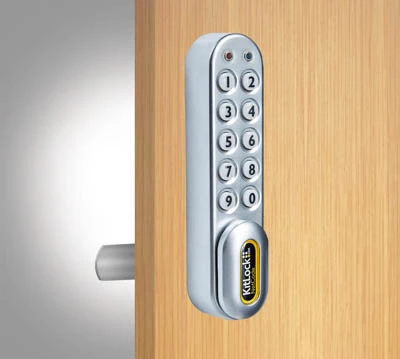 Click to enlarge
Features
Codelocks KL1060 NetCode Locker Lock
The Codelocks KL1060, now known as the KL1000 NetCode, is a battery-powered electronic lock for lockers, cabinets and cupboards. It allows authorised users to access stored items using temporary, time-sensitive NetCodes or locally programmed keypad codes.
NetCodes can be generated remotely through the Codelocks Connect Portal, compatible Codelocks applications or an API integration. Each code can be configured for a defined date, start time and duration, helping organisations provide controlled access without issuing mechanical keys.
The lock itself does not require Wi-Fi or a permanent network connection. Internet access is required by the administrator when registering the lock, generating NetCodes or managing access through the Codelocks platform.
How Codelocks NetCode Access Works
NetCode allows an administrator to issue temporary access remotely without visiting the locker or changing the lock programming for each new user.
- Generate the code: create a NetCode through the Codelocks Connect Portal, an approved application or an API integration.
- Set the access period: select the required date, start time and duration for which the code should remain valid.
- Send it to the user: share the generated code by email, text message or another secure communication method.
- Enter the code: the user enters the code on the lock keypad during its permitted access period.
- Automatic expiry: once the configured period ends, the NetCode no longer provides access.
Available NetCode types and durations depend on the lock version, Codelocks account, subscription and configuration selected during setup.
NetCode, Private and Public Functions
The KL1060 supports three principal operating functions. The appropriate function should be selected according to how the locker or cabinet will be allocated and managed.
| Function | How it works | Typical use |
|---|---|---|
| NetCode | An administrator generates a time-sensitive access code remotely. The code operates only during its configured validity period. | Short-term rental, visitor access, service engineers, equipment collection and remotely managed lockers. |
| Private use | The locker remains locked until an authorised user enters a programmed code. The same code can be used repeatedly. | Assigned staff lockers, personal cabinets and storage allocated to a regular user. |
| Public use | A user enters a personal four-digit code to secure an available locker. Re-entering the same code opens the lock and clears the code for the next user. | Leisure centres, gyms, visitor lockers and other short-term shared storage. |
KL1060 NetCode Features and Benefits
- Temporary, date-and-time-sensitive coded access
- Codes generated through the Codelocks Connect Portal, app or API
- No Wi-Fi or permanent network connection required at the lock
- Private-use and public-use keypad functions also available
- Four-digit local user codes
- Master, Sub-Master and Technician management levels
- Powered by two AAA batteries
- More than 15,000 openings under normal operating conditions
- Visual low-battery warning
- External PP3 battery facility for emergency power
- Vertical, left-handed or right-handed installation options
- Suitable for new doors and compatible cam-lock retrofit projects
- No mechanical keys need to be issued to ordinary users
The KL1060 provides a practical option where users need temporary or remotely managed access but a permanently connected electronic locking system would be unnecessary or impractical.
Installation and Retrofit Overview
The KL1060 can be fitted to suitable locker, cabinet and cupboard doors. It can also replace many conventional mechanical cam locks, although the existing aperture, upper fixing position, cam movement and clearance behind the door must be checked before installation.
Standard fittings are suitable for doors up to 19 mm thick. A longer spindle can be used for suitable doors between 19 mm and 25 mm thick, while a shorter spindle is available for compatible sheet-metal doors.
For a new installation, the lock normally requires a 16 mm spindle hole and a separate 6 mm upper fixing hole. The position of both holes must allow the selected cam to rotate and engage correctly.
The lock should be loaded with batteries, initialised and tested before it is permanently fitted to the door. Default administrator and user codes must also be changed before the locker is placed into service.
Managing NetCode Access
Each lock must be registered and initialised before NetCodes can be generated. The administrator uses the Codelocks platform to associate the physical lock with its account and configure the required NetCode function.
Generated codes can then be supplied to users without sending staff to the locker location. This is useful for remote sites, unattended storage, temporary access and facilities where users book storage before arriving.
NetCode access should form part of a documented management process. Master credentials must be stored securely, expired users should be reviewed and the lock batteries should be checked as part of routine locker maintenance.
Information Required Before Ordering
To confirm whether the KL1060 is suitable for a new or existing installation, provide:
- Number of locks required
- Locker or cabinet manufacturer, where known
- Door material and thickness
- Photographs of the front and rear of any existing lock
- Existing fixing-hole measurements
- Required vertical, left-handed or right-handed orientation
- Private, public or NetCode operation
- Expected number and duration of temporary users
- Whether portal or API integration will be required
Total Locker Service can assist with product selection, retrofit compatibility, programming requirements and larger locker-lock projects.
Call 01284 749211 or email sales@totallocker.co.uk .
Specification
KL1060 / KL1000 NetCode Technical Specification
The following specification applies to the Codelocks KL1060, subsequently marketed as the KL1000 Classic NetCode. Product generation, keypad layout and NetCode length should be confirmed before programming an existing lock, as pre-2019 and later C2 versions use different NetCode formats.
| Manufacturer | Codelocks |
|---|---|
| Product range | KitLock by Codelocks |
| Previous model reference | KL1060 |
| Current product reference | KL1000 Classic NetCode |
| Lock type | Standalone electronic keypad lock for lockers and cabinets |
| Operating functions | NetCode, private use and public use |
| Keypad | Numeric keypad with a concealed programming button beneath the handle when locked |
| Management levels | Master Code, Sub-Master Code, Technician Code, User Code and NetCode |
| Standard user code | Four digits |
| Lock-open period | Approximately four seconds |
| Power supply | 2 × AAA batteries |
| Battery performance | Up to 15,000 operations under normal operating conditions |
| Battery monitoring | Visual warning and Master Code battery-level check |
| Emergency power | External 9 V PP3 battery applied to the front contact points |
| Standard door thickness | Up to 19 mm |
| Extended door thickness | From 19 mm to 25 mm using the appropriate longer spindle |
| Sheet-metal doors | Short spindle supplied for compatible sheet-metal applications |
| Installation orientation | Vertical, left-hand horizontal or right-hand horizontal |
| Ingress protection | IP55 when correctly installed with the specified gasket |
| Network requirement | No Wi-Fi or wired connection required at the lock |
| Portal requirement | Internet access is required by the administrator to register the lock and generate NetCodes |
| Guarantee | Two years, subject to the manufacturer’s terms |
| Supplied installation items | Fixings, spindle options and fitting templates, subject to the selected product kit |
KL1060 Code Levels and Permissions
The lock separates normal user access from administrative and maintenance access. Management codes should only be issued to authorised personnel and recorded securely.
| Code level | Typical length | Main permissions |
|---|---|---|
| Master Code | Eight digits | Opens the lock, changes programming, creates or deletes other code levels, selects the operating function and activates NetCode. |
| Sub-Master Code | Eight digits | Opens the lock and manages the normal User Code without providing full Master Code control. |
| User Code | Four digits | Provides normal access in private function or secures and releases a locker in public function. |
| Technician Code | Six digits | Opens a public-use locker for inspection without erasing the current user’s active code. |
| NetCode | Six digits on earlier versions; seven digits on C2 versions | Opens the lock only during the date and time period assigned when the NetCode was generated. |
| Personal User Code | Four digits | Can be created from a valid NetCode and retains the same expiry period as the original NetCode. |
Code lengths and programming sequences vary between original KL1060 locks and later KL1000 NetCode C2 models. Check the lock generation before using programming instructions.
Available NetCode Durations
NetCode availability depends on the lock generation, portal configuration and enabled operating mode. Not every mode can be active simultaneously.
| NetCode type | Available duration | Technical behaviour |
|---|---|---|
| Standard single-use | 1–12 hours or 1–7 days | The code operates once within its permitted period and is then no longer accepted. |
| Standard multi-use | 1–12 hours or 1–7 days | The code can be used repeatedly until the configured period ends. |
| Medium-term rental | 1–21 days | The code must normally be entered within the initial validation period before continued use. |
| Long-term rental | Up to one year | Designed for extended allocation. New NetCode blocks previous access by default on supported configurations. |
| 24-hour NetCode | 24 hours from a selected start hour | Available as single-use or multi-use on supported lock and portal versions. |
| End-date NetCode | Until a selected date, up to 365 days | Availability depends on the account, lock generation and enabled Codelocks platform features. |
KL1060 Installation Measurements
| Installation detail | Requirement |
|---|---|
| Main spindle aperture | 16 mm diameter |
| Upper fixing hole | 6 mm diameter |
| Standard fitting thickness | Door thickness up to 19 mm |
| Extended fitting thickness | Door thickness up to 25 mm with the longer spindle |
| Sheet-metal fitting | Use the shorter spindle supplied for suitable thin doors |
| Cam selection | Select a cam that provides the correct throw and engagement for the door and frame |
| Packing pieces | Use where required to centralise the lock within the existing aperture |
| Template printing | Print at 100% actual size and verify the dimensions with a ruler before drilling |
| IP55 installation | Fit the specified gasket correctly and confirm that the door and complete enclosure suit the intended environment |
Check rear clearance and cam rotation before drilling the upper fixing hole. The lock should be temporarily positioned and tested before the fixing nut and upper bolt are fully tightened.
Programming and Commissioning Checklist
- Load the two AAA batteries and familiarise yourself with the keypad before fitting the lock.
- Confirm whether the product is an original KL1060, pre-2019 NetCode model or KL1000 NetCode C2 version.
- Check that the selected spindle and cam suit the door thickness, frame and required orientation.
- Register the lock with the appropriate Codelocks account before attempting to generate NetCodes.
- Enter the supplied initialisation sequence while it remains valid.
- Change all factory-set Master and User Codes before the lock enters service.
- Delete the standard User Code where the installation is intended to operate exclusively through NetCode.
- Set the lock’s date and time where restricted operating hours or time-dependent functions will be used.
- Test the Master, Technician, User and NetCode access appropriate to the installation.
- Record the lock reference, orientation, administrator account and programming version in the site maintenance records.
KL1060 Inspection and Maintenance
| Check | Recommended action |
|---|---|
| Battery condition | Use the Master Code battery-level check and replace both AAA batteries together when performance becomes low. |
| Emergency power | Keep a serviceable 9 V PP3 battery available to authorised site staff. |
| Cam and fixing security | Check that the cam screw, spindle nut and upper fixing remain secure without restricting handle movement. |
| Keypad operation | Check that every button responds correctly and that the handle returns freely after use. |
| Administrator codes | Review authorised holders and replace management codes when staff responsibilities change. |
| NetCode configuration | Confirm that the portal is generating the correct code type, duration and lock version. |
| Clock accuracy | Check and correct the internal date and time if access periods appear to begin or expire incorrectly. |
KL1060 Technical Documentation
Programming sequences differ between product generations. Confirm the model and keypad version before following any programming guide.
KL1060 NetCode Specification Sheet
Other products can be compared in the electronic locker lock range , the Codelocks KitLock range and the complete locker lock range .
KL1060 Technical FAQs
How many digits are used in a KL1060 NetCode?
Original and pre-2019 KL1060 NetCode locks normally use six-digit NetCodes. Later KL1000 NetCode C2 locks use seven-digit NetCodes. Confirm the product generation before generating or entering a code. The model should also be checked against the KL1060 technical documentation .
What is the difference between the Master and Sub-Master Codes?
The Master Code controls the main lock programming, operating function and other code levels. The Sub-Master Code has more limited authority and is generally used to open the lock and manage the normal User Code without providing full administrative control.
Does a Technician Code erase the current public-use code?
No. A Technician Code is intended to open a locker in public function without deleting the current user’s active code. Opening a public-use lock with a Master Code may erase the current User Code, so the Technician Code is normally preferable for inspections.
Can KL1060 User Codes be restricted to set operating hours?
Supported KL1000 NetCode versions allow normal User Codes to be restricted to a programmed start and end time. The internal date and time must be set correctly first. Master, Sub-Master and valid NetCodes can continue to operate according to their programmed permissions.
Can a NetCode user create a shorter personal code?
Yes. On supported versions, a user with a valid NetCode can create a four-digit Personal User Code. The shorter code inherits the same start time, expiry time and permissions as the original NetCode.
Can an old NetCode be blocked before it expires?
Supported KL1060 and KL1000 NetCode versions allow a known NetCode to be blocked using the Master Code or another valid NetCode. Some rental configurations can also block the previously used NetCode automatically when a new code is entered.
What happens if the KL1060 Master Code is lost?
A manual factory reset can be performed by accessing the rear battery compartment and following the manufacturer’s reset sequence. The reset restores the factory Master and User Codes and removes existing programming, so the lock must be reconfigured and re-registered before returning it to service.
Is the KL1000 G3 NetCode the same lock as the KL1060?
No. The KL1000 G3 NetCode is a later product with different features, including front battery access and a mechanical key override. KL1000 G3 instructions should not automatically be used for a KL1060 or KL1000 Classic NetCode. Other models can be viewed in the Codelocks KitLock range .
Which instructions should be used for an existing KL1060?
Check the model label, keypad layout, NetCode length and approximate installation date. Original KL1060, pre-2019 NetCode and later C2 versions use different programming sequences. Contact Total Locker Service with photographs if the version cannot be identified reliably.
Delivery
Delivery Information
The approximate lead time is 10 Days.
Standard delivery is available to mainland UK addresses, Monday to Friday between 8:00 am and 5:00 pm.
Deliveries are kerbside only. Products may be delivered by a third-party pallet or specialist carrier using a suitable commercial vehicle.
The customer is responsible for providing suitable personnel and equipment to unload the delivery safely.
Please tell us before ordering about restricted access, specific delivery dates or times, FORS requirements or other special delivery arrangements. These may be available at an additional cost.