
Codelocks KL1100 Keypad Locker Lock
KL1100 Keypad Electronic Locker Lock
 Click to enlarge
Features
Codelocks KL1100 Keypad Locker Lock
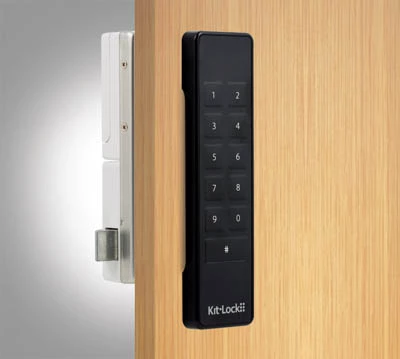
The Codelocks KL1100 Keypad is a slimline electronic lock for lockers, cabinets and cupboards. It combines traditional keypad access with a powered latch, flexible user management and automatic unlocking options.
The lock is suitable for organisations that want to remove the cost and administration associated with replacement keys while retaining simple, familiar code access. It can be used for permanently assigned storage or short-term lockers shared by different users.
Why Choose the KL1100 Keypad Lock?
The KL1100 provides standalone electronic access without requiring keys, access cards, network cabling or a central access-control system. All normal operation and programming is carried out at the lock.
- Keyless access using memorable keypad codes
- Suitable for individually assigned and shared-use lockers
- Multiple user codes can be managed from one lock
- Powered latch supports simple closing and controlled unlocking
- Automatic unlocking can help prevent lockers remaining occupied
- Administrative access can be separated from normal user access
- Can be installed on new lockers or used for compatible retrofit projects
- No network connection or subscription is required for normal operation
- Smooth external surfaces are straightforward to clean
- Available in black or silver to suit different locker finishes
Private and Public Locker Functions
The KL1100 can be configured according to whether the locker is allocated to a regular user or made available to different users throughout the day.
| Function | How the locker is used | Suitable applications |
|---|---|---|
| Private function | A programmed code is used repeatedly by an authorised person. The locker normally remains assigned to the same user or group. | Staff lockers, personal storage, office cabinets, equipment cupboards and individually allocated school lockers. |
| Public function | A user selects a temporary code when securing an available locker. Entering the same code reopens the lock and clears it for the next user. | Gyms, leisure centres, hot-desking areas, visitor storage, changing rooms and other short-term shared facilities. |
Public function can be configured for single-entry or double-entry code confirmation. Double entry can help reduce the risk of a user accidentally securing a locker with an incorrectly entered code.
Flexible User and Administrator Access
Different code levels allow day-to-day users, site managers and maintenance personnel to be given appropriate access without sharing one universal administrator code.
In private function, separate user positions allow several authorised people to operate the same locker or cabinet. This can be useful for departmental storage, shared equipment cupboards and facilities accessed by different shifts.
A Technician Code can be used by authorised staff to inspect or open a public-use locker without unnecessarily deleting the current user's code. Full programming remains restricted to the appropriate management code.
Automatic Unlocking for Shared Lockers
Automatic unlocking helps prevent a public-use locker from remaining occupied indefinitely after a user has left the site or forgotten their code.
The KL1100 can be configured to unlock after a defined period or at a selected time of day. This makes it particularly useful where lockers must be cleared at closing time, at the end of a shift or before the next group of users arrives.
- Release lockers after a maximum permitted occupancy period
- Clear shared lockers at a scheduled closing time
- Reduce the need for staff to inspect every locker manually
- Discourage unauthorised overnight or long-term occupation
- Prepare lockers for the next shift, class or booking period
The site's operating procedures should make users aware of any automatic unlocking period before the lockers are placed into service.
KL1100 Locker and Cabinet Applications
The KL1100 is intended for indoor lockers and cabinets where convenient standalone code access is required.
- Employee and workplace lockers
- Hot-desking and hybrid-working storage
- Gym and leisure-centre lockers
- School, college and university storage
- Healthcare staff lockers
- Office cupboards and shared filing cabinets
- Equipment and maintenance cabinets
- Retail staff storage
- Visitor and contractor lockers
- Changing-room storage
New Installation or Locker Lock Retrofit
The KL1100 can be fitted to suitable new locker and cabinet doors. It also shares its principal fixing-hole arrangement with the KitLock KL1000 Classic, making it a potential upgrade for compatible existing installations.
Retrofit compatibility should not be assumed from the existing lock model alone. Door construction, existing apertures, rear clearance, latch engagement and the position of the locker frame must all be checked.
The KL1100 uses a powered latch rather than a conventional rotating cam. The door and frame must therefore allow the latch to close and release correctly without excessive pressure or misalignment.
When Is the KL1100 the Right Choice?
Choose the KL1100 where a site needs a modern keypad lock with more management flexibility than a basic single-code locker lock.
| Requirement | KL1100 suitability |
|---|---|
| Repeated access by regular users | Suitable. Private function supports assigned access and multiple authorised users. |
| Short-term shared lockers | Suitable. Public function clears the temporary code when the locker is reopened. |
| Automatic end-of-day release | Suitable. The lock can be configured to release at a selected time or after a defined period. |
| Remote code generation | Not the primary application. Consider a NetCode locker lock where time-sensitive codes must be generated remotely. |
| RFID card or fob access | Consider the KL1100 RFID lock or another RFID locker locking system . |
| Central network management | Consider a networked or centrally managed electronic locking system rather than a standalone keypad lock. |
Information to Check Before Ordering
Providing accurate installation details helps confirm the correct lock, finish and fitting arrangement.
- Number of locks required
- Black or silver finish
- Private or public operating function
- New installation or replacement of an existing lock
- Locker or cabinet manufacturer, where known
- Door material and thickness
- Photographs of the front and rear of the existing lock
- Existing fixing-hole positions and dimensions
- Available clearance behind the door
- Required automatic unlocking policy
Total Locker Service can assist with product selection, compatibility checks, replacement locks and larger locker-lock upgrade projects.
Call 01284 749211 or email sales@totallocker.co.uk .
Specification
Specification sheetKL1100 Keypad Technical Specification
These details apply to the Codelocks KitLock KL1100 Keypad. They cover the electrical and mechanical specification, code permissions, configuration limits and servicing requirements. The KL1100 RFID has a different access method and programming procedure.
| Manufacturer and range | Codelocks, KitLock KL1100 |
|---|---|
| Access method | Numeric keypad; 11 individual buttons |
| Lock mechanism | Powered latch, not a conventional rotating cam |
| Code programming | Locally at the lock using its keypad |
| Private-use capacity | Up to 20 four-digit User Codes |
| Power supply | 4 × 1.5 V AA batteries, fitted in the rear latch unit |
| Expected battery life | Up to 100,000 operations under normal operating conditions |
| Low-battery indication | Red LED flashes three times before the lock opens |
| Low-battery reserve | Approximately 100 additional openings after the warning begins |
| Emergency power | Micro-USB connection for a compatible power bank rated at no more than 5 V |
| Code and settings memory | Non-volatile; programmed codes are retained when battery power is lost |
| Clock after power loss | Internal date and time must be reset following battery disconnection or complete exhaustion |
| Incorrect-code penalty | 10-second delay after three consecutive incorrect entries |
| Front-unit dimensions | 138 mm high × 38 mm wide × 12.5 mm deep |
| Construction | Mixed plastic and alloy |
| Maximum door thickness | 25 mm, including any cover plate or packing |
| Mounting | Vertical; non-handed for compatible left- or right-hung doors |
| Ingress protection | IP55 when correctly fitted with the specified gasket |
| Intended environment | Primarily internal locker and cabinet installations |
Programming Codes and Access Permissions
| Code | Length | Number | Permission |
|---|---|---|---|
| Master | 8 digits | 1 | Full programming control, including operating functions and management codes |
| Sub-Master | 8 digits | 1 | Limited programming and management of Technician and User Codes |
| Technician | 6 digits | 1 | Maintenance access; in public function, opening does not cancel the current User Code |
| User | 4 digits | Up to 20 in private function | Routine authorised access to the locker or cabinet |
Keep management codes in a controlled record. Opening a public-use locker with a Master or Sub-Master Code can clear the temporary User Code; use the Technician Code for authorised inspection where the user's existing access must remain valid.
Configuration Parameters and Limits
The figures and requirements below supplement the operating-mode explanations in the Features tab.
| Setting | Technical detail |
|---|---|
| Factory operating function | Private function |
| Public-code confirmation | Single-entry or double-entry code input |
| Maximum locked period | Programmable from 1 to 24 hours in the applicable public-use configuration |
| Scheduled release | Selected daily unlocking time; internal date and time must first be set |
| Restricted opening hours | Configurable start and finish times for normal User Code access |
| Locked-status LED | Periodic red indication can be enabled or disabled |
| Battery-level check | Available to authorised Master or Sub-Master users; LED flashes indicate approximate level |
| Firmware version | Can be checked using the Master Code and LED indication |
| Factory reset | Via the authorised keypad procedure or the reset facility at the latch unit; clears programmed user settings |
The internal clock does not automatically adjust for British Summer Time. Where scheduled access is in use, check the time after battery replacement and when the clocks change.
Batteries and Emergency Access
| Condition | Required action |
|---|---|
| Low-battery LED warning | Replace all four AA batteries as a matched set without unnecessary delay |
| No normal keypad response | Use a compatible power bank at the micro-USB emergency connection, enter an authorised code and replace the AA batteries once the door is open |
| Battery power interrupted | Verify normal unlocking and reset the internal date and time before re-enabling time-dependent functions |
The micro-USB connection supplies temporary emergency power only. It does not recharge the AA batteries and is not intended as a permanent power supply.
Fitting and Alignment Requirements
| Component | Check before fitting |
|---|---|
| Door and packing | Confirm total thickness does not exceed 25 mm |
| Fixing positions | Use the correct KL1100 template at 100% actual size and measure before drilling |
| Front unit | Fit vertically and ensure the gasket is positioned correctly where specified |
| Connecting cable | Route through the door without trapping or pinching the cable or connector |
| Rear latch unit | Allow clearance for the mechanism and access to the AA battery compartment |
| Latch and strike | Confirm smooth engagement and release, without door pressure or binding |
| Existing lock aperture | Check whether an old cam-lock hole needs a suitable cover plate; include its thickness in the overall measurement |
The supplied powered latch is initially in the unlocked position. Fit the batteries, initialise the lock and test operation before placing the locker into use. A powered latch should not be forced against a misaligned strike.
Commissioning and Handover Checklist
- Confirm door thickness, mounting positions, cable routing and latch alignment.
- Install four matching AA batteries and test the latch with the door open.
- Change the factory Master Code and restrict access to management credentials.
- Programme the operating function and the required management and User Codes.
- Set the date and time before enabling scheduled or time-restricted functions.
- Test normal access, Technician access and any configured timing controls.
- Record the lock location, code holder, settings and maintenance arrangements securely.
For the manufacturer's instructions, use the KL1100 Keypad specification PDF linked immediately above this section. The Keypad and RFID versions require their own programming instructions.
KL1100 Keypad Technical FAQs
How many individual User Codes can be programmed?
In private function, up to 20 four-digit User Codes can be stored. Individual user positions can be changed or deleted without removing all the other users.
Can a Technician Code open an occupied public-use locker?
Yes. An authorised Technician Code can open the locker without deleting the current temporary User Code. Opening with higher-level management codes can cancel that assignment.
What happens after three incorrect keypad entries?
Three consecutive incorrect code entries activate a 10-second penalty period. Further keypad operation must wait until the delay ends.
What should be done when the low-battery warning appears?
A red LED flashes three times before unlocking. Although approximately 100 further operations may remain, replace all four AA batteries promptly with a matching set.
How can the KL1100 be opened after battery failure?
Connect a compatible mobile power bank providing no more than 5 V to the emergency micro-USB port. Enter an authorised management code, open the door and replace the internal AA batteries.
Does micro-USB power recharge the batteries?
No. It supplies temporary power for authorised access only. The four AA batteries are not charged through the micro-USB connection.
Are stored codes lost when the batteries are removed?
No. Code and configuration memory is non-volatile. The internal date and time must, however, be set again before relying on timed access or scheduled unlocking.
Does the internal clock adjust for British Summer Time?
No. When timed functions are used, check and reset the clock at the start and end of British Summer Time.
What is the maximum supported door thickness?
Up to 25 mm for a compatible locker or cabinet door. Include any additional cover plate or packing in the overall thickness.
What should be checked if the powered latch does not release freely?
Check door alignment, strike position, rear clearance and whether pressure is being applied to the latch. Do not force the mechanism; correct the fitting before further operation.
When does the KL1100 achieve IP55 protection?
The stated IP55 rating applies when the specified gasket is fitted correctly. Suitability also depends on the door, enclosure and installation environment; the lock is primarily intended for internal use.
Delivery
Delivery Information
The approximate lead time is 10 Days.
Standard delivery is available to mainland UK addresses, Monday to Friday between 8:00 am and 5:00 pm.
Deliveries are kerbside only. Products may be delivered by a third-party pallet or specialist carrier using a suitable commercial vehicle.
The customer is responsible for providing suitable personnel and equipment to unload the delivery safely.
Please tell us before ordering about restricted access, specific delivery dates or times, FORS requirements or other special delivery arrangements. These may be available at an additional cost.