
Digilock Cue Keypad Locker Locks
Digilock Cue Keypad Locker Locks
 Click to enlarge
Features
Digilock Cue Keypad Locker Locks
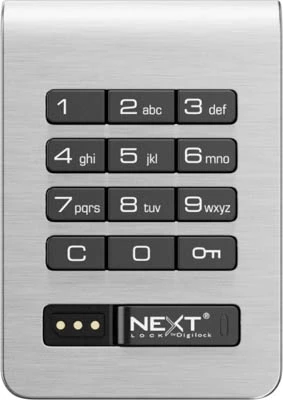
Digilock Cue keypad locker locks provide keyless code-operated access for compatible lockers. The range offers a brushed-nickel, non-handed surface-mounted front unit with an integrated pull handle. It can be specified for new lockers or for suitable replacement installations in schools, workplaces, gyms and changing rooms.
Choose Between a Deadbolt and a Deadlatch
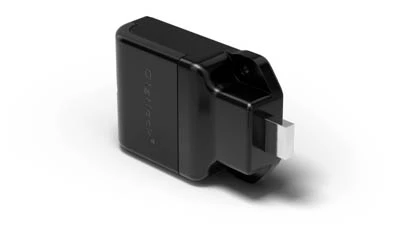
Deadbolt (CKPBOLT) can be configured for shared day-use lockers or assigned lockers. A user operates the motorised bolt using an authorised keypad code. Deadlatch (CKPLATCH) is intended for assigned-use lockers and latches when the door closes. Choose the mechanism according to how the locker should be secured, not merely its appearance.
Both versions use a nominal 12.7 mm (1/2 inch) bolt or latch. The detailed mechanism and operating-mode comparison is in the Specification section below.
Shared Use or Assigned Use
Shared use lets a visitor choose an available locker and use a temporary code for that visit. Assigned use reserves a locker for a particular user and their registered credential. Shared-use operation requires the deadbolt option; the deadlatch is for assigned use only.
Keypad Codes and Lock Management
Digilock's current general keypad guidance describes user codes of four to seven digits, while older Cue-specific manuals describe four-digit codes. The permitted length depends on the lock generation and programming. Confirm the instructions for the exact supplied locks, particularly when matching an existing installation.
Compatible Digilock management credentials provide authorised override, inspection and temporary external power if the batteries are exhausted. Management credentials and programming equipment should be specified and controlled separately from ordinary user access.
Battery Power, IP55 and Retrofitting
Cue keypad locks use four AA batteries. Digilock quotes up to 124,500 keypad cycles under average-use conditions. The linked manufacturer specification sheets describe both the deadbolt and deadlatch models as IP55 rated for moisture and dust protection. IP55 does not mean immersion-proof; check the overall locker installation and exposure conditions before ordering for wet environments.
Before ordering, check the existing door cut-out, thickness, fixing holes, strike position and space behind the door against the drawings. A non-handed lock is not necessarily a direct replacement for every existing lock. Review the Cue keypad deadbolt drawing or Cue keypad deadlatch drawing.
Compare Digilock Cue RFID locks, browse electronic locker locks, or use our locker lock identification service when replacing an existing lock.
Specification
Please see our technical documentation for this product below Cue keypad deadbolt specification
Please see our technical documentation for this product below Cue keypad deadlatch specification
Digilock Cue Keypad Lock Specification
Digilock Cue keypad locks provide battery-powered, keyless access for lockers in workplaces, schools, universities, gyms, leisure centres and changing facilities. Users operate the lock with a keypad code, while authorised staff can manage access using compatible Digilock programming and management credentials.
The Cue range is available with a motorised deadbolt or deadlatch. The deadbolt can support shared-use or assigned-use lockers, while the deadlatch is intended for assigned use and secures automatically when the locker door is closed.
Check the locker-door material, thickness, handing, fixing pattern and internal clearance before ordering. For assistance with a replacement or retrofit installation, provide clear photographs and measurements of the existing locker door and lock.
Product Specification
| Manufacturer | Digilock |
|---|---|
| Product range | Cue electronic locker locks |
| Interface | Alphanumeric electronic keypad |
| User-code length | Model-dependent: newer Digilock keypad guides describe 4–7 digits; older Cue guides specify 4 digits. Check the supplied instructions. |
| Operating modes | Shared use or assigned use, depending on the mechanism |
| Locking mechanisms | Motorised deadbolt or motorised deadlatch |
| Bolt or latch size | 12.7 mm |
| Power supply | Four AA batteries |
| Published battery performance | Up to 124,500 keypad cycles based on average use |
| Standard finish | Brushed nickel |
| Handle | Integrated pull handle |
| Installation | Battery-powered, wire-free locker installation |
| Management functions | Override, audit and temporary external power using compatible Digilock electronic management keys |
| Typical applications | Staff lockers, school lockers, university lockers, gym lockers, leisure lockers and changing-room storage |
Shared-Use and Assigned-Use Modes
Select the operating mode according to whether each locker is temporarily used by different people or permanently allocated to a particular user.
| Mode | How it works | Typical locations |
|---|---|---|
| Shared use | A user selects an available locker and enters a temporary code supported by the supplied lock. After the locker is opened and vacated, it becomes available for another user. | Gyms, leisure centres, visitor areas and day-use changing rooms |
| Assigned use | The locker is allocated to a specific user who operates it with an assigned code or compatible credential. | Workplaces, schools, universities and member facilities |
Deadbolt and Deadlatch Comparison
| Mechanism | Operation | Available modes |
|---|---|---|
| Motorised deadbolt | A solid 12.7 mm bolt extends into the locker frame to secure the door. | Shared use or assigned use |
| Motorised deadlatch | A spring-loaded 12.7 mm latch automatically secures the locker when the door is closed. | Assigned use |
Use the deadbolt where shared-use operation is required or where an assigned user will actively relock the locker. Choose the deadlatch for assigned-use lockers that should secure automatically when closed.
Keypad Operation
| Action | Shared use | Assigned use |
|---|---|---|
| User access | User selects a temporary supported user code | User enters their assigned supported user code |
| After opening | The temporary credential is cleared and the locker becomes available for another user | The assigned credential remains registered for the allocated user |
| Incorrect-code protection | The keypad enters a temporary sleep mode after three consecutive incorrect user-code entries | |
| Management access | Compatible management credentials can override user access and support authorised inspection | |
Electronic Key Management
Cue keypad locks must be set up with the appropriate Digilock programming and management credentials before normal use. Compatible electronic keys can provide authorised override access, management inspection, audit functions and temporary external power.
Programming and manager credentials should be controlled by authorised personnel and stored securely. Confirm the number and type of management credentials required when ordering a new bank of locks.
Optional Mobile Access
Some Digilock keypad configurations can be supplied with Digilock Mobile Access capability. A compatible version includes Bluetooth Low Energy functionality and can work with approved mobile credentials through the Digilock Mobile Access app.
Mobile operation is not included with every Cue keypad lock. Confirm that the selected model supports Digilock Mobile Access before ordering where smartphone operation is required.
Installation and Retrofit Guidance
Cue locks are battery powered and do not require mains wiring. However, compatibility depends on the locker-door construction and preparation. Check the technical drawing before drilling or modifying a door.
Before ordering, confirm:
- Locker-door material and thickness
- Door handing and opening direction
- Existing fixing holes and cut-outs
- Clearance behind the locker door
- Required deadbolt or deadlatch mechanism
- Shared-use or assigned-use operation
- Number of programming and management credentials required
Technical Documents and Related Products
Review the relevant technical drawing before ordering or modifying a locker door:
Compare the wider range of locker locks, browse locker locks by type or view the Digilock Cue RFID locker lock for contactless credential access.
Further manufacturer information is available from the official Digilock Cue product page .
Digilock Cue Keypad Lock FAQs
What is a Digilock Cue keypad lock?
A Digilock Cue keypad lock is a battery-powered electronic locker lock operated with a user code. The permitted code length depends on the lock version. It is available with deadbolt and deadlatch mechanisms for shared-use or assigned-use locker systems.
What is the difference between shared use and assigned use?
Shared use allows a person to select an available locker and create a temporary code. When the locker is opened and vacated, it becomes available for another user. Assigned use allocates the locker to a particular person who operates it with a registered code or compatible credential.
Should I choose a deadbolt or deadlatch?
Choose the deadbolt for shared-use or assigned-use operation. Choose the deadlatch for assigned-use lockers where the door should secure automatically when closed. Review the deadbolt specification and deadlatch specification before ordering.
Which batteries does the Cue keypad lock use?
The Digilock Cue keypad lock uses four AA batteries. Digilock publishes performance of up to 124,500 keypad cycles based on average use. Actual battery life depends on usage, installation conditions and battery quality.
How many digits are used in a Cue keypad code?
Current Digilock keypad instructions allow four to seven digits, but older Cue-specific guides specify four digits. Check the instructions for the supplied lock before setting codes. Shared-use users select a temporary code, while assigned-use users operate the locker with their registered code.
What happens if a user forgets their code?
An authorised manager can use a compatible Digilock management credential to override user access and open the locker. Management keys should be kept securely and restricted to authorised staff.
Does the lock need a mains electrical supply?
No. Digilock Cue keypad locks are powered by four AA batteries and do not require mains wiring. Compatible management keys can provide temporary external power where the internal batteries are depleted.
Can a Cue keypad lock be fitted to an existing locker?
A retrofit may be possible, but compatibility depends on the locker door material, thickness, handing, existing preparation and internal clearance. Send photographs and measurements to Total Locker Service before ordering a replacement lock.
Can Cue keypad locks work with a smartphone?
Smartphone access is available only on compatible locks supplied with Digilock Mobile Access functionality. It is not included with every Cue keypad model, so mobile-access compatibility must be confirmed before ordering.
Are programming and manager keys required?
Yes. Cue keypad locks require appropriate programming and management credentials during setup. A suitable manager credential is also required for authorised override and inspection functions.
Where can I compare other locker locks?
Visit the locker locks guide to compare electronic, mechanical, key, combination, coin and contactless locking options. You can also browse locker locks by type.
Does Total Locker Service provide after-sales support?
Yes. Total Locker Service can assist with product selection, replacement-lock identification, compatible parts and after-sales support. Visit locker parts and service or review the delivery and returns information before ordering.
Delivery
Delivery Information
The approximate lead time is 15 Days.
Standard delivery is available to mainland UK addresses, Monday to Friday between 8:00 am and 5:00 pm.
Deliveries are kerbside only. Products may be delivered by a third-party pallet or specialist carrier using a suitable commercial vehicle.
The customer is responsible for providing suitable personnel and equipment to unload the delivery safely.
Please tell us before ordering about restricted access, specific delivery dates or times, FORS requirements or other special delivery arrangements. These may be available at an additional cost.