Locker CAFM Integration UK: Connecting Locker Estates with Facilities Management Systems
May 13, 2026
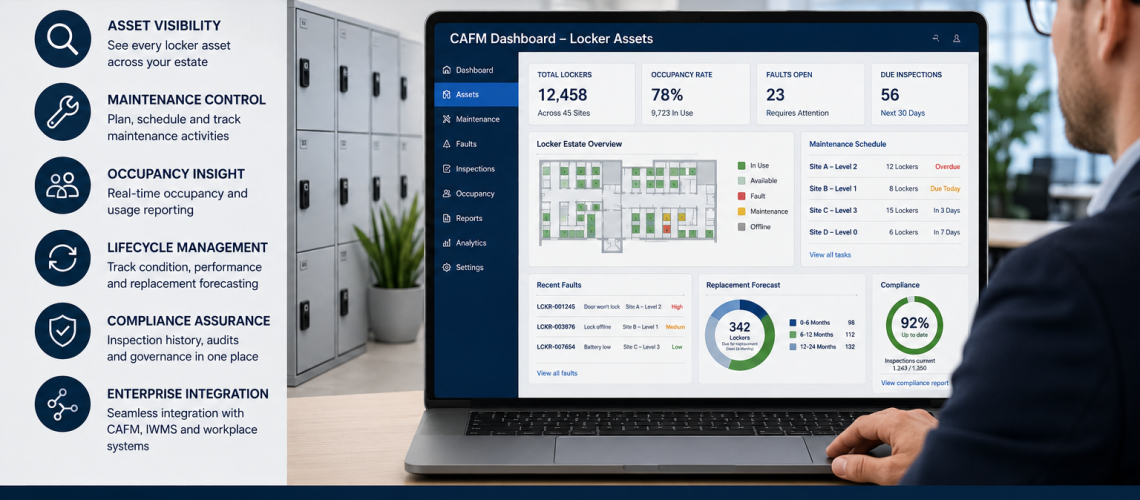
Locker estates are no longer just rows of storage units. In larger workplaces, schools, healthcare buildings, leisure centres and multi-site estates, lockers form part of the wider facilities infrastructure.
They need to be planned, maintained, tracked, audited and replaced in a structured way. That is where CAFM integration becomes important.
CAFM stands for computer-aided facilities management. It helps organisations manage buildings, assets, maintenance, inspections, helpdesk tasks and lifecycle planning. When lockers are included inside a CAFM system, they become visible assets rather than disconnected furniture.
This guide explains how locker estates can connect with CAFM systems, IWMS platforms, workplace management software, asset registers and smart locker reporting tools.
Quick Answer: What Is Locker CAFM Integration?
Locker CAFM integration means recording locker assets, locations, lock types, condition scores, maintenance tasks, inspection dates, occupancy status and replacement priorities inside a facilities management system.
This allows facilities teams to manage lockers in the same structured way as doors, lighting, washrooms, plant rooms, desks, access systems and other workplace assets.
| CAFM Function | Locker Use | Operational Benefit |
|---|---|---|
| Asset register | Records each locker bank or unit | Creates estate visibility |
| Maintenance scheduling | Plans inspections, repairs and lock checks | Reduces reactive faults |
| Helpdesk workflows | Logs damaged doors, lost access and lock faults | Improves response times |
| Lifecycle planning | Tracks condition and replacement priority | Supports capital planning |
| Compliance reporting | Stores audit and inspection history | Improves governance |
| Occupancy reporting | Shows assigned, vacant and inactive lockers | Improves utilisation |
What Is CAFM?
CAFM means computer-aided facilities management. It is a digital system used to manage buildings, assets, maintenance tasks, inspections, service requests and operational records.
A CAFM system can help a facilities team answer practical questions quickly. Where is an asset located? When was it last inspected? Who reported a fault? Has maintenance been completed? Is replacement due? Which site has the highest number of failures?
For lockers, this is especially useful where there are many compartments across different floors, departments, schools, hospitals, factories or leisure facilities.
Why Lockers Belong Inside CAFM Systems
Lockers are often treated as background furniture. This is a mistake. In many organisations, lockers support staff welfare, student storage, PPE control, changing room flow, asset security, access control and workplace efficiency.
If lockers are not tracked properly, problems build slowly. Keys go missing. Compartments are abandoned. Lock types become mixed. Maintenance becomes reactive. Replacement planning becomes guesswork.
Adding lockers into a CAFM system gives the organisation a clear operational view of the estate.
- Each locker bank can have a unique asset record.
- Each location can be mapped by building, floor, room or zone.
- Lock types can be recorded for replacement planning.
- Maintenance history can be linked to each asset.
- Faults can be logged through helpdesk workflows.
- Condition scores can support refurbishment or replacement decisions.
- Occupancy data can show whether the estate is overused or underused.
Locker Data Structures Inside CAFM Systems
The most important part of locker CAFM integration is the data structure. If the data fields are weak, the system will not support useful reporting. If the fields are clear, the locker estate becomes easier to manage over time.
| Data Field | Purpose | Example Use |
|---|---|---|
| Locker ID | Asset reference | Identifies a specific locker bank, unit or compartment |
| Building / zone | Location tracking | Shows where the locker is installed |
| Locker type | Estate categorisation | Steel, laminate, mesh, wet-area, charging or specialist locker |
| Lock type | Access management | Key, hasp, coin return, RFID, PIN or smart lock |
| Occupancy state | Usage visibility | Assigned, vacant, shared-use, inactive, abandoned or reserved |
| Inspection history | Compliance and audit control | Records when the locker was last checked |
| Maintenance records | Lifecycle continuity | Logs repairs, lock changes, door repairs and hinge work |
| Fault status | Reactive maintenance | Open, in progress, completed or awaiting parts |
| Replacement score | Capital planning | Helps decide whether to repair, refurbish or replace |
This structure connects directly with a locker asset register, a locker estate audit and long-term locker lifecycle management.
Asset Database Integration
The first stage of CAFM integration is usually asset database creation. This means recording lockers as assets inside the facilities management platform.
The asset record may represent a full locker bank, a single locker unit, or an individual compartment. The right level depends on the size of the estate and the amount of detail required.
| Asset Level | Best For | Notes |
|---|---|---|
| Locker bank | Small and medium sites | Simple to manage and suitable for most facilities teams |
| Locker unit | Larger estates | Useful where different locker types are mixed |
| Individual compartment | Smart lockers and high-security estates | Useful for detailed occupancy and access control reporting |
Locker ID Structures
A clear locker ID structure is essential. It should be easy to read, easy to scan and easy to match with the physical locker location.
A useful structure may include the site, building, floor, room, locker bank and compartment number.
| ID Element | Example | Meaning |
|---|---|---|
| Site code | IPS | Ipswich site |
| Building code | B2 | Building 2 |
| Floor | F1 | First floor |
| Room or zone | CHG | Changing area |
| Locker bank | L03 | Locker bank 3 |
| Compartment | C12 | Compartment 12 |
An example full ID could be IPS-B2-F1-CHG-L03-C12. This tells the facilities team exactly where the compartment belongs.
Planned Maintenance Scheduling
Lockers need periodic checks. Hinges, doors, frames, locks, fixings, vents, number plates and stands can all wear over time.
CAFM systems allow these checks to be scheduled rather than left until problems are reported.
- Monthly visual checks for high-use areas.
- Termly checks for schools and colleges.
- Quarterly checks for workplace changing rooms.
- Annual estate-wide condition audits.
- Additional checks after refurbishment, relocation or expansion.
This connects closely with a locker maintenance guide and a structured locker estate audit.
Fault Reporting Workflows
Fault reporting is one of the clearest reasons to connect lockers to CAFM. Without a system, locker faults are often reported informally. A member of staff may mention a broken lock, but the issue may not be tracked properly.
With CAFM, each fault can become a helpdesk ticket.
| Fault Type | CAFM Action | Typical Outcome |
|---|---|---|
| Broken lock | Create repair ticket | Lock replaced or repaired |
| Damaged door | Assign maintenance task | Door repaired, replaced or marked for refurbishment |
| Lost access | Escalate to authorised key holder | Access restored safely |
| Corrosion | Schedule inspection | Repair, refurbish or replace decision |
| Abandoned locker | Trigger occupancy review | Locker cleared and reassigned |
Occupancy Reporting
Occupancy reporting shows how locker spaces are being used. This is useful for workplaces with hybrid staff, schools with seasonal demand, gyms with high turnover and industrial sites with shift patterns.
CAFM data can show whether lockers are assigned, vacant, inactive, overused or underused. Smart locker systems can add more detail by reporting live use, access events and duration patterns.
- Vacant lockers can be reassigned.
- Inactive lockers can be reviewed.
- High-demand zones can be expanded.
- Underused zones can be rationalised.
- Shared-use policies can be improved.
This links naturally to locker occupancy management systems and smart locker analytics.
Lifecycle Tracking
Lifecycle tracking records where each locker sits in its operational life. A locker may be new, serviceable, due for maintenance, suitable for refurbishment or ready for replacement.
This helps organisations avoid sudden capital shocks. Instead of replacing large numbers of lockers at short notice, the facilities team can plan staged improvements.
| Status | Meaning | Recommended Action |
|---|---|---|
| Good | Locker is safe, clean and functional | Continue normal inspections |
| Monitor | Early signs of wear | Review during next maintenance cycle |
| Repair | Specific component fault | Replace lock, hinge, door or fixing |
| Refurbish | Locker still usable but tired | Consider repainting, lock upgrades or door replacement |
| Replace | Asset no longer suitable | Plan phased replacement |
Replacement Forecasting
Replacement forecasting uses condition data, fault history, age, usage level and operational importance to predict when lockers should be replaced.
This is especially useful for large estates. A school, hospital, university or national employer may have hundreds or thousands of locker compartments. Without forecasting, replacement planning becomes reactive.
Good CAFM data helps answer several questions.
- Which lockers are creating the most maintenance tickets?
- Which locations have the highest wear?
- Which lock types are failing most often?
- Which areas need refurbishment first?
- Which locker banks should be replaced during the next budget cycle?
QR Code Asset Tagging
QR code asset tagging can make locker CAFM integration easier. A small asset label can be added to a locker bank or compartment. Staff can scan the code to open the asset record, report a fault or check inspection history.
This is useful in large buildings where lockers are spread across many zones. It reduces confusion and improves reporting accuracy.
QR tagging works best when the physical label matches the CAFM asset ID and the locker numbering system.
Smart Locker API Integration
Smart locker systems can provide live operational data. Depending on the system, this may include access events, occupancy state, reservation status, user permissions, lock faults and usage history.
Where API integration is available, smart locker data may be connected with CAFM, IWMS or workplace management systems.
| Smart Locker Data | Facilities Use |
|---|---|
| Access events | Audit trails and usage visibility |
| Occupancy state | Live availability and utilisation reporting |
| Fault alerts | Automated maintenance tickets |
| User permissions | Access governance and revocation |
| Usage frequency | Demand forecasting and estate optimisation |
Multi-Site Locker Estates
CAFM integration becomes more important when lockers are spread across multiple sites. A single-site workplace may manage lockers with a simple register. A multi-site estate usually needs stronger structure.
Examples include NHS estates, academy trusts, universities, councils, factories, logistics networks, gym groups and national employers.
Multi-site locker CAFM records can compare condition, utilisation and maintenance demand across locations.
- Which site has the oldest locker estate?
- Which site has the highest fault rate?
- Which site has unused locker capacity?
- Which site needs capital replacement first?
- Which lock types should be standardised?
Workplace Dashboards
Once locker data is structured, it can be reported through dashboards. These dashboards help facilities managers, estates teams and workplace managers make better decisions.
A useful dashboard may show:
- Total locker assets by site.
- Open locker maintenance tasks.
- Condition scores by location.
- Occupancy levels by zone.
- Lock types across the estate.
- Upcoming inspections.
- Replacement priorities.
- Fault trends over time.
NHS Estates Integration
NHS and healthcare estates often need structured asset control. Staff lockers, changing room lockers, clinical support storage and controlled access areas may all need clear records.
CAFM integration can help healthcare estates teams manage maintenance, cleaning, access, condition and replacement planning across multiple departments.
Healthcare settings may also need closer attention to hygiene, corrosion resistance, cleanability, access control and operational continuity.
School Estates Workflows
Schools and academy trusts can also benefit from CAFM-style locker records. Student lockers are often spread across corridors, year-group areas, changing rooms and specialist departments.
A structured record can help schools manage:
- student locker allocation;
- lost key procedures;
- master key control;
- end-of-term locker checks;
- damage reporting;
- corridor congestion planning;
- seasonal demand;
- replacement budgeting.
This connects with school locker systems, school locker key management and wider locker planning guidance.
Compliance Reporting
Locker CAFM records can support compliance reporting by showing that inspections, maintenance tasks and access reviews have taken place.
This does not mean every locker is a regulated asset. It means the organisation has a clear record of how workplace storage infrastructure is managed.
Useful compliance-related records may include:
- inspection dates;
- condition scores;
- reported faults;
- completed repairs;
- access control changes;
- cleaning checks;
- replacement decisions;
- decommission records.
CAFM, IWMS and Workplace Systems
CAFM is not the only system used in modern facilities management. Some organisations use IWMS platforms, workplace management software, helpdesk systems, asset databases or maintenance planning tools.
The principle is the same. Lockers should be represented inside the operational system that manages the wider estate.
| System Type | Locker Connection |
|---|---|
| CAFM | Asset records, maintenance tasks and inspections |
| IWMS | Workplace planning, space use and estate reporting |
| Helpdesk software | Fault logging and response tracking |
| Smart locker platform | Access data, occupancy and live locker status |
| Asset register | Locker IDs, condition and lifecycle records |
Common Mistakes in Locker CAFM Integration
Locker CAFM integration fails when the data is too vague or too complicated. The system must be practical for the people who use it.
- No unique locker IDs: faults become hard to locate.
- Weak location data: maintenance teams waste time finding assets.
- No lock type field: replacement parts are harder to order.
- No condition score: replacement planning becomes subjective.
- No occupancy status: unused lockers remain hidden.
- No inspection schedule: problems are only found after complaints.
- Too much unnecessary detail: staff stop updating the system.
How to Start a Locker CAFM Integration Project
A locker CAFM project does not need to start with advanced software. It can begin with a simple survey and asset register.
| Step | Action | Outcome |
|---|---|---|
| 1 | Survey locker locations | Creates a clear estate map |
| 2 | Assign locker IDs | Gives every asset a reference |
| 3 | Record lock types | Supports key and lock management |
| 4 | Score condition | Supports maintenance and replacement planning |
| 5 | Record occupancy | Shows usage and spare capacity |
| 6 | Add inspection schedules | Creates planned maintenance control |
| 7 | Connect helpdesk workflows | Improves fault reporting |
| 8 | Review reports | Supports long-term estate decisions |
Internal Links: Related Locker Infrastructure Guides
Locker CAFM integration sits inside a wider locker infrastructure system. These related guides support the same operational framework:
- Locker Asset Register UK
- Locker Estate Audit UK
- Locker Lifecycle Management UK
- Locker Management Systems UK
- Locker Occupancy Management Systems UK
- Locker Access Control Systems UK
- Locker Governance Systems UK
- Smart Locker Analytics UK
- Locker Replacement Planning UK
- Locker Refurbishment UK
Product Links from Total Locker Service
Total Locker Service supplies a wide range of lockers, locks, keys and storage products for workplaces, schools, leisure centres, healthcare buildings and industrial environments.
- Lockers
- Workplace lockers
- Probe lockers
- Locker locks
- Replacement locker keys
- Key cabinets
- Charging lockers
Final Thoughts
Locker CAFM integration turns locker estates into managed infrastructure. It gives facilities teams better visibility over assets, maintenance, faults, occupancy, access control and replacement planning.
For small sites, this may begin as a simple asset register. For larger estates, it can connect with CAFM, IWMS, smart locker platforms, helpdesk workflows and workplace dashboards.
The key principle is simple. Lockers should not sit outside the facilities management system. They should be visible, trackable and planned as part of the wider workplace infrastructure.
FAQ: Locker CAFM Integration UK
What is locker CAFM integration?
Locker CAFM integration means recording locker assets, locations, lock types, inspection history, maintenance records, occupancy status and replacement priorities inside a facilities management system.
Why should lockers be included in a CAFM system?
Lockers should be included because they affect access, welfare, storage, maintenance, occupancy and workplace operations. CAFM records make them easier to manage and report on.
What data should be recorded for locker assets?
Useful fields include locker ID, building, zone, locker type, lock type, occupancy state, inspection history, maintenance records, fault status and replacement score.
Can smart lockers connect to CAFM systems?
Some smart locker systems may connect through APIs or reporting exports. This can support live occupancy reporting, access event records, fault alerts and usage analytics.
Is CAFM integration only useful for large estates?
No. Small sites can still benefit from structured locker records. However, CAFM integration becomes especially valuable for multi-site estates, schools, healthcare buildings, universities and large workplaces.
How does locker CAFM data support replacement planning?
It records condition scores, fault history, maintenance costs and age. This helps facilities teams decide whether to repair, refurbish or replace locker assets.
Can QR codes be used for locker asset tracking?
Yes. QR codes can link physical lockers to asset records, fault reporting forms or CAFM entries. This makes reporting faster and more accurate.
Discover more from Blog Total Locker Service
Subscribe to get the latest posts sent to your email.