Locker Asset Register UK: Tracking Locker Assets, Locks, Keys, Locations and Lifecycle Status
May 13, 2026
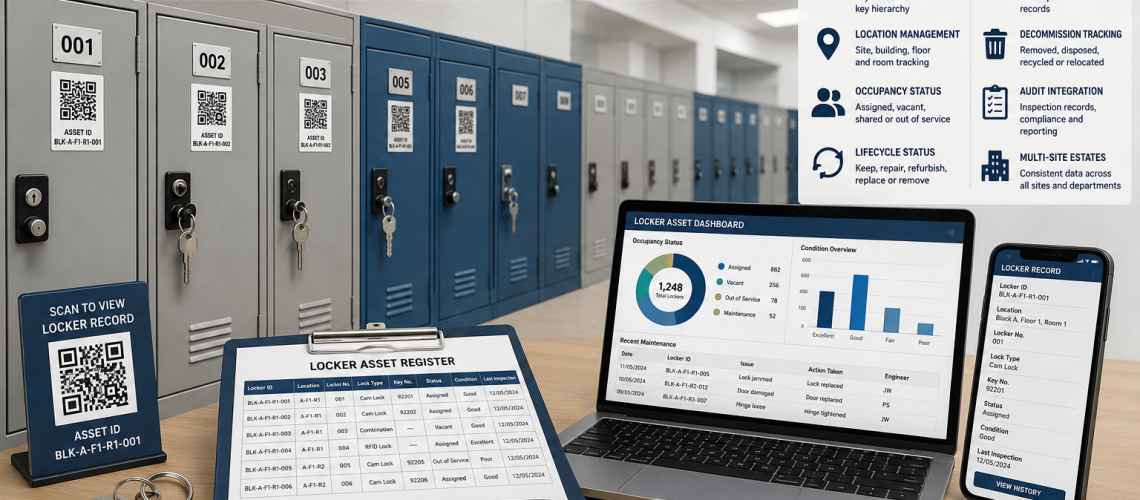
A locker asset register is the controlled record of the physical locker estate: what assets exist, where they are, how they are identified, what they are, which lock family is fitted and when the record was last verified.
The register should be stable enough to support audits, maintenance, CAFM, key management, occupancy and lifecycle planning without trying to become all of those systems at once. Dynamic user allocations, live occupancy, key issue records, work orders and repair-or-replace decisions should remain with the specialist process that owns them.
The asset register records the physical locker asset. Other systems can reference that record without redefining it.
Quick Answer: What Is a Locker Asset Register?
A locker asset register is a structured spreadsheet, database, CAFM record or other controlled dataset that gives each physical locker asset a stable identity and records its core physical and location information. It provides the reference that audits, maintenance, key management, occupancy and lifecycle processes can use when they need to identify the same locker consistently.
What This Page Owns, and What It Hands Off
- Stable physical asset IDs, visible numbering, location and locker specification: this page
- Overall locker-estate coordination: Locker Estate Management UK
- Physical verification and condition evidence: Locker Estate Audit UK
- User allocation and reassignment: Locker Management Systems UK
- Actual occupancy, vacancy and utilisation: Locker Occupancy Management Systems UK
- Key issue, return and master-key governance: Locker Key Management Systems UK
- Faults, inspections and work orders: Locker CAFM Integration UK
- Repair, refurbishment, replacement and decommissioning decisions: Locker Lifecycle Management UK
Why Locker Asset Registers Matter
Locker estates often grow through extensions, replacements, lock changes, relocations and local additions. Without a stable physical record, different teams can end up referring to the same locker by different numbers, locations or descriptions.
A controlled register provides one physical reference point. Key Management can link a key series to the correct lock; CAFM can attach a work order to the correct asset; Estate Audit can verify the record; Occupancy Management can reference the correct compartment; and Lifecycle Management can record the current intervention decision without redefining the asset.
Core Locker Asset Register Fields
Keep the register focused on stable physical data and verified current status. Fast-changing operational records should stay with their authoritative process.
| Field | Purpose | Boundary |
|---|---|---|
| Asset ID | Stable physical reference | Should not depend on current user or visible number |
| Visible locker number | User and maintenance identification | May change during renumbering |
| Site / building / floor / room | Physical location | Keep separate from permanent asset ID |
| Locker bank | Groups related assets | Useful for audits and maintenance |
| Locker type / configuration | Describes doors and compartments | Use controlled values |
| Dimensions | Supports replacement and specification | Record where useful and verified |
| Material | Supports parts, cleaning and specification | Steel, laminate, plastic, mesh or other |
| Manufacturer / range | Supports parts and compatibility | Mark unknown rather than guessing |
| Lock family / model | Identifies installed access hardware | Do not store user credentials here |
| Key / serial reference | Links the installed lock to its key or hardware reference | Issue/holder history belongs in Key Management |
| Physical status | Active, unavailable, relocated or decommissioned | Keep separate from allocation and occupancy |
| Latest verified condition | Shows current physical evidence | Include source/date; detailed evidence belongs in Estate Audit |
| Last verified date | Shows evidence recency | Supports audit planning |
| Record owner | Defines who maintains the entry | Prefer team or role where practical |
Visible Locker Numbers and Stable Asset IDs
Visible locker numbers and asset IDs solve different problems. The visible number helps users and staff find a locker. The asset ID should identify the physical asset even if the locker is renumbered, moved or assigned to somebody else.
| Identifier | Purpose | Can it change? |
|---|---|---|
| Visible locker number | User-facing identification | Yes |
| Stable asset ID | Permanent estate reference | Normally no |
| Location code | Shows where the locker currently sits | Yes |
| Locker-bank reference | Groups related assets | May change after reconfiguration |
A simple asset ID such as LK-004821 can remain stable while building, room and visible number sit in separate fields. Avoid encoding information that may change into the permanent ID unless the organisation has a defined reason to do so.
Asset IDs and Tagging
Asset IDs give each locker a permanent estate-management identity. The visible locker number may change during renumbering or relocation, but the asset ID should remain linked to the asset record.
Asset tags may use printed labels, engraved plates, barcode labels, QR codes or RFID asset tags. The right method depends on the environment.
| Tag type | Best use |
|---|---|
| Printed number labels | Simple school, office and staff locker identification. |
| Engraved plates | More durable identification in high-use areas. |
| Barcode labels | Fast scanning during estate audits. |
| QR code tags | Direct link to digital locker records. |
| RFID asset tags | Advanced inventory tracking and estate systems. |
QR Code Tracking
A QR code can reference the stable asset ID and open an authorised asset page, inspection form or maintenance request. It should make the register easier to use rather than become the only identity of the locker.
- Keep a readable asset or locker reference beside the code.
- Link to the stable physical record rather than a temporary user record.
- Do not expose named users, access credentials or private issue records through a public scan.
- Define what happens if the destination URL or software platform changes.
- Use durable labels suitable for the environment.
Lock and Hardware Reference Fields
The register should identify the installed lock well enough to support parts, compatibility and maintenance. It does not need to become the complete key or access-control database.
- lock family or type;
- manufacturer or range where known;
- model or product reference where useful;
- key number or serial reference where applicable;
- cam or fixing information where needed for replacement;
- door thickness compatibility where relevant;
- master-key group reference where used;
- date fitted or last changed where known.
For failed or obsolete lock hardware, use the Locker Lock Replacement Guide UK. For replacement products, use Locker Locks.
Keep Key References Separate From Key Governance
The asset register can record which key number, key series or master group relates to the installed lock. It should not normally be the authoritative record of who holds a key, when it was issued, whether it was returned or how emergency access is authorised.
| Data | Best owner |
|---|---|
| Installed lock family | Asset Register |
| Key number / series reference | Asset Register with Key Management reference |
| Master-key group reference | Asset Register / Key Management |
| Named key holder | Key Management |
| Issue / return history | Key Management |
| Missing-key response | Key Management |
| Emergency-access authority | Key / access governance process |
Use Locker Key Management Systems UK for key issue, return, spare-key and master-key governance. For replacement keys, use Replacement Locker Keys.
Allocation and Occupancy: Reference, Do Not Duplicate
Assigned, occupied and physically available are not the same state. If the register displays operational status, record the authoritative source and timestamp rather than turning the physical asset record into a second allocation or occupancy system.
| State | Authoritative owner | Register role |
|---|---|---|
| User allocation | Locker Management | Optional reference only |
| Actual occupancy / utilisation | Occupancy Management | Optional current summary |
| Physical availability | Estate / CAFM process | Useful asset status |
| Lifecycle status | Lifecycle Management | Optional current conclusion/reference |
Maintenance Records: Link the History Rather Than Rebuild It
The asset register may show useful maintenance summary fields such as the latest work-order reference, last service date or current under-repair state. Detailed faults, engineer notes, parts, costs and closure records should normally remain in the CAFM or maintenance system.
- last maintenance date;
- open work-order reference where useful;
- current unavailable / under-repair state;
- latest installed component reference where it changes the physical specification;
- link to maintenance history in the authoritative system.
For the work-order and maintenance-data workflow, use Locker CAFM Integration UK.
Refurbishment and Physical Changes
When refurbishment changes the physical locker, update the asset record. A lock-family change, door replacement, new numbering scheme, relocation or reconfiguration may alter fields that belong in the register.
- date of physical change;
- new lock or hardware reference;
- updated visible number where applicable;
- new location after relocation;
- updated configuration or dimensions where the asset was reconfigured;
- reference to the refurbishment or project record.
The decision to refurbish belongs in Locker Lifecycle Management UK; the work itself is covered by Locker Refurbishment UK.
Decommissioning and Replacement Records
When a locker is permanently removed, the register should preserve enough history to show that the asset existed and is no longer active. Do not simply delete the record where the organisation needs a traceable estate history.
- decommissioned status;
- date removed from active service;
- reason or lifecycle-decision reference;
- replacement asset ID where applicable;
- final location or disposal / relocation reference where required.
The register records the outcome. The repair, refurbish, replace or decommission decision belongs in Locker Lifecycle Management UK.
Multi-Site Locker Estates
Multi-site estates need consistent locker data. Without standard fields, one site may track lockers by room number, another by key number and another by department name. That makes estate-level reporting difficult.
A multi-site locker asset register should standardise:
- site codes
- building codes
- locker numbering rules
- asset ID format
- verified condition-status vocabulary
- physical-status values
- lock type categories
- maintenance fields
- linked lifecycle-status references where required
- verification date and evidence-source fields
This is valuable for councils, academy trusts, healthcare estates, universities, leisure groups, industrial operators and larger workplace portfolios.
Spreadsheet vs CAFM Systems
A locker asset register can start as a spreadsheet. For smaller sites, that may be enough. Larger estates may need CAFM integration, QR code scanning, software dashboards or smart locker database integration.
| System | Strength | Limitation |
|---|---|---|
| Spreadsheet | Simple, low cost and quick to start. | Needs discipline to avoid errors and duplicate records. |
| Cloud spreadsheet | Supports shared access and live updates. | Still usually manual and vulnerable to inconsistent data entry. |
| CAFM system | Connects lockers to facilities tasks, asset records and maintenance workflows. | May need custom fields and setup time. |
| QR code register | Fast on-site audit and maintenance access. | Labels must remain readable and durable. |
| Smart locker database | Can connect access, occupancy and usage data. | Requires compatible smart systems and data governance. |
Smart Locker Integration
A smart-locker platform can reference the same stable physical asset ID while keeping fast-changing operational data in the smart system. The asset register does not need to copy every access event, credential, allocation or occupancy reading.
- share the stable locker or compartment ID;
- map the platform record to the physical location;
- record the installed controller or lock family where useful;
- pass maintenance faults into CAFM where required;
- keep access-event logs with the access-audit system;
- keep live occupancy with the occupancy platform;
- keep user allocation with Locker Management.
For the wider connected architecture, use Smart Locker Systems UK. For software administration, use Smart Locker Management Software UK.
Using the Asset Register During a Locker Estate Audit
The audit should verify the physical estate against the register. Where evidence disagrees with the record, preserve the discrepancy until it has been checked rather than overwriting the register blindly.
- Does the asset exist?
- Is it in the recorded location?
- Does the visible number match?
- Is the asset tag readable?
- Does the recorded locker type and configuration match?
- Does the installed lock family match?
- Is the manufacturer or model still correct where recorded?
- What physical condition was observed?
- Which fields could not be verified?
- When was the record last checked?
Keep detailed inspection evidence in Locker Estate Audit UK. Update the register only with verified physical fields that belong to it.
NHS Locker Asset Register Example
An NHS or healthcare locker asset register may identify staff-changing locker assets by site, building, floor, changing area, locker bank, configuration, material and lock family. Dynamic staff allocation and work-order history should remain in their specialist systems.
Useful healthcare fields include staff zone, department, clean or dirty area, lock type, access route, condition, cleaning notes and replacement priority.
School Locker Asset Register Example
A school locker asset register may identify physical lockers by block, corridor, locker bank, visible number, asset ID, configuration and lock family. Pupil allocation, key issue and term-end clearance remain separate operational records.
This helps school business managers understand demand, reduce lost key problems and plan locker renewal during holidays.
Workplace Locker Asset Register Example
A workplace locker asset register may identify staff lockers, visitor banks, PPE lockers and shared-use locker assets. Hybrid-working allocation and actual utilisation remain with Locker Management and Occupancy Management.
Useful workplace fields include department, assigned user type, occupancy status, access method, usage model, maintenance history and lifecycle decision.
Locker Asset Register Checklist
| Question | Why it matters |
|---|---|
| Does every managed asset have a stable ID? | Prevents user or numbering changes breaking history |
| Is the visible locker number stored separately? | Allows renumbering without creating a new asset |
| Can every locker be located? | Supports audits and maintenance |
| Are locker type, configuration and material controlled fields? | Improves consistency |
| Is the installed lock family recorded? | Supports parts and compatibility |
| Are key-holder records kept outside the asset register? | Prevents duplication with Key Management |
| Are live user allocations kept outside the asset register? | Prevents duplication with Locker Management |
| Are maintenance work orders held in CAFM or the maintenance process? | Preserves one source of truth |
| Does condition include a verification date/source? | Shows evidence recency |
| Are decommissioned assets retained appropriately? | Preserves estate history |
| Are field definitions consistent across sites? | Enables portfolio reporting |
| Is there a clear record owner? | Prevents stale or conflicting data |
How Total Locker Service Can Help
Total Locker Service supplies lockers, replacement locks, replacement keys, locker parts and practical advice for UK organisations. A strong locker asset register helps teams order the correct parts, plan replacements, manage keys and make better lifecycle decisions.
Whether you manage lockers in a school, NHS site, workplace, leisure centre or industrial facility, Total Locker Service can help connect locker products with long-term estate control.
Related Locker Asset Register Guides
- Locker Estate Management UK – overall physical-estate coordination.
- Locker Estate Audit UK – physical verification and condition evidence.
- Locker Management Systems UK – user allocation and reassignment.
- Locker Occupancy Management Systems UK – vacancy, availability and utilisation.
- Locker Key Management Systems UK – key issue, return and master-key governance.
- Locker CAFM Integration UK – faults, inspections, work orders and integration.
- Locker Lifecycle Management UK – repair, refurbishment, replacement and decommissioning decisions.
- Multi-Site Locker Estate Management UK – cross-site standards and ownership.
- Smart Locker Systems UK – connected locker architecture.
Locker Asset Register FAQs
What is a locker asset register?
A locker asset register is the controlled record of the physical locker estate. It normally identifies each asset, its location, physical specification, installed lock family, current physical status and the date or source of the latest verification.
Should a locker asset register include user names?
Usually the physical asset register should not be the main user-allocation record. The stable locker record can reference the management system where required, while named user allocations remain with Locker Management.
Should key issue records be stored in the asset register?
The asset register can record the lock family, key number or master-group reference. Named holders, issue dates, returns and missing-key actions should normally remain in the Key Management process.
Can a locker asset register be a spreadsheet?
Yes. A controlled spreadsheet can suit a smaller stable estate. Larger estates may use an asset database, CAFM or IWMS platform, provided the field definitions and ownership remain clear.
What is the difference between an asset ID and a locker number?
The asset ID is the stable reference for the physical locker asset. The visible locker number helps users and staff identify the locker and may change if an area is renumbered.
How does a locker asset register support CAFM?
The stable asset ID and location fields allow faults, inspections and work orders to be linked to the correct physical locker. Detailed maintenance transactions can remain in the CAFM system.
Summary
A locker asset register should remain the stable physical reference for the locker estate. It identifies the asset, describes what and where it is, records the installed hardware and preserves the latest verified physical status.
Keep fast-changing operational data with its proper owner: allocation with Locker Management, occupancy with Occupancy Management, key issue with Key Management, work orders with CAFM and repair/refurbishment/replacement decisions with Lifecycle Management.
Total Locker Service supplies commercial lockers, replacement locks, locker keys, parts and identification products for UK locker estates. For project or replacement advice, contact Total Locker Service.
Discover more from Blog Total Locker Service
Subscribe to get the latest posts sent to your email.