Workplace Storage Analytics UK: Occupancy, Utilisation and Operational Storage Intelligence
May 13, 2026
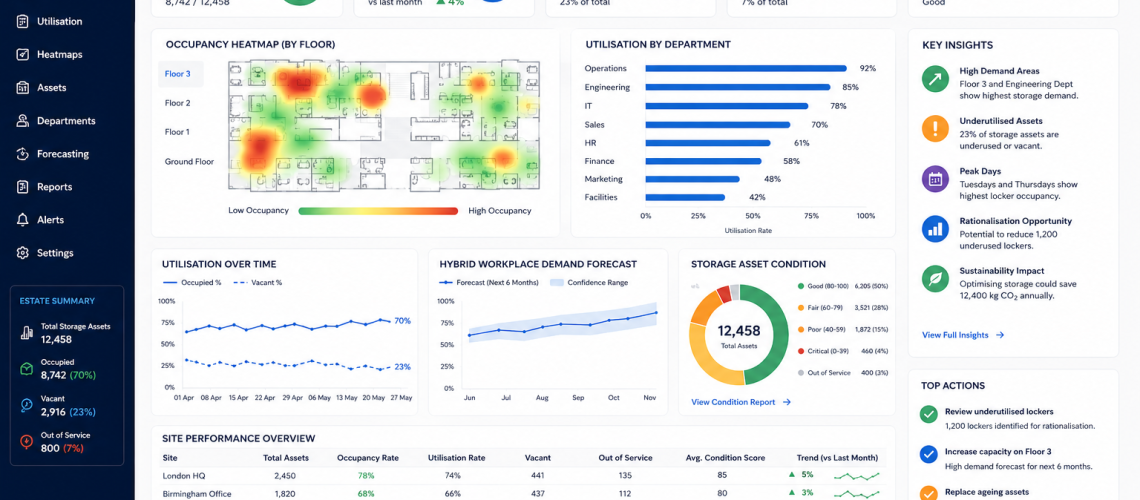
Workplace storage is no longer just a fixed set of lockers, cupboards, cabinets and charging points. In modern workplaces, storage is part of the operational infrastructure.
Facilities teams need to know what is being used, what is underused, where demand is rising, where faults are increasing and where storage space can be improved.
Workplace storage analytics helps organisations measure storage performance using occupancy data, utilisation reports, maintenance records, access activity, asset registers and workplace demand trends.
This guide explains how storage analytics can support locker estates, charging lockers, staff storage, PPE storage, equipment storage, hybrid workplace planning and long-term estate optimisation.
Quick Answer: What Is Workplace Storage Analytics?
Workplace storage analytics is the process of measuring how storage assets are used across a workplace or estate. It can include locker occupancy, vacant storage, charging locker use, access activity, fault rates, maintenance history, asset condition and future demand forecasting.
The goal is simple. It helps facilities teams make better decisions about storage planning, investment, maintenance, allocation and replacement.
| Analytics Area | What It Measures | Why It Matters |
|---|---|---|
| Occupancy | Used, vacant and inactive storage | Shows whether capacity matches demand |
| Utilisation | How often storage is used | Identifies underused or overloaded areas |
| Access activity | Key, RFID, PIN or smart access events | Supports governance and security |
| Maintenance data | Faults, repairs and repeated issues | Improves lifecycle planning |
| Asset condition | Condition scores and replacement need | Supports capital planning |
| Demand forecasting | Future storage requirements | Helps plan expansion or rationalisation |
Why Storage Analytics Matters in UK Workplaces
Many organisations hold more storage than they understand. Some areas have unused lockers. Other areas have shortages. Some staff storage is permanently assigned but rarely used. Some shared-use areas suffer from abandoned items or poor turnover.
Without analytics, storage decisions are often based on complaints, assumptions or one-off surveys. With analytics, facilities teams can work from evidence.
- Reduce unused storage capacity.
- Improve locker allocation.
- Support hybrid workplace planning.
- Identify high-demand areas.
- Track maintenance patterns.
- Plan refurbishment and replacement.
- Improve asset visibility.
- Support workplace dashboards and CAFM reporting.
Workplace Storage as Operational Infrastructure
Storage affects how a workplace functions. Staff need secure places for personal items. Engineers may need tool storage. Cleaners may need controlled access to supplies. Hybrid workers may need temporary lockers. IT teams may need charging lockers. Facilities teams may need key cabinets and asset storage.
When all these storage points are treated separately, the estate becomes fragmented. Analytics helps bring them into one operational view.
| Storage Type | Analytics Value |
|---|---|
| Staff lockers | Occupancy, allocation and turnover |
| Charging lockers | Device storage demand and usage cycles |
| PPE storage | Shift-based demand and stock control support |
| Key cabinets | Access accountability and issue tracking |
| Equipment storage | Asset visibility and maintenance planning |
| Shared-use lockers | Turnover, abandoned use and peak demand |
Occupancy Heatmaps
Occupancy heatmaps show where storage is being used most heavily. They can be simple manual reports or live digital dashboards from smart locker systems.
A heatmap can highlight zones with high demand, low demand or uneven usage.
- Changing rooms with constant locker shortages.
- Office floors with underused assigned lockers.
- Hybrid work zones with peak mid-week demand.
- School corridors with congestion around locker banks.
- Industrial areas where PPE storage demand changes by shift.
This supports better layout planning, allocation rules and long-term storage investment.
Utilisation Dashboards
Utilisation dashboards turn storage data into practical management information. They help facilities managers see patterns across sites, departments, floors and storage types.
A workplace storage dashboard may include:
- total storage assets;
- used storage spaces;
- vacant storage spaces;
- inactive assigned lockers;
- faults by location;
- maintenance tasks;
- replacement priorities;
- peak demand periods;
- smart locker access events;
- asset condition scores.
Estate Rationalisation
Estate rationalisation means using evidence to decide whether storage should be retained, relocated, reduced, expanded or replaced.
This is valuable where organisations have inherited mixed storage over many years. Some areas may contain old lockers that no longer match the current workplace. Other areas may need more flexible storage because working patterns have changed.
| Analytics Finding | Possible Decision |
|---|---|
| High vacancy rate | Reduce, relocate or convert storage |
| Repeated shortage | Add more lockers or change allocation rules |
| High maintenance cost | Repair, refurbish or replace |
| Poor location use | Move lockers closer to demand |
| Inactive assigned lockers | Review allocation policy |
| High shared-use turnover | Consider smart locker control |
Hybrid Workplace Demand Forecasting
Hybrid working has changed storage demand. Many workplaces no longer need one locker for every person. Instead, they may need flexible storage that supports rotating attendance, desk sharing, project work and temporary use.
Analytics helps organisations understand actual demand rather than planning from headcount alone.
- Which days create peak locker demand?
- Which teams need assigned storage?
- Which teams can use shared lockers?
- How many lockers remain unused each week?
- Where should hot lockers be placed?
- Do hybrid workers need charging lockers?
This connects directly with locker occupancy management systems, smart locker analytics and workplace locker management.
Operational Efficiency Metrics
Storage analytics should not stop at counting lockers. It should help improve workplace efficiency.
Useful metrics may include:
| Metric | Meaning | Decision Supported |
|---|---|---|
| Occupancy rate | Percentage of storage in use | Capacity planning |
| Vacancy rate | Percentage of storage not used | Rationalisation |
| Turnover rate | How often shared storage changes user | Shared-use policy |
| Fault rate | Number of issues by location or asset type | Maintenance planning |
| Mean time to repair | Average repair completion time | Service performance |
| Replacement priority score | Condition and lifecycle risk | Capital planning |
| Peak demand period | When storage is under most pressure | Layout and allocation planning |
Storage Analytics Data Fields
Good analytics starts with good data. Storage records should be clear, consistent and easy to maintain.
| Data Field | Purpose |
|---|---|
| Asset ID | Unique reference for each locker, cabinet or storage unit |
| Building / zone | Shows where the storage is located |
| Storage type | Categorises locker, cabinet, charging unit or key storage |
| Access method | Records key, RFID, PIN, app or smart access |
| Occupancy status | Shows assigned, vacant, shared, inactive or faulted state |
| Usage frequency | Measures how often storage is used |
| Fault history | Tracks repeated issues |
| Maintenance record | Shows completed and planned work |
| Condition score | Supports lifecycle decisions |
| Replacement priority | Supports capital planning |
Linking Storage Analytics with CAFM
Workplace storage analytics becomes stronger when connected to CAFM or facilities management systems. CAFM records can hold asset data, maintenance schedules, inspections, helpdesk tickets and replacement planning.
This creates a single view of storage assets across the workplace estate.
- Faults can become helpdesk tickets.
- Inspections can be scheduled.
- Condition scores can support lifecycle reports.
- Occupancy data can guide space planning.
- Replacement decisions can be linked to budget cycles.
For more detail, see Locker CAFM Integration UK.
Smart Locker Analytics
Smart locker systems can produce live data that supports workplace storage analytics. This may include access events, locker availability, usage duration, fault alerts and user permissions.
This is especially useful in flexible workplaces, shared-use environments, parcel locker systems, staff locker areas and device charging locations.
| Smart Locker Data | Analytics Use |
|---|---|
| Live availability | Shows available storage in real time |
| Access events | Supports audit trails and governance |
| Usage duration | Identifies abandoned or long-held lockers |
| Fault alerts | Improves maintenance response |
| Reservation data | Supports hybrid workplace planning |
| User permissions | Supports access control and revocation |
Workplace Examples
Offices
Office storage analytics can show whether hybrid workers need assigned lockers, shared lockers or temporary storage. It can also help decide where charging lockers and personal storage should sit in relation to work zones.
Industrial Sites
Industrial workplaces may need analytics for PPE lockers, changing room lockers, workwear storage, tool storage and shift-based usage. Data can show where wear is highest and where extra storage is needed.
Schools and Colleges
Education sites can use storage analytics to review student locker demand, unused lockers, damaged units, corridor pressure and seasonal allocation patterns.
Healthcare Buildings
Healthcare workplaces may need storage analytics for staff lockers, changing areas, cleanable storage, key control and department-level demand. Data can help estates teams manage condition, cleaning, access and replacement cycles.
Leisure Centres and Gyms
Leisure sites can use analytics to measure peak locker demand, shared-use turnover, wet-area wear, lock faults and changing room capacity.
Storage Analytics and Access Governance
Storage analytics also supports access governance. This is important where lockers, cabinets or storage units are linked to keys, PIN codes, RFID cards, app credentials or master access systems.
Good data helps answer:
- Who has access?
- Which storage is assigned?
- Which lockers are shared?
- Which keys are missing?
- Which users need access removed?
- Which areas require emergency override procedures?
This connects with locker access control systems, locker access governance and locker key management systems.
Storage Analytics and Lifecycle Planning
Analytics helps facilities teams understand when storage assets should be maintained, refurbished or replaced.
Instead of waiting until lockers fail, teams can use fault history, condition scores and usage intensity to plan lifecycle work earlier.
- High-use areas may need more frequent inspections.
- Wet areas may need corrosion checks.
- Older lock types may need phased replacement.
- Damaged doors may signal misuse or poor location planning.
- Repeated faults may justify replacement rather than repair.
This links to locker lifecycle management, locker replacement planning and locker refurbishment.
Common Storage Analytics Mistakes
- Only counting total lockers: total capacity does not show actual usage.
- Ignoring location: storage may be available but in the wrong place.
- Not tracking inactive assignments: assigned lockers may sit unused for months.
- Separating maintenance from occupancy: high-use areas often create more faults.
- Using inconsistent asset names: weak naming makes reporting harder.
- Ignoring hybrid work patterns: headcount alone may overstate daily storage demand.
- Failing to review access data: old permissions and lost keys create risk.
How to Start Workplace Storage Analytics
A storage analytics project can start simply. It does not always need advanced software at the beginning.
| Step | Action | Result |
|---|---|---|
| 1 | Create a storage asset register | Shows what storage exists |
| 2 | Map storage locations | Shows where storage is placed |
| 3 | Record occupancy status | Shows used and unused capacity |
| 4 | Track fault history | Shows maintenance pressure |
| 5 | Score condition | Supports lifecycle planning |
| 6 | Review demand patterns | Supports allocation and forecasting |
| 7 | Build reports or dashboards | Supports management decisions |
Internal Links: Related Workplace Storage and Locker Guides
- Locker CAFM Integration UK
- Smart Locker Analytics UK
- Locker Asset Register UK
- Locker Occupancy Management Systems UK
- Locker Management Systems UK
- Locker Lifecycle Management UK
- Locker Access Control Systems UK
- Workplace Locker Management UK
- Locker Infrastructure Systems UK
- Locker Estate Audit UK
Product Links from Total Locker Service
- Lockers
- Workplace lockers
- Charging lockers
- Locker locks
- Replacement locker keys
- Key cabinets
- COSHH cabinets
Final Thoughts
Workplace storage analytics helps organisations understand how storage is really being used. It turns lockers, cabinets, charging units and storage assets into measurable operational infrastructure.
Good analytics can improve occupancy, reduce unused capacity, support hybrid workplace planning, guide maintenance, strengthen access governance and improve long-term replacement decisions.
For UK workplaces, schools, healthcare buildings, leisure centres and industrial sites, storage analytics is becoming a practical part of facilities management and workplace optimisation.
FAQ: Workplace Storage Analytics UK
What is workplace storage analytics?
Workplace storage analytics measures how storage assets are used across a workplace. It can include locker occupancy, utilisation, access activity, faults, maintenance history, asset condition and demand forecasting.
Why is storage analytics useful?
It helps facilities teams understand whether storage is overused, underused, poorly located, costly to maintain or due for replacement.
Can storage analytics support hybrid working?
Yes. It can show when staff attend, which storage is used, where peak demand occurs and whether assigned or shared lockers are more suitable.
What data should be tracked?
Useful data includes asset ID, location, storage type, access method, occupancy status, usage frequency, fault history, maintenance records, condition score and replacement priority.
Do smart lockers improve storage analytics?
Smart lockers can improve analytics by providing live availability, access events, usage duration, fault alerts and reservation data.
How does storage analytics link with CAFM?
Storage analytics can feed CAFM systems with asset records, fault tickets, inspection schedules, occupancy data and lifecycle reports.
Discover more from Blog Total Locker Service
Subscribe to get the latest posts sent to your email.