Locker CAFM Integration UK: Connecting Locker Estates with Facilities Management Systems
May 13, 2026
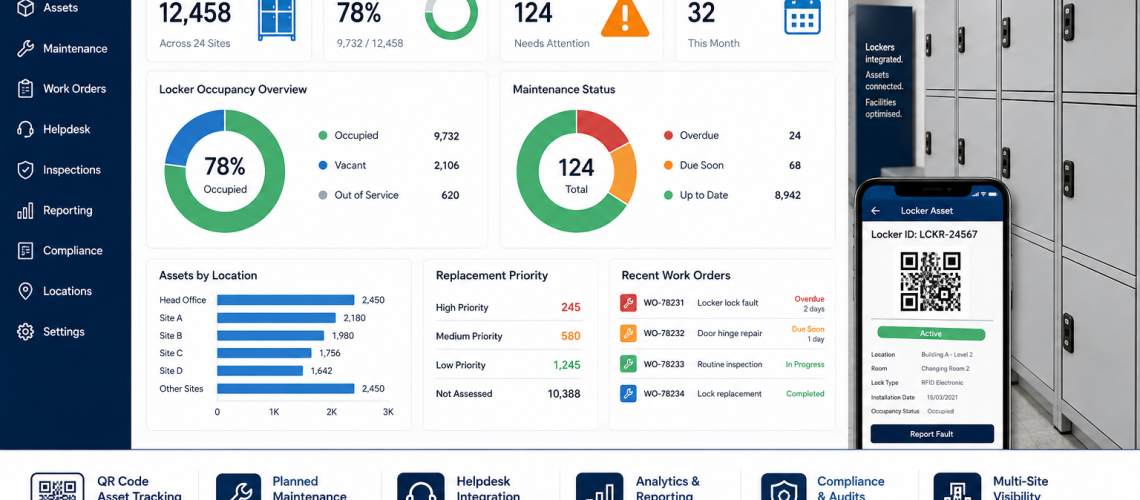
Locker CAFM integration connects locker assets with facilities-management workflows such as fault reporting, work orders, planned maintenance, inspection scheduling, engineer activity, parts use, completion evidence and project handover.
Its job is not to decide verified locker condition or the final intervention route. CAFM should identify the correct physical asset, control maintenance work, record what was done and pass relevant evidence to the specialist processes that own verification, fault diagnosis, refurbishment, replacement and estate decisions.
For stable physical asset fields and identifiers, use Locker Asset Register UK. For verified condition evidence, use Locker Estate Audit UK. For fault diagnosis and initial intervention routing, use Locker Parts & Servicing. Approved refurbishment and replacement work then move into their dedicated project guides.
CAFM owns the work order and maintenance record. Audit verifies physical condition. Parts & Servicing diagnoses the fault. Refurbishment and Replacement Planning deliver approved interventions.
Quick Answer: What Is Locker CAFM Integration?
Locker CAFM integration is the structured connection between the physical locker estate and a CAFM, IWMS, helpdesk or facilities-management system. It allows locker faults, planned tasks, maintenance activity and project handover to use the same controlled workflows as other building assets while preserving clear ownership of asset, audit, occupancy and intervention information.
| CAFM integration area | Main question | Output |
|---|---|---|
| Asset level | At what level should CAFM represent the locker estate? | Bank, unit or compartment model |
| Asset reference | How does CAFM identify the correct physical locker? | Stable asset-reference link |
| Location | Where does the asset sit in the facilities hierarchy? | Site, building, floor, room and zone mapping |
| Fault workflow | How does a reported problem become controlled work? | Helpdesk ticket or work order |
| Planned maintenance | What recurring facilities tasks need scheduling? | Planned-maintenance tasks |
| Inspection task | How is a physical check commissioned and recorded? | Scheduled inspection task plus evidence reference |
| Completion evidence | What work was actually carried out? | Action, parts, dates and outcome |
| Integration mapping | Which values move between systems? | Field-to-field mapping |
| Error handling | What happens when records fail to match? | Validation, retry and reconciliation rules |
| Handover | How do new, moved or removed lockers update CAFM? | Controlled asset/workflow update |
What This Page Owns, and What It Hands Off
- CAFM asset representation, fault tickets, work orders, planned-maintenance tasks, engineer activity, parts use, closure data, imports, mappings, APIs and integration errors: this page
- Stable physical asset IDs, locations and locker specifications: Locker Asset Register UK
- Verified physical findings and evidence state: Locker Estate Audit UK
- Recurring maintenance-risk signals: Locker Predictive Maintenance UK
- Fault diagnosis and initial repair / refurbish / replace routing: Locker Parts & Servicing Guide
- Approved refurbishment delivery: Locker Refurbishment UK
- Approved replacement-project delivery: Locker Replacement Planning UK
- Combined estate-wide status: Locker Estate Management UK
- Approved replacement-project delivery: Locker Replacement Planning UK
- Capital exposure and budget forecasting: Locker Capital Planning UK
- User onboarding, reassignment and offboarding: Locker Management Systems UK
- Occupancy, vacancy, usable capacity and utilisation: Locker Occupancy Management Systems UK
- KPI formulas and denominator rules: Locker KPI & Performance Metrics UK
- Trend comparison and analytical interpretation: Smart Locker Analytics UK
The Clean CAFM Workflow
A useful locker CAFM process should follow a controlled maintenance sequence:
- Identify the physical asset. Resolve the locker bank, unit or compartment through its stable asset reference.
- Capture the event. Record the fault report, planned task, inspection request or other facilities event.
- Create controlled work. Generate the appropriate helpdesk ticket or work order.
- Assign responsibility. Route the job to the correct internal team, contractor or engineer.
- Carry out the action. Inspect, repair, replace a component, adjust, secure, clean or verify as required by the work scope.
- Record completion evidence. Record action, parts, dates, engineer notes and outcome.
- Restore or update operational service status where appropriate. Record whether the locker is available for normal use after the work.
- Route evidence where required. Send recurring, uncertain or material findings to Audit, Parts & Servicing, Predictive Maintenance, Refurbishment, Replacement Planning or another specialist owner.
The sequence deliberately stops short of allowing the maintenance system to convert a repair record into a new verified condition diagnosis or replacement decision by itself.
Step 1: Define the Locker Asset Level
The first integration decision is the level at which CAFM needs to represent the locker estate. More detail is not automatically better.
| CAFM asset level | Can suit | Trade-off |
|---|---|---|
| Locker bank | Conventional estates normally serviced as a group | Simple record structure but limited compartment-level detail |
| Locker unit | Mixed configurations or modular estates | More precise without creating a record for every door |
| Compartment | Smart, individually maintained, high-security or individually metered lockers | Highest record volume and administration |
Choose the lowest level of detail that supports the actual maintenance and reporting workflow. If engineers work on locker banks and no process depends on individual compartment records, thousands of compartment assets may create administration without useful control.
Step 2: Use a Stable Physical Asset Reference
CAFM needs a stable way to identify the real locker asset, but that does not mean CAFM must be the system that originally authors the asset ID. Where the Locker Asset Register is authoritative, CAFM should consume or reference that identifier consistently.
- Do not use a named user as the asset identifier.
- Do not use a temporary allocation reference as the asset identifier.
- Do not rely solely on the visible locker number where that number can change.
- Keep site, room and visible-number fields separate from the stable physical reference.
- Use the same physical reference in faults, work orders and handover records.
- Record relocation as a location change unless the organisation’s asset policy requires a new asset record.
An identifier such as LK-004821 can remain stable while the site, room, locker number and user relationship change elsewhere.
Step 3: Reuse the Existing Building Hierarchy
Locker CAFM data should normally sit within the organisation’s existing facilities hierarchy rather than creating a separate locker-only geography.
- Organisation
- Site
- Building
- Floor
- Department or zone where useful
- Room or changing area
- Locker bank, unit or compartment
This makes faults easier to route and allows lockers to sit alongside other facilities assets without losing locker-specific maintenance detail.
Step 4: Define the Minimum CAFM Field Set
CAFM should not copy every field from every locker system. Keep the values needed to execute facilities work and reference the authoritative source for everything else.
| CAFM field | Purpose | Authoritative source or owner |
|---|---|---|
| Physical asset reference | Link the job to the correct locker asset | Asset Register / organisation asset hierarchy |
| Facilities location | Route engineer or contractor to the correct place | Facilities hierarchy |
| Locker type / range | Support identification and servicing | Asset Register |
| Configuration | Support parts and work planning where required | Asset Register |
| Installed lock family | Support maintenance and parts identification | Asset Register |
| Maintenance work status | Show whether a work order is open, assigned, awaiting parts or complete | CAFM |
| Asset service status | Show whether the physical asset is currently available, restricted or out of service for facilities purposes | CAFM / operational hand-off |
| Last maintenance action | Summarise most recent completed work | CAFM |
| Latest audit-finding reference | Link to verified condition evidence without reproducing the diagnosis | Estate Audit |
| Audit date | Show recency of referenced physical evidence | Estate Audit |
| Intervention status summary | Display the current repair, refurbishment or replacement state where facilities teams need it | Estate Management with specialist source references |
| Responsible maintenance team | Route and govern work | Facilities / CAFM |
Named users, detailed allocation history, live occupancy, personal access events and credential details normally belong outside CAFM unless a specific facilities workflow genuinely requires them.
Separate Service Status, Audit Finding and Intervention Status
These concepts should not be collapsed into one field:
| Status type | Example | Owner |
|---|---|---|
| Maintenance / service status | Open work order, awaiting parts, repaired, returned to service | CAFM |
| Audit finding | No material finding, observation, maintenance finding, verification required, intervention review required, immediate escalation | Estate Audit |
| Intervention status | Monitor, repair, refurbishment review, approved refurbishment, replacement review, approved replacement, decommissioned | Estate Management using specialist evidence |
A completed CAFM job can legitimately set work order = complete. It should not automatically set condition = good or replacement = not required. Where verification or a wider intervention review is needed, route the evidence to Estate Audit and Parts & Servicing.
Step 5: Define the Source of Truth
Integration becomes unreliable when several systems can independently edit the same value. Define one authoritative source for each material data type.
| Information | Preferred authoritative source |
|---|---|
| Stable physical asset ID | Asset Register or organisation’s approved physical-asset system |
| Building / room hierarchy | Facilities location hierarchy |
| Locker specification and lock family | Asset Register |
| User-to-locker relationship | Locker Management |
| Occupancy / availability metric | Occupancy Management or operational smart-locker platform |
| Fault ticket / work order | CAFM / helpdesk |
| Maintenance action and parts used | CAFM |
| Verified audit finding | Estate Audit |
| Maintenance-risk interpretation | Predictive Maintenance |
| Intervention status | Estate Management using Audit, Parts & Servicing, Refurbishment and Replacement Planning inputs |
| Approved replacement-project status | Replacement Planning |
| Capital forecast status | Capital Planning / organisation finance process |
Step 6: Map Fields Between Systems
Create the field map before building an API, import or scheduled exchange. The map should show what is copied, what is referenced and what CAFM must never manufacture itself.
| Source field | CAFM field | Rule |
|---|---|---|
locker_asset_id | asset_reference | Direct reference to the stable physical asset |
site_code | site | Map to approved facilities site ID |
room_code | location | Map to approved facilities room |
lock_family | lock_type | Consume controlled Asset Register value |
audit_finding_id | latest_audit_reference | Reference only; do not translate into a CAFM condition score |
intervention_status | intervention_status_summary | Read from the approved estate/intervention source; CAFM must not author this value from a fault flag |
replacement_project_status | project_status_reference | Read from Replacement Planning where useful |
Do not map a CAFM field such as replacement_flag = yes directly into a new intervention state. That shortcut allows the maintenance system to make a repair/refurbish/replace decision it does not own.
Controlled Vocabularies Matter
Controlled values make integration and reporting more reliable, but the system that owns each vocabulary should remain clear.
- Locker material, locker type, configuration and lock family: Asset Register-controlled values.
- Fault category, work-order priority, job status and completion action: CAFM-controlled values.
- Audit finding: Estate Audit-controlled values.
- Intervention status: estate/intervention-controlled values informed by Parts & Servicing, Estate Audit, Refurbishment and Replacement Planning.
- Site and location codes: facilities hierarchy.
- Occupancy states: Occupancy Management.
CAFM may validate an incoming Audit or intervention value against an approved list. Validation does not make CAFM the owner of that value.
Importing Existing Locker Data
Many estates start with spreadsheets. Clean the data before it enters CAFM rather than reproducing historic inconsistencies.
- Remove duplicate asset rows.
- Separate stable asset ID from visible locker number.
- Standardise site, building and room names.
- Normalise locker type, configuration and lock-family values.
- Identify missing locations.
- Mark unknown values as unknown rather than guessing.
- Do not fabricate condition or intervention states during migration.
- Close assets known to have been removed.
- Separate user allocation from physical asset data.
- Validate a sample against the physical estate or Asset Register.
- Import only when the structure is stable.
QR Codes and Asset Labels
QR codes can connect a physical locker bank to the correct maintenance workflow without turning the label into the source of truth.
- Reference the stable physical asset ID.
- Link to a CAFM asset, fault form or maintenance record where useful.
- Keep a readable asset reference alongside the QR code.
- Use durable labels suitable for the environment.
- Define what happens if the target URL or platform changes.
- Do not expose named-user or credential data through the code.
- Do not use the QR label as the only place the asset identity exists.
Planned Maintenance and Inspection Tasks in CAFM
CAFM can schedule recurring locker tasks where an organisation has decided they are needed. The interval and task content should remain proportionate to environment, use and operational consequence rather than being treated as a universal locker standard.
- Locker or bank reference.
- Task type.
- Scheduled or trigger date.
- Assigned person or contractor.
- Completion date.
- Work notes.
- Follow-up work-order requirement.
- Reference to separate audit evidence where a formal physical finding is required.
A CAFM inspection task can instruct someone to check doors, hinges, locks, corrosion, stability or identification. The resulting verified physical finding should follow the Locker Estate Audit UK evidence model rather than becoming a separate CAFM condition scale.
Helpdesk and Work-Order Data
Fault reports should create structured maintenance records that can be searched, measured and linked back to the correct physical asset.
| Work-order field | Example |
|---|---|
| Asset reference | LK-004821 |
| Fault category | Lock failure |
| Component | Key lock |
| Date reported | Helpdesk timestamp |
| Priority | Normal / urgent according to local rules |
| Assigned team | Facilities maintenance |
| Action | Lock replaced |
| Part fitted | Approved lock reference |
| Date completed | Work-order closure |
| Service outcome | Returned to service / restricted / follow-up required |
| Evidence handoff | None / Audit / Parts & Servicing / Predictive Maintenance / Refurbishment / Replacement Planning |
Repeated work orders can provide evidence to Predictive Maintenance, Analytics, Parts & Servicing or Estate Management. The work order itself should not make the repair-versus-replace decision.
Completion Evidence Is Not a New Condition Diagnosis
When a repair is completed, CAFM should record what happened:
- what component was worked on;
- what action was taken;
- what part was fitted;
- who completed the work;
- when it was completed;
- whether the locker returned to service;
- whether further verification is required;
- and whether evidence should be escalated.
That record can support a later Audit, servicing or replacement judgement. It should not silently overwrite verified physical evidence simply because the ticket has been closed.
Occupancy Data: Reference or Summarise Rather Than Duplicate
Occupancy can change far more frequently than physical asset or maintenance data. Detailed occupancy should normally remain with the system that owns it.
- Keep named-user allocation outside CAFM unless a defined workflow requires it.
- Keep live shared-use state in the locker or occupancy platform.
- Use an out-of-service or service-status value in CAFM when a physical fault affects availability.
- Pass summary occupancy or utilisation only where it supports a facilities decision.
- Do not let a CAFM occupancy copy become a competing source of truth.
Use Locker Occupancy Management Systems UK for the definitions of occupied, vacant, usable, unavailable and utilisation.
Smart Locker and Electronic Lock Interfaces
Electronic and smart locker systems can send facilities-relevant events into CAFM without copying their full operational dataset.
- Stable locker or asset reference.
- Online/offline status where relevant to maintenance.
- Battery or diagnostic warning where supported.
- Hardware fault state.
- Service event requiring a work order.
- Controller or software version where it materially affects support.
- Out-of-service signal where that affects usable capacity.
Do not automatically copy named users, detailed access events, administrator actions or credentials into CAFM. Access-event structure belongs in Locker Access Audit Systems UK, while personal-data and retention questions belong in Locker Access Compliance UK.
API Integration: Define the Contract Before the Connection
An API is an implementation method, not the starting architecture. Define the data contract first.
- Which system creates the authoritative asset reference?
- Which system owns location?
- Which system owns locker specification and lock family?
- Which system owns the work order?
- Which system owns the audit finding?
- Which system owns intervention status?
- Which fields are read-only in CAFM?
- Which direction does each field travel?
- How frequently are updates required?
- How are failed updates retried?
- How are conflicting records reconciled?
- What happens when an asset is relocated, replaced or decommissioned?
- What data is intentionally excluded?
Validation, Conflict and Error Handling
An integration is not complete until failed updates and conflicts have an agreed route.
- Reject duplicate stable asset IDs.
- Reject or flag unknown site and room references.
- Validate Asset Register-controlled values such as locker type and lock family.
- Validate incoming Audit and intervention states without allowing CAFM to create new ones.
- Record failed imports and API calls.
- Define retry behaviour.
- Define which system wins when two systems disagree.
- Keep an appropriate change trail for significant updates.
- Flag records that fail validation instead of silently overwriting them.
- Reconcile the digital record with the physical estate when repeated conflicts occur.
Manual, CSV, Scheduled and API Integration
Not every locker estate needs a live integration. Choose the simplest method that reliably supports the workflow.
| Method | Can suit | Main risk |
|---|---|---|
| Manual update | Small, stable estates | Missed or delayed updates |
| CSV import | Periodic asset or reference refresh | Duplicates and field mismatch |
| Scheduled file exchange | Regular synchronisation between established systems | Timing and conflict rules |
| API | Near-live faults, service status or other fast-changing integrations | Authentication, support, versioning and interface failures |
Commission New Lockers Into CAFM
New and replacement locker projects should hand the maintenance system a reliable baseline rather than leaving facilities teams to reconstruct the estate later.
- Confirm installed quantity and final locations.
- Receive or reference the approved stable asset IDs.
- Record the CAFM asset level being used.
- Reference locker type, configuration and dimensions where maintenance needs them.
- Reference the installed lock family.
- Create relevant planned-maintenance or battery tasks.
- Attach or reference handover documents where appropriate.
- Set the responsible maintenance team.
- Confirm initial service status.
- Validate a sample against the installed estate before project close-out.
The stable physical baseline belongs in Locker Asset Register UK. Replacement-project close-out belongs in Locker Replacement Planning UK.
Repair, Refurbishment, Replacement and Decommissioning Data
Physical change must be reflected in CAFM where it affects the maintenance asset or active work history, but each type of change has a different owner.
| Event | CAFM action | Specialist owner |
|---|---|---|
| Repair completed | Close work order, record action and parts, update service status | CAFM |
| Refurbishment completed | Close related work/project references and update maintenance-relevant fields | Locker Refurbishment UK |
| Relocation | Update facilities location after the physical Asset Register is reconciled | Asset Register / Estate Management |
| Replacement completed | Close old maintenance asset, create/link new maintenance asset and carry forward only applicable records | Replacement Planning |
| Decommissioning | Remove old asset from active maintenance population | Estate Management / Asset Register after the approved physical outcome |
After refurbishment, CAFM should not independently declare the asset’s new condition state. If formal condition verification is required, route the asset through Estate Audit.
Multi-Site Locker CAFM Integration
Multi-site estates benefit from common interfaces and categories more than from forcing identical locker products into every environment.
- Common asset-reference format.
- Common location conventions.
- Common CAFM fault categories.
- Common work-order status values.
- Common lock-family values supplied by the Asset Register.
- Common Audit finding states supplied by Estate Audit.
- Common intervention-status values supplied by the estate/intervention process.
- Common decommissioning workflow.
- Defined local and central maintenance ownership.
Different sites can still use different locker materials, configurations and access technologies. For central/local estate coordination, use Multi-Site Locker Estate Management UK.
CAFM Data Can Feed KPIs Without Defining Them
CAFM is an important source for maintenance KPIs such as:
- fault rate;
- repeat-fault rate;
- response time;
- resolution time;
- open maintenance backlog;
- SLA compliance where a local SLA exists;
- maintenance record completeness;
- repair cost per fault where cost data is recorded consistently.
The formulas, denominators and reporting rules belong in Locker KPI & Performance Metrics UK. Trend comparison and interpretation belong in Smart Locker Analytics UK.
How CAFM Evidence Supports Intervention Decisions
CAFM can provide strong evidence that a wider intervention review is justified without making that decision itself.
- Repeated repair events on the same asset.
- Repeated lock or hinge replacement.
- Long or recurring downtime.
- Parts repeatedly unavailable.
- Escalating maintenance cost where measured consistently.
- Recurring faults after previous repair.
- Maintenance notes indicating suspected wider physical deterioration.
Predictive Maintenance can interpret recurring maintenance-risk patterns. Parts & Servicing handles fault diagnosis and initial intervention routing, Estate Audit verifies wider condition where required, Locker Refurbishment delivers approved renewal of retained assets and Replacement Planning delivers approved renewal projects.
Practical Locker CAFM Implementation Sequence
- Define the facilities requirement. Decide what CAFM actually needs to support.
- Define estate scope. Sites, locker populations and maintenance boundaries.
- Choose the CAFM asset level. Bank, unit or compartment.
- Confirm the authoritative physical Asset Register.
- Clean source data. Remove duplicates and unresolved locations.
- Map the facilities hierarchy.
- Choose the minimum CAFM field set.
- Assign a source of truth for every non-CAFM value.
- Define CAFM-controlled vocabularies. Faults, priorities, job states and actions.
- Reference Audit and intervention vocabularies without redefining them.
- Build the fault-to-work-order process.
- Build planned-maintenance and inspection-task workflows.
- Define completion evidence and service-status rules.
- Create field mappings.
- Choose manual, CSV, scheduled or API integration.
- Define validation, retries and conflict handling.
- Pilot on a controlled group.
- Reconcile the digital records with the physical estate.
- Define new-project and replacement handover.
- Define decommissioning and archive rules.
Locker CAFM Data-Quality Rules
- Stable physical asset references must resolve to a real Asset Register record.
- Site and room values must match the approved facilities hierarchy.
- Locker type and lock family should use controlled Asset Register values.
- Fault category should use an approved CAFM value.
- Work-order status should use an approved CAFM value.
- Audit findings should be consumed from the Audit process rather than recreated.
- Intervention status should be consumed from the approved estate/intervention source rather than inferred from a CAFM flag.
- Removed assets must not remain in active maintenance populations.
- Unknown values should be marked unknown, not guessed.
- Named users should not be stored in physical asset fields.
- Failed integrations should be visible and reconcilable.
Common Locker CAFM Integration Mistakes
- Making CAFM the owner of every locker field. It should own maintenance workflow, not every source record.
- Allowing CAFM to create intervention status from a fault flag. Maintenance evidence is not the repair/refurbish/replace decision.
- Using work-order closure as proof of physical condition. Closure proves the recorded work is complete, not that Audit has verified the whole asset.
- Creating a second condition scale inside CAFM. Use Estate Audit findings where verified condition is required.
- Starting with an API before defining ownership and mappings.
- Making every compartment a separate CAFM asset without operational need.
- Using visible locker numbers as permanent asset keys.
- Copying named-user allocation and live occupancy into CAFM unnecessarily.
- Allowing free-text fault or lock categories where controlled values are needed.
- Maintaining the same field manually in several systems.
- Guessing missing values during migration.
- Failing to close replaced or decommissioned maintenance assets.
- Assuming live API integration is always better than a simpler controlled exchange.
Locker CAFM Integration Checklist
- Choose bank, unit or compartment as the CAFM asset level.
- Reference a stable physical Asset Register ID.
- Map lockers into the existing building hierarchy.
- Define the minimum CAFM field set.
- Define CAFM-controlled fault, priority, job-status and action values.
- Identify the authoritative source for Audit findings.
- Identify the authoritative source for intervention status.
- Build the fault-to-work-order workflow.
- Define planned-maintenance tasks.
- Define inspection tasks without creating a duplicate Audit model.
- Define completion evidence.
- Define service-status rules.
- Build field mappings.
- Clean legacy data before import.
- Define manual, CSV, scheduled or API exchange.
- Define validation and error handling.
- Separate occupancy from physical maintenance data.
- Define handover for new and replacement lockers.
- Define relocation and decommissioning updates.
- Test the integration against real assets before wider rollout.
Where Locker CAFM Questions Go Next
| Question | Next guide |
|---|---|
| What are the stable physical asset fields? | Locker Asset Register UK |
| What is the verified physical condition? | Locker Estate Audit UK |
| How should recurring maintenance patterns be interpreted? | Locker Predictive Maintenance UK |
| Should the locker remain a routine repair, move to refurbishment or enter replacement review? | Locker Parts & Servicing, supported by Estate Audit where wider condition evidence is needed |
| Where is the combined estate-wide status? | Locker Estate Management UK |
| How is an approved replacement project delivered? | Locker Replacement Planning UK |
| How is capital exposure forecast? | Locker Capital Planning UK |
| How are users allocated and reassigned? | Locker Management Systems UK |
| How is occupancy or utilisation defined? | Locker Occupancy Management Systems UK |
| How are maintenance KPIs calculated? | Locker KPI & Performance Metrics UK |
| How are trends and exceptions interpreted? | Smart Locker Analytics UK |
| How are access events structured? | Locker Access Audit Systems UK |
Locker CAFM Integration UK FAQs
What is locker CAFM integration?
Locker CAFM integration connects locker assets with facilities workflows such as faults, work orders, planned maintenance, inspection tasks, completion evidence and project handover while retaining clear ownership of asset, audit and intervention data.
Should every locker compartment have its own CAFM record?
No. Many estates can be maintained effectively at locker-bank or unit level. Individual compartment records are useful only where maintenance, security, smart-system or reporting requirements justify that detail.
Should CAFM own the locker asset ID?
Not necessarily. CAFM needs a stable physical asset reference, but the authoritative ID may come from the Locker Asset Register or the organisation’s wider asset system. The same reference should then be used consistently in maintenance records.
Can CAFM decide that a locker should be replaced?
No. CAFM can record repeated faults, downtime, repair actions and completion evidence that may justify a wider review. Use Locker Parts & Servicing for fault diagnosis and initial intervention routing, with Estate Audit supporting wider condition evidence where required.
Does closing a CAFM work order prove that the locker is in good condition?
No. Work-order closure shows that the recorded maintenance action has been completed. Where formal physical verification is required, condition evidence should come from the Estate Audit process.
Does CAFM need named-user allocation data?
Usually not. Named-user allocation and live occupancy normally belong in Locker Management or operational locker systems. CAFM should receive only the information needed for the facilities workflow.
Is an API required for locker CAFM integration?
No. Manual updates, CSV imports and scheduled exchanges can be appropriate where information changes slowly. API integration is useful where maintenance or service-status events need to move between systems more quickly.
What happens to CAFM data after locker replacement?
The old maintenance asset should be closed or decommissioned, the new physical asset should be linked or created using the approved stable reference, and only maintenance information that still applies should be carried forward.
Can smart locker faults create CAFM work orders?
Yes, where the integration is designed for it. The event should resolve to the correct physical asset, create a controlled fault or work order and retain a clear source and error-handling process.
Summary
Locker CAFM integration should remain focused on maintenance execution and facilities workflow: asset reference, fault capture, work orders, planned tasks, engineer activity, parts, completion evidence, imports, APIs and project handover.
Keep stable physical fields with the Asset Register, verified condition with Estate Audit, recurring maintenance-risk interpretation with Predictive Maintenance, fault diagnosis with Parts & Servicing, approved refurbishment with Locker Refurbishment, approved replacement with Replacement Planning and the combined estate view with Estate Management.
The clean flow is: fault or task → controlled work order → action → completion evidence → service-status update → specialist evidence handoff where required. That gives facilities teams a useful maintenance system without turning CAFM into a second Audit, servicing or replacement-decision engine.
Discover more from Blog Total Locker Service
Subscribe to get the latest posts sent to your email.