Enterprise Workplace Storage Systems UK: Managing Lockers, Assets, Access and Workplace Storage Infrastructure
May 13, 2026
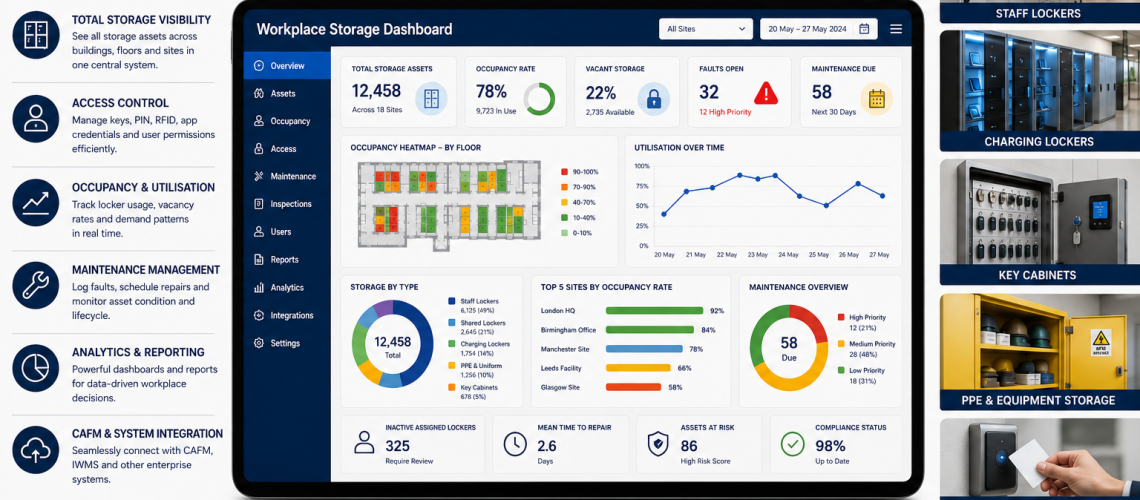
Enterprise workplace storage systems help organisations manage storage across buildings, departments, staff groups and sites. They bring lockers, charging lockers, key cabinets, PPE storage, equipment storage, access control, maintenance and analytics into one structured operational framework.
For larger workplaces, storage is no longer a simple furniture purchase. It is part of the workplace infrastructure. It affects staff experience, operational efficiency, security, asset control, hybrid working, facilities management and long-term estate planning.
This guide explains how enterprise workplace storage systems work, what they include and how facilities teams can plan storage as a managed estate rather than a collection of separate products.
Quick Answer: What Is an Enterprise Workplace Storage System?
An enterprise workplace storage system is a structured approach to managing staff lockers, shared-use lockers, charging lockers, key cabinets, PPE storage, equipment storage, access methods, allocation rules, maintenance, audits, analytics and lifecycle planning across a workplace estate.
It helps organisations move from disconnected storage units to a controlled workplace storage infrastructure.
| System Area | What It Controls | Why It Matters |
|---|---|---|
| Storage assets | Lockers, cabinets and storage units | Creates estate visibility |
| Access control | Keys, RFID, PIN, app or smart credentials | Improves security and accountability |
| Allocation | Assigned, shared and temporary storage | Matches storage to working patterns |
| Maintenance | Faults, inspections and repairs | Reduces downtime and reactive spend |
| Analytics | Occupancy, utilisation and demand | Supports better planning |
| Lifecycle planning | Repair, refurbish and replacement decisions | Supports long-term investment control |
Why Enterprise Storage Systems Matter
Large workplaces often grow storage in layers. A site may start with staff lockers, then add charging lockers, key cabinets, PPE storage, visitor storage, shared lockers and equipment storage. Over time, the estate becomes difficult to manage.
Without a system, organisations can face common problems.
- Unused lockers remain assigned.
- Keys are lost without clear accountability.
- Storage shortages appear in high-demand areas.
- Old locker banks stay in place after working patterns change.
- Faults are reported informally and not tracked.
- Maintenance becomes reactive.
- Replacement planning becomes guesswork.
- Smart locker data sits outside wider facilities systems.
An enterprise storage system brings structure to these issues.
Core Components of an Enterprise Workplace Storage System
A strong system combines physical products, access methods, data records, governance rules and facilities workflows.
| Component | Examples | Operational Role |
|---|---|---|
| Personal storage | Staff lockers, office lockers, changing room lockers | Supports daily staff use |
| Shared-use storage | Hot lockers, visitor lockers, temporary lockers | Supports flexible working |
| Charging storage | Laptop lockers, phone lockers, device charging lockers | Supports digital workplace needs |
| Controlled storage | Key cabinets, PPE cabinets, secure cupboards | Improves accountability |
| Access systems | Keys, PIN, RFID, smart credentials | Controls who can use storage |
| Asset data | Asset IDs, locations, condition scores | Supports maintenance and lifecycle planning |
| Analytics | Occupancy, utilisation, fault trends | Supports decisions and reporting |
Workplace Storage System Architecture
Enterprise storage works best when each layer connects to the next. Physical storage should connect to access control. Access control should connect to user allocation. Allocation should connect to occupancy reporting. Maintenance should connect to asset records. Asset records should support lifecycle planning.
This creates a storage architecture rather than a loose group of products.
| Layer | Function | Linked Guide |
|---|---|---|
| Planning layer | Defines storage need, layout and capacity | Locker Planning UK |
| Access layer | Controls keys, RFID, PIN or smart credentials | Locker Access Control Systems UK |
| Management layer | Handles allocation, administration and workflows | Locker Management Systems UK |
| Asset layer | Tracks asset IDs, locations and condition | Locker Asset Register UK |
| Analytics layer | Measures occupancy, utilisation and demand | Workplace Storage Analytics UK |
| Integration layer | Connects storage to CAFM and FM systems | Locker CAFM Integration UK |
Staff Lockers in Enterprise Storage Systems
Staff lockers are often the foundation of workplace storage. They support personal belongings, uniforms, bags, workwear and shift-based storage.
In an enterprise system, staff lockers should not be treated as isolated units. They should be linked to allocation rules, access methods, occupancy records and maintenance processes.
- Assigned lockers for permanent staff.
- Shared lockers for flexible staff.
- Temporary lockers for visitors and contractors.
- Hot lockers for hybrid workplaces.
- Changing room lockers for welfare areas.
Charging Lockers and Digital Workplace Storage
Charging lockers are increasingly important in workplaces that use laptops, tablets, scanners, radios, phones and other rechargeable devices.
Enterprise storage planning should consider where devices are stored, charged, issued, returned and monitored.
- Laptop charging lockers for offices and education settings.
- Phone charging lockers for staff and visitors.
- Tool and device charging for operational teams.
- Shared device storage for shift workers.
- Secure charging for high-value equipment.
See the charging lockers range for suitable options.
Key Cabinets and Access Accountability
Key cabinets often sit alongside locker systems. They help organisations manage keys for buildings, vehicles, cabinets, lockers, plant rooms and operational areas.
In an enterprise storage system, key control supports access accountability. It also reduces disruption when staff leave, keys go missing or emergency access is needed.
For product options, see key cabinets.
PPE, Uniform and Equipment Storage
Industrial, healthcare, leisure and operational workplaces often need storage for PPE, uniforms, tools, cleaning equipment and specialist items.
Enterprise storage systems should consider how these items are accessed, checked, replaced and stored safely.
- PPE lockers for staff equipment.
- Uniform storage for changing rooms.
- Tool lockers for workshops and maintenance teams.
- Cleaning storage for facilities teams.
- Secure cabinets for restricted equipment.
Access Control Across Workplace Storage
Access control is one of the most important parts of an enterprise workplace storage system. Different areas may need different access methods.
| Access Method | Best For | Consideration |
|---|---|---|
| Key locks | Assigned lockers and simple storage | Requires key management |
| Hasp locks | Low-cost padlock use | Depends on user-supplied padlocks |
| Coin locks | Leisure and visitor areas | Good for shared-use environments |
| Combination locks | Keyless staff storage | Needs code management |
| RFID locks | Schools, offices and leisure centres | Can link with access cards |
| Smart locks | Flexible and data-led estates | Supports reporting and remote administration |
For deeper guidance, read Locker Access Control Systems UK.
Allocation Rules and Storage Governance
Enterprise storage systems need clear allocation rules. Without them, lockers and storage spaces can become blocked, abandoned or unfairly distributed.
Common allocation models include:
- one locker per employee;
- shared-use lockers;
- department-based storage zones;
- temporary project storage;
- visitor and contractor storage;
- hybrid worker hot lockers;
- controlled access storage for restricted items.
Governance should define who can use each storage type, how access is issued, when storage is reviewed and what happens when staff leave.
Storage Asset Registers
An asset register gives the organisation a clear record of storage assets. It can include lockers, key cabinets, charging lockers, cupboards, benches, stands and specialist storage units.
Important fields include:
| Data Field | Purpose |
|---|---|
| Asset ID | Unique reference for each storage asset |
| Location | Building, floor, room or zone |
| Storage type | Locker, cabinet, charging unit or key cabinet |
| Access method | Key, RFID, PIN, app or smart credential |
| Occupancy status | Assigned, vacant, shared, inactive or faulted |
| Condition score | Supports lifecycle planning |
| Maintenance history | Tracks repairs and inspections |
| Replacement priority | Supports capital planning |
Workplace Storage Analytics
Analytics helps organisations understand how storage is really being used. This is especially useful in hybrid workplaces, multi-site estates and high-turnover environments.
Useful analytics include:
- occupancy rates;
- vacant storage;
- inactive assigned lockers;
- shared-use turnover;
- usage heatmaps;
- maintenance fault trends;
- replacement priority reports;
- department-level demand;
- hybrid workplace demand forecasting.
See Workplace Storage Analytics UK for a deeper guide.
CAFM and Facilities Management Integration
Enterprise workplace storage becomes stronger when connected to CAFM or facilities management systems. This allows storage assets to sit inside the same operational system as maintenance tasks, helpdesk tickets, inspections and lifecycle plans.
- Locker faults can become helpdesk tickets.
- Storage inspections can be scheduled.
- Asset condition can be reviewed across sites.
- Replacement planning can be linked to budgets.
- Occupancy reports can support workplace planning.
Read Locker CAFM Integration UK for a detailed integration guide.
Multi-Site Enterprise Storage
Multi-site organisations need stronger storage control than single-site workplaces. Different buildings may have different locker types, lock systems, allocation rules and maintenance standards.
Enterprise storage systems help standardise the estate while still allowing each site to meet local needs.
- Standard asset naming.
- Consistent lock strategies.
- Shared condition scoring.
- Centralised replacement planning.
- Site-by-site utilisation reporting.
- Common access governance policies.
Sector Examples
Corporate Offices
Corporate offices may need hot lockers, charging lockers, visitor storage and shared team storage. Analytics can help align storage with hybrid attendance patterns.
Industrial Sites
Industrial workplaces often need staff lockers, PPE storage, workwear storage, tool lockers and key control. Storage systems should support shifts, welfare areas and operational security.
Schools and Colleges
Education sites may need student lockers, staff lockers, key management and seasonal allocation rules. A storage system can support safeguarding, corridor flow and maintenance planning.
Healthcare Buildings
Healthcare workplaces may need staff changing lockers, cleanable storage, access-controlled cabinets and estate-level asset records. Maintenance, hygiene and access control are especially important.
Leisure Centres and Gyms
Leisure sites need high-turnover shared-use lockers, wet-area materials, coin locks, RFID options and strong maintenance routines. Usage analytics can help manage peak demand.
Enterprise Storage Planning Checklist
| Question | Why It Matters |
|---|---|
| What storage assets already exist? | Creates the baseline estate record |
| Where are storage shortages occurring? | Identifies demand pressure |
| Which areas are underused? | Supports rationalisation |
| Which access methods are used? | Supports security and key control |
| How are faults reported? | Improves maintenance response |
| Which assets are ageing? | Supports replacement planning |
| Does hybrid working change demand? | Prevents overbuying or underprovision |
| Can data link to CAFM? | Improves estate visibility |
Common Mistakes to Avoid
- Buying products without a storage strategy: this creates fragmented systems.
- Ignoring access control: storage becomes difficult to govern.
- Using inconsistent numbering: faults and assets become harder to track.
- Not measuring occupancy: unused storage remains hidden.
- Not planning maintenance: small faults become larger failures.
- Forgetting hybrid working: old allocation models may no longer fit.
- Separating storage from CAFM: facilities teams lose asset visibility.
Internal Links: Related Workplace Storage Guides
- Workplace Storage Infrastructure UK
- Workplace Storage Analytics UK
- Storage Management Systems UK
- Locker CAFM Integration UK
- Locker Asset Register UK
- Locker Management Systems UK
- Locker Access Control Systems UK
- Locker Occupancy Management Systems UK
- Workplace Locker Operations UK
- Smart Locker Analytics UK
Product Links from Total Locker Service
- Lockers
- Workplace lockers
- Charging lockers
- Locker locks
- Replacement locker keys
- Key cabinets
- COSHH cabinets
Final Thoughts
Enterprise workplace storage systems help organisations manage storage as infrastructure. They connect lockers, charging points, key cabinets, PPE storage, access control, maintenance, analytics and lifecycle planning into one coherent approach.
This improves visibility, reduces waste, supports hybrid working, strengthens access governance and helps facilities teams plan storage around real workplace demand.
For larger UK workplaces, schools, healthcare sites, leisure centres and industrial estates, this system-led approach is far stronger than treating storage as separate products bought in isolation.
FAQ: Enterprise Workplace Storage Systems UK
What is an enterprise workplace storage system?
It is a structured system for managing workplace storage assets such as lockers, charging lockers, key cabinets, PPE storage, equipment storage, access control, maintenance, analytics and lifecycle planning.
Why do larger workplaces need storage systems?
Larger workplaces need storage systems because storage demand changes across teams, shifts, sites and working patterns. A system helps control allocation, access, maintenance and replacement planning.
What products are included in workplace storage systems?
They can include staff lockers, shared-use lockers, charging lockers, key cabinets, PPE lockers, equipment storage, secure cupboards and access-controlled cabinets.
How does storage analytics help?
Storage analytics shows occupancy, vacancy, usage trends, fault patterns, maintenance pressure and future demand. This helps organisations make better storage decisions.
Can workplace storage systems link to CAFM?
Yes. Storage assets can be added to CAFM systems for asset records, inspections, helpdesk tickets, maintenance schedules and lifecycle planning.
Are smart lockers part of enterprise storage systems?
Yes. Smart lockers can support flexible use, access control, live availability, reporting, remote administration and workplace storage analytics.
Discover more from Blog Total Locker Service
Subscribe to get the latest posts sent to your email.