Mechanical vs Electronic Locker Locks UK: Which Locker Lock System Is Right for You?
May 7, 2026
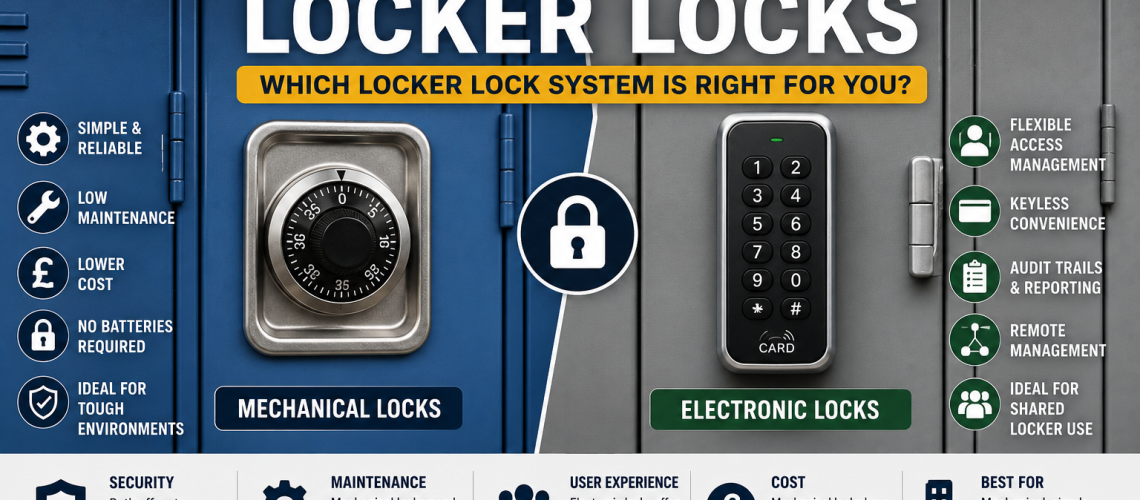
Mechanical and electronic locker locks control access in fundamentally different ways. Mechanical locks operate without electrical power and rely on physical mechanisms such as keys, padlocks, mechanical codes, coins or tokens. Electronic locks add an electronic input, controller and powered actuator before the physical locking point can release.
This guide owns the direct comparison between mechanical and electronic locker locks. It compares power dependency, failure modes, administration, maintenance, override, installation, retrofit and support consequences without deciding which technology is universally better.
For the overall access-technology decision, use Locker Access Control Systems UK. For the operating model itself, use Shared-Use vs Assigned Locker Locks UK.
Mechanical = no electrical power required for normal operation. Electronic = electronic input + controller + power + actuator + physical locking mechanism.
Quick Answer: Mechanical vs Electronic Locker Locks
The main difference is not simply “basic vs advanced”. Mechanical locks depend on physical access hardware and local mechanical operation. Electronic locks add power, programming and electronic authorisation before the same basic task is completed: releasing the locker door.
| Factor | Mechanical locker locks | Electronic locker locks |
|---|---|---|
| Normal operation | Physical mechanism only | Electronic input plus mechanical release |
| Power | No electrical power for normal operation | Battery or fixed power required |
| User access | Key, padlock, mechanical code, coin or token | PIN, RFID or other supported electronic input |
| Typical failure layer | Mechanical wear, key, code, cam or latch issue | Electronic input, power, actuator plus mechanical locking point |
| Programming | None for most mechanical locks | Local or system configuration required |
| Emergency support | Spare key, master key, reset or mechanical recovery depending on type | Admin code, management credential, emergency power, mechanical override or service method depending on product |
What This Page Owns, and What It Hands Off
- Mechanical vs electronic comparison: this page
- Power dependency: this page
- Mechanical failure vs electronic failure: this page
- Maintenance and support differences: this page
- Override and recovery comparison: this page
- Retrofit and installation consequences: this page
- Overall technology selection: Locker Access Control Systems UK
- Shared-use vs assigned-use model: Shared-Use vs Assigned Locker Locks UK
- Individual electronic lock operation: Electronic Locker Locks UK
- Battery-powered vs hardwired architecture: Digital Locker Locks UK
- RFID credential detail: RFID Locker Locks UK
- Keyed mechanical detail: Keyed Locker Locks UK
- Mechanical combination detail: Mechanical Combination Locker Locks UK
- Smart/networked system capability: Smart Locker Systems UK
- Lock ownership cost: Locker Lock Cost UK
What Counts as a Mechanical Locker Lock?
Mechanical locker locks operate without electrical power during normal use. They include several different mechanisms rather than one single lock type.
- Key-operated cam locks
- Padlock fittings and separate padlocks
- Mechanical combination locks
- Coin-operated locks
- Token-operated locks where applicable
These mechanisms differ from one another, but they share one important characteristic: normal access does not require batteries, wiring or an electronic controller.
What Counts as an Electronic Locker Lock?
An electronic locker lock uses an electronic input and powered internal control before releasing the mechanical locking point.
- PIN or keypad lock
- RFID card, fob or wristband lock
- Locally programmed electronic lock
- Connected electronic lock
- Other supported digital-input lock
An electronic lock is not automatically a smart locker system. A standalone battery-powered keypad can be fully electronic while remaining completely local and unnetworked.
Mechanical Does Not Mean Keyed Only
Mechanical access includes more than keyed locks. A mechanical combination lock can be keyless. A coin lock can support temporary use. A padlock fitting can allow the user to bring a separate lock.
This matters because comparing “mechanical” against “electronic” is broader than comparing “keyed” against “electronic”.
Electronic Does Not Mean Networked
Electronic locks can operate at several levels.
| Electronic level | What it means |
|---|---|
| Standalone | Local power and local programming at the lock |
| Locally managed | Lock plus a local programming tool, credential or controller |
| Connected | Lock communicates with other system components |
| Smart locker system | May add allocation, dashboards, reporting, remote management or integrations |
Once software, communications and estate-wide administration become central to the requirement, use Smart Locker Systems UK.
Power Dependency
Mechanical locks do not depend on electrical power during normal operation. Electronic locks do.
- Mechanical: failure is usually mechanical, access-related or alignment-related.
- Electronic: failure can be electronic, power-related, programming-related or mechanical.
That added electronic layer changes diagnosis because a non-opening locker may have more than one possible failure path.
Battery-Powered vs Hardwired Is a Separate Electronic Question
Electronic locks can receive power from local batteries or fixed electrical infrastructure.
That architecture affects servicing, failure scope, cabling, retrofit disruption and expansion. Use Digital Locker Locks UK for that comparison rather than expanding it here.
Mechanical Failure Modes
Mechanical locks normally fail through wear, damage, contamination, incorrect access input or physical misalignment.
- Worn or broken key
- Stiff cylinder
- Forgotten mechanical combination
- Worn dial, wheel or push-button mechanism
- Coin mechanism jam
- Bent cam or latch
- Door pressure or frame misalignment
- Loose fixing
The exact fault depends on the mechanical lock type, so use the relevant specialist page for detailed diagnosis.
Electronic Failure Modes
Electronic locks can experience the same physical door and latch problems as mechanical locks, plus additional electronic and power-related faults.
- Flat or weak battery
- Power-supply fault
- Unresponsive keypad
- RFID credential not recognised
- Programming or administrator-access issue
- Actuator fault
- Controller or communication fault where connected
- Mechanical cam, latch or door alignment fault
For individual lock-level diagnosis, use Electronic Locker Locks UK.
A Correct Credential Can Still Meet a Mechanical Fault
Electronic authorisation does not replace the physical locking point. A PIN or RFID credential can be accepted correctly while the locker remains shut because the cam, latch, actuator or door is binding.
This makes one comparison especially important:
- Mechanical lock: access input and physical lock are usually part of the same local mechanism.
- Electronic lock: authorisation can succeed while the mechanical release still fails.
Maintenance Comparison
| Maintenance area | Mechanical | Electronic |
|---|---|---|
| Mechanical inspection | Yes | Yes |
| Key / code support | Depends on lock type | PIN / credential / administrator support |
| Battery maintenance | No | Yes where battery powered |
| Power infrastructure | No | Possible where hardwired |
| Programming | Normally no | Yes |
| Software / network support | No | Only on connected systems |
Electronic access therefore does not eliminate mechanical maintenance. It adds electronic maintenance on top of the physical lock and door.
User Support Comparison
The support burden changes rather than disappearing.
- Mechanical keyed: lost key, damaged key, spare key, master key.
- Mechanical combination: forgotten code, reset, override.
- Mechanical padlock: abandoned padlock, incompatible padlock, lost padlock key/code.
- Electronic PIN: forgotten PIN, administrator reset, battery or keypad issue.
- Electronic RFID: credential compatibility, enrolment, lost credential, reader issue.
So the meaningful comparison is not “mechanical needs administration, electronic does not”. Both require administration, but the tasks are different.
Override and Recovery
Every locker system needs an authorised recovery route when normal access fails.
| Mechanical | Electronic |
|---|---|
| Spare key | Administrator PIN |
| Master key | Management credential |
| Mechanical code reset | Programming tool or local reset |
| Coin-lock service key | Emergency power where supported |
| Physical replacement | Mechanical override or service method where supported |
Not every lock provides every recovery method. Confirm the actual product before relying on an assumed override route.
Installation Complexity
Mechanical locks are often physically compact, but they still require compatible door preparation, fixing and cam or latch geometry.
Electronic locks can add:
- larger front-face footprint;
- deeper lock bodies;
- battery access;
- reader or keypad clearance;
- wiring where hardwired;
- controller or power-supply infrastructure;
- and programming or commissioning.
This does not mean every electronic lock is difficult to install. It means more installation variables may need checking.
Retrofit Consequences
Changing an existing mechanical lock to electronic access can involve more than swapping one lock body for another.
- Existing cut-out
- Door thickness
- Fixing centres
- Front-face coverage
- Rear clearance
- Battery access
- Cam or latch geometry
- Door handing
- Power or cabling where required
Use Locker Lock Upgrade Guide UK for the access-method change and Retrofit Locker Locks UK where the locker door needs physical adaptation.
Failure Isolation
Mechanical locks are normally local devices, so a fault tends to remain at one locker.
Standalone electronic locks can also fail locally, especially when each lock has its own battery and local programming. Connected systems may add shared dependencies such as controllers, communications or power supplies.
Once the comparison involves shared electronic infrastructure, use the Digital Locker Locks and Smart Locker Systems guides.
Wet-Area Comparison
Mechanical operation does not automatically make a lock suitable for wet areas, and electronic operation does not automatically make a lock unsuitable.
- Mechanical components can corrode, seize or become contaminated.
- Electronic products need suitable protection for the reader, keypad, seals, battery compartment and internal components.
Use Locker Locks for Wet Areas UK for environmental specification.
High-Traffic Comparison
Repeated use affects both technologies.
- Mechanical locks experience repeated key, dial, button, handle or cam movement.
- Electronic locks experience repeated keypad, reader, actuator and mechanical latch operation.
Use Locker Locks for High-Traffic Areas UK for duty-cycle and repeated-use implications.
Security Is Not Determined by Mechanical vs Electronic Alone
Neither category is inherently secure or insecure as a whole.
- Locker door and frame strength
- Lock fixing
- Cam or latch engagement
- Key, code or credential control
- Override control
- User behaviour
- Location and supervision
- Stored-item risk
Electronic event records, where available, can support administration or investigation, but they are not the same thing as preventing unauthorised access.
Mechanical vs Electronic Cost Belongs Elsewhere
Mechanical locks may have fewer infrastructure components, while electronic systems can add batteries, programming, power, controllers or software. But total ownership cost depends on the actual hardware, installation, failures, administration and support model.
Use Locker Lock Cost UK rather than turning this comparison page into a cost-selection guide.
Do Not Use Sector Labels to Choose Mechanical or Electronic
Schools, workplaces, factories, warehouses, leisure facilities and healthcare sites can all use mechanical or electronic locker locks.
The sector name does not determine the technology. The actual operating requirement, environment, administration model and locker hardware do.
Do Not Use Assigned vs Shared as a Shortcut
Assigned lockers can use mechanical or electronic locks. Shared lockers can also use mechanical or electronic locks when the selected product supports the required operating mode.
Use Shared-Use vs Assigned Locker Locks UK for that operating decision.
Common Mechanical vs Electronic Comparison Mistakes
- Assuming mechanical automatically means keyed.
- Assuming electronic automatically means smart or networked.
- Assuming electronic removes mechanical failure.
- Assuming mechanical means no administration.
- Assuming electronic means remote management or audit records.
- Using sector labels to choose the technology.
- Using assigned vs shared as a shortcut for technology selection.
- Ignoring battery or power-failure procedures.
- Ignoring the locker door and cam/latch geometry during retrofit.
- Turning purchase price into a universal whole-life conclusion.
Mechanical vs Electronic Comparison Checklist
- Does the lock need electrical power?
- What user input does it require?
- What happens if normal user access fails?
- What management override exists?
- What mechanical parts still secure the door?
- What maintenance does the technology add?
- What happens if battery or fixed power is lost?
- Does the lock require programming?
- Is any software or network dependency present?
- Can one fault affect multiple lockers?
- Does the proposed lock physically fit the locker?
- What changes under wet or high-use conditions?
- Is the comparison really about operating model, cost or smart functionality instead?
Where Mechanical vs Electronic Questions Go Next
| Question | Next guide |
|---|---|
| What are the direct differences between mechanical and electronic locker locks? | This guide |
| Which access technology should we choose overall? | Locker Access Control Systems UK |
| How does an individual electronic lock work? | Electronic Locker Locks UK |
| Battery-powered or hardwired? | Digital Locker Locks UK |
| How does RFID work at the lock? | RFID Locker Locks UK |
| How does a keyed mechanical lock work? | Keyed Locker Locks UK |
| How does a mechanical combination lock work? | Mechanical Combination Locker Locks UK |
| Should lockers be shared or assigned? | Shared-Use vs Assigned Locker Locks UK |
| Do we need software, networking or central management? | Smart Locker Systems UK |
| What will the lock hardware cost to own? | Locker Lock Cost UK |
| How do we convert existing lockers? | Locker Lock Upgrade Guide UK |
| What if physical modification is required? | Retrofit Locker Locks UK |
Mechanical vs Electronic Locker Locks FAQs
What is the main difference between mechanical and electronic locker locks?
Mechanical locker locks operate without electrical power during normal use. Electronic locker locks use an electronic input, controller and powered actuator before the physical locking mechanism can release.
Are electronic locker locks more secure than mechanical locks?
Not automatically. Security depends on the specific lock, locker construction, fixing, override control, user behaviour and site procedures rather than whether the lock is mechanical or electronic.
Do electronic locker locks always need batteries?
No. Many standalone electronic locks use batteries, while other systems use fixed power. The exact power architecture should be checked for the selected system.
Do mechanical locker locks require less maintenance?
Mechanical locks have fewer electronic maintenance elements because they do not need batteries, programming or power infrastructure, but they still require mechanical inspection, support and replacement when worn or damaged.
Can electronic locker locks still fail mechanically?
Yes. The electronic input may authorise access correctly while the actuator, cam, latch, bolt or locker door remains mechanically obstructed or misaligned.
Are mechanical locker locks only suitable for assigned lockers?
No. Mechanical lock types include keyed, padlock, combination and coin-operated systems, and some can support temporary or shared-use operating models.
Are electronic locker locks automatically smart locker systems?
No. A standalone battery-powered keypad or RFID lock can be electronic without being connected to software, a network or a smart locker platform.
Can a mechanical locker lock be replaced with an electronic lock?
Often, but compatibility depends on the locker door, existing cut-out, fixing method, rear clearance, cam or latch geometry and any power or programming requirements. A representative retrofit should be tested before a bulk conversion.
Summary
Mechanical and electronic locker locks differ mainly in the extra layers that electronic access introduces.
Mechanical locks rely on local physical mechanisms. Electronic locks add power, programming and electronic authorisation while still depending on a physical latch, cam or bolt to secure the locker.
Keep the overall technology choice with Access Control, battery-versus-hardwired architecture with Digital Locker Locks, individual electronic hardware with Electronic Locker Locks, smart functionality with Smart Locker Systems and operating-model questions with Shared vs Assigned.
Discover more from Blog Total Locker Service
Subscribe to get the latest posts sent to your email.