
Biometric Laptop Safe for Secure Device Storage
Secure Laptop Safe with Biometric Access
 Click to enlarge
Laptop Safes
Secure Laptop Storage
High Security Safes
Laptop Lockers
Security Products
Features
Biometric Laptop Safe for Controlled Device Storage
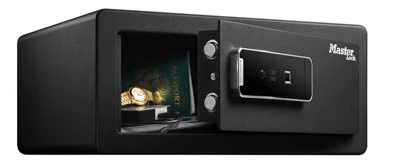
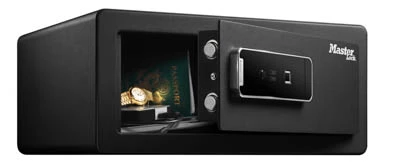
This biometric laptop safe provides compact, lockable storage for a laptop and selected personal items in offices, education settings, hotels, accommodation and home workspaces.
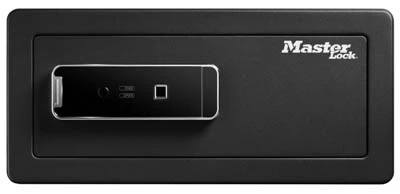
Fingerprint access allows an authorised user to open the safe without entering a combination. Before ordering, compare the laptop and any protective case with the internal dimensions shown in the specification section .
This product is a secure-storage safe rather than a charging unit. It should not be treated as providing fire protection, water protection or a certified cash rating unless supporting documentation confirms those capabilities.
Suitable Laptop Safe Applications
| Location | Typical storage requirement |
|---|---|
| Private offices | Lockable storage for a company or personal laptop when it is not in use |
| Schools and colleges | Controlled storage for a staff, departmental or loan device |
| Hotels | In-room storage for a guest laptop and selected personal items |
| Serviced accommodation | Individual storage for occupants requiring fingerprint-controlled access |
| Shared workplaces | Assigned storage where access is limited to registered users |
| Home offices | Storage for a laptop, external drives and selected work items |
The safe is intended for individual or controlled-access storage. A bank of lockers may be more suitable where many users or devices need separate compartments.
Check That the Laptop Will Fit
Laptop screen size alone does not confirm that a device will fit. Measure the complete laptop and any case, sleeve or accessories that will be stored with it.
| Check | What to measure or confirm |
|---|---|
| Laptop width | Measure the widest point of the closed device |
| Laptop depth | Measure from the front edge to the rear edge |
| Laptop thickness | Include feet, covers and any permanently attached accessories |
| Protective case | Measure the case or sleeve if the laptop will remain inside it |
| Power supply | Allow additional space where the charger or adapter will also be stored |
| Door clearance | Confirm that the device can pass through the safe opening without contacting the door or locking mechanism |
| Internal dimensions | Compare all measurements with the usable internal height, width and depth in the product specification |
Leave sufficient clearance to place and remove the laptop without forcing it against the door, locking bolts or internal surfaces.
Managing Biometric Access
Establish who will administer the safe before registering users. Access procedures are particularly important where the safe is used in a hotel, school, office or other shared environment.
| Control | Recommended procedure |
|---|---|
| Authorised users | Register only people who require access to the stored items |
| Fingerprint testing | Test each registered fingerprint before placing valuables inside |
| User changes | Review registered access when staff, guests or authorised users change |
| Override access | Restrict override access to the owner or an authorised administrator |
| Override-key storage | Keep override keys in a separate secure location and never inside the safe |
| Battery checks | Check the power supply periodically and respond to any low-battery warning |
| Access records | Record who administers the safe where it forms part of an organisational security procedure |
Planning the Safe Location
Choose the installation position before ordering. The location should allow the door to open fully while keeping the safe accessible to authorised users.
| Installation check | What to confirm |
|---|---|
| Available space | Confirm sufficient width, height and depth for the safe body |
| Door movement | Allow enough clearance for the door to open without obstruction |
| Supporting surface | Check that the floor, shelf or furniture is suitable for the safe and its stored contents |
| Fixing position | Confirm that the proposed surface is suitable for the supplied bolt-down arrangement |
| User access | Position the fingerprint reader where authorised users can operate it comfortably |
| Moisture and heat | Avoid locations exposed to excessive moisture, heat or unsuitable environmental conditions |
| Maintenance access | Allow access for battery replacement, cleaning and inspection |
Follow the manufacturer’s instructions and use fixings appropriate to the supporting material. Where necessary, obtain advice from a competent installer.
Laptop Safe, Laptop Locker or Charging Locker?
| Storage type | Best suited to | Main consideration |
|---|---|---|
| Biometric laptop safe | One laptop and selected personal items requiring compact, fingerprint-controlled storage | Check the device dimensions and plan who will administer access |
| Laptop locker | Several users or devices requiring separate lockable compartments | Select the number of compartments and the required lock system |
| Laptop charging locker | Multiple devices that need to be secured and charged while stored | Confirm electrical requirements, device capacity and site power provision |
| High-security safe | Applications requiring a documented security or insurance rating | Confirm the required rating with the insurer or responsible organisation |
Biometric Laptop Safe FAQs
How do I check whether my laptop will fit?
Measure the closed laptop’s width, depth and thickness, including its case or sleeve. Compare those measurements with the usable internal dimensions in the specification and allow clearance for the door and locking mechanism.
Can I charge a laptop inside this safe?
This product is presented as a storage safe rather than a charging safe. Do not charge a device inside it or route a power cable through the safe unless the manufacturer’s instructions explicitly permit that use. For powered storage, consider a laptop charging locker .
Is this laptop safe fire-resistant or waterproof?
No fire or water-protection classification is stated on this page. Select a separately tested product where protection from fire or water is required.
Where should the override keys be kept?
Keep the override keys in a separate secure location controlled by the owner or an authorised administrator. Do not store them inside the laptop safe.
Should the laptop safe be bolted down?
Secure fixing can help prevent unauthorised removal. Check that the proposed surface and fixings are suitable, then follow the manufacturer’s installation instructions.
When is a laptop locker more suitable than a laptop safe?
A laptop locker is normally more suitable when several users or devices need separate compartments. A compact laptop safe is better suited to one device and selected personal items in a controlled location.
Specification
Master Lock Biometric Laptop Safe Specification
The Master Lock biometric laptop safe provides fingerprint-controlled storage for laptops and selected personal items. Its solid steel door and body, two motorised locking bolts and concealed hinges are designed to provide resistance against unauthorised access and prying attempts.
Up to 30 fingerprints can be registered, allowing authorised users to open the safe without entering a numerical combination. Mechanical override keys and a low-battery jump kit provide alternative access arrangements.
| Product type | Biometric laptop safe |
|---|---|
| Manufacturer | Master Lock |
| Primary access method | Biometric fingerprint recognition |
| Fingerprint capacity | Up to 30 registered fingerprints |
| Door and body | Solid steel construction |
| Locking bolts | Two motorised bolts |
| Hinges | Concealed hinges |
| Internal protection | Carpeted floor to help protect stored items from scratches |
| Fixing provision | Can be bolted down using the supplied bolt-down hardware |
Laptop Safe Dimensions and Capacity
Compare the usable internal dimensions with the complete laptop, protective sleeve and any accessories that will be stored. Laptop screen size alone does not confirm compatibility.
| Specification | Measurement |
|---|---|
| External height | 195 mm |
| External width | 430 mm |
| External depth | 370 mm |
| Internal height | 192 mm |
| Internal width | 427 mm |
| Internal depth | 310 mm |
| Internal capacity | 25.4 litres |
| Product weight | 10.6 kg |
Power, Override Access and Supplied Items
| Battery requirement | Four AA alkaline batteries |
|---|---|
| Batteries included | No |
| Mechanical override | Two override keys included |
| Low-battery support | Low-battery jump kit included |
| Bolt-down hardware | Included |
Technical Notes
- The fingerprint system allows access without memorising a numerical code.
- Check the external dimensions against the proposed installation position.
- Check the internal dimensions against the laptop and any protective case.
- Keep the override keys in a separate secure location.
- Use alkaline batteries of the type stated by the manufacturer.
- Install the safe using the supplied hardware and fixings suitable for the supporting material.
Delivery
Delivery Information
The approximate lead time is 5 Working Days.
Standard delivery is available to mainland UK addresses, Monday to Friday between 8:00 am and 5:00 pm.
Deliveries are kerbside only. Products may be delivered by a third-party pallet or specialist carrier using a suitable commercial vehicle.
The customer is responsible for providing suitable personnel and equipment to unload the delivery safely.
Please tell us before ordering about restricted access, specific delivery dates or times, FORS requirements or other special delivery arrangements. These may be available at an additional cost.