
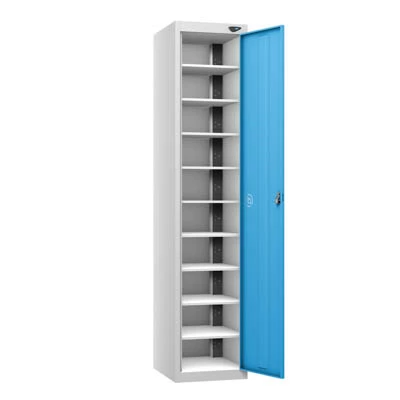
Pure 1-Door, 10-Compartment Laptop Storage and Charging Locker
Pure 10-Compartment Laptop Storage and Charging Locker
 Click to enlarge
Features
Pure 1-Door 10-Compartment Laptop Locker
The Pure laptop locker provides a centrally controlled location for managing a shared pool of laptops and portable workplace technology.
Its central-access format is intended for organisations that want an authorised member of staff to issue, collect and manage multiple devices from one secure cabinet. It is particularly suited to managed equipment pools rather than situations where every user needs independent access to an individual compartment.
For individually accessible storage, compare the wider laptop and tablet locker range .
Centralised Laptop Storage and Management
The cabinet is designed to keep several devices together behind one controlled access point. This can simplify asset management where laptops are issued by an IT department, teacher, administrator, supervisor or equipment manager.
| Requirement | How the locker can be used |
|---|---|
| Shared device pool | Store portable computers together so authorised staff can issue them when required. |
| End-of-day collection | Provide one known location for returning equipment after lessons, shifts, meetings or training sessions. |
| Asset accountability | Number the internal positions and allocate each location to a specific device or asset record. |
| Restricted access | Limit access to designated staff rather than issuing a separate locker key or code to every device user. |
| Routine inspection | Allow authorised personnel to inspect the complete device pool during one opening procedure. |
Where Is a Central-Access Laptop Locker Used?
| Location | Typical use | Management consideration |
|---|---|---|
| Schools and colleges | Store classroom laptops between lessons or overnight. | Assign responsibility for issuing devices and checking that they have been returned. |
| Universities and training centres | Manage portable computers used in teaching rooms, workshops and temporary training spaces. | Use an asset register or booking process where several groups share the same equipment. |
| Offices | Hold shared laptops for hybrid workers, visitors, meetings and temporary projects. | Define who can authorise access and how equipment is signed in and out. |
| Healthcare and public-sector sites | Provide a controlled location for shared portable technology. | Confirm local information-security and equipment-management procedures before deployment. |
| Warehouses and industrial workplaces | Store laptops used for stock control, maintenance, inspections or shift administration. | Position the cabinet in a clean, dry and supervised area suitable for electronic equipment. |
Choosing the Main Door Lock
Because the main door controls access to the complete device pool, the lock should be selected according to who will manage the cabinet and how access credentials will be controlled.
| Lock type | Suitable management approach | Points to consider |
|---|---|---|
| Key-operated cam lock | Simple access for a small number of authorised key holders. | Maintain a record of spare keys and any available master-key reference. |
| Padlock-compatible hasp | Sites that already operate a controlled padlock system. | Confirm the permitted padlock dimensions and how replacement padlocks will be managed. |
| Mechanical combination lock | Keyless access where a code can be issued to authorised staff. | Decide whether the access code will be permanent or changed at planned intervals. |
| Digital keypad lock | Managed keyless access where electronic code control is preferred. | Establish procedures for battery replacement, administrator access and forgotten codes. |
| RFID lock | Organisations using compatible cards or credentials for access. | Confirm card compatibility and administrator credential requirements before ordering. |
The lock secures the main cabinet door rather than giving separate users independent access to the internal device positions.
Check the Laptop Fleet Before Ordering
Device size alone is not the only compatibility consideration. The complete laptop, protective case, connector and charging cable must fit without being compressed, sharply bent or trapped by the cabinet door.
- Record the make and model of every device that will be stored
- Measure laptops with their protective cases fitted
- Check the position of each charging connector
- Confirm whether devices use identical or mixed power supplies
- Allow space for plugs, adapters and cable bends
- Decide whether chargers will remain permanently inside the cabinet
- Number devices and internal positions consistently
- Plan how damaged cables or power supplies will be identified
Where the device fleet includes tablets, smaller notebooks or mixed technology, compare the Pure tablet locker range before selecting the final cabinet.
Managing Devices While They Are Charging
A charging cabinet should form part of a documented equipment-management process rather than being treated only as storage furniture.
- Use the charging format specified for the installed device fleet
- Keep charging cables assigned to their corresponding device positions
- Remove damaged plugs, cables or power supplies from service
- Prevent loose cables from being trapped by the main door
- Keep ventilation openings clear during use
- Do not store unrelated combustible materials with charging equipment
- Follow the device and charger manufacturers' operating instructions
- Arrange electrical inspection according to the site's own procedures
Where charging is not required, select the appropriate unpowered configuration rather than installing unused electrical equipment.
Positioning and Installing the Locker
Select a dry indoor location with suitable access to the required electrical supply. The locker should not obstruct escape routes, doors, corridors or access to other equipment.
| Check | Why it matters |
|---|---|
| Wall position | The locker should be secured in accordance with the manufacturer's installation instructions. |
| Electrical supply | The available circuit and socket position must suit the selected charging configuration. |
| Ventilation | Air openings must remain unobstructed so heat does not accumulate around stored equipment. |
| Door clearance | Allow sufficient space for the main door to open fully without striking walls, furniture or equipment. |
| Floor condition | The installation surface should be level, stable and capable of supporting the cabinet and stored equipment. |
| Supervision | Position the locker where authorised staff can manage access and inspect its condition. |
Manufacturing and Fire-Performance Information
Pure promotes carbon-zero manufacturing for its locker ranges and uses the FlameZero designation for tested fire-performance characteristics. Procurement teams requiring environmental or fire documentation should request the current certificates for the exact product configuration.
These designations should not be rewritten as claims that the cabinet is fireproof or that it prevents all fire risks associated with electrical equipment.
Information Required Before Ordering
- Number and model of devices to be managed
- Dimensions of devices with protective cases fitted
- Required power and connector arrangement
- Selected main-door locking system
- People or teams authorised to access the cabinet
- Preferred frame and door finish
- Location of the available electrical supply
- Wall construction and proposed fixing position
- Any restricted delivery access at the destination
- Required environmental or fire-performance documentation
Supplying this information before manufacture helps confirm that the locker, charging arrangement and access-control method are appropriate for the intended device-management process.
Call 01284 749211 or email sales@totallocker.co.uk for configuration and compatibility assistance.
Specification
Please see our technical documentation for this product below Pure 1-Door 10-Compartment Laptop Locker Specification
Please see our technical documentation for this product below Pure Power Charging Locker Brochure
Pure 1-Door 10-Compartment Laptop Locker Specification
Technical details for the Pure 1-door laptop storage and charging locker are shown below. The cabinet is available as a storage-only unit or with one of two charging configurations.
Cabinet Dimensions and Construction
| Feature | Specification |
|---|---|
| Overall height | 1800 mm |
| Overall width | 380 mm |
| Overall depth | 450 mm |
| External doors | One full-height access door |
| Internal storage positions | Ten separate compartments |
| Cabinet construction | Robust steel carcass |
| Top style | Flat top |
| Manufacture | United Kingdom |
| Manufacturer's warranty | Ten years, subject to the manufacturer's terms |
Dimensions are nominal. Check the current technical drawing before allocating floor space, preparing access routes or approving the final configuration.
Storage and Charging Configurations
Storage-only, UK three-pin and USB versions are listed as separate product configurations. Select the required configuration from the product options before adding the locker to the basket.
| Configuration | Technical provision | Electrical equipment |
|---|---|---|
| Storage only | Ten internal device-storage positions | No integral charging provision |
| UK three-pin charging | Cabinet configured for devices using compatible UK three-pin power adapters | Integral UK socket configuration |
| USB charging | Cabinet configured for devices using the specified USB charging connection | Integral USB charging configuration |
Confirm the required charging type before ordering. The presence of a USB connection does not by itself confirm compatibility with every laptop, tablet or charging protocol.
Standard Frame Colours
| Frame colour | Selection |
|---|---|
| Pearl Silver | Standard selectable frame finish |
| Arctic White | Standard selectable frame finish |
| Slate Grey | Standard selectable frame finish |
Standard Door Colours
| Door colour | Door colour |
|---|---|
| Cornflower Blue | Lime Light |
| Mint | Ribbon Blue |
| Cobalt Blue | Lemon |
| Magma | Flame Red |
| Forest Green | Orchid Violet |
| Slate Grey | Pearl Silver |
| Arctic White | — |
Screen settings and lighting can affect the appearance of colours. Request a current colour reference when an exact match is important.
Warranty and Technical Documents
| Document or provision | Details |
|---|---|
| Manufacturer's warranty | Ten years, subject to the applicable warranty conditions, correct use and exclusions |
| Product specification | View the product specification sheet |
| Charging-locker brochure | View the Pure Power charging locker brochure |
Pure 10-Compartment Laptop Locker FAQs
What are the overall dimensions of the laptop locker?
The locker measures 1800 mm high, 380 mm wide and 450 mm deep. The current product data uses a depth of 450 mm rather than 460 mm.
How many doors and compartments does the locker have?
The cabinet has one full-height external access door and ten separate internal positions for storing portable devices.
Is a storage-only version available?
Yes. The product selector includes a storage-only configuration without integral charging equipment. UK three-pin and USB charging versions are listed separately.
Are UK three-pin and USB charging fitted together?
No. UK three-pin charging and USB charging are separate selectable configurations. Choose the option that corresponds with the equipment being stored.
Which frame colours are available?
The selectable frame finishes are Pearl Silver, Arctic White and Slate Grey. A wider range of contrasting door colours is available.
What warranty is supplied with the locker?
The product data lists a ten-year manufacturer's warranty, subject to the applicable terms, correct use and exclusions. Consult the Pure Power charging locker brochure for supporting product information.
Is the laptop locker manufactured in the UK?
Yes. This Pure steel laptop locker is manufactured in the United Kingdom.
Where can I view the complete technical specification?
View the Pure 1-door 10-compartment laptop locker specification for product-specific technical information.
Delivery
Delivery Information
The approximate lead time is 10 Working Days.
Standard delivery is available to mainland UK addresses, Monday to Friday between 8:00 am and 5:00 pm.
Deliveries are kerbside only. Products may be delivered by a third-party pallet or specialist carrier using a suitable commercial vehicle.
The customer is responsible for providing suitable personnel and equipment to unload the delivery safely.
Please tell us before ordering about restricted access, specific delivery dates or times, FORS requirements or other special delivery arrangements. These may be available at an additional cost.