
Data Safes for Fire-Resistant Digital Media Storage
Planning Fire-Resistant Digital Media Storage
Selecting a data safe begins with the media being protected, not simply the external size of the safe.
Record the type, quantity and physical dimensions of the backup media, together with the required fire protection, access method and available installation space. This helps identify a data safe with sufficient usable capacity and a suitable tested classification.
A data safe should form part of a wider backup and recovery process. It protects stored media, but it does not replace duplicate backups, recovery testing or an off-site copy of critical information.
Create a Digital Media Inventory
Prepare an inventory before comparing models. Different media formats, storage cases and backup-rotation procedures can require substantially different internal layouts.
| Inventory item | Information to record | Why it matters |
|---|---|---|
| Media format | USB drives, external hard drives, backup tapes, optical disks, memory cards or mixed media | Confirms that the safe is intended and tested for the contents being stored |
| Quantity | Current number of individual drives, tapes, disks or storage cases | Establishes the minimum usable internal capacity |
| Physical dimensions | Height, width and depth of the largest item or media-storage case | Helps confirm shelf spacing and internal clearance |
| Storage containers | Boxes, tape cases, drive cases, wallets or labelled archive trays | Packaging can require more space than the media alone |
| Backup rotation | Frequency with which media is inserted, removed or replaced | Helps determine the most practical internal arrangement and lock type |
| Retention period | How long each backup set must remain available | Indicates whether capacity is required for several generations of backups |
| Expected growth | Estimated increase in stored media during the intended life of the safe | Reduces the risk of selecting a safe that becomes too small |
| Recovery priority | Which backup sets would be required first following an incident | Supports an organised layout and clear identification system |
Data Safe Capacity and Internal Layout
External dimensions do not represent the usable storage space. The safe body, insulation, door construction and internal fittings all affect the available capacity.
| Capacity check | What to confirm |
|---|---|
| Usable internal dimensions | Confirm the internal height, width and depth from the product specification |
| Shelf arrangement | Check the number of shelves, their adjustment range and whether they can be removed |
| Door clearance | Allow for the internal door furniture and the space required to remove larger media cases |
| Media orientation | Determine whether tapes, drives or archive boxes will be stored vertically or horizontally |
| Identification space | Allow room for labels, dividers or separate backup sets |
| Future capacity | Include a reasonable allowance for additional backup media |
| Internal loading | Confirm that shelves and fittings are suitable for the proposed stored weight |
Do not select a model solely from the catalogue capacity description. Compare the listed internal dimensions with the actual media and containers that will be stored.
Check the Fire-Test Evidence
Fire protection should be assessed using the test information supplied for the individual model. A general description such as “fire safe” does not by itself confirm that the product is suitable for digital media.
| Evidence | Question to ask |
|---|---|
| Test standard | Which recognised test method or classification applies to the selected model? |
| Protected contents | Does the test relate to digital media, backup tapes, disks or paper documents? |
| Protection period | For how long was the safe tested under the stated conditions? |
| Product model | Does the certificate apply to the exact size and model being ordered? |
| Certificate scope | Are there any exclusions, installation conditions or permitted internal fittings? |
| Independent evidence | Is a current test certificate or manufacturer technical document available? |
Use the exact protection period and classification stated in the technical documentation. Do not assume that a paper-safe rating provides equivalent protection for electronic media.
Plan the Safe Location and Delivery Route
Data safes can be heavy relative to their external size. The complete route from the delivery vehicle to the final position should be checked before ordering.
| Site check | Information required |
|---|---|
| Delivery address | Full postcode and details of any vehicle or time restrictions |
| Parking and unloading | Distance from the unloading point to the building entrance |
| Doorways | Clear opening width and height of every doorway on the route |
| Corridors and corners | Narrow sections, tight turns and restricted manoeuvring space |
| Steps and stairs | Number, dimensions and position of any steps or staircases |
| Lift access | Lift-door dimensions, internal size and rated capacity |
| Floor level | Ground floor, basement or upper-floor location |
| Final position | Available floor area, door-opening clearance and surrounding access |
| Floor suitability | Confirm that the proposed location can support the safe and its contents |
| Fixing requirements | Check whether fixing is available, required or suitable for the selected model |
Review the general delivery and access information before ordering a larger data safe.
Manage Access and Backup Rotation
The lock protects access to the safe, but the organisation should also maintain a clear procedure for handling, recording and recovering the stored media.
| Control | Procedure to define |
|---|---|
| Authorised users | Identify who may open the safe, remove media or add new backups |
| Key or credential control | Record who holds keys, codes, fingerprints or administrative access |
| Media register | Maintain a record of each backup set and its current location |
| Rotation schedule | Define when media is replaced, archived or moved off site |
| Labelling | Use consistent references without exposing unnecessary confidential information |
| Duplicate backups | Keep additional protected copies where required by the recovery plan |
| Recovery testing | Confirm at planned intervals that stored backups can be read and restored |
| Incident procedure | Define who is responsible for retrieving and restoring critical information following an incident |
Information to Provide When Requesting a Data Safe
Supplying the following information helps identify suitable models and reduces the risk of ordering a safe that is too small or unsuitable for the intended media.
| Information | Details to provide |
|---|---|
| Media type | USB drives, hard drives, backup tapes, disks, memory cards or mixed media |
| Quantity and dimensions | Current quantity, storage-case dimensions and expected growth |
| Required protection | Required test classification or protection period, where known |
| Lock preference | Key, electronic or fingerprint access where available |
| Installation position | Ground floor, upper floor, basement or other location |
| Access route | Door widths, steps, lifts, corridors and parking restrictions |
| Delivery postcode | Full delivery postcode for access and carriage assessment |
| Required date | Preferred delivery date or project deadline |
Data Safes With Key, Combination Or Fingerprint Locks
Compare data safes for USB drives, hard drives, backup tapes, disks and digital media. Models include key lock, electronic lock and fingerprint lock options depending on size and specification.
DS2000 Series - Datacare
DS2000 Series Datacare provides fire protection for paper documents computer diskettes tapes and all forms of data storage and security for cash and valuables all in one unit.
Lead Time 1 Working daysfrom £379 Plus V.A.T.
DS2000 Series - DatacareSpecification Sheet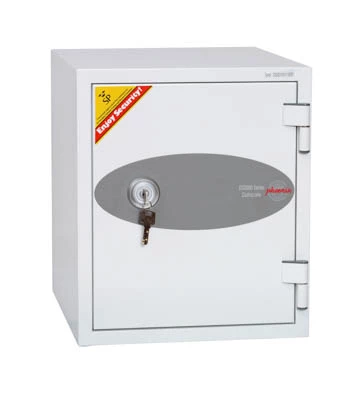
DS2500 Series - Data Combi
DS2500 Series Data Combi is designed to meet the requirement of a large capacity fire protection unit for computer diskettes tapes and all forms of data storage.
Lead Time 3 Working daysfrom £638 Plus V.A.T.
DS2500 Series - Data CombiSpecification Sheet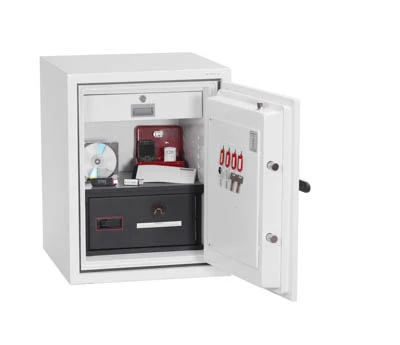
DS4620 Series - Data Commander
DS4620 Series Data Commander is designed to meet the requirement of a large capacity fire protection unit for computer diskettes tapes and all forms of data storage.
Lead Time 5 Working daysfrom £1760 Plus V.A.T.
DS4620 Series - Data CommanderSpecification SheetData Safe vs Fireproof Safe
A data safe is designed to protect digital media that may be damaged by heat at lower temperatures than paper documents. A fireproof document safe is designed mainly for paper records, certificates, files and selected valuables. If you need to protect USB drives, backup tapes, disks or hard drives, choose a data safe or media safe rather than relying on a standard fireproof safe.
Choosing the Right Data Safe
Before ordering, consider the type of media being stored, the volume of storage required, the fire rating, lock type, safe weight and delivery access. Larger data safes may need access checks for steps, narrow doors, upper floors or restricted delivery areas.
- Small data safes: suitable for USB drives, memory cards and small backup devices
- Medium data safes: suitable for mixed media, disks, portable drives and office backups
- Large data safes: suitable for higher-volume backup media and business continuity storage
- Fireproof document safes: better suited to paper records, certificates and files
Data Safe Lock Options
Data safes are available with different lock types depending on the model. Key locks are simple and reliable, electronic locks are convenient for managed access, and fingerprint locks can help restrict access to authorised users on selected models.
Data Safes Compared With Fireproof Document Safes
| Safe type | Best for | Main protection focus |
|---|---|---|
| Data safe | USB drives, hard drives, backup tapes and disks | Digital media protection from heat, fire and unauthorised access |
| Fireproof document safe | Paper records, certificates and files | Paper document protection |
| High security safe | Cash, valuables and higher-security storage | Physical attack resistance and secure access control |
Choose Data Safes by Media Type
- USB drive safes for memory sticks and portable flash storage
- Hard drive safes for external drives and business backup devices
- Backup tape safes for removable tapes and archive media
- Fireproof media safes for digital storage that needs lower internal temperature protection
- Fireproof document safes for paper records, certificates and files
- All safes for cash, documents, valuables and secure storage
Data Safe FAQs
What is a data safe?
A data safe is a fire-resistant safe designed to protect digital media such as USB drives, hard drives, backup tapes, disks and memory cards from heat, fire and unauthorised access.
Is a data safe the same as a fireproof safe?
No. A standard fireproof safe is usually designed for paper documents. A data safe is designed for digital media that can be damaged by lower internal temperatures.
What should I store in a data safe?
Data safes are suitable for removable backup media, USB drives, external hard drives, tapes, disks, memory cards and digital business records.
Do data safes have electronic locks?
Some data safes are available with electronic locks, key locks or fingerprint locks, depending on the model. Choose the lock type based on access control, user numbers and site policy.
Do larger data safes need special delivery checks?
Yes. Larger or heavier data safes may need access checks for steps, narrow doors, upper floors, lifts, parking restrictions or restricted delivery areas.