Locker Asset Register UK: Tracking Locker Assets, Locks, Keys, Locations and Lifecycle Status
May 13, 2026
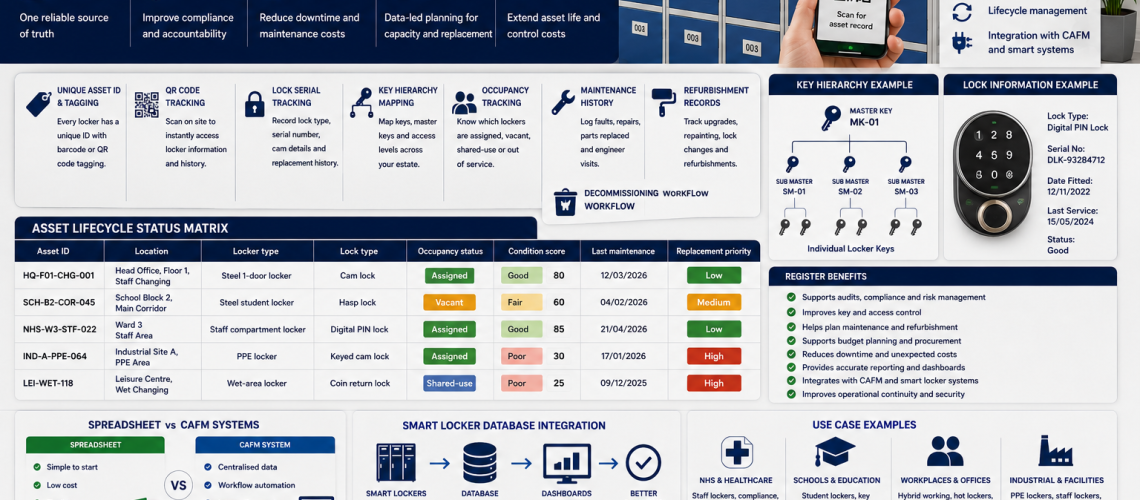
A locker asset register is the central record used to track every locker, lock, key, location, condition, occupancy status and lifecycle decision across a site or estate. It helps UK facilities managers, estates teams, schools, NHS sites, workplaces and procurement teams manage lockers as structured operational assets.
This is now a critical enterprise layer. Many locker management tasks depend on accurate asset data. Audits, lifecycle planning, occupancy reviews, access control, lock replacement, refurbishment, governance and procurement all need one reliable source of truth.
Without a register, locker estates become fragmented. Keys are tracked separately from locks. Repairs are handled without lifecycle history. Occupancy is checked manually. Replacement planning becomes reactive. A locker asset register closes that gap.
What Is a Locker Asset Register?
A locker asset register is a structured spreadsheet, database, CAFM record or smart locker system that records each locker asset and its management status.
It should identify where each locker is, what type it is, which lock is fitted, which key or credential controls it, whether it is occupied, what condition it is in and what action is required next.
A strong locker asset register answers:
- Where is each locker located?
- What is the unique asset ID?
- What visible number is on the door?
- What lock type is fitted?
- Which key, PIN, RFID card or digital credential opens it?
- Is the locker assigned, vacant, shared-use or out of service?
- When was it last inspected?
- What maintenance has been completed?
- Has the locker been refurbished?
- Should it be kept, repaired, refurbished, replaced, relocated or removed?
Why Locker Asset Registers Matter
Locker estates often grow over time. A school may add lockers in several phases. A workplace may change from assigned lockers to shared-use lockers. An NHS site may have staff changing lockers across several departments. A factory may have PPE lockers, staff lockers and visitor lockers in different areas.
Over time, this creates mixed lock types, unclear key records, missing locker numbers, unknown condition history and inconsistent replacement decisions.
A locker asset register creates structure. It links physical lockers to facilities management, compliance logging, operational continuity, infrastructure databases, smart estate analytics and capital planning.
Core Locker Asset Register Fields
| Field | Purpose |
|---|---|
| Asset ID | Creates a unique reference for each locker or compartment. |
| Visible locker number | Helps users and staff identify the locker quickly. |
| Site | Supports multi-site estate management. |
| Building, floor and room | Shows the exact physical location. |
| Locker type | Records material, size, compartment format and use case. |
| Dimensions | Supports specification and replacement planning. |
| Lock type | Shows whether the locker uses keys, hasps, PIN, RFID or digital access. |
| Key or credential record | Links the locker to key numbers, master keys or digital credentials. |
| Occupancy status | Shows whether the locker is assigned, vacant, shared-use or unavailable. |
| Condition score | Supports maintenance, audits and replacement decisions. |
| Maintenance history | Records repairs, faults, parts and service dates. |
| Lifecycle status | Shows keep, repair, refurbish, replace, relocate or remove. |
Locker Numbering Systems
Locker numbering is the visible identity layer. It helps users find lockers and helps staff carry out inspections, repairs, key checks and allocation reviews.
A basic system may use door numbers only. A stronger system links the door number to site, building, floor, room, bank and compartment data.
Example numbering formats include:
- SCH-B1-R02-L045 for school, block 1, room 2, locker 45.
- HQ-F02-CHG-118 for head office, floor 2, changing room, locker 118.
- NHS-WARD3-STF-022 for NHS ward 3, staff locker 22.
- IND-A-PPE-064 for industrial site A, PPE locker 64.
Asset IDs and Tagging
Asset IDs give each locker a permanent estate-management identity. The visible door number may change if a locker is renumbered or relocated. The asset ID should remain linked to the asset record.
Common tagging methods include printed labels, engraved plates, barcode labels, QR code tags and RFID asset tags.
| Tag type | Best use |
|---|---|
| Printed number labels | Simple school and workplace locker identification. |
| Engraved plates | Durable labelling in high-use areas. |
| Barcode labels | Fast scanning during audits. |
| QR code tags | Direct access to digital locker records. |
| RFID asset tags | Advanced estate tracking and inventory control. |
QR Code Tracking
QR code tracking allows staff to scan a locker and open its digital record. This can speed up audits, maintenance checks, occupancy reviews and replacement planning.
A QR-linked locker record may show the asset ID, locker number, location, lock type, key number, condition score, occupancy status, maintenance history and next required action.
QR tracking is especially useful for larger schools, workplaces, healthcare departments, leisure centres and multi-site estates.
Lock Serial Tracking
Lock serial tracking records the lock fitted to each locker. This is important because many estates contain mixed lock systems. Some lockers may use cam locks. Others may use hasps, combination locks, coin locks, RFID locks, PIN locks or digital locks.
Useful lock tracking fields include:
- lock type
- manufacturer or range
- key number or serial number
- cam length
- fixing pattern
- door thickness compatibility
- master key group
- date fitted
- replacement history
- known faults
This links directly with Locker Lock Replacement Guide UK and Locker Lock Compatibility Guide UK.
Key Hierarchy Mapping
Key hierarchy mapping shows how individual keys, spare keys, master keys and emergency access routes relate to the locker estate.
A key hierarchy map should show:
- which key opens each locker
- which master key group applies
- who holds authorised master keys
- where spare keys are stored
- which keys have been issued
- which keys have been returned
- which keys are missing
- which locks have been changed after key loss
- which emergency access process applies
This connects with Locker Key Management Systems UK and Replacement Locker Keys Cut to Code UK.
Occupancy Status Tracking
Occupancy status tracking shows whether each locker is in active use. This turns the asset register into a planning and utilisation tool.
Useful occupancy statuses include:
- assigned
- vacant
- shared-use
- temporary allocation
- reserved
- abandoned contents check required
- awaiting clean-down
- awaiting repair
- out of service
- decommissioned
This helps organisations identify over-supplied areas, shortage zones, unused lockers and future procurement needs. It links closely with Locker Occupancy Management Systems UK.
Maintenance History
Maintenance history records faults, repairs, inspections, parts fitted and follow-up actions. It helps estates teams decide whether lockers should be repaired, refurbished or replaced.
Maintenance records should include:
- fault date
- reported issue
- asset ID
- inspection notes
- parts replaced
- engineer or responsible person
- completion date
- follow-up action
- cost where recorded
Repeated faults can show that a locker bank is becoming uneconomical to maintain. This links with Locker Maintenance Guide UK and Locker Lifecycle Management UK.
Refurbishment Records
Refurbishment records show when lockers have been repaired, repainted, relabelled, upgraded or reconfigured. This is important because refurbished lockers should not be treated as untouched old stock.
Useful refurbishment fields include:
- refurbishment date
- work completed
- doors replaced
- locks upgraded
- hinges replaced
- paint or finish updated
- numbering changed
- asset tag updated
- expected extended life
- next review date
This connects directly with Locker Refurbishment UK.
Decommissioning Workflow
Decommissioning is the controlled removal of a locker from active service. It should be recorded clearly so damaged, unsafe or unsuitable lockers are not quietly returned to use.
A decommissioning workflow should include:
- reason for removal
- condition evidence
- final occupancy check
- key or credential cancellation
- asset register update
- replacement asset link
- disposal or relocation note
- date removed from service
- authorised person
Asset Lifecycle Status Matrix
An asset lifecycle status matrix gives estates and procurement teams a clear snapshot of locker condition, usage and replacement priority. It is useful for audits, capital planning, refurbishment decisions and multi-site estate reviews.
| Asset ID | Location | Locker type | Lock type | Occupancy status | Condition score | Last maintenance | Replacement priority |
|---|---|---|---|---|---|---|---|
| HQ-F01-CHG-001 | Head Office, Floor 1, Staff Changing | Steel 1-door locker | Cam lock | Assigned | Good | 12/03/2026 | Low |
| SCH-B2-COR-045 | School Block 2, Main Corridor | Steel student locker | Hasp lock | Vacant | Fair | 04/02/2026 | Medium |
| NHS-W3-STF-022 | Ward 3 Staff Area | Staff compartment locker | Digital PIN lock | Assigned | Good | 21/04/2026 | Low |
| IND-A-PPE-064 | Industrial Site A, PPE Area | PPE locker | Keyed cam lock | Assigned | Poor | 17/01/2026 | High |
| LEI-WET-118 | Leisure Centre Wet Changing | Wet-area locker | Coin return lock | Shared-use | Poor | 09/12/2025 | High |
This matrix is the practical core of the register. It helps teams move from scattered notes to structured locker estate management.
Multi-Site Locker Estates
Multi-site estates need consistent locker data. Without standard fields, one site may track lockers by room number, another by key number and another by department. That makes reporting difficult.
A multi-site asset register should standardise site codes, building codes, asset ID formats, condition scores, occupancy statuses, lock categories, maintenance fields, replacement categories and audit frequency.
This is useful for academy trusts, councils, healthcare estates, universities, leisure groups, industrial operators and workplace portfolios.
Spreadsheet vs CAFM Systems
A locker asset register can start as a spreadsheet. For smaller sites, this may be enough. Larger estates may need CAFM integration, QR code scanning, smart locker databases or API-connected reporting.
| System | Strength | Limitation |
|---|---|---|
| Spreadsheet | Simple, low cost and quick to start. | Needs discipline to avoid errors and duplicate records. |
| Cloud spreadsheet | Supports shared access and live updates. | Still relies on manual control. |
| CAFM system | Connects lockers to facilities tasks, assets and maintenance workflows. | May need setup and custom fields. |
| QR code register | Fast on-site audit and maintenance access. | Tags must remain readable and durable. |
| Smart locker database | Can connect access, occupancy and usage data. | Requires compatible systems and data governance. |
Smart Locker Database Integration
Smart locker systems can add live data to the asset register. Instead of recording only static asset details, the database may include access events, occupancy status, user assignments, maintenance alerts and usage reports.
Smart locker database integration can support:
- live occupancy dashboards
- access event logs
- automatic user assignment
- credential revocation
- maintenance alerts
- audit exports
- API-connected reporting
- multi-site administration
This is the natural bridge into Smart Locker Analytics UK and Smart Locker Systems UK.
Audit Integration
The asset register should feed directly into locker audits. During an audit, each locker is checked against the register and any difference is corrected.
Audit checks should confirm:
- the locker exists in the recorded location
- the visible number matches the register
- the asset tag is readable
- the lock type is correct
- the key or credential record is current
- the occupancy status is accurate
- the condition score is up to date
- maintenance actions are closed
- replacement priority is still valid
This links with Locker Estate Audit UK and Locker Infrastructure Standards UK.
NHS Locker Asset Register Example
An NHS or healthcare locker asset register may track staff changing lockers by department, ward, changing room, lock type and cleaning access. It may also support infection-control upgrades, staff movement planning, maintenance records and estate replacement programmes.
Useful healthcare fields include staff zone, department, clean or dirty area, lock type, access route, condition, cleaning notes and replacement priority.
School Locker Asset Register Example
A school locker asset register may track student lockers by block, corridor, year group, form group, key number and occupancy status. It can also record damage, lost keys, abandoned lockers and term-end returns.
This helps school business managers understand demand, reduce lost key problems and plan locker renewal during holidays.
Workplace Locker Asset Register Example
A workplace locker asset register may track staff lockers, visitor lockers, hot lockers, PPE lockers and shared-use lockers. It can support hybrid working, departmental allocation, locker occupancy reviews and future workplace expansion.
Useful workplace fields include department, assigned user type, occupancy status, access method, usage model, maintenance history and lifecycle decision.
How the Asset Register Supports Smart Locker Analytics
Once the asset register exists, smart locker analytics becomes structurally logical. The register defines the locker estate. Analytics then measures how that estate performs.
Smart analytics can build on asset register data to show occupancy heatmaps, predictive maintenance, access analytics, utilisation dashboards, demand forecasting, hybrid workplace analytics, API-connected lockers and reporting systems.
This creates a clear sequence:
- First, identify and structure the locker estate.
- Next, connect assets to access, occupancy and maintenance records.
- Then, use analytics to improve capacity, cost, security and lifecycle planning.
Locker Asset Register Checklist
| Register area | Question |
|---|---|
| Identity | Does every locker have a unique asset ID? |
| Location | Can each locker be found quickly? |
| Access | Are locks, keys and credentials recorded? |
| Occupancy | Is each locker assigned, vacant, shared-use or out of service? |
| Maintenance | Are faults and repairs logged? |
| Refurbishment | Are upgrades, repainting and repairs recorded? |
| Lifecycle | Is each locker marked keep, repair, refurbish, replace or remove? |
| Audit | Is register data checked against physical lockers? |
| Software | Should the register connect to CAFM or smart locker systems? |
| Governance | Who owns and updates the register? |
How Total Locker Service Can Help
Total Locker Service supplies lockers, replacement locks, replacement keys, locker parts and practical advice for UK organisations. A structured locker asset register helps teams order the correct parts, plan replacements, manage keys and make better lifecycle decisions.
Whether you manage lockers in a school, NHS site, workplace, leisure centre or industrial facility, Total Locker Service can help connect locker products with long-term estate control.
Recommended Internal Links
- Locker Estate Audit UK
- Locker Infrastructure Standards UK
- Locker Management Systems UK
- Locker Lifecycle Management UK
- Locker Refurbishment UK
- Locker Replacement Planning UK
- Locker Occupancy Management Systems UK
- Locker Access Control Systems UK
- Locker Key Management Systems UK
- Smart Locker Analytics UK
FAQ
What is a locker asset register?
A locker asset register is a structured record of every locker asset, including location, number, lock type, key record, occupancy status, condition, maintenance history and lifecycle decision.
Why do organisations need a locker asset register?
Organisations need a locker asset register to track lockers, manage keys, plan maintenance, support audits, control occupancy and make better replacement decisions.
Can a locker asset register be a spreadsheet?
Yes. A spreadsheet can work for smaller sites. Larger estates may need cloud records, CAFM systems, QR code tracking or smart locker database integration.
What should a locker asset register include?
It should include asset ID, visible locker number, location, locker type, lock type, key number or credential, occupancy status, condition score, maintenance history, refurbishment records and lifecycle status.
How does a locker asset register support audits?
It gives auditors a clear record to check against the physical locker estate. Differences in location, condition, access records or occupancy can then be corrected.
How does a locker asset register help with smart locker analytics?
The register defines the locker estate. Smart locker analytics can then measure occupancy, usage, access events, maintenance trends and demand across those recorded assets.
Discover more from Blog Total Locker Service
Subscribe to get the latest posts sent to your email.