Locker Lifecycle Management UK: Repair, Refurbishment, Replacement & Decommissioning
May 13, 2026
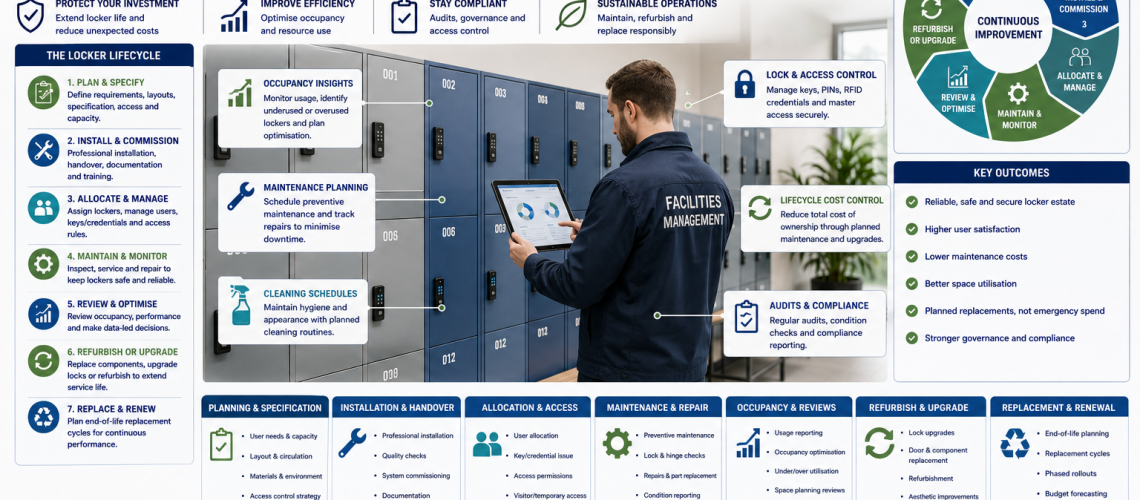
Locker lifecycle management is the evidence-led process used to decide whether physical locker assets should remain in service, be monitored, repaired, refurbished, replaced or decommissioned.
It brings together physical condition, maintenance history, recurring faults, corrosion, parts availability, access-system support, operational suitability and downtime so facilities teams can choose a proportionate next action.
Locker Estate Management coordinates the wider physical estate. Locker Lifecycle Management decides what intervention should happen next. Locker Replacement Planning delivers an approved renewal project.
For estate-wide coordination, use Locker Estate Management UK. For physical verification and condition assessment, use Locker Estate Audit UK. Once complete replacement has been approved, use Locker Replacement Planning UK.
The key lifecycle question is not “how old is the locker?” It is “what does the current evidence justify doing next?”
Quick Answer: What Is Locker Lifecycle Management?
Locker lifecycle management turns evidence about an existing locker into a defined intervention status and next action.
- Normal service: no material intervention is currently required.
- Monitor: an issue exists, but intervention is not yet justified.
- Repair required: a defined fault can be corrected while the wider asset remains suitable.
- Refurbishment review: coordinated renewal may extend useful service.
- Replacement review: complete renewal now warrants formal comparison with continued repair or refurbishment.
- Approved replacement: renewal has been authorised and should move into project planning.
- Decommissioned: the asset has left active service and should no longer count as usable capacity.
These statuses should be based on evidence rather than a fixed locker age. Structural condition, failure history, supportability, suitability and repairability are normally more useful than age alone.
What This Page Owns
This guide owns the physical intervention decision for existing locker assets.
- Lifecycle status.
- Normal service versus intervention.
- Monitor versus repair.
- Repair viability.
- Component replacement.
- Refurbishment viability.
- Replacement-review entry.
- Recurring-fault escalation.
- Maintenance-risk trends.
- Parts obsolescence and supportability.
- Corrosion and environmental deterioration.
- Suitability for current use.
- Access-system obsolescence as a lifecycle trigger.
- Decommissioning decisions.
What This Page Does Not Own
| Question | Specialist owner |
|---|---|
| What physical locker assets exist and where? | Locker Asset Register UK |
| How is the whole locker estate coordinated? | Locker Estate Management UK |
| What is the verified physical condition? | Locker Estate Audit UK |
| How are work orders and maintenance systems administered? | Locker CAFM Integration UK |
| How is an approved replacement project scoped and phased? | Locker Replacement Planning UK |
| How are users allocated and reassigned? | Locker Management Systems UK |
| How is occupancy or utilisation measured? | Locker Occupancy Management Systems UK |
| Which key, PIN, RFID or digital lock should be used? | Locker Access Control Systems UK |
What Evidence Should Drive a Locker Lifecycle Decision?
- Verified physical condition.
- Structural integrity.
- Door, frame and hinge condition.
- Corrosion or moisture damage.
- Maintenance and repair history.
- Repeated fault patterns.
- Failure frequency.
- Time between failures.
- Downtime and unavailable capacity.
- Parts availability.
- Lock and access-system supportability.
- Current operational suitability.
- Previous refurbishment history.
- Compatibility with approved estate standards.
One damaged lock does not normally justify replacing a sound locker bank. Equally, repeated repairs across deteriorating, unsupported or unsuitable lockers can justify moving the asset into refurbishment or replacement review.
Locker Lifecycle Status Matrix
The matrix below gives facilities teams a consistent way to move an asset from evidence to status and then to the correct next action.
| Status | Typical evidence | Next action | Escalation trigger |
|---|---|---|---|
| Normal service | Sound structure, serviceable components, no significant recurring faults | Routine operation and maintenance | New condition, reliability or suitability evidence |
| Monitor | Minor deterioration, isolated historic faults, early corrosion or declining parts availability | Record issue and review at defined trigger | Progression, recurrence or increasing operational effect |
| Repair required | Localised fault with sound surrounding structure and compatible parts available | Correct fault and return to service | Repeat failure or evidence that repair no longer stabilises the asset |
| Refurbishment review | Several worn components, outdated locks, recurring faults or coordinated renewal opportunity while structure remains sound | Assess refurbishment scope, cost and expected service extension | Refurbishment cannot solve underlying condition, support or suitability problem |
| Replacement review | Widespread deterioration, repeated intervention, unsupported components or poor operational suitability | Compare retention, refurbishment and complete replacement | Formal approval of renewal |
| Approved replacement | Renewal requirement accepted | Move to Replacement Planning | Completion of replacement project |
| Decommissioned | Asset permanently removed from active service | Update estate, asset, occupancy and maintenance records | None unless asset is formally reinstated |
The status names can be adapted to an organisation’s existing facilities terminology. What matters is that every status has a clear meaning, supporting evidence and defined next action.
Normal Service
Normal service means there is no current evidence that a lifecycle intervention is required beyond ordinary maintenance.
- The locker remains structurally sound.
- Locks and fittings remain serviceable.
- Faults are isolated rather than recurring.
- Compatible parts remain available.
- The locker remains suitable for current users.
- No significant corrosion or structural deterioration is progressing.
When Monitoring Is the Right Decision
Monitoring is appropriate where a real issue exists but current evidence does not justify repair, refurbishment or replacement.
- Minor cosmetic deterioration.
- Early surface corrosion that is not materially progressing.
- An isolated historic failure that has not repeated.
- Replacement parts becoming less common but still obtainable.
- An older lock family that remains serviceable.
- A possible future suitability problem linked to planned organisational change.
Every monitor decision should have a defined review trigger or review date. Otherwise, monitor can become an indefinite holding status.
When Repair Is the Right Decision
Repair is normally appropriate where the fault is localised, the wider asset remains serviceable and a practical corrective action is available.
- Failed locks.
- Loose or damaged hinges.
- Door-alignment problems.
- Damaged cams, catches or latches.
- Missing shelves, hooks or fittings.
- Local fixing problems.
- Isolated damaged doors where compatible replacements exist.
If the same problem repeatedly returns after repair, the decision should be escalated into lifecycle review rather than simply repeating the same maintenance instruction.
Component Replacement Does Not Mean Locker Replacement
A failed lock, hinge, door, shelf or fitting does not automatically mean the whole locker has reached end of life. Component replacement can preserve a sound cabinet for many more years where parts remain compatible and supportable.
- Replace failed locks while retaining sound doors and cabinets.
- Replace damaged doors where the cabinet structure remains suitable.
- Renew worn hinges, catches and internal fittings.
- Replace damaged numbering and identification.
- Retrofit a replacement lock family where technically practical.
When several components need coordinated replacement across a locker bank or site, the work may become refurbishment rather than routine repair.
When Refurbishment Is the Right Decision
Refurbishment sits between isolated repair and complete replacement. It can be appropriate where the main locker structure remains worth retaining but several elements need coordinated renewal.
- Multiple locks need replacement.
- Several doors need renewal.
- Hinges and hardware require coordinated replacement.
- Numbering or identification needs renewal.
- Internal fittings need replacement.
- A supported access-control retrofit is available.
- The locker finish can be restored appropriately.
Refurbishment should solve the underlying problem rather than simply reduce immediate cost. Retaining an unsuitable structure or unsupported platform can defer rather than resolve the lifecycle issue.
Refurbish or Replace?
| Evidence | May support refurbishment | May support replacement review |
|---|---|---|
| Cabinet structure | Sound and stable | Widespread deterioration or distortion |
| Doors | Repairable or replaceable | Extensive damage across the bank |
| Locks | Compatible replacements or upgrades available | Obsolete system with impractical retrofit |
| Corrosion | Localised and controllable | Widespread or recurring deterioration |
| Parts support | Core components remain obtainable | Critical parts unavailable or dependent on improvised substitutes |
| Suitability | Dimensions and configuration still meet the requirement | Locker no longer suits users or stored items |
| Maintenance history | Faults remain limited and predictable | Repeated intervention continues across the same assets |
| Future support | Refurbished system remains maintainable | Refurbishment preserves an unsupported platform |
Repeated Faults as a Lifecycle Trigger
A single fault normally belongs to maintenance. Repeated faults become lifecycle evidence when they show that routine repair is no longer stabilising the asset.
- The same component repeatedly fails after repair.
- Several lockers of the same type develop the same fault.
- Repairs increasingly depend on modified or non-standard parts.
- The same locker bank repeatedly becomes unavailable.
- Maintenance visits are increasing.
- Repair intervals are becoming shorter.
- Downtime is increasing after each failure.
- Problems are spreading from components into doors, frames or cabinet structure.
These patterns should trigger a lifecycle review rather than another identical repair instruction.
Use Maintenance Trends as Early Warning Evidence
Facilities teams do not need complex predictive software to identify rising lifecycle risk. Maintenance history can show when an asset family is becoming progressively harder to keep in service.
| Trend | Possible meaning | Lifecycle response |
|---|---|---|
| Rising repair frequency | Underlying reliability may be deteriorating | Review recurrence and wider condition |
| Shorter intervals between failures | Repairs may no longer be stabilising the asset | Consider refurbishment or replacement review |
| Increasing downtime | Parts, labour or fault complexity may be worsening | Review supportability |
| Recurring corrosion | Environment or material may be unsuitable | Review specification and retained structure |
| Increasing use of substitute parts | Original component support may be declining | Review standardisation or replacement |
| Repeated temporary repairs | Permanent corrective work may no longer be practical | Escalate lifecycle status |
| Same fault across one product family | Problem may be systemic rather than isolated | Assess the affected population |
These trends indicate increased risk. They do not prove that a specific component will fail on a particular date, so physical condition should still be verified before major intervention is approved.
Parts Obsolescence and Supportability
A locker can remain structurally sound while becoming increasingly difficult to maintain because important components are obsolete or incompatible with current requirements.
- Original locks are no longer available.
- Replacement doors or hinges cannot be sourced economically.
- Available parts need repeated modification.
- Master-key compatibility can no longer be maintained.
- Electronic hardware is unsupported.
- Programming tools or credentials are no longer practical to obtain.
- A growing mixture of substitute components increases maintenance complexity.
Obsolescence does not automatically mean complete locker replacement. A supported retrofit or standardisation programme may preserve a sound physical asset.
Corrosion, Moisture and Environmental Deterioration
Corrosion should be assessed by extent, location, progression and effect on continued safe and practical use.
- Is the corrosion cosmetic or structural?
- Is it isolated or widespread?
- Has the source of moisture been addressed?
- Are doors, frames, bases or fixings affected?
- Can damaged components be replaced economically?
- Is the original locker material still appropriate for the environment?
Recurring corrosion following local repairs may indicate that the locker material or specification is unsuitable for the environment. That can justify moving from repair into refurbishment or replacement review.
Structural Condition
Structural condition is one of the clearest differences between an asset suitable for repair and one requiring broader intervention.
- Cabinet distortion.
- Door-frame damage.
- Failed hinge mounting points.
- Unstable locker banks or failed fixings.
- Severe corrosion at structural points.
- Damage preventing reliable closure.
- Repeated forced-entry damage.
If current condition is uncertain, verify it through Locker Estate Audit UK before approving major refurbishment or replacement.
Suitability for Current Use
A locker can become a lifecycle problem without being physically broken. The original product may simply no longer suit the way the site operates.
- Compartments are too small for current belongings or equipment.
- Depth no longer suits uniforms, PPE or bags.
- Door configuration provides poor capacity for current users.
- The access method no longer suits shared or changing users.
- The locker material is unsuitable for the environment.
- The locker bank conflicts with revised circulation or accessibility requirements.
- The existing doors cannot support a required access upgrade.
Lifecycle Management decides whether the existing physical asset remains worth retaining. New quantities, dimensions and room layouts belong in Locker Planning UK.
Access-System Obsolescence as a Lifecycle Trigger
An outdated lock or credential system can create a lifecycle issue even where the locker cabinets remain structurally sound. Separate the access problem from the cabinet problem before deciding on complete replacement.
| Situation | Possible lifecycle route |
|---|---|
| Individual failed lock with compatible replacement | Repair |
| Obsolete lock family but sound doors accept retrofit | Refurbishment / access upgrade |
| Large-scale conversion requires disproportionate door modification | Replacement review |
| Cabinets remain sound but administration requirements changed | Assess access-control upgrade first |
| Electronic platform unsupported but cabinets remain suitable | Replace access architecture before considering cabinet replacement |
For selecting the future lock or credential method, use Locker Access Control Systems UK.
Reactive, Planned, Condition-Based and Trend-Led Maintenance
Maintenance method supports the lifecycle decision but does not replace it.
| Approach | How it works | When it may suit |
|---|---|---|
| Reactive | Repair after a fault is reported | Low-risk isolated failures |
| Planned / preventative | Inspect or service at defined intervals | High-use estates or components where routine checks reduce disruption |
| Condition-based | Intervene when physical evidence reaches a defined threshold | Corrosion, wear, alignment or structural deterioration |
| Trend-led | Use repair history, recurrence and downtime to identify rising risk | Larger estates with enough reliable maintenance history |
Trend-led maintenance should be treated as evidence that an asset deserves closer inspection or earlier review, not as certainty that a failure will occur on a specific date.
Occupancy and Capacity Are Context, Not Lifecycle Status
Low utilisation does not prove that a locker has reached physical end of life. It may indicate excess capacity, poor location or a change in allocation policy.
- An underused locker bank may be relocated rather than replaced.
- A heavily used bank with repeated faults may justify earlier intervention.
- Replacement quantities may be reduced where surplus usable capacity exists elsewhere.
- Changing operational requirements may justify different locker configurations even where existing units remain physically sound.
For occupancy, vacancy and utilisation methodology, use Locker Occupancy Management Systems UK.
Do Not Replace Lockers by Age Alone
There is no useful universal age at which ordinary commercial lockers automatically need replacement. Locker banks installed at the same time can reach very different conditions because of material, environment, use, cleaning, impact, maintenance and lock-system history.
- Structural condition.
- Extent of corrosion.
- Repeat-fault history.
- Parts support.
- Repairability.
- Operational suitability.
- Refurbishment potential.
- Ability to support the locker consistently.
When Should Lockers Enter Replacement Review?
- Widespread structural deterioration.
- Recurring corrosion that cannot be controlled through local repair.
- Repeated failures across the same locker family.
- Critical spare parts are unavailable or impractical to source.
- Previous refurbishment has failed to stabilise the asset.
- The lockers no longer suit the storage requirement.
- A required access upgrade cannot reasonably be fitted.
- Maintenance disruption has become operationally significant.
- Several intervention types are required simultaneously and full renewal deserves comparison.
Replacement review is not the same as approved replacement. It means the evidence is strong enough to compare continued use, refurbishment and complete renewal formally.
Locker Lifecycle Decision Table
| Evidence pattern | Likely lifecycle route |
|---|---|
| Sound asset with no material recurring faults | Normal service |
| Minor stable issue | Monitor |
| Localised repairable defect | Repair |
| Sound structure with several worn components | Refurbishment review |
| Repeated repairs but structure remains viable | Refurbishment or replacement review |
| Unsupported lock family on otherwise sound lockers | Access retrofit or refurbishment review |
| Widespread structural or corrosion damage | Replacement review |
| Locker no longer suits users | Relocation, reconfiguration or replacement review |
| Renewal formally approved | Approved replacement |
| Asset permanently removed | Decommissioned |
Record Why the Lifecycle Decision Was Made
- Asset or locker-bank reference.
- Current lifecycle status.
- Main evidence used.
- Date of decision.
- Decision owner or approval route.
- Next action.
- Review date where monitoring is selected.
- Links to relevant inspection, CAFM or project records.
The resulting lifecycle status should be returned to Locker Estate Management UK so the wider estate view remains current.
What Happens After Replacement Is Approved?
Lifecycle Management should provide the evidence that justifies renewal but should not absorb the detailed procurement and installation project.
- Why continued service is no longer appropriate.
- Why routine repair is insufficient.
- Whether refurbishment was considered.
- Which condition, supportability or suitability factors justify renewal.
- Which assets or areas are affected.
- Whether replacement is urgent or can be programmed.
Once replacement is approved, move the project to Locker Replacement Planning UK for quantities, scope, specification, procurement and phasing.
Decommissioning Locker Assets
Decommissioning formally removes a locker from active service. It should involve more than physically removing the cabinet.
- Remove the asset from usable capacity.
- Update the physical asset record.
- Resolve user-allocation references.
- Close or transfer maintenance records.
- Record reusable components where appropriate.
- Remove obsolete local numbering or location references.
- Record the replacement or relocation reference where one exists.
Locker Estate Management UK should then show that the asset is no longer active, while the Locker Asset Register preserves the appropriate asset history.
Lifecycle Cost Control
Good lifecycle management does not simply choose the cheapest immediate action. It considers whether the intervention restores a useful, reliable and supportable asset.
- A low-cost repair can be good value where it restores a sound locker.
- Repeated low-cost repairs can become poor value where the same failure continues.
- Refurbishment can be good value where it solves the underlying problem and retains a sound structure.
- Replacement can be justified before complete physical failure where supportability or suitability has materially deteriorated.
- Whole-estate replacement can be unnecessary where evidence supports targeted intervention.
Avoid fixed assumptions about locker lifespan or universal payback periods. Use actual condition, maintenance, parts, downtime and project evidence.
Lifecycle Evidence by Environment
| Environment | Evidence that may deserve attention |
|---|---|
| Schools | Heavy door use, damaged locks, impact damage and changing pupil storage requirements |
| Workplaces | Changing allocation models, underused capacity, lock standardisation and building moves |
| Healthcare staff areas | High shift turnover, cleaning environment, recurring lock faults and department changes |
| Industrial sites | PPE suitability, impact, dust, contaminants, corrosion and intensive shift use |
| Leisure and wet areas | Moisture, corrosion, high user turnover and lock or hinge deterioration |
| Multi-site estates | Different condition profiles, inconsistent lock families and variable maintenance history |
The intervention should remain evidence-based. A sector label by itself does not prove that a locker needs repair, refurbishment or replacement.
Practical Locker Lifecycle Management Workflow
- Identify the asset. Use the correct locker-bank or asset reference.
- Collect evidence. Bring together condition, maintenance history, recurrence, parts support, downtime and suitability.
- Confirm the problem. Separate isolated defects from wider deterioration.
- Check repairability. Decide whether a defined repair can restore reliable service.
- Review recurrence. Check whether faults are returning or becoming more frequent.
- Assess refurbishment. Decide whether coordinated renewal can preserve a sound core asset.
- Review replacement triggers. Consider structure, obsolescence, suitability and supportability.
- Assign lifecycle status. Normal service, monitor, repair, refurbishment review, replacement review, approved replacement or decommissioned.
- Record the evidence. Keep the decision traceable.
- Hand off the action. Send repairs to maintenance and approved renewal to Replacement Planning.
- Update Estate Management. Keep lifecycle status visible across the wider estate.
- Review where required. Monitor statuses should have a defined trigger or date.
Common Locker Lifecycle Management Mistakes
- Replacing lockers by age alone.
- Replacing complete locker banks for isolated lock faults.
- Repeating repairs without reviewing recurrence.
- Ignoring shorter intervals between failures.
- Refurbishing structurally unsuitable lockers because refurbishment looks cheaper.
- Replacing sound cabinets because the lock system is obsolete without considering retrofit.
- Ignoring declining parts support.
- Using occupancy as proof of physical end of life.
- Failing to record why an asset entered replacement review.
- Leaving monitor status without a review trigger.
- Failing to update Estate Management after the lifecycle decision.
- Leaving decommissioned lockers in active capacity figures.
Locker Lifecycle Management Checklist
- Is the asset clearly identified?
- Is current condition known?
- Is maintenance history available?
- Are recurring faults visible?
- Are failure intervals becoming shorter?
- Is downtime increasing?
- Are compatible parts still available?
- Is corrosion understood?
- Is the locker still suitable for its current use?
- Is the existing access system supportable?
- Can a local repair restore reliable service?
- Is refurbishment technically practical?
- Would refurbishment solve the underlying issue?
- Has replacement review been triggered by evidence rather than age?
- Is the lifecycle decision recorded?
- Does monitor status have a review trigger?
- Have approved replacements moved to Replacement Planning?
- Have repair actions moved to maintenance / CAFM?
- Has Estate Management been updated?
- Are decommissioned lockers removed from usable capacity?
Related Locker Lifecycle Guides
- Locker Estate Management UK – estate-wide visibility, ownership and coordination.
- Locker Asset Register UK – physical asset identity, location and core record fields.
- Locker Estate Audit UK – physical verification and condition evidence.
- Locker CAFM Integration UK – faults, work orders and maintenance-system integration.
- Locker Replacement Planning UK – approved replacement scope, procurement and phasing.
- Locker Access Control Systems UK – key, PIN, RFID and digital access selection.
- Locker Management Systems UK – user allocation and operational administration.
- Locker Occupancy Management Systems UK – occupancy, vacancy and utilisation.
Locker Lifecycle Management UK FAQs
What is locker lifecycle management?
Locker lifecycle management is the evidence-led process used to decide whether physical locker assets should remain in service, be monitored, repaired, refurbished, replaced or decommissioned.
What are the main locker lifecycle statuses?
A practical status model is normal service, monitor, repair required, refurbishment review, replacement review, approved replacement and decommissioned.
What is the difference between locker estate management and lifecycle management?
Locker Estate Management coordinates the wider physical locker estate and keeps asset, condition, capacity and lifecycle information visible. Lifecycle Management decides what physical intervention should happen next.
When should a locker be repaired rather than replaced?
Repair is usually appropriate where the fault is localised, the wider cabinet remains suitable, compatible parts are available and the repair is expected to restore reliable service.
When do repeated locker faults become a lifecycle problem?
Repeated faults become lifecycle evidence when the same failures continue after repair, repair intervals shorten, downtime increases, parts support declines or similar problems appear across the same locker family.
When should lockers be refurbished?
Refurbishment can be appropriate where the main locker structure remains sound but several locks, doors, hinges, fittings, finishes or access components need coordinated renewal.
When should lockers enter replacement review?
Replacement review may be justified by widespread structural deterioration, recurring failures, significant corrosion, poor parts support, unsuitable locker configuration or maintenance disruption that is no longer being solved by repair.
Should lockers be replaced at a fixed age?
No universal fixed age determines when ordinary commercial lockers should be replaced. Physical condition, supportability, suitability, maintenance history and parts availability provide better evidence.
Does an obsolete lock mean the complete locker must be replaced?
No. Where the cabinet and door remain suitable, a compatible replacement or retrofit lock may allow the physical locker to remain in service.
What happens after locker replacement is approved?
The project should move into replacement planning for scope, quantity, specification, procurement, phasing and implementation while the approved lifecycle status remains visible in the wider estate record.
What does decommissioning a locker mean?
Decommissioning formally removes a locker from active service. Asset, maintenance, occupancy and allocation records should be updated so it no longer appears as usable capacity.
Summary
Locker Lifecycle Management should answer one question: given the available evidence, what should happen next to this physical locker asset?
Estate Management coordinates the wider physical estate. Asset Register identifies what exists. Estate Audit verifies condition. CAFM records faults and maintenance. Occupancy measures use. Access Control selects the locking technology. Lifecycle Management decides whether the existing asset should remain in normal service, be monitored, repaired, refurbished, replaced or decommissioned.
Recurring faults, increasing repair frequency, corrosion, rising downtime and declining parts support are lifecycle evidence. They should trigger proportionate review rather than automatic replacement.
Once replacement has been approved, continue to Locker Replacement Planning UK. For replacement lockers, compare the current commercial locker ranges or contact Total Locker Service with photographs, quantities, existing locker details and condition information.
Discover more from Blog Total Locker Service
Subscribe to get the latest posts sent to your email.