Mechanical vs Electronic Locker Locks UK: Cost, Security, Retrofit and Workplace Comparison Guide
May 8, 2026
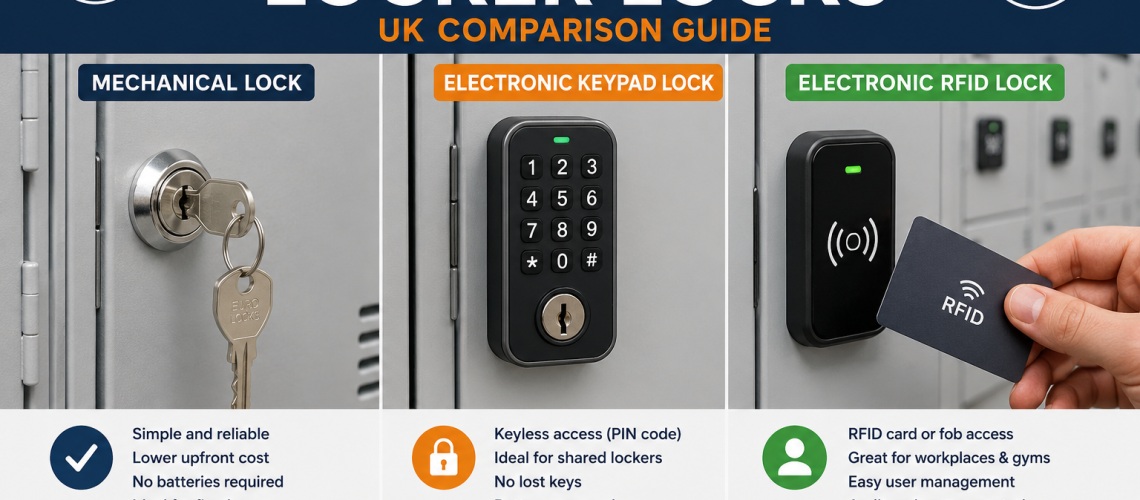
Electronic upgrades need extra care because the lock body, keypad face, fixing footprint and internal clearance may be larger than a standard cam lock. Some electronic locks are designed for locker and cabinet retrofits, but the existing door, lock hole, cam position, fixing method and available internal space must be checked before ordering.
Retrofit rule: do not choose a replacement lock by appearance alone. Measure the lock cut-out, door thickness, cam length, cam direction, fixing centres and the space behind the locker door. This prevents poor fit, restricted door closing and lock bodies catching on stored items.
For this decision, use our locker lock compatibility guide UK, replacement locker locks UK guide and retrofit locker locks UK guide.
Best lock by environment
The right choice depends on how the locker is used. A fixed staff locker, shared hybrid office locker, school locker and gym locker all create different access, admin and maintenance demands.
| Environment | Best mechanical option | Best electronic option | Likely best choice |
|---|---|---|---|
| Office staff lockers | Keyed cam lock or mechanical combination lock | Digital keypad or RFID lock | Mechanical for fixed users; electronic for shared lockers |
| Hybrid workplace | Mechanical combination lock | Public-use digital lock, RFID lock or smart locker lock | Electronic or smart system |
| School lockers | Padlock fitting, keyed lock or coin lock | RFID or keypad lock | Depends on age group, vandal risk and admin capacity |
| Gym or leisure centre | Coin return lock or hasp lock | RFID, wristband, keypad or card-operated lock | Electronic for modern shared-use changing areas |
| Warehouse or factory | Keyed lock or padlock fitting | Heavy-duty keypad lock | Mechanical unless lost keys or shift changes cause problems |
| Public high-risk area | Anti-vandal mechanical lock | Robust managed electronic lock | Security assessment needed before selection |
| Wet area | Corrosion-resistant coin lock, hasp lock or padlock option | Suitable moisture-resistant electronic option | Depends on humidity, cleaning routine and corrosion risk |
| Visitor lockers | Coin return lock | Public-use keypad, RFID or smart lock | Electronic if users change frequently |
| Device lockers | Keyed cam lock | Digital, RFID or smart managed lock | Electronic or smart system if access tracking matters |
For more detail on specialist environments, see our locker locks for wet areas UK guide, locker locks for high-traffic areas UK guide and anti-vandal locker locks UK guide.
Mechanical vs electronic locker locks for workplace systems
Workplace lockers are no longer just rows of fixed staff storage. Many sites now need lockers for hybrid staff, visitors, contractors, devices, PPE, tools and shared storage. This is where lock choice becomes part of the wider workplace storage system.
Mechanical locks work well where each person has a fixed locker. Electronic locks work better where the locker is part of a changing workplace process. This includes temporary allocation, flexible working, shared storage, visitor access, device charging and controlled access to workplace assets.
If the site only needs secure personal storage, a mechanical lock may be enough. If the site needs shared allocation, fewer lost keys, better access control or a route into smart storage, electronic locking is usually the stronger long-term option.
For the wider system, see our workplace storage systems UK guide, smart locker systems UK guide and storage access control guide UK.
Decision guide: which should you choose?
Use this route before choosing a lock:
- Choose mechanical locks if each user has a fixed locker, the budget is tight and key management is not a major problem.
- Choose electronic locks if lockers are shared, users change often, keys are regularly lost or the site needs keypad, card or RFID access.
- Choose smart locker systems if the site needs software control, audit trails, dynamic allocation, reporting or integration with wider workplace systems.
- Choose retrofit upgrades if the locker bodies are still in good condition but the existing locks are causing admin, security or usability issues.
- Choose replacement mechanical locks if the existing system works well but locks are damaged, worn or missing keys.
The best choice is not always the most advanced lock. It is the lock that matches the user model, environment, risk level, admin pressure and maintenance capacity.
Common mistakes to avoid
- Choosing electronic locks without planning battery checks.
- Buying replacement locks without checking compatibility.
- Using keyed locks where users constantly change.
- Using complex smart locks where a simple mechanical lock would work.
- Ignoring manager override access.
- Choosing locks without checking door thickness, cam length and lock body depth.
- Focusing only on lock purchase price instead of lifetime admin cost.
- Using the same lock type across every environment without checking user behaviour.
- Upgrading locks without checking whether the locker doors are still strong enough.
Final recommendation
Mechanical locker locks are best for simple, assigned and low-cost storage. Electronic locker locks are best for keyless access, shared use and sites with high admin pressure. Smart locker systems are best when locks need to become part of a wider storage, access and workplace management process.
If you are replacing or upgrading locker locks, start with the locker door and user model. Then choose the lock. This avoids compatibility problems and ensures the system works in daily use.
To compare options, view our locker locks range, electronic keypad and RFID locks or contact Total Locker Service for help choosing a suitable lock for your lockers.
Explore related locker lock guides
- Locker locks UK guide
- Electronic locker locks UK
- Keyless locker locks UK
- Smart locker systems UK
- Locker lock cost UK
- Locker lock compatibility guide UK
- Replacement locker locks UK
- Retrofit locker locks UK
- Workplace storage systems UK
- Storage access control guide UK
FAQ: Mechanical vs electronic locker locks UK
Are mechanical or electronic locker locks better?
Neither is automatically better. Mechanical locker locks are better for simple, low-cost and assigned storage. Electronic locker locks are better for shared lockers, keyless access and sites that want to reduce lost key admin.
Are electronic locker locks worth it?
Electronic locker locks are worth it when keys create ongoing cost or inconvenience. They are especially useful in gyms, offices, schools, universities and workplaces where users change regularly or lockers are shared.
Do electronic locker locks need batteries?
Most electronic locker locks are battery powered. This means battery checks and replacement routines should be part of the maintenance plan. Sites should also understand override procedures before installation.
Can electronic locks be fitted to existing lockers?
Often, yes. However, compatibility must be checked first. Important measurements include lock hole size, fixing footprint, door thickness, cam length, cam direction and lock body depth inside the locker.
Are mechanical locker locks cheaper?
Mechanical locker locks are usually cheaper to buy. However, lifetime cost may rise if keys are often lost, locks need changing or staff spend time managing key issues.
Which lock is best for workplace lockers?
For fixed staff lockers, mechanical keyed or combination locks may be enough. For hybrid offices, shared lockers or high-turnover staff areas, electronic keypad, RFID or smart locker locks are often more practical.
Which lock is best for gym lockers?
Coin locks, RFID locks, wristband locks and keypad locks can all work in gyms. Electronic locks are often preferred where users want keyless access and the site wants a more modern shared-use system.
Which lock is best for school lockers?
Schools can use keyed locks, padlock fittings, coin locks, combination locks or electronic locks. The best choice depends on age group, supervision, budget, vandal risk and how much key management the school can handle.
Do electronic locker locks improve security?
Electronic locks can improve access control by removing physical keys and supporting PIN, card or RFID access. However, overall security still depends on the locker body, door strength, fixings, hinges and management procedures.
Should I replace keys or upgrade to keyless locks?
If only a few keys are missing, replacement keys may be enough. If lost keys are a repeated problem across many lockers, a keyless or electronic upgrade may reduce long-term admin and improve user convenience.
Can mechanical locker locks be used for shared lockers?
Yes, but they are not always ideal. Coin locks and mechanical combination locks can support shared use, but electronic public-use locks are often easier to manage where users change frequently.
What is the main disadvantage of electronic locker locks?
The main disadvantage is that they need more planning than simple mechanical locks. Battery replacement, override access, user instructions and compatibility checks should all be agreed before installation.
Discover more from Blog Total Locker Service
Subscribe to get the latest posts sent to your email.