Locker Lock Upgrade Guide UK
May 8, 2026
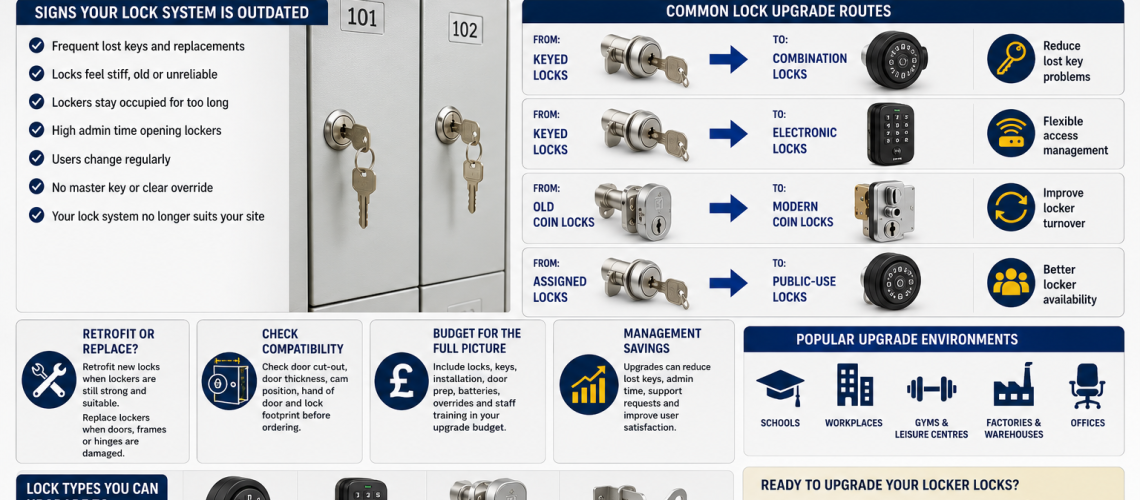
A locker lock upgrade changes an existing locker from one access method to another while keeping the locker itself in service. Typical projects include changing keyed locks to combination, PIN or RFID access, replacing obsolete coin operation, converting selected coin locks to hasps, or standardising several older lock types onto an agreed access method.
This guide owns the upgrade and transition process: document the existing lock, confirm the already-selected new access method, test a representative conversion, plan management access, communicate the change to users, convert lockers in a controlled sequence, commission the new locks and formally close the old process.
It does not decide whether the locker should be upgraded at all. That belongs in Locker Lifecycle Management Systems UK. It also does not choose the new lock technology from scratch; use Locker Access Control Systems UK for that decision.
Replacement = swap a failed or worn lock. Compatibility = prove the new lock fits. Retrofit = physically fit a different lock. Upgrade = change the access method and transition the users.
Quick Answer: What Is a Locker Lock Upgrade?
A locker lock upgrade is a controlled change from the existing access method to a different one on lockers that are remaining in service. The project should preserve practical access while moving users, management procedures and physical lock hardware from the old arrangement to the new one.
| Change | This page’s role |
|---|---|
| Keyed to combination | Plan and execute the change in user and management access |
| Keyed to PIN | Transition from physical keys to code-based operation |
| Keyed to RFID | Move users and administrators to the approved credential model |
| Coin to new coin system | Replace obsolete operation while controlling the changeover |
| Coin to hasp | Convert suitable lockers to user-managed padlock operation |
| Several legacy lock types to one standard | Sequence the conversion without losing service continuity |
What This Page Owns, and What It Hands Off
- Upgrade sequence, user transition, management transition, pilot conversion and commissioning: this page
- Whether an upgrade should happen at all: Locker Lifecycle Management Systems UK
- Which access technology should replace the old one: Locker Access Control Systems UK
- Detailed physical fit and measurement: Locker Lock Compatibility Guide UK
- Physical retrofit method: Retrofit Locker Locks UK
- Like-for-like replacement: Locker Lock Replacement Guide UK
- Physical lock cost: Locker Lock Cost UK
- Complete access-system cost: Locker Access System Cost Guide UK
- Large mixed-estate migration: Hybrid Locker Estates UK
Start With an Approved Reason for Change
An upgrade project should begin after the organisation has already established that a change of access method is appropriate.
- The current lock type is obsolete or difficult to support.
- The agreed operating model has changed.
- The organisation has selected a different credential method.
- Several legacy lock types are being standardised.
- Coin operation is being withdrawn.
- A new management or override method has been approved.
- An approved smart or electronic access project requires conversion of existing lockers.
Whether these reasons justify intervention belongs in Lifecycle Management. This page starts once the change itself has been approved.
Document the Existing Lock Before Planning the Upgrade
The existing installation should be recorded before the conversion is specified.
- Existing lock manufacturer and model where known
- Current access method
- Current user key, code, coin, token or credential
- Current master or management access
- Locker range or door type
- Number of lockers affected
- Known lock variations within the site
- Existing spare parts
- Known faults or unsupported products
If the existing lock cannot be identified, use Locker Lock Identification Guide UK before ordering conversion hardware.
Confirm the New Access Method Before the Conversion Starts
The upgrade project should receive a clear target state rather than trying to choose technology during installation.
- Keyed
- Hasp and padlock
- Mechanical combination
- Coin or token
- Electronic PIN
- RFID card, fob or wristband
- Another approved electronic or smart credential method
For the technology-selection decision, use Locker Access Control Systems UK.
Confirm Physical Compatibility Before Ordering the Upgrade
A chosen access method does not automatically fit the existing locker. Before placing a bulk order, the proposed lock must be checked against the actual door and frame.
- Door material and thickness
- Existing cut-out
- Fixing arrangement
- Lock footprint
- Cam or latch geometry
- Rotation and handing
- Rear clearance
- Battery access where applicable
- Reader or keypad clearance
The detailed measurement and fit process belongs in Locker Lock Compatibility Guide UK. Where the project requires modification of the existing door to accept a different lock, use Retrofit Locker Locks UK.
Keyed Locker Locks to Mechanical Combination
A keyed-to-combination upgrade changes both the physical lock and the way users access the locker.
- Confirm the selected combination lock fits the existing door.
- Confirm private-use or public-use mode.
- Confirm the management or code-recovery method.
- Decide whether existing user keys remain valid during phased conversion.
- Prepare user instructions before changeover.
- Test reset and management access before bulk rollout.
- Remove obsolete key records after each completed conversion phase.
The project should not assume that removing keys removes administration. Forgotten combinations, resets and authorised management access still require a defined process.
Keyed Locker Locks to Electronic PIN
A keyed-to-PIN conversion changes the user credential from a physical key to a code and may introduce batteries, programming and different management tools.
- Confirm the required operating mode.
- Confirm the administrator or manager code process.
- Confirm battery access after installation.
- Confirm the supported emergency or management access route.
- Prepare user instructions for code creation or use.
- Define who handles forgotten codes.
- Commission every converted lock before releasing it to users.
Keyed Locker Locks to RFID
An RFID conversion has two separate dependencies: the new lock must fit the locker and the approved credential must work with the proposed RFID system.
- Confirm physical lock compatibility.
- Confirm card, fob or wristband compatibility.
- Confirm whether existing organisational credentials will be reused.
- Confirm the management credential.
- Confirm battery and service access.
- Confirm public-use or private-use mode.
- Test representative credentials before wider conversion.
- Prepare a fallback route for failed or missing credentials.
Do not assume that two products described as RFID are compatible. For the underlying technology, use RFID Locker Locks UK.
Upgrading Coin-Operated Locker Locks
Older coin-operated systems can be upgraded in several ways depending on the approved target access method and the physical door preparation.
- Old coin lock to compatible modern coin lock
- Coin mechanism to a different coin or token arrangement
- Coin lock to mechanical combination
- Coin lock to electronic access
- Coin lock to RFID
- Coin lock to hasp and padlock operation
Coin locks can differ in handing, latch arrangement and fixing method, so identify the original installation before selecting a conversion.
Coin Lock to Hasp and Padlock Conversion
Where coin operation is being withdrawn, a compatible hasp conversion can allow users to secure the locker with a padlock while retaining the existing locker body.
Total Locker Service supplies conversion solutions for selected existing coin-lock installations and can design and manufacture conversion components for some non-standard applications where the original lock and locker door can be assessed.
See the Ojmar hasp conversion and hasp conversion options.
Hasp or Padlock Fitting to Built-In Lock
An organisation may also move in the opposite direction, replacing user-managed padlocks with a built-in keyed, combination or electronic lock.
- Remove the hasp only after the new lock fit has been proven.
- Check whether the existing door preparation can be reused.
- Confirm the new management-access method.
- Tell users when personal padlocks will cease to be accepted.
- Provide a clear transition date.
- Commission the new lock before withdrawing the old arrangement.
Changing the Operating Mode During an Upgrade
An upgrade can change not only the technology but also how the lock behaves between users.
| Operating mode | Transition requirement |
|---|---|
| Private / assigned | Transfer a persistent key, code or credential to the regular user |
| Public / shared | Ensure the lock releases or resets correctly for the next user |
| Managed shared | Confirm allocation and administrator workflow before rollout |
The operating model should already have been approved before installation. For assigned, shared, hot and temporary allocation models, use Locker Allocation Systems UK.
Preserve Management and Override Access During the Upgrade
Changing the ordinary user access method can unintentionally remove a useful management route if it is not planned.
- Existing master key
- Sub-master key
- Manager key
- Override key
- Management PIN
- RFID management credential
- Programming tool
- Administrator software function
The upgrade should identify which old management tools remain valid, which are replaced and when the old tools should be withdrawn. Organisational authority to use those tools belongs in Locker Access Permissions & Governance UK.
Master-Key Considerations During a Keyed-Lock Upgrade
If the existing lockers form part of a master-key suite, record that structure before changing locks.
- Individual key series
- Master-key group
- Sub-master groups
- Quantity of management keys
- Which lockers sit within each group
- Whether the new lock can preserve the required management structure
For the wider key hierarchy and control process, use Master Key Locker Systems UK.
Test One Representative Conversion First
Before ordering a large quantity, fit the proposed upgrade to a representative locker from each distinct door or lock arrangement.
- Identify and photograph the original lock.
- Record the existing management-access method.
- Confirm the target access method.
- Check physical compatibility.
- Fit the proposed conversion.
- Test the new lock repeatedly with the door open.
- Check cam or latch engagement.
- Check the door closes without abnormal force.
- Test ordinary user access.
- Test management / override access.
- Check battery or service access where applicable.
- Record any modification required.
- Approve the bulk conversion only after the test is satisfactory.
If several locker ranges, ages or door types exist, test each distinct arrangement rather than assuming one successful conversion represents the whole estate.
Plan the Upgrade Sequence
Large locker banks can be converted in phases where that reduces disruption or allows the project team to learn from early installations.
- Locker bank by locker bank
- Department by department
- Floor by floor
- Building by building
- Site by site
- New users first
- Highest-problem areas first where already approved
For a large estate containing several generations of access technology during transition, use Hybrid Locker Estates UK.
Keep Lockers Usable During the Changeover
An access upgrade should not unnecessarily leave users without storage.
- Convert defined locker banks rather than disabling an entire area where practical.
- Tell users when their existing key, code or credential will stop working.
- Issue the new credential before withdrawing the old one where appropriate.
- Provide a local support point during the first changeover period.
- Keep a documented fallback method for commissioning problems.
- Record lockers that cannot be converted as planned.
User Communication During a Lock Upgrade
A technically correct conversion can still create unnecessary support demand if users are not told what is changing.
- Why the access method is changing
- Date of change
- Whether belongings need to be removed beforehand
- What new key, code or credential will be used
- How the new lock operates
- What to do if access fails
- What happens to the old key, token or padlock
- Who to contact for support
Administrator and Facilities Handover
The upgrade also changes what facilities or local administrators need to support.
- New master or management credentials
- Reset process
- Emergency opening route
- Battery replacement where applicable
- Programming tool
- Spare lock and cam references
- Replacement credential process
- Fault escalation
- Supplier support contact
Commission Every Converted Lock
The conversion is not complete simply because the new hardware has been fitted.
- Confirm the lock is secure in the door.
- Confirm the cam or latch engages correctly.
- Confirm the door closes without abnormal force.
- Confirm ordinary user access.
- Confirm manager or override access.
- Confirm public / private operating mode where applicable.
- Confirm battery access where applicable.
- Confirm credential operation where applicable.
- Record defects or lockers requiring a different conversion.
Close the Old Access Process After Conversion
One of the easiest upgrade mistakes is to install a new access method while leaving the old administrative process partly active.
- Recover obsolete master keys where appropriate.
- Mark old key-series records as retired.
- Remove obsolete spare locks from normal issue stock.
- Update locker records with the new lock type.
- Update maintenance and battery information.
- Update user instructions.
- Update administrator instructions.
- Record remaining legacy lockers that have not yet been converted.
Upgrade Cost Belongs in the Cost Guides
An upgrade project can include lock hardware, cams, conversion plates, door modification, installation labour, credentials, batteries, training, software and future spares.
This page should identify those items as part of the transition but should not become the main cost model. Use Locker Lock Cost UK for physical hardware ownership cost and Locker Access System Cost Guide UK for complete system, software, integration and administration cost.
Do Not Use the Upgrade Guide to Decide Whether the Locker Should Be Replaced
A lock conversion assumes the existing locker has already been judged suitable to remain in service. If the door, frame, hinges, dimensions, location or wider locker specification are in question, that decision belongs in Locker Lifecycle Management Systems UK.
The upgrade team should report unexpected structural problems rather than silently turning the access project into a locker-replacement decision.
Do Not Use the Upgrade Guide to Choose Technology From Scratch
Statements such as “schools should use combination locks” or “hybrid offices should use RFID” are too broad for an upgrade procedure. Different sites can have different operating requirements within the same sector.
The selected technology should arrive from the Access Control decision. This page then manages the transition from old to new.
Locker Lock Upgrade Checklist
- Has the need to upgrade already been approved?
- Is the target access method defined?
- Is the existing lock identified?
- Are different locker types within the site recorded?
- Has physical compatibility been checked?
- Is a retrofit or conversion plate required?
- Is the target operating mode defined?
- Is user credential compatibility confirmed?
- Is management / override access defined?
- Will an existing master-key structure be affected?
- Has one representative conversion been tested?
- Have all distinct door types been tested?
- Is the rollout sequence defined?
- Is continuity during conversion planned?
- Are users being told when access changes?
- Are administrators trained?
- Are spare locks, cams, batteries or tools available?
- Will each converted locker be commissioned?
- Will obsolete keys, records and support processes be retired?
- Will remaining legacy lockers be recorded?
Common Locker Lock Upgrade Mistakes
- Using the upgrade project to make the lifecycle decision. Decide first whether the locker remains in service.
- Choosing the new technology during installation. Define the target access method beforehand.
- Assuming a new lock fits because the front face looks similar.
- Ordering a full quantity without a representative trial.
- Testing one locker when the estate contains several door types.
- Forgetting management / override access.
- Removing a master-key route without an approved replacement.
- Assuming existing RFID cards are compatible.
- Changing user access without changing user instructions.
- Changing hardware without updating maintenance information.
- Leaving obsolete keys and records active after conversion.
- Converting every locker at once when a phased change would reduce risk.
- Mixing physical retrofit detail into the upgrade workflow instead of using the Compatibility and Retrofit guides.
Where Locker Lock Upgrade Questions Go Next
| Question | Next guide |
|---|---|
| Should these lockers be upgraded at all? | Locker Lifecycle Management Systems UK |
| Which new access technology should be selected? | Locker Access Control Systems UK |
| Will the proposed lock fit? | Locker Lock Compatibility Guide UK |
| How is a different lock physically retrofitted? | Retrofit Locker Locks UK |
| How is a failed lock replaced like for like? | Locker Lock Replacement Guide UK |
| What does the physical lock cost? | Locker Lock Cost UK |
| What does the complete access system cost? | Locker Access System Cost Guide UK |
| How should old and new systems coexist during a larger migration? | Hybrid Locker Estates UK |
| How does RFID lock technology work? | RFID Locker Locks UK |
| How should administrator authority be controlled? | Locker Access Permissions & Governance UK |
Locker Lock Upgrade UK FAQs
What is the difference between replacing and upgrading a locker lock?
Replacement usually swaps a failed or worn lock for a compatible equivalent. An upgrade changes the access method, such as moving from a key to combination, PIN or RFID access.
Can keyed locker locks be upgraded to combination locks?
Often, provided the selected combination lock is physically compatible with the locker and supports the required operating and management-access model.
Can existing lockers be upgraded to RFID?
Sometimes. The RFID lock must fit the locker physically and the intended card, fob or wristband must be compatible with the selected RFID system.
Should one upgrade lock be tested before ordering in bulk?
Yes. A representative trial can confirm physical fit, user operation, management access, cam or latch engagement and maintenance access before the wider conversion.
Can coin-operated lockers be converted to hasp and padlock use?
Some can. The original coin lock and door preparation should be identified first so a compatible conversion fitting can be selected or designed.
Who decides whether the complete locker should be replaced instead?
That decision belongs in the locker lifecycle process. The lock-upgrade workflow assumes the existing locker has already been judged suitable to remain in service.
What should happen to old keys after an upgrade?
Once the relevant lockers have been commissioned on the new access method, obsolete keys and key records should be retired or updated so the old process does not remain active accidentally.
Summary
Locker lock upgrading should remain focused on the controlled transition from an existing access method to a new one on lockers that are staying in service.
Keep the lifecycle decision with Lifecycle Management, technology selection with Access Control, detailed fit with the Compatibility Guide, physical conversion detail with Retrofit Locker Locks and like-for-like replacement with the Replacement Guide.
The strongest upgrade project defines the target access method first, proves the conversion on representative lockers, protects management access, communicates the change to users, commissions every converted lock and formally retires the old process.
Discover more from Blog Total Locker Service
Subscribe to get the latest posts sent to your email.