Locker Management Systems UK: Operational Infrastructure for Secure Locker Estates
May 12, 2026
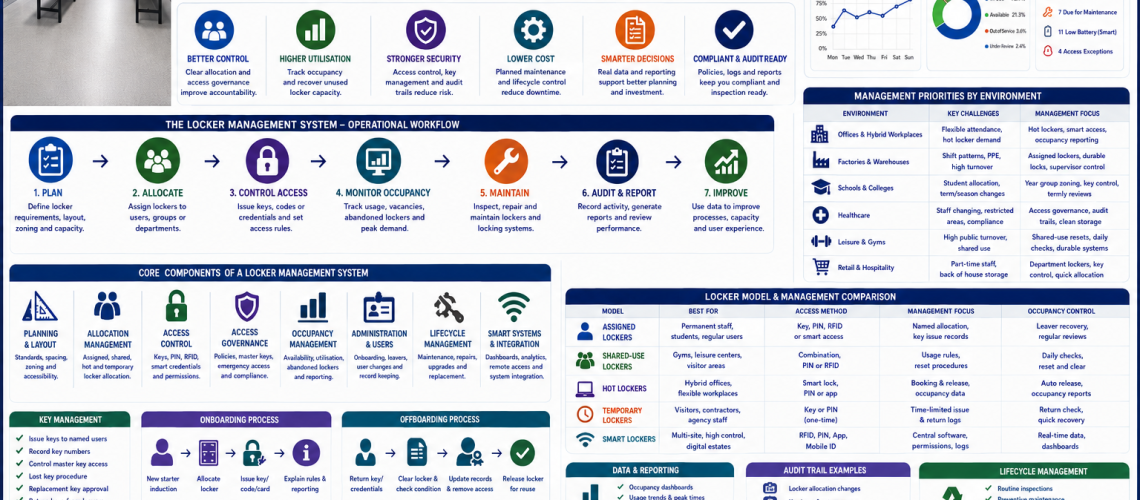
A locker management system is the operational infrastructure used to plan, allocate, control, monitor, maintain and audit lockers across a workplace, school, leisure centre, healthcare site or industrial facility.
It is not just a set of lockers. It is the full management layer around locker use. This includes allocation, access control, governance, occupancy, key control, smart systems, audits, maintenance, administration and lifecycle planning.
Quick answer: what is a locker management system?
A locker management system controls how lockers are planned, issued, accessed, used, reviewed and maintained. It connects physical lockers with operational processes such as staff onboarding, student allocation, access permissions, lost key procedures, occupancy checks, smart locker reporting and long-term replacement planning.
Why locker management systems matter
Locker estates often fail because the hardware is treated separately from the daily operation. A site may have good lockers, but poor allocation, weak key control, no occupancy review, unclear access rules or no repair process. A locker management system fixes that gap.
- Connects locker planning with daily administration.
- Improves locker allocation and availability.
- Reduces lost keys and access confusion.
- Supports clear access governance.
- Improves occupancy and space utilisation.
- Creates better maintenance and audit records.
- Supports smart locker upgrades and digital reporting.
- Moves locker estates from hardware management into storage operations.
The core layers of a locker management system
| System layer | What it controls | Why it matters |
|---|---|---|
| Planning | Locker location, layout, spacing, zoning and capacity | Creates a practical physical estate |
| Allocation | Assigned lockers, shared lockers, hot lockers and temporary lockers | Controls who uses each locker |
| Access control | Keys, master keys, PINs, RFID, combination locks and smart credentials | Controls who can open lockers |
| Governance | Permissions, emergency access, key control and access rules | Creates accountability |
| Occupancy | Vacant lockers, active lockers, abandoned lockers and demand | Improves space use |
| Administration | Onboarding, offboarding, records, reporting and user changes | Keeps the system current |
| Lifecycle | Maintenance, repairs, upgrades and replacement planning | Keeps lockers reliable over time |
| Smart systems | Dashboards, analytics, remote access and digital audit trails | Adds visibility and control |
1. Locker planning as the foundation
Locker management starts before lockers are installed. Planning decides where lockers go, how users move around them, how doors open, how much space is available and whether the locker area can support peak demand.
- Choose the right locker depth and compartment size.
- Allow enough door clearance and aisle width.
- Plan bench spacing in changing rooms.
- Use zones for departments, year groups or staff areas.
- Keep locker banks away from bottlenecks.
- Plan accessibility and inclusive reach heights.
- Leave access for cleaning, repairs and inspection.
Start with the locker planning standards UK guide, then support it with locker depth and projection guide UK, locker door clearance guide UK and locker aisle width guide UK.
2. Locker allocation management
Allocation is the bridge between locker hardware and real users. A locker estate must show who uses each locker, how long they use it for and what happens when that user leaves, moves role or no longer needs the locker.
| Allocation model | Best for | Management requirement |
|---|---|---|
| Assigned lockers | Staff, students and regular users | Named records and access issue logs |
| Shared-use lockers | Gyms, leisure centres and shift sites | Reset process and usage rules |
| Hot lockers | Hybrid offices and flexible workplaces | Booking, release and occupancy checks |
| Temporary lockers | Visitors, contractors and agency staff | Time-limited issue and return process |
| Department lockers | Teams, zones and work areas | Supervisor responsibility and access rules |
3. Locker access control
Access control decides how lockers are opened and who can open them. It includes physical locks, digital credentials, master keys, override procedures and emergency access routes.
- Keyed locks for simple assigned use.
- Master key systems for controlled override access.
- Combination locks to reduce physical key handling.
- Coin locks for public and leisure changing rooms.
- PIN locks for shared or managed use.
- RFID locks for card and fob access.
- Smart locker credentials for software-led access.
For the access layer, link to locker access control systems UK, locker access governance UK and locker locks UK guide.
4. Locker access governance
Governance gives access control its rules. It defines who can issue access, who can approve replacement keys, who can use master keys, who can open lockers in an emergency and how access is withdrawn.
- Access permissions.
- Master key control.
- Emergency access procedures.
- Replacement key approval.
- Lost key escalation.
- Digital credential removal.
- Access reviews after staff changes.
- Audit records for access events.
This is where locker management becomes operational governance. Use the locker access governance UK guide as the main support page.
5. Key management and replacement control
Many locker systems still rely on keys. Key management is therefore a core part of locker operations. A good system records which keys exist, who holds them, which have been lost and when locks should be replaced.
- Issue keys against named users or locker numbers.
- Record key numbers and lock numbers.
- Control who can request replacement keys.
- Store master keys securely.
- Use sign-out records for spare keys.
- Review repeated key losses.
- Replace locks when key control is no longer reliable.
Useful support pages include locker key management systems UK, locker keys UK and replacement locker keys cut to code UK.
6. Locker occupancy management
Occupancy management shows whether lockers are actually being used. It helps facilities teams identify vacant lockers, abandoned lockers, overused zones, underused zones and real capacity problems.
- Track vacant lockers.
- Identify abandoned lockers.
- Monitor shared-use turnover.
- Review hot locker demand.
- Recover lockers from leavers.
- Return repaired lockers to available stock.
- Use usage data before buying more lockers.
For this layer, use locker occupancy management systems UK.
7. Workplace locker operations
Workplace locker operations turn locker management into a daily routine. They connect lockers to staff onboarding, offboarding, shift patterns, PPE storage, cleaning, inspections and facilities reporting.
- Issue lockers to new starters.
- Recover lockers from leavers.
- Manage shared lockers and hot lockers.
- Support PPE, uniform and personal storage.
- Check locker areas during shift changes.
- Record repairs and cleaning issues.
- Review locker demand by department or zone.
For the operational layer, link to workplace locker operations UK and workplace locker layout guide UK.
8. Smart locker management systems
Smart locker systems add digital administration to locker management. They can help organisations manage access, occupancy, user permissions, audit trails and reporting through software.
- Remote locker administration.
- Digital credentials.
- RFID, PIN or app-based access.
- Usage dashboards.
- Occupancy reporting.
- Locker release and reset controls.
- Audit trails and access logs.
- Multi-site reporting.
For digital planning, use smart locker systems UK.
9. Auditing and reporting
Auditing turns locker use into measurable information. Records help teams understand what is assigned, what is available, what is broken, what has been replaced and where problems repeat.
- Locker assignment records.
- Key issue and return logs.
- Master key holder records.
- Lost key reports.
- Replacement lock records.
- Occupancy reports.
- Maintenance logs.
- Inspection reports.
- Leaver clearance records.
- Smart locker access logs.
10. Maintenance and lifecycle control
Locker management should include the full lifecycle of the locker estate. This means planning routine checks, repairs, replacement parts, upgrades and eventual replacement before the system becomes unreliable.
- Inspect locks, doors, hinges and number plates.
- Replace damaged lock barrels, cams and keys.
- Check lock compatibility before upgrades.
- Keep common spare parts available.
- Plan phased replacement for ageing locker banks.
- Review whether old locks still suit the access model.
- Upgrade high-risk or high-use zones first.
For technical support, use locker lock compatibility guide UK, replacement locker locks UK and locker lock maintenance guide UK.
Locker management by environment
| Environment | Main operational challenge | Best management focus |
|---|---|---|
| Schools | Student allocation, lost keys and corridor flow | Year group zoning, key control and termly reviews |
| Workplaces | Staff onboarding, leavers and daily storage | Allocation records, access control and occupancy checks |
| Hybrid offices | Flexible attendance and hot locker demand | Smart access, booking rules and occupancy reporting |
| Factories | PPE, shift patterns and heavy use | Durable lockers, supervisor control and maintenance plans |
| Warehouses | High staff turnover and agency workers | Temporary allocation and fast locker recovery |
| Healthcare | Staff changing and controlled areas | Access governance, clean storage and audit records |
| Leisure centres | High public turnover and wet areas | Shared-use access, daily checks and durable fittings |
Locker management workflow
- Plan the locker estate by location, user group and capacity.
- Select suitable lockers, locks and access methods.
- Create allocation records before issue.
- Issue keys, codes, cards or credentials through a controlled process.
- Monitor occupancy, vacant lockers and abandoned use.
- Record faults, maintenance and replacements.
- Review access permissions and master key control.
- Recover lockers from leavers or inactive users.
- Audit the system regularly.
- Use the audit data to improve layout, capacity and lifecycle planning.
Locker management checklist
- Are all lockers recorded and numbered?
- Is each locker assigned, vacant, shared or out of service?
- Are keys, codes or credentials recorded?
- Are master keys stored securely?
- Are replacement key requests controlled?
- Are leaver lockers recovered quickly?
- Are abandoned lockers reviewed?
- Are occupancy levels checked before buying more lockers?
- Are repairs logged and completed?
- Are locker records reviewed regularly?
Best locker management system by need
| Need | Recommended system | Why |
|---|---|---|
| Small staff locker area | Assigned lockers with a key register | Simple and cost-effective |
| Large workplace | Allocation records, access governance and maintenance logs | Improves control at scale |
| Hybrid office | Hot lockers with smart access or booking controls | Matches flexible attendance |
| School locker estate | Year group allocation and termly key review | Supports student turnover |
| Leisure centre | Shared-use lockers with daily reset checks | Handles high turnover |
| Multi-site estate | Standardised records and central reporting | Improves consistency |
| High-security site | Access governance with audit trails and controlled override | Improves accountability |
Common locker management failures
- Lockers installed without an allocation process.
- No central record of who uses each locker.
- Keys issued without return control.
- Master keys stored informally.
- Abandoned lockers treated as occupied lockers.
- Broken lockers left out of service for too long.
- New lockers bought before occupancy is checked.
- Smart locker systems installed without governance rules.
- Maintenance handled reactively instead of planned.
- Access control decisions made separately from daily operations.
Related locker management guides
Use these guides to build a complete locker management system:
- Locker Planning Standards UK
- Locker Access Control Systems UK
- Locker Access Governance UK
- Locker Occupancy Management Systems UK
- Workplace Locker Operations UK
- Locker Key Management Systems UK
- Smart Locker Systems UK
- School Locker Systems UK
- Locker Lock Compatibility Guide UK
- Replacement Locker Locks UK
- Lockers
- Work Lockers
- Locker Locks
Final advice
Locker management systems are the bridge between storage hardware and storage operations. A strong system does not stop at choosing lockers. It controls how lockers are planned, issued, opened, reviewed, maintained, audited and improved over time.
For smaller sites, this may mean clear allocation records, controlled key issue and regular maintenance checks. For larger estates, it may mean smart locker software, occupancy dashboards, access governance, audit trails and lifecycle planning. The goal is the same in every setting: secure lockers, clear responsibility and reliable daily operation.
Discover more from Blog Total Locker Service
Subscribe to get the latest posts sent to your email.