Locker Occupancy Management Systems UK: Availability, Usage Tracking and Space Control
May 12, 2026
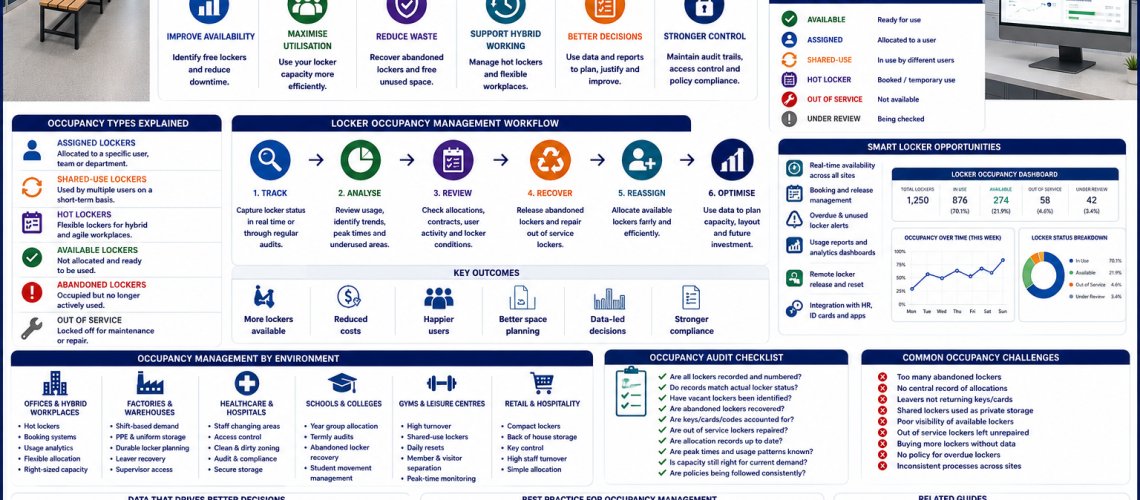
Locker occupancy management is the system used to track which lockers are assigned, vacant, shared, abandoned, underused or in high demand. It helps organisations improve locker availability, reduce wasted space and plan storage more accurately.
This guide explains how UK workplaces, schools, healthcare sites, gyms, leisure centres, warehouses and offices can manage locker occupancy as part of a wider locker management and access control system.
Quick answer: what is locker occupancy management?
Locker occupancy management is the process of monitoring locker use, availability and demand. It includes assignment records, vacant locker checks, abandoned locker reviews, shared-use turnover, hot locker control, smart locker reporting and capacity planning.
What locker occupancy management includes
| Occupancy area | What it tracks | Why it matters |
|---|---|---|
| Assigned lockers | Named users, departments and long-term allocation | Keeps ownership clear |
| Vacant lockers | Unused lockers ready for allocation | Improves availability |
| Abandoned lockers | Lockers still occupied but no longer actively used | Recovers wasted capacity |
| Shared-use lockers | Daily or short-term use by changing users | Supports high turnover |
| Hot lockers | Flexible workplace lockers used when needed | Supports hybrid working |
| Peak demand | Busy times, shift changes and school movement periods | Helps plan capacity |
| Smart locker data | Access logs, booking data and usage reports | Improves visibility and decisions |
Why locker occupancy management matters
Many sites buy more lockers before checking whether existing lockers are being used properly. Occupancy management helps show whether the problem is true shortage, poor allocation, abandoned use, weak leaver processes or lockers in the wrong location.
- Improves locker availability.
- Reduces wasted locker space.
- Helps recover abandoned lockers.
- Supports hybrid working and hot locker systems.
- Improves planning before buying more lockers.
- Helps facilities teams understand real demand.
- Supports better access control and administration.
1. Assigned locker occupancy
Assigned lockers are issued to named users, departments or groups. They work well for permanent staff, students, shift workers and regular users, but they need accurate records to avoid wasted capacity.
- Record the locker number.
- Record the user, department or group.
- Record the key, code or credential issued.
- Review allocation when people move roles.
- Recover lockers when users leave.
- Check whether assigned lockers are still needed.
2. Vacant locker management
Vacant lockers should be easy to identify. If facilities teams do not know which lockers are available, users may be told there is no capacity even when lockers are empty.
- Keep a live list of available lockers.
- Mark lockers as available, assigned, out of service or under review.
- Check empty lockers after staff or student changes.
- Make sure repaired lockers return to available stock.
- Review locker zones with low demand.
- Update records after every reassignment.
3. Abandoned locker recovery
Abandoned lockers are one of the most common causes of false shortage. They appear occupied but are no longer actively used. This can happen when staff leave, students change year group, lockers are forgotten or shared lockers become personal storage.
- Identify lockers with no recent use or unclear ownership.
- Check allocation records before opening.
- Use a clear notice and review process.
- Follow internal policy for abandoned contents.
- Record recovery actions.
- Clean and inspect recovered lockers.
- Return usable lockers to available stock.
4. Shared-use locker occupancy
Shared-use lockers are common in gyms, leisure centres, workplaces, public venues and changing rooms. They are designed for temporary use, so occupancy control must prevent lockers becoming permanently occupied.
- Set clear maximum use periods.
- Use reset procedures for combination, PIN or RFID locks.
- Check lockers at the end of each day or session where needed.
- Monitor peak use times.
- Separate member, visitor and staff locker zones.
- Use signage to explain shared-use rules.
5. Hot locker and hybrid workplace occupancy
Hot lockers support flexible and hybrid workplaces. Instead of giving every employee a permanent locker, the organisation provides lockers that can be used when staff are on site.
- Use booking, sign-out or digital allocation where needed.
- Prevent long-term occupation of flexible lockers.
- Review occupancy against office attendance.
- Set clear release rules.
- Use smart locker data where demand changes quickly.
- Plan locker numbers around real attendance patterns, not total headcount alone.
For wider operational planning, see workplace locker operations UK and smart locker systems UK.
6. Smart locker occupancy reporting
Smart locker systems can provide better visibility of occupancy. Depending on the system, they may show which lockers are occupied, available, overdue, reserved or out of service.
- Real-time locker availability.
- Usage reports by day, week or department.
- Overdue or abandoned locker alerts.
- Remote release or reset.
- Digital assignment records.
- Access and activity logs.
- Occupancy dashboards for facilities teams.
7. Occupancy audits and manual tracking
Not every site needs smart locker software. Manual occupancy tracking can still work well if records are kept current and reviews are carried out regularly.
- Locker allocation spreadsheet.
- Key issue and return register.
- Vacant locker list.
- Out-of-service locker list.
- Termly or quarterly locker audit.
- Leaver and transfer checks.
- Repair and reinstatement records.
Locker occupancy by environment
| Environment | Main occupancy issue | Best management focus |
|---|---|---|
| Schools | Year changes, term-end returns and abandoned student lockers | Termly allocation checks and year group zoning |
| Offices | Hybrid working and uneven attendance | Hot lockers, smart reporting and occupancy review |
| Factories | Shift patterns and PPE storage | Assigned lockers, supervisor checks and leaver recovery |
| Warehouses | High turnover and agency staff | Temporary allocation and controlled key return |
| Healthcare | Staff changing, restricted areas and shift rotation | Clear assignment records and access control |
| Leisure centres | High visitor turnover and lockers left occupied | Shared-use rules, daily checks and reset procedures |
| Universities | Termly changes and high student movement | Time-limited allocation and vacancy tracking |
Occupancy data to record
A useful occupancy record should show more than whether a locker is taken. It should help staff decide what action is needed next.
- Locker number.
- Location or zone.
- Status: available, assigned, shared, out of service or under review.
- User, department or group.
- Access method.
- Key, code or credential record.
- Date assigned.
- Review date.
- Fault or maintenance status.
- Recovery or release notes.
Locker occupancy management workflow
- Map all locker locations and locker numbers.
- Record each locker status.
- Assign ownership or mark the locker as available.
- Track keys, codes or credentials.
- Review vacancies and abandoned lockers regularly.
- Recover unused lockers through a clear process.
- Repair damaged lockers and return them to available stock.
- Review demand before ordering more lockers.
Locker occupancy checklist
- Do you know how many lockers are available today?
- Are assigned lockers linked to named users or departments?
- Are abandoned lockers reviewed regularly?
- Are leaver lockers recovered quickly?
- Are out-of-service lockers repaired and returned to use?
- Are shared-use lockers checked often enough?
- Are hot lockers released after use?
- Are peak demand times recorded?
- Are low-use zones being reviewed?
- Are new locker purchases based on real occupancy data?
Best occupancy system by site type
| Site type | Recommended occupancy system | Why |
|---|---|---|
| Small workplace | Manual allocation list and key register | Simple and low cost |
| Large workplace | Department allocation records and regular audits | Improves control at scale |
| Hybrid office | Hot locker system with occupancy reporting | Matches flexible attendance |
| School | Year group locker records and term-end review | Supports student movement and returns |
| Leisure centre | Shared-use reset and daily occupancy checks | Prevents permanent occupation |
| Multi-site organisation | Standardised records across every site | Makes reporting and planning easier |
| Smart locker estate | Digital dashboard and usage analytics | Gives fast visibility and stronger reporting |
Common locker occupancy problems
- Lockers appear full but many are abandoned.
- No central record of assigned lockers.
- Leavers keep keys or access credentials.
- Shared-use lockers become unofficial personal lockers.
- Out-of-service lockers are not repaired quickly.
- Facilities teams buy more lockers before checking utilisation.
- Locker records do not match actual locker numbers.
- Hybrid offices still use permanent allocation for every worker.
- High-demand areas are full while other zones are underused.
Related locker occupancy and management guides
Use these guides to build a complete locker occupancy and management system:
- Locker Management Systems UK
- Workplace Locker Operations UK
- Locker Access Control Systems UK
- Locker Access Governance UK
- Smart Locker Systems UK
- School Locker Systems UK
- Locker Planning Standards UK
- Locker Key Management Systems UK
- Lockers
- Work Lockers
Final advice
Locker occupancy management helps organisations understand whether they have a real locker shortage or a management problem. The strongest systems track assigned lockers, vacant lockers, abandoned lockers, shared-use lockers and out-of-service lockers clearly.
For smaller sites, a simple allocation register may be enough. For larger workplaces, schools, leisure centres and hybrid offices, occupancy reviews, smart locker dashboards and regular recovery processes can improve availability without always buying more lockers.
Discover more from Blog Total Locker Service
Subscribe to get the latest posts sent to your email.