Locker Key Management Systems UK: Operational Control, Tracking and Access Governance
May 11, 2026
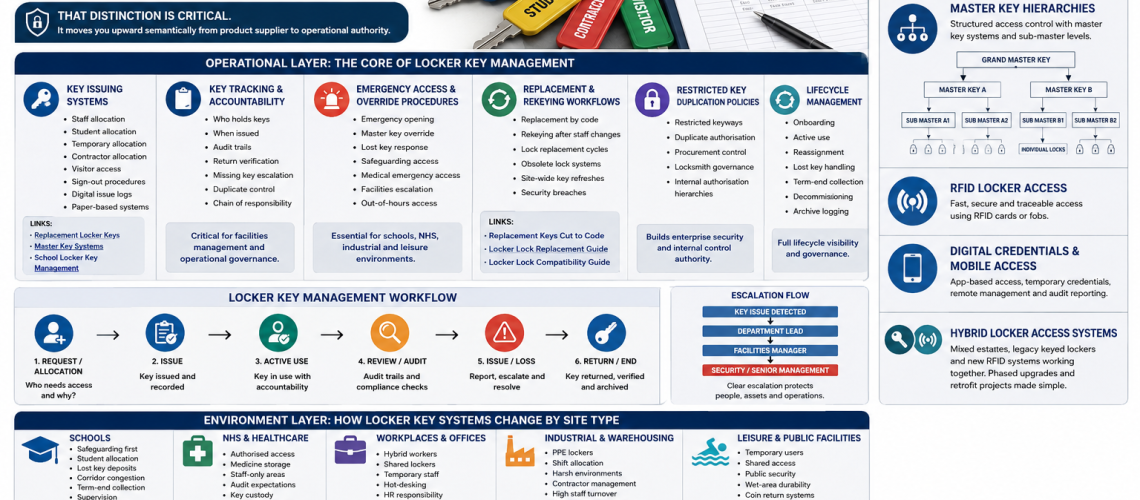
A locker key management system is not simply a set of keys, locks or replacement keys. It is the complete operational structure used to allocate keys, control access, track responsibility, manage emergencies, audit use and maintain security across the full life of a locker system.
This guide explains how locker key management systems work in UK schools, workplaces, healthcare sites, industrial facilities, leisure centres and public buildings. It also shows how physical keys, master keys, RFID access, digital credentials and hybrid systems fit into one controlled access model.
Quick answer: A good locker key management system controls who receives a key, who can open lockers in an emergency, how lost keys are handled, how replacements are ordered, how duplicate keys are restricted and how the whole system is audited over time.
For replacement keys, start with our replacement locker keys cut to code UK guide. Lock suitability, use the locker lock compatibility guide UK. For wider lock options, see our locker locks UK guide.
What Is a Locker Key Management System?
A locker key management system is the governance layer behind a locker installation. It controls how keys are issued, tracked, replaced, duplicated, returned and retired.
This is important because a locker estate can fail operationally even when the physical lockers and locks are still working. Lost keys, unclear responsibility, weak master key control and poor audit records can create delays, security risks and extra management work.
| Basic view | Operational view |
|---|---|
| Keys open lockers | Keys create access responsibility |
| Locks secure doors | Locks form part of an access control system |
| Replacement keys solve loss | Replacement workflows maintain continuity |
| Master keys open multiple lockers | Master key governance controls emergency access |
| Users hold keys | The site tracks allocation, returns and accountability |
The strongest systems combine practical key control with clear procedures. This moves locker management away from reactive replacement and towards planned operational control.
Locker Key Management Architecture
A complete system works across three connected layers.
| Layer | Purpose | Examples |
|---|---|---|
| Operational layer | Controls day-to-day key issue, tracking, emergency access and audits | Issue logs, return checks, replacement workflows, master key control |
| Environment layer | Adapts the system to the site type | Schools, NHS, offices, warehouses, leisure centres |
| Access technology layer | Defines the access method used | Physical keys, master keys, RFID, mobile credentials, hybrid access |
Operational Layer: The Core of Locker Key Management
The operational layer is the most important part of the system. It defines how keys move through the organisation and who remains responsible at each stage.
1. Key Issuing Systems
Key issuing is the starting point for access control. Every issued key should have a clear user, purpose, date, return expectation and escalation route.
Locker keys may be issued to permanent staff, temporary staff, students, contractors, visitors or short-term users. Each group needs a different level of control.
| User type | Typical issue method | Control requirement |
|---|---|---|
| Staff | Assigned key per locker | HR or facilities record |
| Students | Term-based allocation | Deposit, return check and safeguarding access |
| Contractors | Temporary issue | Sign-out and return verification |
| Visitors | Short-term issue | Front-desk control |
| Shared users | Daily or session-based issue | Fast return and reassignment process |
Issue records can be paper-based or digital. Digital issue logs are easier to search and audit. Paper logs can still work well on smaller sites if they are used consistently.
For school-specific procedures, see our school locker key management UK guide. Replacement ordering, use our replacement locker keys cut to code UK guide. For emergency override structures, see master key locker systems.
2. Key Tracking and Accountability
Key tracking answers one simple question: who is responsible for each key right now?
A strong tracking process records who holds the key, when it was issued, which locker it opens, when it should be returned and what happens if it is not returned.
| Tracking point | Why it matters |
|---|---|
| Key holder | Creates clear responsibility |
| Locker number | Connects the key to the physical asset |
| Issue date | Supports audits and dispute checks |
| Return date | Controls reassignment and end-of-use checks |
| Missing key status | Triggers escalation before security weakens |
| Duplicate record | Controls unauthorised copying |
This creates a chain of responsibility. It also supports facilities management, school administration, HR, estates teams and front-desk staff.
3. Emergency Access and Override Procedures
Emergency access is one of the strongest reasons to manage locker keys as a system. Sites need a safe way to open lockers when a user is absent, a key is lost or urgent access is required.
Emergency opening may be needed for safeguarding, medical incidents, lost property checks, security concerns, maintenance access, out-of-hours issues or operational failure.
| Situation | Likely access route | Governance need |
|---|---|---|
| Lost user key | Master key or replacement key | Log the event and verify identity |
| Safeguarding concern | Authorised staff override | Two-person procedure where appropriate |
| Medical emergency | Immediate authorised access | Clear escalation route |
| Out-of-hours access | Facilities or duty manager control | Restricted key custody |
| Security incident | Controlled opening and possible rekeying | Incident record and follow-up action |
Emergency access should never mean uncontrolled access. The better model is controlled override with clear authority, logging and follow-up.
4. Replacement and Rekeying Workflows
Replacement keys are part of lifecycle management. They are not only a quick fix for lost keys.
A good workflow explains when to order a replacement key, when to replace a lock, when to rekey a group of lockers and when to refresh a whole system.
| Problem | Best response |
|---|---|
| User lost a key | Order a replacement key by code if security risk is low |
| Key number is unknown | Identify the lock before ordering |
| Staff member leaves without returning a key | Assess rekeying or lock replacement |
| Many keys are missing | Audit the estate and refresh high-risk areas |
| Lock is obsolete | Check compatibility before replacement |
| Security breach occurs | Replace or rekey affected locks |
For this stage, use our replacement locker keys cut to code UK guide, locker lock replacement guide UK and locker lock compatibility guide UK.
5. Restricted Key Duplication Policies
Duplicate control is a security governance issue. If anyone can copy a key without authorisation, the site loses control over access.
Higher-security systems may use restricted keyways, authorised duplication, approved suppliers, controlled procurement and internal sign-off before duplicate keys are produced.
| Control | Purpose |
|---|---|
| Authorised requester list | Prevents casual duplicate orders |
| Restricted key profile | Limits unauthorised copying |
| Purchase approval | Creates procurement control |
| Master key custody policy | Protects override access |
| Duplicate key log | Records how many keys exist |
This is especially important for schools, healthcare sites, public buildings, industrial sites and any estate using master keys.
6. Lifecycle Management
Lifecycle management controls the full journey of each key, from first issue to final retirement.
| Lifecycle stage | Management action |
|---|---|
| Onboarding | Allocate locker, issue key and record user |
| Active use | Track holder, condition and access rights |
| Reassignment | Check return before issuing to another user |
| Lost key handling | Escalate, replace, rekey or replace lock |
| Term-end or role-end collection | Recover keys and update records |
| Decommissioning | Retire keys, archive records and remove access |
This is where a locker key system becomes enterprise-grade. It supports continuity, accountability and long-term operational security.
Environment Layer: How Locker Key Systems Change by Site Type
The same key system does not suit every environment. Schools, NHS sites, offices, factories and leisure centres all have different risks and workflows.
Schools
School locker key management must support student allocation, safeguarding, lost key control, term-end collection, emergency staff access and corridor flow.
Student systems often need deposits, year-group records, form-group allocation and clear procedures for missing keys. Staff also need controlled emergency access when safeguarding or supervision requires it.
For school-specific planning, link this page to school locker key management UK, school locker corridor planning UK and anti-congestion locker planning for schools.
NHS and Healthcare Sites
Healthcare locker key systems need authorised access, strong key custody, audit trails and clear override procedures. Staff-only areas, changing rooms, medicine storage areas and clinical support spaces may all require different controls.
Healthcare settings may also need stronger separation between staff belongings, medicine storage, controlled access cupboards and general equipment storage.
For related storage guidance, see medical storage systems UK and the medical cabinet range.
Workplaces and Offices
Workplace locker key systems often support hybrid workers, shared lockers, hot-desking, temporary staff, HR processes and facilities management.
Assigned lockers suit permanent users. Shared lockers may need a stronger return process, digital logging or smart access. Where staff turnover is high, rekeying and lock replacement procedures become more important.
For workplace layout and planning, use workplace locker planning UK. For future access upgrades, see smart locker systems UK.
Industrial and Warehousing Sites
Industrial sites often manage lockers for PPE, uniforms, tools, personal belongings and shift workers. These environments may have high staff turnover, damaged keys, harsh conditions and contractor access.
Good systems should support shift allocation, supervisor access, replacement workflows and clear escalation for lost or damaged keys.
Leisure and Public Facilities
Leisure centres, gyms, pools and public facilities often use temporary access. Front-desk control, coin return locks, wet-area durability and shared-use procedures are important.
In wet areas, key systems must also consider corrosion, user behaviour and fast turnover. For wet environments, see locker locks for wet areas UK.
Access Technology Layer: Keys, Master Keys, RFID and Digital Credentials
Physical Key Systems
Physical key systems remain common because they are simple, familiar and cost-effective. They work well for assigned lockers, staff lockers, school lockers and many workplace systems.
The main risks are lost keys, uncontrolled duplicates and weak tracking. These risks are reduced through issue logs, replacement procedures and duplicate control.
Master Key Hierarchies
Master key systems allow authorised staff to open multiple lockers without holding every user key. They are useful for emergency access, maintenance and management control.
A simple hierarchy may include user keys, section master keys, department master keys and a site master key. Access should be limited to named staff.
| Level | Access | Typical holder |
|---|---|---|
| User key | One locker | Student, staff member or user |
| Section master | One area or group | Supervisor or department lead |
| Site master | Wider locker estate | Facilities manager or authorised senior staff |
| Emergency override | Controlled access route | Named emergency holder |
For deeper guidance, see master key locker systems.
RFID Locker Access
RFID locker access can reduce physical key handling. Users open lockers with cards, fobs or existing access credentials.
RFID systems can support audit trails, shared lockers and faster reassignment. They are useful in offices, leisure centres, universities, healthcare sites and larger workplace estates.
Digital Credentials and Mobile Access
Digital locker access can use mobile credentials, app-based permissions, temporary access and remote management. This helps sites that need flexible allocation or detailed audit reporting.
Digital systems can support hybrid workers, contractors and short-term access. They also reduce the need to cut and issue physical keys.
Hybrid Locker Access Systems
Many sites do not move from keys to digital access in one step. They run mixed estates.
A hybrid locker access system may include older keyed lockers, new RFID lockers, master key override areas and phased retrofit projects. This is common in schools, offices, hospitals, warehouses and leisure centres.
Hybrid systems need careful planning. The site must know which lockers use keys, which use credentials, which have master access and which need future upgrades.
For upgrade planning, use the locker lock selection tool UK, smart locker systems UK and locker lock compatibility guide UK.
Locker Key Management Workflow
The following workflow gives a practical model for operational control.
| Stage | Action | Record required |
|---|---|---|
| 1. Allocate | Assign locker to user, role or group | User name, locker number and date |
| 2. Issue | Provide key or credential | Issue log and acceptance |
| 3. Track | Monitor key holder and status | Current holder record |
| 4. Audit | Check keys, lockers and missing items | Audit sheet or digital report |
| 5. Escalate | Handle loss, damage or unauthorised access | Incident record |
| 6. Replace or rekey | Order key, replace lock or refresh system | Replacement record |
| 7. Reassign or retire | Return, reissue or decommission | Closure record |
Choose Your Locker Key Management System
The right system depends on the site, user type and level of risk.
| Site need | Recommended system | Supporting guide |
|---|---|---|
| Simple staff lockers | Physical keys with issue log | Locker locks UK |
| School student lockers | Assigned keys with term-end return process | School locker key management UK |
| Emergency access required | Master key hierarchy | Master key locker systems |
| High turnover workplace | Tracked issue system with rekeying rules | Locker lock maintenance guide |
| Hybrid office | Smart or RFID access | Smart locker systems UK |
| Mixed old and new lockers | Hybrid access plan | Locker lock compatibility guide UK |
FAQ: Locker Key Management Systems UK
What is a locker key management system?
A locker key management system is the process used to issue, track, audit, replace and control locker keys. It includes allocation, accountability, emergency access, duplicate control and lifecycle management.
Is locker key management the same as ordering replacement keys?
No. Replacement keys are only one part of the system. Full key management also covers issuing, tracking, auditing, emergency opening, duplicate control, rekeying and security governance.
Who should control locker master keys?
Master keys should only be held by authorised staff. This may include facilities managers, school leadership, estates teams, duty managers or named emergency holders. Access should be logged and reviewed.
How should schools manage locker keys?
Schools should use student allocation records, deposit or return procedures, term-end collection, lost key escalation and controlled staff emergency access. Safeguarding and supervision should be built into the process.
When should a locker be rekeyed instead of ordering a replacement key?
Rekeying or lock replacement may be better when a key is lost by a former staff member, a duplicate risk exists, several keys are missing or a security breach has occurred.
Can locker key systems include RFID or digital access?
Yes. Many modern locker systems use RFID, digital credentials, mobile access or hybrid systems. These can reduce physical key handling and improve audit reporting.
What is a hybrid locker access system?
A hybrid locker access system combines older keyed lockers with newer RFID, digital or smart locker access. It is useful for phased upgrades and mixed locker estates.
Why is key tracking important?
Key tracking creates accountability. It shows who holds each key, when it was issued, when it should be returned and what action is needed if it is missing.
Summary
Locker key management is not just about keys, locks or replacements. It is an operational control system. The strongest sites manage allocation, accountability, emergency access, audits, restricted duplication, replacement workflows and lifecycle control as one connected process.
This page should sit above the replacement key, master key, school key management, lock compatibility, smart locker and locker planning pages. It becomes the operational authority hub for the Locker Keys UK ecosystem.
Discover more from Blog Total Locker Service
Subscribe to get the latest posts sent to your email.