Master Key Locker Systems UK: Override Keys, Locker Key Management and Controlled Access
May 8, 2026
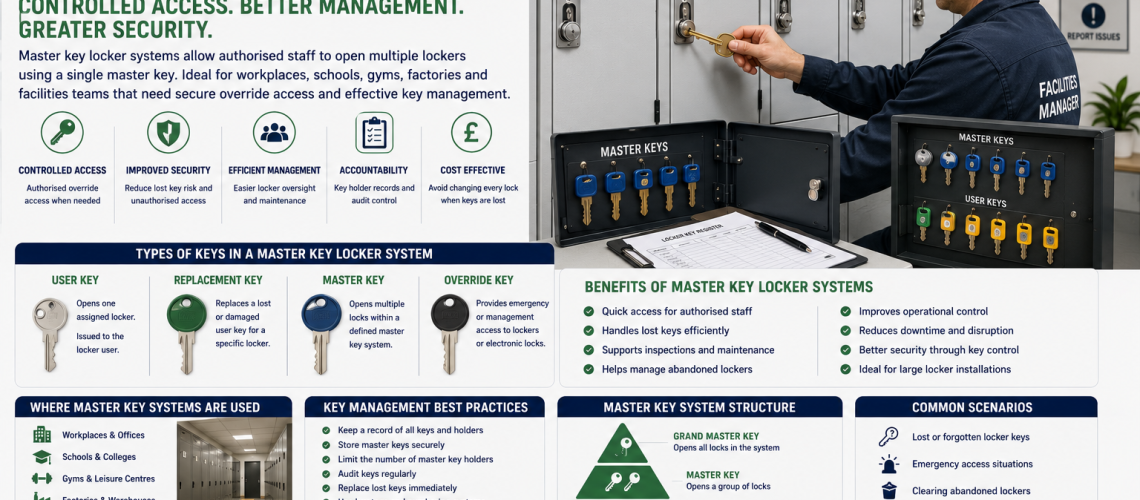
Master key locker systems allow authorised staff to open multiple compatible locker locks using a controlled management key while individual users continue to use their own keys. They are commonly used in schools, workplaces, factories, warehouses, healthcare sites, gyms, leisure centres and other managed facilities where emergency, maintenance or administrative access is required.
A well-designed master key system is more than one key that opens several lockers. It combines individual user keys, master or sub-master access, accurate records, secure key storage and clear rules defining who may use management access and when.
Quick answer: use a master key locker system where lockers are normally assigned to individual users but authorised staff still need controlled access for lost keys, maintenance, inspections, abandoned lockers, emergencies or operational management. Keep the number of master keys limited, record who holds them and organise larger installations into clearly defined master or sub-master groups.
What Is a Master Key Locker System?
A master key locker system is a group of compatible locks arranged so that individual users have keys for their own lockers while one authorised management key can operate several locks within a defined group.
The master key therefore provides an additional authorised access route without requiring facilities staff to keep and identify an individual spare key for every locker.
A typical system can include:
- Individual user keys
- Controlled spare user keys
- Sub-master keys for individual areas or departments
- A wider master key
- Locker and key-number records
- Master-key holder records
- Secure master-key storage
- Lost-key and emergency-access procedures
The exact hierarchy depends on the lock system and the way the site is organised. A master key should never be assumed to operate every locker simply because the locks look similar.
How Do Locker Master Keys Work?
In a mechanical master-keyed locker system, each lock is configured to accept its normal individual user key and one or more authorised keys within the master-key hierarchy.
| Key type | Typical access | Typical holder |
|---|---|---|
| User key | One assigned locker | Employee, pupil, member or locker user |
| Spare user key | The same individual locker | Facilities or authorised site staff |
| Sub-master key | A defined locker bank, floor, department or area | Department manager, supervisor or authorised site staff |
| Master key | A wider defined group of compatible lockers | Facilities manager or nominated senior staff |
| Override key | Management or emergency access according to the particular lock design | Authorised management or service staff |
This hierarchy means that a user can operate their own locker without gaining access to neighbouring lockers, while authorised staff retain an appropriate management route.
Master Key, Sub-Master and Override Key: What Is the Difference?
The terms master key and override key are sometimes used interchangeably, but they do not always describe the same thing.
Master Key
A master key normally operates several compatible mechanical locks within a deliberately designed master-key group. Individual user keys continue to operate their own locks.
Sub-Master Key
A sub-master provides management access to a smaller group within the wider hierarchy. For example, a school might have separate sub-master groups for different buildings or departments while facilities management retains a higher-level master.
Override Key
An override key is an authorised secondary access method. It may be used with a mechanical combination lock, electronic lock or another specialist locking system and is not necessarily part of a conventional mechanical master-key hierarchy.
Electronic override keys are usually manufacturer and model specific rather than universal. See our electronic locker override key guide for more information.
Why Use a Master Key System for Lockers?
The main advantage is controlled management access without requiring facilities staff to maintain an ordinary spare user key for every routine opening.
| Requirement | How master access helps |
|---|---|
| User loses a locker key | Authorised staff can gain temporary access while a replacement is arranged |
| Locker requires maintenance | Facilities staff can inspect the locker without waiting for the user key |
| Locker has been abandoned | Authorised staff can clear or inspect it according to site procedures |
| School safeguarding issue | Named staff have a controlled access route where authorised |
| Staff leaver does not return a key | Management retains access while deciding whether the lock needs changing |
| Locker bank requires inspection | A defined master or sub-master reduces the number of keys required |
| Emergency access | Staff have an established route rather than forcing the locker |
A master-key system does not itself determine whether somebody is authorised to open another person’s locker. The organisation’s own security, safeguarding, employment and access procedures should determine when management access is permitted.
Designing a Locker Master Key Hierarchy
Before specifying a master-key arrangement, start with the physical locker estate and the people who need access.
1. Audit the Existing Lockers
Record how many lockers are installed, where they are located, which lock types are fitted and whether existing locks already belong to a compatible master suite.
Do not assume that similar-looking cam locks share the same master system. Different manufacturers, cylinders and key series may require different master keys.
2. Identify the Users
Determine whether the lockers are used by pupils, permanent employees, shift workers, contractors, leisure users, healthcare staff or another group. This affects how much routine management access is genuinely necessary.
3. Group the Lockers Logically
Large installations can be divided according to the way the site actually operates. Possible groups include:
- Building
- Floor
- Department
- School year area
- Changing room
- Warehouse zone
- Staff group
- Locker bank
This allows a sub-master to provide the access required for one operational area without automatically providing unnecessary access elsewhere.
4. Keep Higher-Level Access Limited
Avoid creating more high-level master keys than the organisation can control effectively. Every additional master key creates another item that must be stored, tracked and recovered.
5. Create a Key Plan
A clear key plan can show which user keys belong to which sub-master groups and which master keys operate those groups. On larger estates this can be easier to manage than relying only on key numbers.
| Area | User access | Management access |
|---|---|---|
| Locker bank A | Individual user keys | Sub-master A |
| Locker bank B | Individual user keys | Sub-master B |
| Locker bank C | Individual user keys | Sub-master C |
| All compatible groups where specified | Not applicable | Higher-level master |
The actual hierarchy depends on the lock system being supplied. It should be confirmed when the master-key arrangement is specified rather than assumed afterwards.
Master Key Systems and Locker Key Records
A master key does not remove the need for an accurate locker key register. It makes accurate records more important because the site now has several levels of access to control.
For each locker, useful information can include:
- Locker number
- Location
- Lock manufacturer
- User key number or code
- Current user or department
- Master-key group
- Sub-master group where applicable
- Number of user keys supplied
- Number of spare keys held
- Date of any lock or cylinder change
For the complete issuing, tracking, auditing and replacement process, use our locker key management systems guide.
Master Key Storage and Physical Key Control
The older master-key article correctly identified physical storage as part of the system. Designing a good hierarchy is of limited value if the master keys are then left in an uncontrolled desk drawer.
Depending on the size of the site, useful controls can include:
- Lockable wall-mounted key cabinets
- Numbered or identified key hooks
- Engraved or coded key tags
- Paper or digital sign-out records
- Restricted-access offices
- Electronic key cabinets or controlled key-storage systems where justified
Total Locker Service supplies a range of key cabinets and secure key storage suitable for organising user, spare and management keys.
How Should Master Keys Be Controlled?
Master and sub-master keys require stronger controls than ordinary user keys because a single key may provide access to several lockers.
- Limit master-key holders to named authorised people.
- Keep unused master keys in secure storage.
- Record how many master and sub-master keys exist.
- Record issue and return where keys are not permanently allocated.
- Review access when staff responsibilities change.
- Recover controlled keys when authorised holders leave.
- Carry out periodic presence checks.
- Escalate immediately if a master or sub-master cannot be accounted for.
- Do not produce uncontrolled duplicates.
- Keep master-suite records current when locks are changed.
Avoid attaching unnecessary descriptions to a master key that would immediately tell an unauthorised person exactly which lockers or building area it operates.
Restricted Keys and Duplicate Control
Some higher-control lock systems use restricted key profiles or controlled duplication arrangements. These can make additional keys subject to an authorised ordering process rather than allowing unrestricted duplication.
Where a restricted system is specified, record:
- The authorised organisation or account
- Who may request additional keys
- The key or system reference
- The number of master keys issued
- The number of additional keys subsequently supplied
- Any approval requirements for duplication
Not every locker cam lock uses a restricted profile. If controlled duplication is important to the project, specify that requirement before selecting the lock rather than assuming it is included with a standard keyed locker lock.
Master Key vs Spare Key vs Replacement Key
| Key type | Purpose | Best used for |
|---|---|---|
| User key | Normal access to one assigned locker | Day-to-day locker use |
| Spare user key | Additional copy for one specific locker | Controlled backup access |
| Replacement key | Replaces a lost or damaged user key | Restoring normal user access |
| Sub-master | Opens a defined group of compatible locks | Department or area management |
| Master key | Opens a wider defined group | Facilities or authorised site management |
| Override key | Provides secondary management access according to lock type | Combination or electronic systems and other controlled override arrangements |
If one user has simply lost a locker key and the correct code is known, the normal solution may be a replacement locker key cut to code rather than changing the master-key system.
For help identifying the correct code, see how to find a locker key number or lock code.
What Happens If a User Key Is Lost?
A missing user key and a missing master key should not be treated as the same problem.
| Situation | Typical response |
|---|---|
| User key lost, code known and risk is low | Order a replacement key |
| User key lost and a spare exists | Issue the authorised spare and update records |
| User key suspected stolen | Assess whether the individual lock should be changed |
| Former user keeps a key | Consider changing that locker lock |
| Lock damaged | Repair or replace the lock |
| Master key remains secure | The wider master group may not require alteration |
Where the existing lock needs changing, see our locker lock replacement guide.
What Happens If a Locker Master Key Is Lost?
A missing master key is more significant because it may operate several lockers. The correct response depends on the extent of the master-key group, whether the key can be associated with the site and the security level required.
A practical response is to:
- Confirm that the master key is genuinely missing.
- Identify exactly which locks the key can operate.
- Record who last held or used it.
- Restrict or suspend unnecessary locker use where the risk justifies it.
- Assess whether the missing key could reasonably be connected with the site or affected lockers.
- Consult the lock supplier regarding replacement or rekeying options.
- Replace affected locks where continued operation by the missing master presents an unacceptable risk.
- Issue replacement master keys only through the controlled procedure.
- Update the master-key register after remedial work.
There is no universal rule that every lock must automatically be replaced whenever a master key is temporarily misplaced. The response should reflect the actual access provided and the security risk created by the loss.
Master Key Systems for Schools
Schools are a common use case because individual pupils can retain their own locker keys while authorised staff have a controlled route for lost-key assistance, maintenance and appropriate safeguarding access.
Larger schools may use sub-master groups based on:
- Building
- Year group area
- PE changing room
- Sixth-form area
- Staff locker area
- Individual locker banks
Master keys should be restricted to staff whose responsibilities genuinely require them. For the wider student issue, lost-key, term-end and safeguarding process, see our school locker key management guide.
Master Key Systems for Workplaces
Workplaces commonly use master-keyed lockers where staff have permanently assigned storage but facilities teams require access for maintenance, locker reallocation or employee leaving procedures.
A workplace arrangement might give ordinary employees individual keys, departmental supervisors a limited sub-master and facilities management a wider master where justified.
Master access should complement staff onboarding and offboarding. When an employee leaves, recover the user key and update the allocation. If the key is not returned and continued access creates a security concern, consider replacing the individual lock.
Factories, Warehouses and Industrial Locker Areas
Industrial locker installations can include personal lockers, workwear lockers, PPE storage and changing-room lockers used across several shifts.
Sub-master groups can help divide a large locker estate into operational areas so supervisors receive only the management access needed for their responsibilities.
High levels of user turnover also make accurate key records important. A master key should not become a substitute for recovering user keys or updating locker assignments.
Healthcare and Care Environments
Master-keyed staff lockers can provide useful facilities access on healthcare and care sites, particularly where users work different shifts and lockers are distributed across several departments.
Ordinary staff locker master access should remain separate from access procedures for medicine, clinical equipment or other specialist controlled storage. The fact that both use keys does not mean they should share the same security hierarchy.
Gyms, Leisure Centres and Changing Rooms
Master or override access can help leisure staff deal with lost keys, abandoned belongings, maintenance and lock faults. However, a traditional master-keyed user-key system is not always the best choice for high-turnover public lockers.
Coin locks, mechanical combination locks, electronic locks and RFID systems can reduce the need to issue permanent physical keys where lockers change users throughout the day.
Can Existing Lockers Be Converted to a Master Key System?
Often, but not universally. Many lockers fitted with replaceable cam locks can potentially be changed to compatible master-keyable locks without replacing the locker itself.
Before ordering replacement locks, check:
- Existing lock manufacturer
- Door material
- Door thickness
- Fixing-hole or cut-out dimensions
- Lock-body dimensions
- Cam length
- Cam shape and throw
- Door handing where relevant
- Clearance behind the door
- Whether the proposed locks can be supplied within the required master suite
Do not order a complete bank of replacement locks solely because the existing locks appear visually similar. Compatibility and master-key configuration should be confirmed first.
When Is a Master-Key System Not the Best Option?
Master-keyed locks work particularly well for assigned lockers, but other access systems can be more practical where users change frequently or physical key administration has become excessive.
| Requirement | Possible approach |
|---|---|
| Permanent assigned locker | Keyed lock with controlled master access |
| Frequent user-key loss | Consider mechanical combination locking |
| High-turnover public use | Coin, combination or electronic system |
| Staff already use RFID credentials | Consider compatible RFID locker access |
| Hybrid workplace with shared storage | Consider managed electronic or smart lockers |
| Small stable installation | Simple keyed system with limited master access may remain appropriate |
For a complete comparison of keys, codes, padlocks, coin locks and electronic access, see our locker locking systems guide.
Digital and Electronic Alternatives to Master-Keyed Locks
Electronic access changes the management method rather than removing the need for controlled override access.
Depending on the lock or locker system, digital alternatives can include:
- PIN access
- RFID cards
- RFID fobs
- Staff access credentials
- Mobile credentials
- Temporary user permissions
- Software-managed locker allocation
Some standalone electronic locks retain a physical override key. More advanced systems may provide administrator credentials or another emergency-access method instead.
For larger electronically managed installations, see our smart locker systems UK guide.
Warning Signs Your Master-Key System Needs Reviewing
The master-key arrangement should be reviewed when its records or controls no longer reflect the physical installation.
- Too many people hold master keys.
- Nobody knows exactly how many master keys exist.
- Master keys are not stored securely.
- Sub-master groups are undocumented.
- Master keys cannot be matched confidently to locker areas.
- Locks have been replaced without updating the key plan.
- Unlabelled keys are accumulating.
- Former staff may still have management keys.
- Different locker areas use several unrelated master systems.
- Users regularly lose keys and the administration has become excessive.
- A refurbishment is planned and the opportunity exists to simplify the hierarchy.
Routine lock inspection should form part of the wider maintenance process. See our locker maintenance guide.
Master Key System Planning Checklist
| Question | Why it matters |
|---|---|
| How many lockers are involved? | Determines the scale of the hierarchy |
| Which lock manufacturers are currently fitted? | Identifies compatibility and existing suites |
| Are lockers divided into logical areas? | Helps define possible sub-master groups |
| Who uses the lockers? | Defines normal access requirements |
| Who genuinely needs management access? | Prevents unnecessary master-key distribution |
| Who will hold the highest-level keys? | Establishes accountability |
| How will master keys be stored? | Protects management access |
| How will issue and return be recorded? | Maintains traceability |
| What happens if a user key is lost? | Defines the routine replacement process |
| What happens if a master key is lost? | Defines the higher-risk escalation process |
| Can existing locks be retained? | May reduce unnecessary replacement |
| Is future expansion expected? | Allows the hierarchy to be planned appropriately |
Master Key Locker Systems FAQ
What is a master key locker system?
A master key locker system allows individual users to operate their own lockers while an authorised master key can open several compatible locks within a defined management group.
What is a locker sub-master key?
A sub-master key opens a defined group of compatible locker locks, such as one department, building or locker bank, without necessarily providing access to every locker in the wider master-key system.
Is an override key the same as a master key?
Not always. A mechanical master key operates several locks within a designed master-key hierarchy. An override key is a secondary management-access method and may instead be associated with an electronic or combination lock.
Can one master key open every locker?
Only where the locking system has been specifically designed that way. Master keys operate defined compatible groups and should not be assumed to operate unrelated locks or different manufacturers’ systems.
Who should hold locker master keys?
Master keys should normally be limited to named people whose responsibilities require management access, such as facilities staff, site managers or other authorised personnel. Spare master keys should be stored securely.
What should happen if a locker master key is lost?
Identify the affected master-key group, confirm who last held the key, assess the security risk and contact the lock supplier regarding replacement or rekeying options. Locks should be changed where continued operation by the missing master key would create an unacceptable risk.
Do I need to replace a lock when a normal locker key is lost?
Not necessarily. If the lock is working, the correct key code is known and the missing key creates little security risk, a replacement user key may be sufficient. Consider replacing the lock if the key was stolen or continued access creates a concern.
Can existing lockers be converted to a master key system?
Many lockers fitted with replaceable cam locks can potentially be converted by fitting compatible master-keyable locks. The door preparation, lock dimensions, cam arrangement and required master-key suite should be checked before ordering.
How many levels can a locker master key system have?
The available hierarchy depends on the lock system. Many locker installations only need individual user keys plus a master or a limited sub-master structure. Additional levels should only be introduced where they solve a genuine access-management requirement.
Should locker master keys be kept in a key cabinet?
Secure key cabinets are a practical way to control spare, master and sub-master keys. Access to the cabinet should itself be restricted to authorised staff and controlled keys should remain identifiable and accounted for.
Are restricted locker master keys available?
Some higher-control locking systems can use restricted key profiles or authorised duplication arrangements. This is not a feature of every standard locker lock, so controlled duplication should be specified when the locking system is selected.
Are electronic locker override keys universal?
No. Electronic locker override keys are normally manufacturer and model specific. Confirm the lock manufacturer and model before ordering an override key.
Replacement Keys, Master Keys and Locker Locks
Total Locker Service supplies replacement locker keys, locker locks and selected master or override keys for many commercial locker locking systems used throughout the UK.
If you need an ordinary replacement user key, start with our replacement locker keys cut to code. If the complete lock requires replacement, browse our locker locks and replacement locker locks.
For a wider explanation of replacement keys, spare-key control and operational records, see our Locker Keys UK guide and locker key management systems guide.
For help with a larger master-key requirement, provide the locker or lock manufacturer, existing key or lock references, number of lockers, required access groups and photographs of the existing locks where identification is needed.
Discover more from Blog Total Locker Service
Subscribe to get the latest posts sent to your email.