School Locker Systems UK: Planning and Management
May 12, 2026
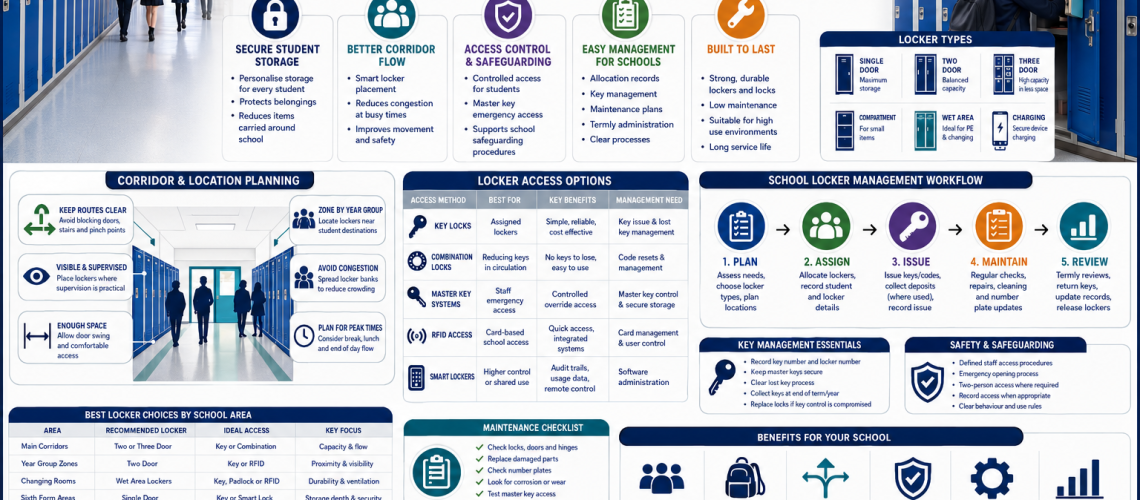
Locker management systems control how lockers are allocated, used, administered and returned to service. A reliable system identifies who has each locker, how long the allocation lasts, how access is managed and what happens when a user leaves, changes role or no longer needs the storage.
UK workplaces, schools, healthcare facilities, leisure centres and industrial sites can manage lockers through manual records, electronic locks or connected software. The appropriate method depends on user numbers, allocation changes, operational requirements and the complexity of the locker installation.
This guide explains the day-to-day operation of locker management systems, including assigned and shared lockers, onboarding, offboarding, temporary access, administration, reassignment and managing exceptions.
What is a locker management system?
A locker management system is the process used to assign lockers to authorised users, maintain those assignments, coordinate access and return compartments to the available pool when allocations end.
It does not necessarily require specialist software. A small workplace with permanently assigned lockers may only need accurate records, numbered compartments and controlled keys. Larger organisations with frequent changes of users may benefit from electronic or connected administration.
The central management question is straightforward: who is responsible for each locker, for how long, and what must happen before another person can use it?
| Management function | Operational responsibility |
|---|---|
| Allocation | Assign an available locker to an authorised user |
| Onboarding | Create the allocation and issue access |
| Changes | Update assignments when circumstances change |
| Temporary use | Control start dates, expiry and extensions |
| Offboarding | End allocations and recover or revoke access |
| Reassignment | Prepare a locker for another user |
| Exceptions | Resolve lost access, abandoned use and disputed assignments |
| Administration | Define who may issue, change, override and close allocations |
Locker management compared with other locker systems
Locker management is connected to several other operational subjects, but they should not be confused.
| System | Main responsibility |
|---|---|
| Locker management | User allocation, onboarding, offboarding and reassignment |
| Locker allocation | Designing assigned, shared, temporary and other allocation models |
| Occupancy management | Understanding actual use, availability and demand |
| Access control | Managing the locking methods and supported credentials |
| Estate management | Managing the physical locker installation and its condition |
| Smart locker software | Providing supported digital administration, reporting and integration tools |
These functions need to exchange accurate information. However, an unused locker is not necessarily unallocated, and a locker with no assigned user may still be unavailable because it requires maintenance.
For detailed usage analysis, see Locker Occupancy Management Systems UK. For physical asset planning, read our Locker Estate Management UK guide.
1. Choose the correct locker operating model
The intended use of the lockers should be established before deciding whether electronic access or management software is necessary.
| Operating model | How it works | Management priority |
|---|---|---|
| Assigned lockers | A user retains a compartment for an agreed period | Accurate allocation and controlled handover |
| Shared lockers | Different users access a compartment at different times | Release, reset and availability |
| Hot lockers | Users select available compartments when required | Reliable available-stock information |
| Temporary lockers | Access is issued for a defined short period | Expiry and recovery |
| Departmental lockers | A compartment is assigned to a team or function | Named management responsibility |
| Role-based lockers | Allocation follows a role rather than a named person | Handover when personnel change |
Detailed selection between these models belongs in our Locker Allocation Systems UK guide. The purpose here is to explain how the chosen model should be administered.
2. Managing assigned lockers
Assigned lockers are suitable where a person needs continuing personal storage. Examples include permanent employees, pupils, university students and staff with regular changing-room requirements.
A reliable assigned-locker process should record the user, locker reference, start date and access method. It should also define when the allocation will be reviewed or ended.
- Confirm that the user is entitled to a locker.
- Assign an available compartment.
- Record the user and locker reference.
- Issue the approved key, code or credential.
- Explain the rules for use and reporting problems.
- Review the assignment when the user changes department, location or role.
- Close the allocation when the user’s entitlement ends.
Assigned lockers should not remain indefinitely allocated to people who have left the organisation. Regular reconciliation with the appropriate administrative records can identify assignments that need review.
3. Managing shared and hot lockers
Shared and hot lockers require a more active return-to-service process because different people use the same storage over time.
The system must clearly identify whether a locker is available, allocated, awaiting clearance or temporarily unavailable.
- Establish how users select or receive an available locker.
- Record when the temporary allocation begins.
- Define when the permitted use ends.
- Provide an approved process for releasing the compartment.
- Reset access according to the selected lock’s instructions.
- Handle items left behind through the organisation’s property policy.
- Remove faulty lockers from the available pool.
A hot-locker arrangement is only useful if users can reliably identify available storage. Incorrect records can result in lockers being assigned twice or appearing available when they are still in use.
4. Temporary locker allocation
Temporary lockers may be issued to visitors, contractors, agency staff, short-term workers or people attending an event.
Temporary assignments should include a defined start and end point. Without an expiry or review process, short-term access can gradually become an unmanaged permanent allocation.
| Required information | Purpose |
|---|---|
| Authorised issuer | Identifies who approved the allocation |
| User or visitor reference | Establishes responsibility |
| Locker number | Identifies the compartment |
| Start date or time | Records when use begins |
| Expiry date or time | Defines when access should end |
| Access reference | Connects the allocation with its key or credential |
| Return status | Confirms whether the locker is ready for reuse |
Time-limited PINs or electronic credentials can support temporary use where the chosen lock and system provide those functions. They are not essential to every temporary locker arrangement.
5. Locker user onboarding
Onboarding creates the relationship between an authorised user and an individual locker. The process should be consistent whether the allocation is managed manually or electronically.
- Confirm entitlement: establish why the person or role requires storage.
- Select the operating model: assigned, shared, hot or temporary.
- Choose an available locker: confirm that the compartment is ready for use.
- Create the allocation: record the user or role and locker reference.
- Issue access: provide the approved key, code or credential.
- Record relevant dates: include start, review and expiry information as applicable.
- Communicate responsibilities: explain permitted use, fault reporting and return arrangements.
Onboarding should not create an allocation against a locker that is awaiting repair, clearance or another outstanding administrative action.
6. What should a locker allocation record contain?
An allocation record connects the user with the compartment. It should contain enough information to administer the assignment without duplicating the organisation’s complete physical asset register.
| Field | Purpose |
|---|---|
| User or authorised identifier | Shows who is responsible |
| Locker reference | Identifies the compartment |
| Allocation type | Assigned, shared, hot or temporary |
| Start date | Records when the allocation begins |
| Review or expiry date | Prevents unmanaged continuing use |
| Access reference | Links the appropriate key or credential where required |
| Allocation status | Active, pending return or closed |
| Responsible administrator | Identifies who can approve changes |
Information about locker dimensions, materials, manufacture dates, physical condition and maintenance history should be maintained in the appropriate asset or facilities records.
For detailed physical asset records, see Locker Asset Register UK.
7. Locker user offboarding
Offboarding ends an allocation and prepares the locker for another authorised user. It is particularly important when employees leave, students finish a course or contractors complete their work.
A reliable offboarding process should:
- Confirm that the current user’s allocation should end.
- Recover any issued physical key where applicable.
- Revoke or expire electronic credentials where supported.
- Confirm that the locker has been cleared under the organisation’s approved procedure.
- Record damage or faults requiring attention.
- Reset the locking arrangement if required.
- Close the user’s allocation record.
- Return the locker to the available pool only when it is ready for reuse.
A locker requiring repair should remain unavailable until the fault has been resolved. Closing a user’s allocation does not automatically mean that the physical locker can be reassigned.
8. Reassigning lockers to new users
Reassignment should follow a controlled process that preserves the history of the previous allocation.
Do not simply overwrite the former user’s details without recording that their assignment has ended.
- Close or amend the previous allocation.
- Recover or revoke the previous access method.
- Check that the compartment has been cleared.
- Confirm the locker is usable and available.
- Reset the locking arrangement where necessary.
- Create the new allocation record.
- Issue access to the new authorised user.
The same principles apply when a person changes department, building, shift pattern or role. An organisation should be able to establish who held a locker previously without retaining unnecessary personal information indefinitely.
9. Managing lost access and locker exceptions
Locker management systems must handle occasions when normal access or allocation procedures fail.
| Problem | Management response |
|---|---|
| Lost locker key | Verify authorisation and arrange a suitable replacement |
| Forgotten combination | Follow the approved reset or recovery procedure |
| RFID credential failure | Check allocation and credential compatibility |
| Temporary use exceeds expiry | Review entitlement and apply the agreed extension or clearance process |
| Damaged lock | Record the defect and remove the locker from the available pool where appropriate |
| Disputed allocation | Check the allocation history before changing access |
| Abandoned belongings | Apply the organisation’s notice and property-handling procedure |
The management system should identify the correct response and responsible staff member. Detailed repairs, programming instructions and credential technology belong to the relevant specialist procedures.
10. Abandoned and overheld lockers
An overheld locker is a compartment that remains assigned or in use beyond its expected period. An apparently abandoned locker may still contain personal belongings, even when the associated allocation seems inactive.
Organisations should avoid treating inactivity alone as permission to open a locker or dispose of its contents.
- Check the existing allocation and expiry records.
- Determine whether the user is still entitled to storage.
- Follow the applicable contact and notice procedure.
- Obtain the required authority before opening the locker.
- Handle belongings according to the organisation’s policy and applicable requirements.
- Record the action taken.
- Return the locker to availability only when clearance and resetting are complete.
11. Keep allocation, occupancy and maintenance status separate
One of the most important administrative distinctions is the difference between an allocation ending and a locker becoming available for reuse.
| Status type | Example | Responsible function |
|---|---|---|
| Allocation | Active, pending return or closed | Locker management |
| Occupancy | In use, apparently inactive or vacant | Occupancy management |
| Physical availability | Serviceable, unavailable or under repair | Facilities or estate management |
| Lifecycle condition | Monitor, repair, refurbish or replace | Asset and lifecycle management |
For example, an employee may have left and their allocation may be closed, but the locker could still be unavailable because a lock is damaged or personal property has not been cleared through the approved procedure.
Managing these statuses separately helps avoid inaccurate availability records and accidental reassignment.
12. Locker administrator responsibilities
Locker administration may involve reception, HR, facilities, security and local departmental managers. In smaller organisations, some responsibilities may be combined.
| Role | Typical responsibility |
|---|---|
| Locker administrator | Create, amend and close allocations |
| Reception or local administrator | Issue approved temporary storage |
| Facilities team | Coordinate defects and physical availability |
| Authorised security manager | Manage permitted higher-level access |
| System administrator | Maintain supported software settings and roles |
| Department manager | Confirm local requirements and user entitlement |
The organisation should define who can authorise each type of action. Being able to open a locker technically is not the same as having permission to do so.
13. Manual, electronic and smart locker management
Locker management does not have to be digital. The most appropriate approach is the one that can maintain accurate allocations and reliable handover without unnecessary complexity.
| Approach | Can suit | Typical administration |
|---|---|---|
| Manual management | Smaller installations with stable users | Numbered lockers, key records and spreadsheets |
| Standalone electronic locks | Keyless assigned or shared storage | Local PIN or RFID administration |
| Connected management systems | Frequently changing allocations or multiple sites | Supported central administration, expiry and reporting |
Standalone electronic locks should not automatically be described as centrally managed smart lockers. Some provide only local programming and access administration.
Connected systems may offer additional functions, but capability varies between suppliers, hardware and software configurations.
14. When does locker management software make sense?
Management software becomes more useful when manual allocation changes create significant administrative work or the organisation needs consistent control across several locations.
Situations that may justify a connected system include:
- Frequent onboarding and offboarding.
- Large numbers of temporary users.
- Shared or hot-locker operation.
- Multiple buildings or sites.
- Need for supported remote administration.
- Automated expiry of temporary assignments.
- Integration with existing organisational systems.
Where the requirement is mainly a stable allocation register, a connected platform may add cost without solving a significant operational problem.
For cloud dashboards, software integrations, APIs, reporting, resilience and multi-site administration, read our Smart Locker Management Software UK guide.
15. Locker management in different sectors
The underlying administration principles are similar across sectors, but the operating arrangements vary according to user requirements.
| Environment | Typical management requirement |
|---|---|
| Workplaces | Staff onboarding, department changes and hybrid-working allocations |
| Schools and colleges | Student allocation, key control and term-end reassignment |
| Healthcare | Staff changing, shift patterns and controlled access procedures |
| Industrial facilities | Shift workers, contractors and PPE storage |
| Leisure centres | Frequent turnover and reliable release of shared lockers |
| Multi-site organisations | Consistent policies with appropriate local administration |
For education-specific procedures, see our School Locker Systems UK guide.
Locker management system implementation checklist
Before introducing or revising a locker management system, confirm the following arrangements.
- Every locker has a stable, unique reference.
- The operating model has been defined.
- Each allocation has an identifiable authorised user or role.
- Start dates and expiry arrangements are recorded where required.
- Access is issued through an approved process.
- Administrator responsibilities are clear.
- Offboarding includes access recovery or revocation.
- Temporary and shared lockers have reliable release procedures.
- Lost-access and abandoned-use procedures are documented.
- Faulty lockers are prevented from being reassigned.
- Allocation records are updated when users change role or location.
- Personal data is handled in accordance with applicable requirements.
- The chosen system can be operated and supported by the responsible staff.
Locker management systems and Total Locker Service
Total Locker Service supplies commercial lockers, locking equipment and replacement components for UK schools, workplaces, leisure facilities, healthcare settings and industrial users.
The equipment chosen should support the organisation’s intended allocation and management procedures. A system for permanently assigned staff lockers may need different locking and administration arrangements from one designed for short-term shared use.
Browse our commercial lockers range and locker locks to review available product options.
Locker Management Systems UK FAQs
What is a locker management system?
A locker management system is the operating process used to assign lockers, administer users, manage access, record allocation changes and return lockers to the available pool after use.
Does a locker management system require software?
No. Smaller installations may be managed using numbered lockers, controlled keys and accurate registers. Software can become useful where allocations change frequently or several sites need coordinated administration.
What is the difference between locker management and occupancy management?
Locker management controls user assignments, onboarding, offboarding and reassignment. Occupancy management examines how available capacity is actually being used and where demand exists.
How are lockers reassigned to new users?
The previous allocation should be closed, old access recovered or revoked, and the locker checked and reset where necessary. A new assignment can then be created for the authorised user.
Can locker management systems support temporary users?
Yes. Temporary users can be assigned lockers for defined periods. The management process should record the authorised user, locker reference, start date, expiry arrangements and return status.
Are electronic locker locks the same as smart locker management systems?
No. Standalone electronic locks can provide keypad or RFID access without central management. A connected smart locker system may additionally offer supported software administration, reporting, integrations and remote functions.
What happens when a locker user leaves an organisation?
The organisation should close the allocation, recover or revoke access, follow its property-clearance procedure, inspect the locker and return it to availability only when it is ready for another user.
Should locker management and maintenance records be separate?
They should be connected but can be maintained as separate records. Allocation records identify users and assignment periods, while maintenance records track physical faults, repairs and whether a locker is serviceable.
Summary: managing locker allocations effectively
An effective locker management system keeps the relationship between users and lockers accurate throughout the allocation period. It should provide consistent onboarding, controlled access, clear offboarding procedures and reliable reassignment.
Manual records may be sufficient for stable installations, while connected management systems can support more complex operating requirements. The correct approach is the one that maintains accurate records, appropriate access control and dependable return to availability without unnecessary administration.
For locker hardware, visit the Total Locker Service commercial lockers range.
Discover more from Blog Total Locker Service
Subscribe to get the latest posts sent to your email.