Locker Infrastructure Systems UK: Access, Allocation, CAFM and Smart Locker Integration
May 13, 2026
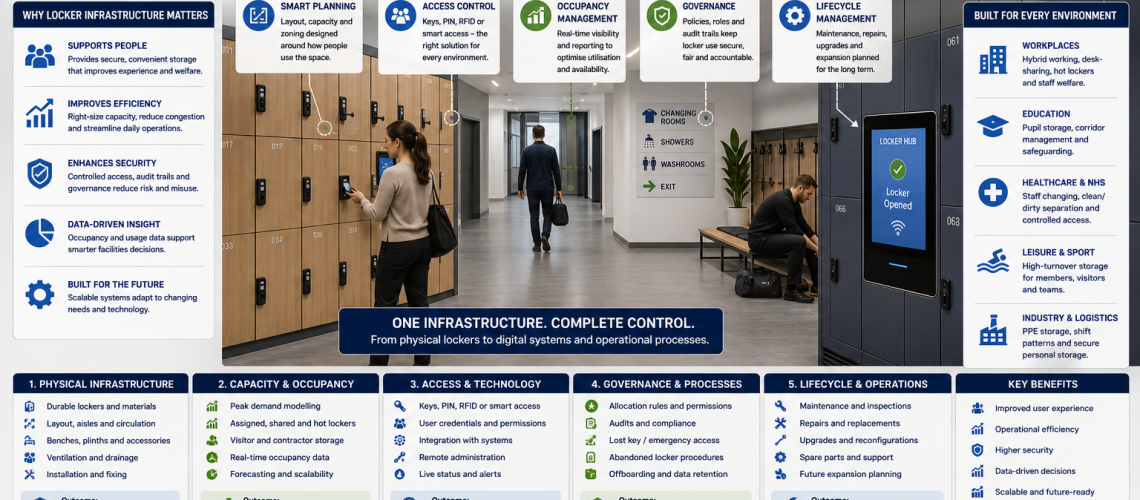
Locker infrastructure systems connect physical lockers with the processes and digital systems used to allocate, access, maintain and manage them. Depending on the organisation, this can range from numbered lockers, controlled keys and a spreadsheet through to RFID access, smart-locker software, occupancy reporting, asset registers and CAFM integration.
The aim is not to make every locker installation more complicated. Good locker infrastructure uses the simplest level of integration that reliably supports the users, facilities team and locker estate.
This guide explains how UK organisations can connect locker hardware with allocation, access control, occupancy information, asset records, maintenance workflows and facilities-management systems. For the physical size, quantity and room-layout stage, start with our Locker Planning UK guide. For day-to-day allocation and user administration, see Locker Management Systems UK.
Quick Answer: What Is a Locker Infrastructure System?
A locker infrastructure system is the framework that connects physical lockers with the operational systems around them. It can include locker identities, user allocation, keys or electronic credentials, occupancy status, maintenance records, asset-management information, smart-locker software and CAFM or IWMS platforms.
A small site may only need numbered lockers, controlled keys and an accurate record of who uses each compartment. A large, flexible or multi-site estate may justify electronic access, automated allocation, occupancy reporting and integration with wider workplace or facilities systems.
| Locker infrastructure layer | What it controls | Typical system or process |
|---|---|---|
| Physical locker estate | Locker identity, location and installed hardware | Asset register |
| User allocation | Who receives or uses each locker | Locker management system |
| Access | Keys, PINs, RFID and electronic credentials | Access-control system |
| Occupancy | Available, assigned, shared or unavailable lockers | Occupancy-management system |
| Maintenance | Faults, repairs and work orders | CAFM or maintenance workflow |
| Smart operation | Allocation, access, availability and reporting | Smart-locker platform |
| Estate reporting | Condition, utilisation and future requirements | Estate-management process |
Why Locker Infrastructure Matters
Lockers are often purchased as physical products but then managed through several separate processes. Facilities teams may have one spreadsheet for locker numbers, another for users, a key register, maintenance records in a helpdesk system and completely separate replacement plans.
That can work for a small estate, but as the number of lockers, users or sites grows, fragmented records can create avoidable problems:
- duplicate or inconsistent locker identifiers;
- unclear user allocation;
- unknown vacant lockers;
- lost keys or uncontrolled master access;
- maintenance faults that cannot be linked to the correct locker;
- several systems holding different versions of the same information;
- old lockers remaining active in records after replacement;
- poor visibility across multiple buildings or sites.
A well-designed infrastructure model connects the information that genuinely needs to move while leaving specialist processes in the systems best suited to manage them.
Start with the Physical Locker Identity
Every connected locker system needs a reliable way to identify the physical asset. This does not require sophisticated software. What matters is that the same locker or locker bank can be recognised consistently across allocation, access, maintenance and estate records.
- unique asset or locker-bank ID;
- site and room location;
- visible locker number;
- locker type and compartment configuration;
- lock family or access technology;
- controller or reader reference where electronic systems are installed;
- relevant installation or servicing information.
For larger estates, these fields can be held in a locker asset register. The asset register provides a stable physical reference even when users, locks, maintenance status or occupancy change over time.
Locker Allocation and User Management
Allocation records answer a simple but important question: who is currently entitled to use the locker?
The answer may be straightforward for permanently assigned staff lockers. Shared offices, contractors, temporary workers, schools and smart-locker environments can require more flexible administration.
- permanent assigned lockers;
- shared or day-use lockers;
- temporary allocation;
- visitor or contractor lockers;
- release and reassignment;
- staff or pupil leavers;
- lockers temporarily removed from service.
The dedicated Locker Management Systems UK guide explains allocation and administration in detail. Infrastructure becomes relevant when that allocation information needs to connect with another system, such as RFID access, workplace identity or occupancy reporting.
Allocation and Occupancy Are Different
A locker can be allocated without being regularly used, while a shared locker can be occupied without being permanently assigned. Treating allocation and occupancy as the same thing can distort capacity planning.
| Information | Example | Why it matters |
|---|---|---|
| Assigned user | Locker 214 is allocated to one employee | Controls responsibility |
| Available | Locker 37 is ready for shared use | Shows usable capacity |
| Temporary allocation | Contractor uses locker 42 until Friday | Supports controlled reassignment |
| Unavailable | Locker 16 is awaiting repair | Prevents allocation of an unusable compartment |
| Utilisation | A locker zone regularly operates below capacity | Supports future capacity decisions |
For the detailed distinction between availability, allocation and utilisation, see Locker Occupancy Management Systems UK.
Locker Access Control and Infrastructure
The access method determines how the user opens the locker and how much administration the system requires. A conventional key lock may need nothing more than controlled key records. Electronic systems can introduce credentials, software, administrator permissions and event data.
| Access method | Typical infrastructure requirement |
|---|---|
| Key lock | Key issue, spare-key and master-key records |
| Mechanical combination | Reset and management-override procedure |
| Coin or token lock | Management key and servicing process |
| Electronic PIN | Reset, override and battery-management process |
| RFID | Credential administration and, where applicable, identity integration |
| Smart locker | Allocation, access, availability, reporting and software administration |
If you are deciding which access technology to use, see Locker Access Control Systems UK. Where physical keys remain part of the estate, the Locker Key Management Systems UK guide covers issue, return, replacement and master-key governance.
RFID Does Not Automatically Mean Smart Locker Integration
An RFID lock can operate locally without being connected to a central network or smart-locker platform. Likewise, an electronic PIN lock may be completely standalone.
When comparing locker systems, establish whether the proposed product actually supports:
- central user administration;
- remote credential changes;
- live or periodic availability reporting;
- event or audit data;
- fault or battery alerts;
- software exports;
- API connections;
- integration with identity or workplace systems.
Do not assume these functions are available simply because a lock uses RFID or another electronic credential.
Smart Locker Platforms
Smart locker systems can combine access, allocation, availability and administration within one platform. They are most useful where a site has a genuine need for flexible or frequently changing locker use.
- hybrid workplaces;
- large shared-use locker estates;
- high staff turnover;
- temporary or contractor populations;
- centralised multi-site administration;
- situations where current availability needs to be visible;
- operations where manual allocation has become burdensome.
By contrast, a stable bank of permanently assigned lockers may gain little from networking, software subscriptions or complex credential administration.
For dashboards, user administration, exports and software capabilities, see Smart Locker Management Software UK.
Connecting Lockers with CAFM and IWMS
Computer-aided facilities management (CAFM) and integrated workplace management systems (IWMS) can provide a useful home for locker maintenance where lockers are already treated as building assets.
A facilities platform may be able to:
- hold locker asset IDs within the building hierarchy;
- open the correct asset record from a QR code;
- accept locker faults through an existing helpdesk;
- create maintenance work orders;
- schedule inspections;
- record completed repairs;
- retain asset history;
- report across multiple sites.
That does not mean every piece of locker information belongs in CAFM. User allocation, access credentials and live occupancy can remain in specialist systems while the facilities platform receives only the information it needs.
See Locker CAFM Integration UK for the detailed facilities-management workflow.
Maintenance and Fault Reporting
Maintenance is one of the clearest examples of useful locker-system integration. A fault can be reported against a known locker ID, passed to the maintenance team and then retained as part of the asset history.
- A user or administrator identifies a fault.
- The correct locker or bank is identified.
- The issue enters the maintenance workflow.
- The required lock, hinge, door or other component is identified.
- The repair is completed.
- The work order is closed.
- The maintenance history remains linked to the physical asset.
- Repeated faults can be reviewed when future repair, refurbishment or replacement is considered.
This is more useful than maintaining an independent locker-maintenance database if the organisation already has an established facilities helpdesk or CAFM process.
Asset Registers and Locker Estate Records
The asset register should provide a stable reference for what physically exists. User allocation, occupancy and maintenance status can change frequently, but the asset ID allows those changing records to resolve back to the correct locker.
- use unique and stable IDs;
- use consistent site and location naming;
- record the locker or bank type;
- record lock/controller information where it affects maintenance;
- update physical fields after refurbishment or major modification;
- close retired asset records after removal;
- create new records as replacement lockers are handed over.
For the full register structure, see Locker Asset Register UK. For a wider view of condition, occupancy and future requirements across an estate, see Locker Asset Management UK.
Avoid Multiple Sources of Truth
One of the most common infrastructure problems is the same information being edited independently in several systems. Before integrating lockers with other platforms, decide which system is authoritative for each type of data.
| Information | Typical authoritative source |
|---|---|
| Physical locker identity and location | Asset register |
| User-to-locker allocation | Locker management system |
| Current occupancy or availability | Occupancy or smart-locker platform |
| User identity | HR, identity or membership system where integrated |
| Access permission | Authorised access-control system |
| Maintenance work orders | CAFM or facilities-maintenance system |
| Physical condition evidence | Inspection or locker estate audit |
| Replacement programme | Estate/procurement planning process |
Integration should normally move the required information between these systems rather than create another database containing competing versions of the same data.
APIs, CSV Files or Manual Updates?
Locker integration does not automatically require a live API. The correct method depends on how frequently information changes, how quickly it needs to move and how much operational risk is created by delay.
| Method | Can suit | Main limitation |
|---|---|---|
| Manual record | Small and stable locker estates | Requires disciplined updating |
| Spreadsheet or CSV exchange | Periodic asset or allocation updates | Not real time |
| Scheduled integration | Regular synchronisation between defined systems | Requires compatible software |
| API integration | Live or near-live user, availability or fault data | Requires development, authentication and ongoing support |
| Single integrated platform | Estates where one platform genuinely covers the required functions | Can increase dependence on one supplier |
The simplest reliable method is normally the strongest choice. A well-maintained spreadsheet can be better infrastructure than an elaborate automated integration that nobody understands or owns.
Define What Each Integration Must Do
Where two systems exchange locker information, document the connection clearly before implementation.
- Source: which system creates the authoritative value?
- Identifier: which locker, compartment, user or location ID joins the records?
- Fields: exactly what information is exchanged?
- Direction: does data move one way or both ways?
- Frequency: manual, scheduled or live?
- Validation: what happens when identifiers do not match?
- Failure: how is a failed update identified?
- Ownership: who maintains the connection?
- Retirement: what happens when a locker or connected system is decommissioned?
This prevents a useful integration from gradually becoming an undocumented dependency that is difficult to maintain.
Locker Access Data and Privacy
Connected lockers can produce more information than conventional mechanical lockers. Depending on the system, records may include user accounts, credentials, allocations, access events, administrator actions and booking history.
Organisations should decide what data is actually required, why it is needed, who can access it and how long it should be retained. Collecting additional information simply because the software supports it can create unnecessary administration and data-protection obligations.
For detailed guidance on access logs, personal data and retention, see Locker Access Compliance UK.
Multi-Site Locker Infrastructure
Organisations with multiple buildings do not necessarily need identical lockers everywhere. A school, hospital, warehouse and office can require different locker materials, configurations and locks while still using a common management structure.
Useful areas to standardise include:
- asset-ID structure;
- site and room naming;
- locker and lock categories;
- allocation terminology;
- fault categories;
- maintenance records;
- data exports;
- administrator responsibilities.
This allows central reporting without forcing every location into an unsuitable product specification.
Locker Infrastructure for Schools
School locker infrastructure is usually more concerned with reliable allocation, key control, pupil changes, term-end recovery, faults and maintenance than with sophisticated software.
- consistent locker numbering;
- pupil-to-locker records;
- replacement-key procedures;
- controlled master access;
- term-end key and locker recovery;
- damage and maintenance reporting;
- clear asset records for replacement planning.
For the actual education specification, use the School Lockers UK guide.
Locker Infrastructure for Workplaces
Workplace infrastructure can range from permanently assigned key-operated lockers to shared electronic systems supporting hybrid staff, contractors and visitors.
- staff allocation and offboarding;
- assigned versus shared lockers;
- hybrid-worker access;
- contractor and visitor storage;
- credential integration;
- occupancy reporting;
- facilities maintenance;
- multi-site administration.
See Workplace Lockers UK for the underlying staff-storage specification.
Locker Infrastructure for Healthcare Estates
Healthcare locker infrastructure may need to connect staff allocation, department locations, access systems and facilities-maintenance records without mixing those systems unnecessarily.
- stable locker-bank and department references;
- clear separation between physical assets and staff allocation;
- maintenance faults linked to the correct locker asset;
- recorded lock-system changes;
- controlled temporary staff allocation;
- consistent estate data across buildings.
Changing-room design, uniform storage, shift patterns and clean/dirty workflow should be handled as physical and operational planning requirements rather than being buried inside the infrastructure database.
When Locker Integration Is Worthwhile
Integration is most valuable when it removes a real administrative problem or improves visibility that the organisation genuinely needs.
- large locker populations;
- many temporary or changing users;
- shared-use lockers;
- several buildings or sites;
- frequent maintenance activity;
- existing CAFM infrastructure;
- electronic access requiring central administration;
- a genuine need for occupancy or availability information.
When Not to Integrate
More technology is not automatically better locker management. Integration can be unnecessary where the estate is small, stable and easy to administer.
- Do not install live occupancy software where a simple allocation register already answers the operational question.
- Do not connect lockers to HR or identity platforms without a defined benefit.
- Do not install smart locks simply to produce data that nobody will use.
- Do not duplicate maintenance records in locker software and CAFM without defining which is authoritative.
- Do not commission a custom API if periodic spreadsheet exchange adequately meets the requirement.
- Do not centralise administration where controlled local management works better.
A numbered locker bank, a controlled set of keys and an accurate spreadsheet can be entirely appropriate infrastructure.
Questions to Ask Before Buying an Integrated Locker System
- What operational problem are we trying to solve?
- How many lockers and users are involved?
- Are lockers permanently assigned, shared or temporary?
- Does current availability need to be visible?
- Which access technology is required?
- Do we already have an authoritative user database?
- Do we already manage assets and faults through CAFM?
- What information genuinely needs to move between systems?
- How often must that information update?
- Who will administer the system?
- Who will support any integration?
- What happens if the software or network is unavailable?
- Can data be exported if the platform is replaced?
- What ongoing licence, support and maintenance costs apply?
Locker Infrastructure Integration Checklist
- Give every locker or locker bank a stable identifier.
- Use consistent site and location naming.
- Define where user allocation is recorded.
- Separate allocation from actual occupancy where necessary.
- Define how access credentials are administered.
- Decide where faults and work orders are recorded.
- Link maintenance history to the correct physical asset.
- Choose one authoritative source for each important data field.
- Use manual, scheduled or live integration according to the real requirement.
- Document data flows between connected systems.
- Review whether identifiable access records are genuinely required.
- Define what happens when lockers are replaced or removed.
- Test complex integrations before estate-wide rollout.
- Keep the system no more complicated than necessary.
Common Locker Infrastructure Mistakes
- Integrating before defining the operating model. Decide how lockers will actually be used first.
- Duplicate locker IDs. Use a stable identifier that follows the physical asset.
- Confusing allocation with occupancy. They answer different questions.
- Assuming RFID automatically means smart lockers. Many RFID systems operate locally.
- Synchronising unnecessary information. Move only data required by a real workflow.
- Maintaining the same data independently in several systems. Define an authoritative source.
- Ignoring maintenance. Electronic lockers still have doors, hinges, locks, batteries and physical components.
- Leaving removed lockers active in connected systems. Decommission records properly.
- Buying technology without assigning ownership. Every system and interface needs an administrator.
- Over-engineering a simple locker estate. Manual control can be entirely appropriate.
Related Locker Infrastructure Guides
- Locker Planning UK – quantities, dimensions, layout and physical installation planning.
- Locker Management Systems UK – user allocation and operational administration.
- Locker Occupancy Management Systems UK – utilisation and availability.
- Locker Access Control Systems UK – key, PIN, RFID and electronic access.
- Locker Key Management Systems UK – physical key administration and governance.
- Locker Asset Register UK – physical asset IDs, locations and records.
- Locker Asset Management UK – managing lockers as facilities assets.
- Locker Estate Audit UK – condition, use and replacement evidence.
- Locker CAFM Integration UK – connecting lockers with facilities-management systems.
- Locker Access Compliance UK – identifiable access data, retention and governance.
- Locker Replacement Planning UK – phased renewal and replacement projects.
- School Lockers UK – education-specific locker specification.
- Workplace Lockers UK – offices, factories and staff storage.
Locker Infrastructure Systems FAQs
What is a locker infrastructure system?
A locker infrastructure system is the framework that connects physical lockers with allocation, access control, occupancy, asset records, maintenance and facilities-management processes. It can be entirely manual or include connected smart-locker technology.
Do locker infrastructure systems need smart lockers?
No. Small or stable locker estates can often be managed effectively with conventional locks, numbered lockers and accurate records. Smart lockers become useful when electronic allocation, changing users, shared use, central administration or current availability solve a defined operational problem.
Can lockers connect to CAFM systems?
Yes. Where the CAFM platform supports appropriate asset and maintenance workflows, lockers can be recorded as building assets and linked to inspections, faults, work orders and maintenance history.
Does RFID make a locker a smart locker?
No. RFID describes an access credential technology. An RFID lock can operate locally without networking, central software, occupancy reporting or integration with other systems.
Do locker systems need API integration?
No. Manual records, spreadsheets, CSV files and scheduled exchanges can all be appropriate. Live APIs are most useful where current information needs to move automatically between systems.
What locker data should be integrated?
Only information required by a defined operational workflow should be exchanged. Common examples include locker IDs, location, allocation status, availability, credential status, fault references and maintenance completion.
What is the difference between locker management and locker infrastructure?
Locker management controls day-to-day operation such as allocation, reassignment and user administration. Locker infrastructure focuses on how the physical locker estate and those operational processes connect with access, asset, maintenance and facilities systems.
When is locker integration unnecessary?
Integration may be unnecessary where the locker estate is small, users are stable and manual records already provide reliable control. Technology should solve a defined problem rather than be added solely to make the system more complex.
Build Locker Infrastructure Around the Real Operational Need
Locker infrastructure can range from a numbered locker bank with controlled keys and a spreadsheet to a multi-site smart-locker estate connected to access, workplace and facilities-management platforms.
The strongest solution is not necessarily the most technically advanced. It is the one that gives users reliable access, gives administrators clear control, keeps asset and maintenance records accurate and avoids unnecessary duplication.
For the physical locker requirement, start with the Locker Planning UK guide or view our commercial locker range. For allocation and operational administration, continue to Locker Management Systems UK.
Discover more from Blog Total Locker Service
Subscribe to get the latest posts sent to your email.