Charging Locker Power Requirements Explained
April 16, 2026
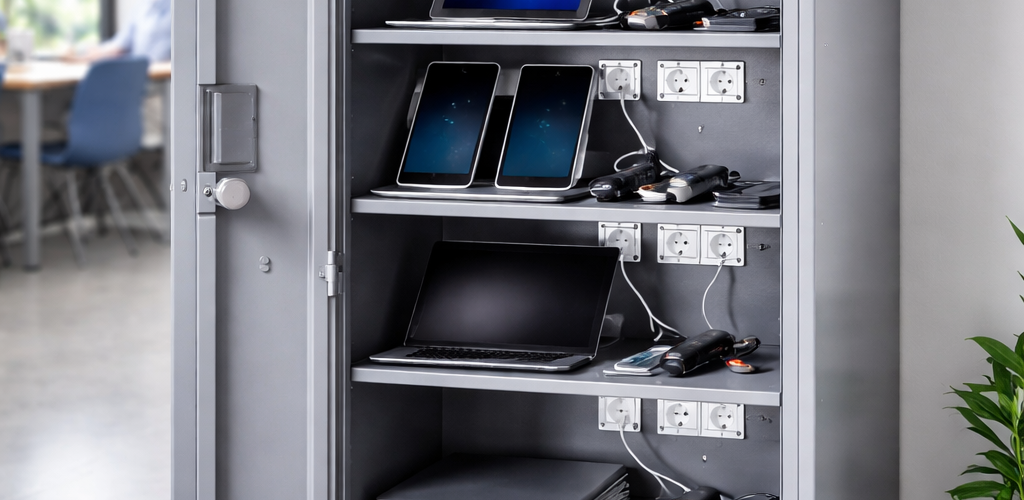
Charging lockers can serve the same basic purpose in schools and workplaces, but the way they are used is often very different. Schools usually work around teaching timetables, centrally managed device sets and staff supervision. Workplaces may need to support permanent staff, hybrid workers, contractors, shift teams and a much wider mixture of equipment.
This guide compares charging lockers for schools vs workplaces and focuses specifically on those operational differences: who uses the equipment, how devices are issued and returned, when charging takes place, how consistent the equipment is and how closely the process is supervised.
For the wider subject of powered secure storage, product types and overall specification, use the Charging Lockers UK guide.
Charging lockers for schools vs workplaces: quick comparison
| Question | School | Workplace |
|---|---|---|
| Main users | Pupils, students and teaching staff | Employees, contractors and shift teams |
| Typical equipment | Laptops, Chromebooks and tablets | Laptops, radios, scanners, tablets and tools |
| Usage cycle | Lessons and the school day | Working day, hybrid attendance or shifts |
| Device ownership | Often class or departmental pools | Assigned, pooled or mixed |
| Supervision | Often staff-managed | Often user, team or supervisor-managed |
| Equipment consistency | Often highly standardised | Frequently mixed |
| Return pattern | Class-end or day-end return | Staggered, flexible or shift return |
| Charging window | Often overnight | Daytime, overnight or between shifts |
| Main planning emphasis | Simplicity, routine and supervision | Flexibility, accountability and workflow |
The table does not mean every school or workplace operates in the same way. It identifies the patterns that most often make their charging-locker requirements different.
Different user populations change the requirement
The first major difference is the user population.
In a school, charging equipment may be used by pupils across several year groups, classes or departments. The people physically using the devices can change repeatedly during the day, while responsibility for managing the equipment remains with teachers, technicians or the IT department.
A workplace can have a much less uniform population. The same site may contain:
- permanent office employees;
- hybrid workers attending only on selected days;
- contractors;
- visitors;
- warehouse or production teams;
- day and night shifts;
- supervisors;
- facilities and maintenance staff.
That difference affects the operating routine around the charging locker. A school can often build the process around a relatively predictable population and timetable. A workplace may need to accommodate people arriving, leaving and changing roles at different times.
Teaching timetable vs working day, hybrid attendance and shifts
School charging routines are often closely tied to the timetable. Devices may be collected before a lesson, used for a defined teaching period and returned immediately afterwards. Alternatively, a class set may remain with one department through the school day before being returned for charging in the afternoon.
This creates clear operational points:
- before lessons begin;
- between lessons;
- at break or lunch;
- at the end of the teaching day;
- during overnight charging.
Workplaces can operate very differently. An office may have users arriving throughout the morning and leaving at different times. Hybrid workers may attend only two or three days each week. A warehouse may have a concentrated handover between shifts, while another site operates continuously across 24 hours.
The workplace charging routine therefore needs to fit the actual working pattern rather than assuming one universal collection and return time.
Centrally managed school sets vs workplace device fleets
School charging lockers frequently support a recognisable set of equipment. A department may own 20 identical Chromebooks, a primary school may operate a set of tablets, or an IT department may manage several identical laptop banks.
The important feature is that the equipment is often managed as a set. Individual pupils may use different devices, but the school still treats the equipment as one teaching resource that must be complete, charged and available when required.
Workplace device fleets are often less uniform. An organisation may have:
- employee laptops;
- shared loan laptops;
- tablets;
- mobile phones;
- two-way radios;
- barcode scanners;
- handheld terminals;
- test equipment;
- power-tool batteries.
Even within one device category, workplace equipment may come from different manufacturers or generations. That creates a different operational problem from managing a standardised school class set.
Standardised school devices vs mixed workplace equipment
Device consistency is one of the strongest practical differences between many school and workplace projects.
A school that purchases devices in batches may know that every Chromebook in a class set uses the same case, charger and operating routine. Staff can establish one repeatable issue-and-return process that works across the whole set.
A workplace may need to accommodate several laptop formats, different generations of handheld equipment or specialised operational devices. The workflow therefore has to cope with more variation.
This page is concerned with that operational difference, rather than the physical dimensions themselves. If you need to check compartment width, height, depth, chargers, plugs and cable clearance, use Charging Locker Sizes Explained.
School supervision vs workplace accountability
School charging systems are often based on visible supervision. A teacher, technician, librarian or IT team may control when equipment is released and when it is returned.
For example, a teacher might collect a class set at the start of a lesson, check that the devices are complete and then return the whole set when teaching finishes. The system succeeds because one person or department oversees the process.
Workplaces often depend more heavily on accountability. Employees may collect and return devices independently, a supervisor may issue equipment to a shift, or a team may be responsible for a pool of devices without direct observation throughout the day.
The workplace question is therefore often:
Can the organisation establish who is responsible for the equipment at each stage of the working process?
That is a different requirement from continuous supervision.
Issue-and-return routines
Charging lockers work best when issue and return are treated as part of the operating routine rather than as an afterthought.
Typical school routine
- Teacher or authorised member of staff accesses the device set.
- Devices are issued to pupils or taken into the classroom.
- The set is used during teaching.
- Devices are collected again.
- The set is checked for missing or damaged equipment.
- Devices are returned for charging.
- The equipment is ready for the next lesson or school day.
Typical workplace routine
- User or supervisor collects the required equipment.
- The device becomes the responsibility of that employee, team or shift.
- Equipment remains in use for part or all of the working period.
- The device is returned when no longer required.
- Faults, damage or missing equipment are reported.
- The device is returned to charging ready for its next user.
The workplace process may be less synchronised than the school routine, particularly where users have flexible hours or shifts overlap.
Overnight charging vs daytime and between-shift charging
Schools often have a natural charging window after pupils leave. A set used during the day can be returned in the afternoon and remain charging overnight, ready for lessons the following morning.
That predictable downtime can simplify the operational routine. The equipment has a clear end-of-day return point and several hours in which to recharge.
Workplaces can have several different charging windows:
- overnight charging for office laptops;
- short daytime top-ups;
- charging while hybrid staff are away from the building;
- rapid turnaround between warehouse shifts;
- continuous rotation of radios or scanners;
- planned charging during maintenance downtime.
Where the electrical supply, charger arrangement or simultaneous electrical load is the issue, use Charging Locker Power Requirements Explained. For the underlying charging arrangement itself, see How Charging Lockers Work.
School operational example: centrally managed Chromebook class set
Consider a secondary school with a department-owned set of Chromebooks.
The devices are not permanently allocated to pupils. They are a teaching resource used by several classes across the week. The department needs the complete set ready at known points in the timetable.
A practical routine could be:
- the department controls access to the charging area;
- a teacher collects the required devices before the lesson;
- pupils receive the devices in the classroom;
- the teacher checks the set when it is returned;
- missing or damaged devices are identified before the next class;
- the devices return to charging at the end of use;
- the full set charges overnight after the final lesson.
The key school requirement is not maximum flexibility. It is a repeatable, supervised routine that keeps a known device set complete and ready for teaching.
School operational example: central IT device pool
A larger school or college may operate several device pools from an IT department rather than storing equipment directly in classrooms.
In this model, the charging locker becomes part of a central support process. Devices may be issued to departments, temporary replacements may be provided when equipment fails and returned equipment may need to be checked before reissue.
The operational priorities become:
- clear device identification;
- controlled issue and return;
- easy checking of incomplete sets;
- predictable charging readiness;
- simple staff administration.
The users may change continuously, but the management process remains centralised.
Workplace operational example: hybrid office
Now consider an office where employees attend on different days and the business keeps a pool of loan laptops alongside permanently issued equipment.
There is no single classroom-style return point. One employee may arrive at 08:00, another at 10:00 and another may work from home that day. Loan equipment might be collected for a meeting and returned two hours later.
The charging system therefore has to work with:
- variable attendance;
- different arrival and departure times;
- personally issued and pooled equipment;
- short-term loans;
- daytime returns as well as overnight storage;
- users accessing equipment without continuous supervision.
The main workplace emphasis is flexibility within a controlled process, rather than the timetable-led simplicity of the school example.
Workplace operational example: warehouse scanners and radios
A warehouse or distribution site creates another pattern again.
Handheld scanners and radios may be issued at the beginning of a shift and returned when that shift ends. The devices are operational equipment rather than general office technology, and availability can directly affect the incoming team’s ability to work.
The charging routine may therefore look like this:
- Outgoing workers return radios or scanners.
- Equipment is checked and connected for charging.
- Faulty devices are removed from normal circulation.
- Charged units are made available to the incoming shift.
- Supervisors manage shortages or substitutions.
The key requirement is reliable handover between working periods. Unlike a school, the site may not have a long overnight window in which the whole device pool is unused.
Industrial example: mixed equipment and specialist devices
Industrial environments can contain a much broader equipment mix than a typical school deployment. A single organisation might need secure charging for radios, scanners, tablets, diagnostic equipment and removable tool batteries.
Different teams may also use the equipment in different ways. Maintenance staff might have personally issued devices, while production teams share radios between shifts and warehouse staff use a scanner pool.
The charging requirement is therefore defined less by a single standard user and more by the workflows surrounding each device group.
Shared vs assigned use is a separate decision
Schools often use pooled class or departmental equipment, while workplaces can contain individually issued, pooled and role-based devices at the same time. That difference matters, but the detailed shared-versus-assigned decision has its own search intent.
For the full comparison of pooled devices, personal allocation, role-based charging and hybrid systems, use Shared vs Assigned Charging Lockers.
Capacity should follow the environment
A school may know exactly how many devices belong to a class or department. A workplace may need to consider changing attendance, multiple shifts or several equipment pools. Those differences affect demand, but the calculation itself belongs in the dedicated capacity guide.
Use How to Plan Charging Locker Capacity once the school or workplace usage pattern is clear.
Access and lock choice
Schools may rely more heavily on staff-controlled access, while workplaces can require employee self-service, team access or supervisor control. That operational difference should inform the next specification stage, but this page does not need to compare individual lock technologies.
For keys, codes, mechanical and electronic access options, use Best Lock Types for Charging Lockers.
Location follows supervision and workflow
A school may favour a classroom, IT area or staff-controlled resource point because supervision is part of the operating model. A workplace may prioritise proximity to hot-desking, a staff area, equipment issue point or shift handover zone.
The detailed location decision, including access routes, electrical supply, circulation and installation considerations, is covered in Where to Install Charging Lockers.
What actually changes between a school and workplace charging-locker project?
| Planning issue | School emphasis | Workplace emphasis |
|---|---|---|
| Users | Large pupil population with staff oversight | Employees, contractors, visitors and shift workers |
| Routine | Timetable-led | Working hours, hybrid patterns or shifts |
| Device management | Class sets and department pools | Personal, pooled and role-based fleets |
| Equipment range | Often standardised laptops or tablets | Frequently mixed device types |
| Control | Direct staff supervision is common | Accountability and independent access are more common |
| Return | Often coordinated at lesson or day end | Can be staggered or tied to shift handover |
| Charging period | Long overnight window is common | May need daytime, overnight or rapid turnaround |
| Primary operational goal | Keep teaching devices organised and ready | Keep equipment available without disrupting workflow |
Questions to ask before choosing a school or workplace charging locker
- Who will physically collect and return the devices?
- Are users pupils, permanent staff, hybrid workers or shift teams?
- Does use follow a teaching timetable, working day or shift pattern?
- Are the devices managed as a class set, an employee fleet or an operational pool?
- Are most devices identical or is the equipment mixed?
- Will issue and return be supervised directly?
- Is the main charging window overnight, during the day or between shifts?
- Does equipment have to be available immediately for the next class or working team?
- Does the organisation need a simple central routine or a more flexible distributed process?
Choosing charging lockers for the environment
For a school, begin with the teaching routine. Identify who controls the devices, when classes need them, when sets return and whether overnight charging provides the main recovery window. Standardised equipment and staff supervision often allow a comparatively structured system.
For a workplace, begin with the operational workflow. Identify whether staff attendance is fixed or flexible, whether equipment is personal or pooled, whether shifts overlap and whether different device types need to pass through the same storage system.
Those environmental differences should be established before detailed decisions about capacity, compartment dimensions, access, power and location.
When you are ready to compare physical products, view the Total Locker Service charging locker range.
Charging lockers for schools vs workplaces: FAQs
How do charging-locker requirements differ between schools and workplaces?
Schools often organise charging around teaching timetables, standardised class or department device sets and staff supervision. Workplaces are more likely to have mixed equipment, flexible attendance, independent users or shift-based issue and return routines.
Why are school charging routines often more predictable?
School device use often follows lessons and the school day. Equipment can be issued for a known teaching period, returned as a set and then charged overnight ready for the next planned use.
Why can workplace charging lockers need more flexibility?
Workplaces may have permanent staff, hybrid workers, contractors and shift teams using different devices at different times. Returns can be staggered and equipment can include laptops, tablets, radios, scanners and tools.
Are school charging lockers normally staff supervised?
Many school systems use staff supervision because teachers, technicians or IT teams manage class sets and control issue and return. The exact arrangement depends on the school and device-management process.
How are workplace devices commonly returned for charging?
Office devices may return during the day or overnight, while radios, scanners and other operational equipment may be returned at shift handover so that they can be prepared for the next team.
Are workplace charging lockers only for laptops?
No. Workplace charging lockers can support laptops, tablets, radios, scanners, handheld terminals, phones, test equipment and tool batteries depending on the organisation and operational requirement.
Do schools and workplaces need different charging-locker capacities?
They can. Schools may plan around known class or department device sets, while workplaces may need to consider changing attendance, several shifts or multiple device pools. Detailed capacity should be calculated from actual simultaneous demand.
School vs workplace charging lockers: summary
School and workplace charging lockers may contain similar devices, but the operating environments behind them are different.
Schools commonly work around teaching timetables, centrally managed class or departmental sets, standardised equipment, staff supervision and predictable end-of-day charging.
Workplaces are more likely to combine permanent and flexible users, individually issued and pooled equipment, mixed device fleets, staggered returns and charging during the day, overnight or between shifts.
Once those environmental differences are understood, use the dedicated guides for shared vs assigned charging, capacity, sizes, lock types, placement and power requirements.
For the complete charging-locker specification overview, return to the Charging Lockers UK guide. To compare available products, browse our charging lockers for laptops, tablets, phones and tools.
Discover more from Blog Total Locker Service
Subscribe to get the latest posts sent to your email.