Charging Lockers for Schools vs Workplaces: Key Differences
April 16, 2026
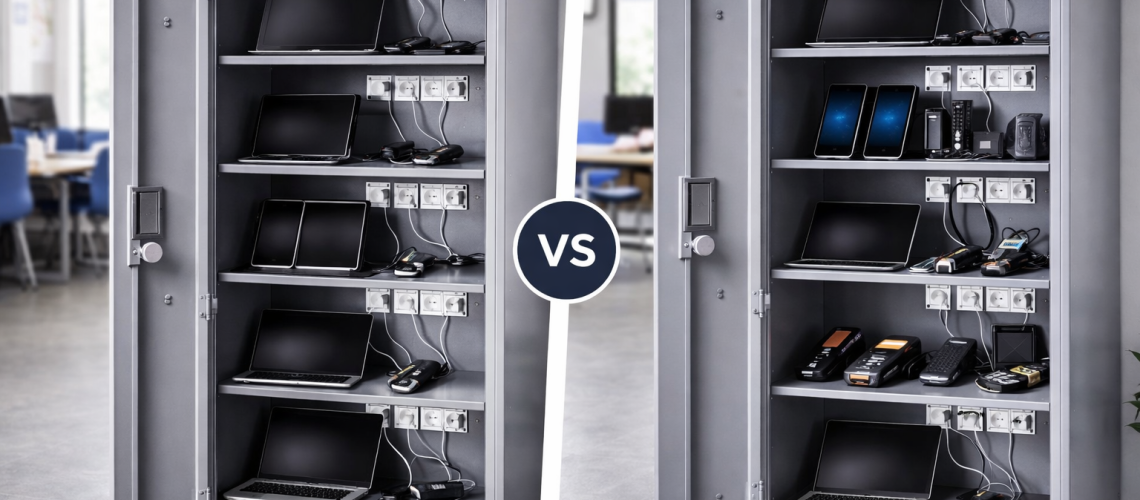
Charging lockers are used in both schools and workplaces, but the operating environment changes what a good system looks like. Schools usually work around timetables, class sets, staff supervision and relatively standardised devices. Workplaces may have hybrid attendance, assigned laptops, shared radios, scanners, shift-issued equipment or several device types moving through the same charging system.
The important question is therefore not whether charging lockers work in both environments. They do. The useful question is how should charging-locker planning change between a school and a workplace?
This guide focuses specifically on that comparison: users, equipment, supervision, issue-and-return routines, charging windows, device consistency and the different operational pressures found in education, offices and industrial workplaces. For the full buying and specification process, start with our Charging Lockers UK guide.
School vs Workplace Charging Lockers: Quick Comparison
| Question | Schools | Workplaces |
|---|---|---|
| Main users | Pupils, students, teachers and IT staff | Employees, contractors, hybrid staff and shift teams |
| Typical equipment | Laptops, Chromebooks and tablets | Laptops, tablets, phones, radios, scanners and tools |
| Typical usage cycle | Lessons and school day | Working day, hybrid attendance or shifts |
| Device ownership | Often class or department pools | Assigned, pooled or mixed |
| Supervision | Often staff-managed | Often self-service, team-managed or supervisor-controlled |
| Equipment consistency | Often highly standardised | Frequently mixed |
| Return pattern | Class end, lesson end or day end | Staggered, shift-based or flexible |
| Main charging window | Often overnight or between lessons | Daytime, overnight or between shifts |
| Main planning emphasis | Simplicity, supervision and consistent routines | Flexibility, accountability and workflow |
Why the Environment Changes the Charging-Locker Requirement
The charging technology may be similar, but the surrounding operating process can be completely different.
A secondary school managing thirty similar Chromebooks for a department has a very different routine from a warehouse issuing handheld scanners to two shifts, or a hybrid office supporting employees who are only on site several days each week.
Those differences affect:
- who opens the locker;
- who is responsible for the device;
- when equipment is returned;
- whether devices are issued individually or as a group;
- whether the same equipment returns to the same position;
- how much supervision exists;
- how predictable the charging window is;
- how much device variation the system must tolerate.
The locker should support that process rather than forcing a school or workplace to change its normal equipment workflow simply to suit the storage furniture.
What Charging Lockers Usually Need to Do in Schools
Schools commonly use charging lockers to manage shared educational devices. Laptops, Chromebooks and tablets may belong to a class set, department or central IT pool rather than to a named pupil.
The charging locker therefore often supports a structured cycle:
- Devices begin the day charged and stored.
- Teaching staff or authorised users issue them for lessons.
- Devices move between classrooms or pupils.
- They are returned to the charging location.
- Staff check that devices have been returned correctly.
- Equipment charges ready for the next lesson or following day.
That makes consistency important. The easier the routine is to understand, the easier it is for staff to spot missing devices, incorrect returns or charging problems.
What Charging Lockers Usually Need to Do in Workplaces
Workplace requirements are often broader because the user patterns and equipment mix can vary considerably.
An office may need charging storage for laptops used by hybrid staff. A warehouse may need radios and scanners ready for each shift. A facilities team may manage tablets, handheld devices and rechargeable tools. A depot may need shared equipment returned and reissued throughout the day.
That creates a less uniform operating model. Workplace charging lockers may need to support:
- named users;
- shared device pools;
- different teams using the same equipment;
- shift handovers;
- mixed device types;
- changing attendance patterns;
- contractors or temporary staff;
- equipment that is returned at different times.
The main workplace challenge is often flexibility without losing control.
User Population: Pupils and Staff vs Employees and Shift Teams
Schools often have a large number of users but a relatively small number of people managing the charging system. Pupils may use the equipment, while teachers, technicians or IT staff control the issue-and-return process.
That can favour a centralised routine where staff know which device set belongs to which class or department.
Workplaces can distribute responsibility more widely. An employee may manage their own laptop, a supervisor may issue shared radios, or one team may hand scanners directly to the next shift.
This is why school charging tends to emphasise supervision and simplicity, while workplace charging often places more emphasis on accountability and adaptable access.
Device Ownership: Class Sets vs Assigned and Pooled Equipment
Schools frequently purchase devices as groups. A set of tablets or Chromebooks may belong to a department and be used by different pupils throughout the week.
Workplaces can contain several ownership models at the same time. One employee may have an assigned laptop, while radios are shared between shifts and visitor devices remain part of a central loan pool.
This comparison page does not reproduce the detailed allocation decision. If you are deciding whether compartments should be permanently assigned or flexibly shared, use our Shared vs Assigned Charging Lockers guide.
Device Types: Standardised School Fleets vs Mixed Workplace Equipment
One of the strongest differences is often device consistency.
A school may have thirty identical Chromebooks, twenty-four matching tablets or several class sets bought under the same hardware programme. That makes day-to-day handling predictable.
Workplaces are more likely to contain a mixed fleet. One department may use laptops, another may use tablets, while operational teams depend on scanners, radios or handheld terminals.
The workplace therefore needs to think more carefully about future device variation and whether one locker format can support everything that is likely to use it.
For physical device fit and compartment measurements, use our Charging Locker Sizes Explained guide.
Issue-and-Return Routines
School routine
A typical school routine may be highly structured. A teacher collects a class set, pupils use the devices, and the set is returned together. This makes it comparatively easy to see whether all equipment has come back.
Workplace routine
A workplace may have staggered returns. Hybrid staff leave at different times, field teams return when jobs are complete, and shift equipment may be returned immediately before the next team arrives.
The locker system needs to accommodate that pattern rather than assuming every device returns at one predictable time.
Charging Windows: School Day vs Working Day and Shift Patterns
Schools often have relatively clear charging windows. Equipment may charge overnight, during lunch periods or between lesson blocks.
Workplaces can be more complicated:
- office laptops may charge overnight;
- hybrid devices may charge during the working day;
- radios and scanners may charge between shifts;
- equipment may be returned and collected continuously;
- some workplaces operate twenty-four hours.
This can make workplace charging demand less predictable, even where the total number of devices is known.
Supervision: Staff-Controlled Schools vs Workplace Accountability
School charging systems are often actively supervised. Teachers, technicians or IT teams may issue and collect devices, particularly where equipment is shared by pupils.
That can make simple, clearly labelled storage extremely effective. The staff member managing the system can see whether equipment is returned correctly and whether a charging position is empty.
Workplaces frequently rely less on direct supervision. Employees may access charging storage independently, while managers rely on allocation rules, locker numbering, access permissions or internal procedures.
The detailed lock decision belongs elsewhere. If you are comparing keys, combinations, digital locks or RFID options, use our Charging Locker Lock Types guide.
School Example: A Shared Chromebook Class Set
Consider a department with a set of similar Chromebooks used by several classes.
- the devices belong to the department rather than individual pupils;
- the same model is used throughout the set;
- devices are issued and returned as a group;
- teaching staff supervise the process;
- charging happens mainly after lessons and overnight;
- the equipment needs to be ready at predictable times.
The strongest charging-locker requirement is therefore an organised, easily supervised system that supports rapid issue and return of a standard device fleet.
School Example: Tablets Shared Across Several Classes
A central tablet pool creates a slightly different school scenario. Different teachers may borrow the same devices during the day, but the equipment still returns to one managed location.
- clear device identification;
- a simple shared return process;
- staff oversight;
- consistent charging positions;
- easy confirmation that the full set has been returned.
The school does not necessarily need complex individual-user allocation. It needs a system that supports a shared teaching resource.
Workplace Example: Hybrid Office Laptops
A hybrid office can create the opposite problem. Attendance changes from day to day, some laptops belong to named employees and others may be held as loan or shared devices.
- irregular attendance;
- assigned and shared devices together;
- different return times;
- employees accessing storage without direct supervision;
- equipment remaining secure when its normal user is off site.
Here the main requirement is flexibility. A system designed around a rigid school-style class set may be unnecessarily restrictive.
Workplace Example: Warehouse Radios and Scanners
A warehouse may use radios and handheld scanners that are issued at the start of each shift and returned at the end.
- Outgoing shift returns equipment.
- Devices are placed into charging positions.
- Equipment charges during the handover period or between uses.
- The next shift collects devices.
- The same equipment may be used by a different employee.
This is not simply a workplace version of a school class set. Accountability, short turnaround and shift overlap may matter more than long overnight charging windows.
Workplace Example: Maintenance and Facilities Equipment
Facilities and maintenance teams can introduce even more variety. One charging area may support tablets, radios, handheld devices and rechargeable tools.
That makes the equipment mix itself a major part of the decision. A locker designed around identical school tablets may not be suitable for a workplace where chargers and device dimensions vary substantially.
For specialist tool and battery use, see our tool and battery charging lockers.
Capacity Planning: The Difference Without Repeating the Capacity Guide
Schools commonly start with a known class or department device set. Workplaces may need to think about peak attendance, shift overlap or how many pooled devices require charging at the same time.
That distinction matters, but the actual compartment calculation belongs in our dedicated Charging Locker Capacity Planning guide.
Placement Priorities: Supervision vs Workflow
Schools often prefer locations where staff can supervise issue and return easily. Workplaces often prioritise access at the point where equipment is actually handed over or collected.
- a classroom, IT area or managed resource room in a school;
- a hot-desk area or staff zone in an office;
- a supervisor station or shift-change area in a warehouse;
- a maintenance base or equipment room for facilities teams.
Detailed location, door-clearance and power-access planning belongs in our Where to Install Charging Lockers guide.
Power Requirements: Environment Changes Usage, Not Electrical Fundamentals
A school and a workplace may use charging lockers differently, but both still need an appropriate electrical supply for the actual charging equipment.
For electrical loading and connection guidance, use our Charging Locker Power Requirements Explained guide.
The Charging Principle Is the Same in Both Environments
Whether the locker is in a school or workplace, the underlying principle remains the same: equipment is placed into secure powered storage, connected to the appropriate charging arrangement and left charging until it is needed again.
If you need the technical operating explanation, read How Charging Lockers Work.
School or Workplace Charging Locker: What Should Change in the Buying Decision?
For schools, start with the teaching routine:
- Who issues the devices?
- Are they class sets or individually assigned?
- Are all devices the same?
- When are they returned?
- Who checks that they are charging?
- When must the full set be ready again?
For workplaces, start with the workflow:
- Are devices assigned, shared or mixed?
- Do users work fixed hours, hybrid patterns or shifts?
- Are devices returned together or at different times?
- How much equipment variation exists?
- Who is accountable for shared devices?
- Does the charging system need to support future changes in staff or equipment?
School vs Workplace Charging Locker Decision Table
| If this describes the project | Planning emphasis |
|---|---|
| Identical tablets used by several classes | Shared, supervised and highly standardised school process |
| Chromebooks assigned to one department | Clear set management and predictable return times |
| Named staff laptops in an office | Accountability and predictable personal access |
| Loan laptops for hot-desking staff | Flexible shared workplace access |
| Radios issued to each shift | Fast turnaround and shift handover |
| Warehouse scanners shared by teams | Pooled equipment and operational accountability |
| Mixed tablets, radios and tools | Workplace flexibility and varied equipment support |
| School class sets managed by teachers | Simplicity, supervision and easy set checking |
Use the Right Guide for the Next Charging-Locker Question
| Question | Dedicated guide |
|---|---|
| Should compartments be shared or assigned? | Shared vs Assigned Charging Lockers |
| How many charging positions are needed? | Charging Locker Capacity Planning |
| What size compartments are required? | Charging Locker Sizes Explained |
| Which lock type should be used? | Charging Locker Lock Types |
| Where should the locker be positioned? | Where to Install Charging Lockers |
| What power supply is required? | Charging Locker Power Requirements |
| How does the system technically work? | How Charging Lockers Work |
| I need the complete buying overview | Charging Lockers UK Guide |
Common School vs Workplace Charging-Locker Planning Mistakes
- Assuming schools and workplaces need the same operating model. Their users and return patterns can be very different.
- Designing workplace systems around school-style class sets. Hybrid attendance and mixed devices may need more flexibility.
- Assuming all school devices are individually assigned. Many education fleets are managed as shared resources.
- Assuming all workplace devices belong to named employees. Radios, scanners and loan equipment may be pooled.
- Ignoring supervision. School device control is often staff-led, while workplaces may rely more on access procedures.
- Ignoring shift change. Operational workplaces can have concentrated return and collection periods.
- Repeating technical decisions inside the environment comparison. Capacity, sizing, power, locks and placement should be checked separately once the operational model is clear.
School vs Workplace Charging Lockers FAQs
How are charging lockers used differently in schools and workplaces?
Schools often use charging lockers for centrally managed class or department device sets, with staff supervising issue and return. Workplaces are more likely to combine assigned and shared devices, varied equipment and flexible or shift-based access.
Are school charging lockers usually shared?
Many school charging systems manage shared class or department devices, although staff laptops and specialist equipment may still use assigned storage. The allocation model should follow how the devices are actually issued.
Do workplaces need more flexible charging lockers than schools?
Often they do. Workplaces may have hybrid attendance, shifts, mixed device types and a combination of assigned and pooled equipment. Schools frequently have more standardised device fleets and predictable timetable-based routines.
What devices are commonly stored in school charging lockers?
School charging lockers commonly store laptops, Chromebooks and tablets used by classes, departments or teaching staff.
What devices are commonly stored in workplace charging lockers?
Workplaces may use charging lockers for laptops, tablets, phones, radios, scanners, handheld terminals, tools and rechargeable batteries, depending on the sector and workflow.
Why is supervision more important in school charging-locker systems?
School devices are often issued to pupils as shared sets, so teachers or IT staff may directly supervise collection and return. Clear, easy-to-check charging storage supports that process.
How do shift patterns affect workplace charging lockers?
Shift-based workplaces may return and reissue radios, scanners or other devices within short handover periods. This can make rapid turnaround and clear equipment accountability more important than a single overnight charging cycle.
How do I calculate how many charging compartments a school or workplace needs?
The calculation should be based on how many devices genuinely require secure charging at the same time. Schools may plan around class sets, while workplaces may need to account for peak attendance or shift demand. Use the dedicated charging locker capacity guide for the detailed calculation.
Do schools and workplaces need different charging-locker lock types?
Not automatically. The best lock depends on who needs access, whether compartments are shared or assigned and how the organisation manages lost keys, codes or credentials. Lock type should be specified separately from the school-versus-workplace comparison.
Charging Lockers for Schools vs Workplaces: Summary
Schools and workplaces can use the same broad category of charging storage, but they often need very different operating models.
Schools usually place more emphasis on class sets, standardised devices, timetable-based use, visible supervision and predictable return routines. Workplaces more often need flexibility for hybrid attendance, named and pooled devices, shift handovers, mixed equipment and changing user patterns.
Once that environmental difference is clear, move to the dedicated guide for the next decision rather than trying to solve capacity, sizing, power, locks and placement on this page.
To compare current products, browse the Total Locker Service charging locker range, or return to the Charging Lockers UK guide for the complete canister structure.
Discover more from Blog Total Locker Service
Subscribe to get the latest posts sent to your email.