Locker Access Permissions and Governance UK: Roles, Overrides and Access Control Policy
May 11, 2026
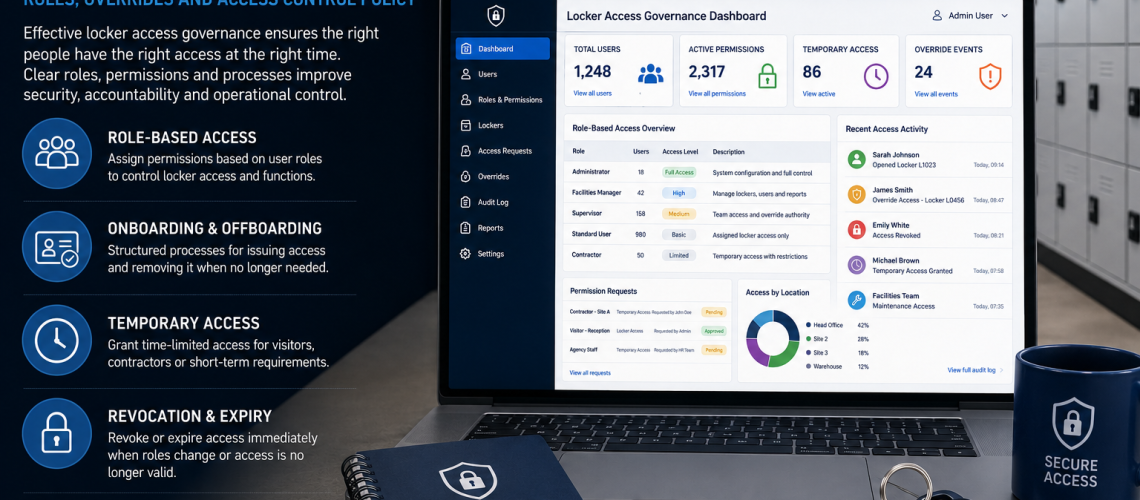
Locker access permissions and governance define who is authorised to do what within a locker system. This includes who may approve access, administer permissions, reset locks or credentials, use management overrides, authorise emergency opening, approve temporary or contractor access and revoke privileges when they are no longer required.
This is different from choosing how a locker opens. Keys, PINs, RFID cards, wristbands and mobile credentials are access-control technologies. Governance determines which people or organisational roles have authority to issue, administer, reset, override and remove those permissions.
Access Control chooses how access works. Governance decides who has authority. Locker Management operates the user-to-locker relationship. Audit records what happened. Compliance controls how identifiable records are handled.
This guide owns the authority layer: access roles, permission hierarchy, administrator authority, reset and override authority, emergency access, contractor and temporary-user approval, revocation, role changes, local and central administrator scope, permission reviews and exception approval.
Quick Answer: What Is Locker Access Governance?
Locker access governance is the framework used to decide which people or organisational roles have authority over locker access and administration.
- Who may use a locker?
- Who may approve access?
- Who may administer access?
- Who may reset a lock, PIN or credential?
- Who may use a master or management override?
- Who may authorise emergency opening?
- Who may approve contractor or temporary-user access?
- Who may extend or revoke temporary authority?
- Who may revoke ordinary or privileged access?
- Who may grant an exception?
- Who reviews privileged permissions?
- Who records governance decisions?
A good governance model separates ordinary locker use from the higher privileges required to administer, reset, override or change access.
What This Page Owns, and What It Hands Off
| Question | Owner |
|---|---|
| Who may approve, administer, reset, override or revoke access? | This guide |
| Who may approve temporary-user or contractor access? | This guide |
| Who may grant exceptions or privileged permissions? | This guide |
| Which key, PIN, RFID or digital technology should be used? | Locker Access Control Systems UK |
| Who gets which locker and for how long? | Locker Management Systems UK |
| Which access events should be recorded? | Locker Access Audit Systems UK |
| How should identifiable access records be handled and retained? | Locker Access Compliance UK |
| How does software technically enforce roles and permissions? | Smart Locker Management Software UK |
Why Locker Access Governance Matters
Locker permissions can become unclear when responsibility develops informally. One team allocates lockers, another holds master keys, supervisors reset codes, facilities staff have override credentials and nobody is clearly responsible for reviewing who still needs those privileges.
- Ordinary users may receive more access than they require.
- Administrators may retain privileges after changing roles.
- Former employees may remain authorised.
- Contractors may retain access after work finishes.
- Too many people may hold master or override authority.
- Managers may reset access without a defined approval route.
- Emergency override may exist without a named decision-maker.
- Local teams may create permissions outside agreed policy.
- Exceptions may quietly become normal practice.
Governance addresses these problems by assigning authority to defined roles and establishing when those permissions should be granted, reviewed, changed and removed.
Governance Is About Authority, Not Lock Technology
A mechanical key and a digital credential work differently, but both create the same governance questions:
- Who may receive access?
- Who approves it?
- Who may issue or administer it?
- Who may reset it?
- Who may override it?
- Who may revoke it?
- Who may approve an exception?
The access technology determines how these decisions are implemented. It should not determine the governance structure by itself.
For physical keys, mechanical combination locks, electronic PIN locks, RFID and connected access systems, use Locker Access Control Systems UK.
Define Locker Access Roles
Access roles should reflect actual organisational responsibility rather than giving broad administrative rights to anyone who occasionally needs them.
| Role | Typical authority | Governance principle |
|---|---|---|
| Ordinary user | Use an assigned, booked or permitted locker | No administrative authority |
| Supervisor | Limited authority within a defined team, shift or area | Scope should remain restricted |
| Facilities administrator | Operational administration, resets or authorised overrides | Authority should match responsibility |
| Security or duty manager | Incident or emergency authority where required | Use should follow a defined escalation route |
| Local administrator | Administer access within a site, building or department | Cannot exceed agreed local scope |
| Central administrator | Organisation-wide or multi-site authority | Highly privileged and restricted |
| Contractor | Only the access needed for approved work | Restricted in scope and duration |
A small organisation may combine several responsibilities in one person. Larger estates may separate them between facilities, security, IT, HR and departmental management. The important point is that authority is explicit rather than assumed.
Separate Ordinary Users From Administrators
Ordinary access and administrative access should be treated as different permission classes.
- Ordinary users should not receive administrator rights.
- Supervisors should not automatically receive estate-wide authority.
- Local administrators should remain limited to their defined scope.
- Central administrative rights should be restricted to people who genuinely require them.
- Override authority should remain separate from ordinary access.
- Emergency authority should not become routine administrative access.
Higher privileges should not be granted merely because they make administration more convenient.
Create a Clear Permission Hierarchy
- User permission: ordinary authorised locker access.
- Local operational permission: limited administration within a team or location.
- Supervisor permission: defined authority to approve or support access within an operational area.
- Facilities permission: broader operational authority for maintenance, resets or approved access intervention.
- Administrator permission: authority to create, change or revoke permissions.
- Central administrator permission: higher-level authority across several areas or sites.
- Emergency authority: exceptional access limited to defined roles and circumstances.
The exact hierarchy can vary, but increasing authority should normally mean increasing restriction, clearer approval and stronger review.
Separate Approval From Administrative Execution
Approval authority and administrative execution do not need to belong to the same person.
For example, a department manager might approve a person’s entitlement to storage while a facilities administrator carries out the allocation or credential change.
- Who may approve ordinary user access?
- Who may approve access to several lockers or areas?
- Who may approve supervisor authority?
- Who may approve administrator authority?
- Who may approve contractor access?
- Who may approve temporary access?
- Who may approve emergency or exceptional access?
- Who may remove those permissions?
The operational user-to-locker allocation itself belongs in Locker Management Systems UK.
Who May Administer Access?
A person who performs an administrative action does not necessarily own the decision behind it.
- Can administrators create access without separate approval?
- Can supervisors administer only their own department?
- Can local administrators create other administrators?
- Can administrators change their own privileges?
- Who can approve cross-department or cross-site access?
- Who can delegate administrative authority?
Technical ability to make a change does not automatically create organisational authority to make that decision.
Define Reset Authority
A reset changes the access state of a locker and should therefore be treated as a privileged action.
- Who may approve a reset?
- Who may perform it?
- Can supervisors reset access directly?
- Are some resets restricted to facilities or administrators?
- Can a local administrator reset lockers outside their area?
- Do higher-risk resets require escalation?
The technical method used to perform a reset belongs to Access Control or Smart Locker Management Software. Governance owns the authority to initiate or approve it.
Supervisor and Facilities Override Authority
Supervisors and facilities teams may require access beyond their own user locker, but that authority should have a defined purpose and scope.
- Supporting a user who has lost normal access.
- Authorised maintenance.
- Dealing with abandoned belongings under the organisation’s procedure.
- Implementing an approved reassignment.
- Responding to an operational incident.
- Carrying out an authorised inspection.
The governance question is not merely whether an override mechanism exists. It is who may authorise its use and under which circumstances.
Emergency Override Authority
Emergency access should be distinguished from routine supervisor or facilities access.
- Which roles can declare that emergency access is required?
- Which roles may carry out the opening?
- Does the action require one or more approvals?
- Does the authority apply estate-wide or only to defined areas?
- How is emergency authority changed when personnel change?
- Who reviews the permission itself?
The resulting access event may need to be recorded, but event evidence belongs in Locker Access Audit Systems UK.
Contractor Locker Permissions
Contractors should receive only the access needed for their approved work, and the organisation should identify who has authority to approve that access.
- Which manager or department may sponsor contractor access?
- Does facilities approval also apply?
- Is access restricted to a particular location?
- Can contractors ever receive override privileges?
- Who may approve an extension?
- Who revokes authority when the work ends?
- Does high-privilege contractor access require additional approval?
The practical allocation, start date, expiry point and return-to-availability process belong in Locker Management Systems UK. The credential technology belongs in Access Control.
Temporary-Access Approval Authority
Temporary users can include visitors, agency staff, project workers, contractors and other short-term users. Governance decides who is authorised to approve, extend or revoke that temporary authority.
Approval can be separate from the person or system that creates the allocation or credential.
- A department may approve the operational need.
- Facilities may confirm suitable locker capacity.
- An administrator may implement the approved permission.
- A sponsor may request an extension.
- A defined role should have authority to revoke the permission.
Temporary allocation, start and expiry dates and return to the available pool now belong in Locker Management Systems UK.
Define Revocation Authority
Governance should make clear who may remove a person’s ordinary or privileged locker access and under which circumstances.
- A member of staff leaves.
- A contractor finishes work.
- A temporary assignment ends.
- A person changes role, department or location.
- A privilege is no longer required.
- A credential is lost or compromised.
- An administrator changes responsibilities.
- An exception is withdrawn.
Revocation should apply to privileged access as well as ordinary locker access. Removing the user’s locker allocation while leaving old administrator or override rights active does not complete the access-removal process.
Role Changes and Leavers
Permissions should follow the person’s current responsibilities rather than remain indefinitely because they were once required.
- A supervisor moving department may no longer require override authority.
- A local administrator moving site may no longer require access to the previous location.
- A facilities employee changing responsibilities may need a narrower permission set.
- A temporary project administrator may need elevated rights removed when the project ends.
- A leaver should no longer retain user or administrative authority.
The operational process for closing a user’s allocation and returning the locker to service belongs in Locker Management Systems UK. Governance owns the continued existence or removal of permissions.
Central vs Local Administrator Authority
Larger organisations may need several levels of administrative authority.
| Authority | Possible scope | Key governance question |
|---|---|---|
| Local administrator | One department, building or site | Can this role act outside the local area? |
| Regional or estate administrator | Several sites or operational areas | Which local decisions can be overridden? |
| Central administrator | Organisation-wide | Who approves and reviews this higher privilege? |
| System administrator | Technical platform administration | Does technical access also grant operational authority? |
A person who can technically change a permission does not necessarily have authority to make the underlying access decision.
Where software enforces site or role scopes, use Smart Locker Management Software UK. For cross-site physical estate responsibility, use Multi-Site Locker Estate Management UK.
Review Privileged Locker Permissions
Permissions can be correct when issued and become inappropriate later. Governance should therefore define which privileges need periodic review.
- Who currently holds administrator rights?
- Who has supervisor override authority?
- Who has facilities override authority?
- Who may authorise emergency opening?
- Which contractors still have approved privileges?
- Which temporary exceptions remain active?
- Do local administrators still require their full scope?
- Have role changes been reflected in the permission model?
The appropriate review frequency depends on the organisation and the significance of the permission. Privileged authority should not become permanent merely because nobody has reviewed it.
Exception Approval
Not every legitimate requirement will fit the normal permission model. Governance should therefore define how exceptions are approved.
- Temporary access across two departments.
- A project manager requiring wider authority for a fixed period.
- An unusual maintenance requirement.
- A temporary change to emergency responsibilities.
- Cross-site facilities support.
- A short-term administrative delegation.
An exception should identify who approved it, what authority was added, its scope and when it should be reviewed or withdrawn.
This prevents exceptions from quietly becoming permanent permission structures.
Governance Records vs Access Audit Records
| Governance record | Audit record |
|---|---|
| Who is authorised to approve access | Which access event occurred |
| Who holds administrator authority | Which administrator performed an action |
| Who may perform resets | When a reset occurred |
| Who can approve an exception | What activity took place under that exception |
| Which role may use emergency override | When emergency override was used |
| When permission should be reviewed | Events generated during that period |
Governance records the authority. Audit records the event.
For successful and failed access, override events, reset records and administrator activity, use Locker Access Audit Systems UK.
Governance vs Locker Access Compliance
Governance and compliance are also different layers.
| Governance | Compliance |
|---|---|
| Who may hold administrator authority? | Who should be allowed to view personal access records? |
| Who may approve a reset? | How long should the resulting record be retained? |
| Who may authorise an override? | How should identifiable override records be protected? |
| When should privileged permission be withdrawn? | When should associated personal data be deleted or anonymised? |
Personal data, retention, exports and record handling belong in Locker Access Compliance UK.
What Should Locker Governance Records Contain?
A governance record does not need to duplicate every operational or access-event log. Its purpose is to show how authority is structured.
- Defined access roles.
- Permissions available to each role.
- Named owners for important governance responsibilities.
- Administrator scope.
- Local and central authority boundaries.
- Reset authority.
- Override authority.
- Emergency decision authority.
- Temporary-user approval authority.
- Contractor approval authority.
- Revocation authority.
- Exception approvals.
- Permission-review dates.
- Changes to privileged roles.
Where these records contain identifiable personal information, retention and data-handling requirements belong in Locker Access Compliance UK.
Governance for Physical and Digital Locker Systems
The same governance principles can apply across physical and digital systems even though the enforcement method differs.
| Governance decision | Physical example | Digital example |
|---|---|---|
| Ordinary access | User receives authorised key access | User receives authorised digital permission |
| Administrator authority | Control of master or override key | Administrator account or management credential |
| Reset authority | Authorised lock or key intervention | Authorised credential or code reset |
| Revocation | Key recovered or physical access arrangement changed | Permission disabled or removed |
| Local scope | Master access restricted to an area | Administrator rights restricted to a site or department |
For choosing the access method, use Locker Access Control Systems UK. For software-based enforcement, use Smart Locker Management Software UK.
Governance for Mixed Locker Estates
Many locker estates contain several generations of locking technology. One building may use keyed locks, another combinations and a newer area RFID or connected smart lockers.
- Define ordinary-user authority.
- Define supervisor authority.
- Define local administrator authority.
- Define central administrator authority.
- Define who may reset each system.
- Define who may use override access.
- Define emergency authority.
- Define temporary-user and contractor approval.
- Define revocation authority.
- Review privileged permissions across the whole estate.
The technology can vary while the organisation maintains one coherent authority model.
Workplace Locker Access Governance
Workplaces may combine permanent employees, hybrid workers, shift staff, contractors and visitors. The governance question is not simply how each group gets a locker, but which roles have authority over their access.
- Which managers can approve employee access?
- Can supervisors approve access only within their own team?
- Who may reset credentials?
- Who approves contractor access?
- Who removes privileges when people leave?
- Who holds facilities or emergency override authority?
- Who reviews administrator rights?
For workplace allocation and user administration, use Locker Management Systems UK. For broader workplace locker requirements, use Workplace Lockers UK.
School Locker Access Governance
Schools may need separate authority for pupil access, pastoral or administrative support, facilities management and safeguarding-related situations.
- Who approves pupil locker access?
- Who may approve reassignment?
- Who may authorise a reset or replacement access method?
- Which staff may use management override?
- Who has emergency or safeguarding-related authority?
- Who can revoke permissions?
- Who reviews staff holding privileged access?
For the wider education requirement, use School Lockers UK.
Healthcare Locker Access Governance
Healthcare estates can include permanent staff, rotating shifts, agency workers, contractors and several departments sharing changing facilities.
- Departmental approval authority.
- Facilities administrator scope.
- Temporary-worker approval.
- Contractor permissions.
- Local vs estate-wide administrator authority.
- Override authority.
- Revocation after role or employment changes.
- Review of privileged access.
For staff changing-room planning and operational storage requirements, use NHS & Healthcare Changing Room Planning UK.
Industrial Locker Access Governance
- Define the authority of shift supervisors.
- Separate ordinary worker access from privileged access.
- Define facilities and maintenance override rights.
- Control contractor approvals.
- Restrict administrator authority by location where appropriate.
- Remove permissions promptly when temporary work ends.
- Review privileged roles when responsibilities change.
Leisure Locker Access Governance
Leisure sites often use short-term rather than permanently assigned lockers. The operational model may differ, but staff authority still needs to be explicit.
- Who may assist users who cannot regain normal access?
- Who may reset or clear a locker?
- Who may override access?
- Who may authorise access to abandoned contents?
- Who holds higher administrator permissions?
- Who may change or revoke staff authority?
Common Locker Access Governance Failures
- No clearly defined owner. Nobody owns the authority model.
- Ordinary users receive unnecessary privileges.
- Too many people hold administrator rights.
- Local administrators receive organisation-wide authority.
- Technical administrators are assumed to have policy authority.
- Reset authority is undefined.
- Supervisor override becomes routine access.
- Emergency authority is not restricted.
- Contractor access has no responsible sponsor.
- Temporary exceptions have no review point.
- Former staff retain privileged permissions.
- Role changes do not trigger permission review.
- Revocation authority is unclear.
- Privileged permissions are never reviewed.
- Governance decisions are confused with access-event logs.
- Software capability is mistaken for organisational authority.
Locker Access Governance Checklist
- Are ordinary user roles defined?
- Are administrator roles separated from ordinary users?
- Is there a clear permission hierarchy?
- Is access-approval authority defined?
- Is administrative execution authority defined?
- Is reset authority defined?
- Is supervisor override authority limited?
- Is facilities override authority documented?
- Is emergency authority defined?
- Is contractor approval authority defined?
- Is temporary-user approval authority defined?
- Is revocation authority defined?
- Do role changes trigger permission review?
- Are leavers removed from privileged roles?
- Are local and central administrator boundaries clear?
- Are privileged permissions reviewed periodically?
- Is there an approval route for exceptions?
- Do exceptions have review or expiry points?
- Are governance decisions recorded?
- Are governance records kept conceptually separate from access-event logs?
- Is software capability kept separate from organisational authority?
Related Locker Access Guides
- Locker Access Control Systems UK – keys, PINs, RFID and digital access technology.
- Locker Management Systems UK – assigned, shared, hot, temporary and other allocation models plus day-to-day administration.
- Locker Access Audit Systems UK – access-event evidence, resets, overrides and administrator actions.
- Locker Access Compliance UK – personal data, retention, exports and record handling.
- Smart Locker Management Software UK – software-enforced roles, remote administration and permission scopes.
- Locker Key Management Systems UK – physical locker keys, master keys and key-control operations.
- Multi-Site Locker Estate Management UK – central and local physical estate coordination.
Locker Access Permissions and Governance FAQs
What is locker access governance?
Locker access governance defines who is authorised to approve, administer, reset, override, review and revoke locker access within an organisation.
What is the difference between access control and access governance?
Access Control determines how lockers are opened, such as with keys, PINs, RFID or digital credentials. Access Governance determines who is authorised to receive, administer, reset, override or revoke that access.
What is the difference between access governance and an audit trail?
Governance defines who is authorised to perform an action. An audit trail records evidence of actions or events that actually occurred.
Does being a locker system administrator automatically give someone authority to change access?
No. Technical capability to change a permission should not automatically be treated as organisational authority to make the underlying access decision.
Who should be allowed to reset locker access?
The organisation should define which roles may approve and perform resets. Depending on the operating model, this may be limited to authorised supervisors, facilities personnel or system administrators.
Who should be allowed to override a locker?
Override authority should be restricted to defined roles such as authorised supervisors, facilities personnel, security staff or administrators. Ordinary users should not automatically receive override authority.
Who should approve temporary locker access?
The organisation should define which role can approve temporary access, who may implement it, who may extend it and who may revoke it. These responsibilities do not all need to belong to the same person.
Should contractor locker access be temporary?
Contractor access should normally be limited to the scope and period required for the approved work. Governance should define who approves, extends and revokes that authority.
What happens to locker permissions when someone changes role?
A role change should trigger a review of existing permissions, particularly administrator, supervisor and override rights. Authority that is no longer required should be removed or reduced.
What is the difference between a local and central locker administrator?
A local administrator may have authority within one department, building or site, while a central administrator may control permissions across several locations or the wider organisation. Those boundaries should be defined explicitly.
Should locker administrator permissions be reviewed?
Yes. Privileged permissions should be reviewed periodically and when responsibilities change so administrator, supervisor or override authority does not remain active after it is no longer needed.
Summary
Locker Access Permissions & Governance should answer one question: who has authority to approve, administer, reset, override, extend, revoke or otherwise control locker access?
Keep the neighbouring functions separate. Access Control owns the technology. Locker Management owns user allocation and temporary-use operation. Access Audit owns evidence of events. Compliance owns identifiable-data handling. Smart Locker Management Software owns the technical tools used to enforce permissions.
A strong governance model keeps authority explicit, limits privileged access, reviews it when circumstances change and prevents technical capability from quietly becoming organisational permission.
Discover more from Blog Total Locker Service
Subscribe to get the latest posts sent to your email.