Key Tracking Methods UK: Logs, Sign-Out Sheets and Audit Trails
April 27, 2026
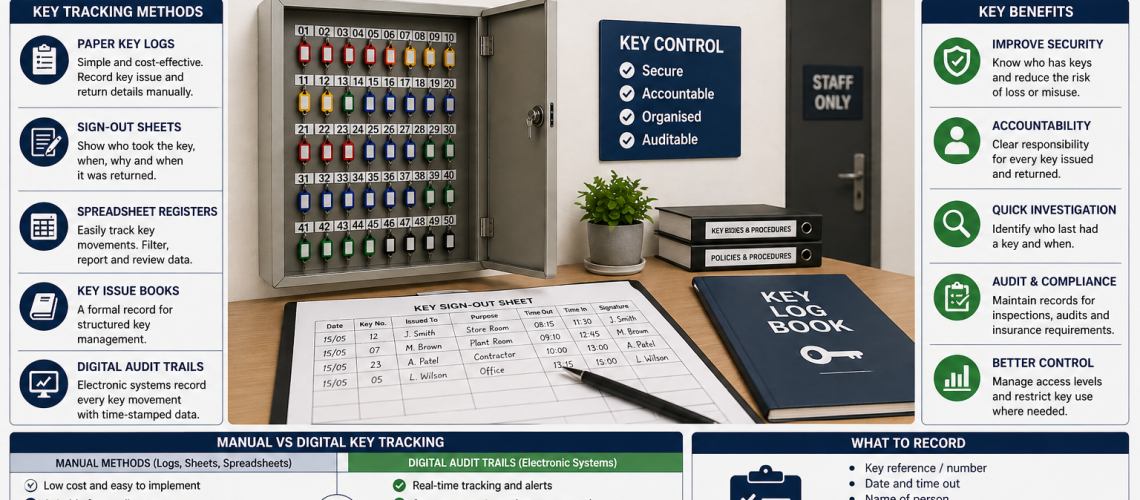
Key tracking records who has taken a key, when it was issued and when it was returned. Its purpose is simple: if a key is missing, overdue or repeatedly shared, the organisation should be able to reconstruct what happened without relying on memory.
For some workplaces, a paper key log or sign-out sheet is perfectly adequate. Others need a spreadsheet, formal issue book or an electronic system that automatically creates an audit trail.
This guide owns the recording and evidence side of key management: paper logs, sign-out sheets, spreadsheets, issue and return records, overdue-key visibility and digital audit trails.
For the wider workplace process covering responsibilities, access rules, issue procedures and what happens when keys are lost, see Managing Keys in the Workplace UK. For the broader choice between manual and electronic control systems, see Key Control Systems UK.
Key Tracking Methods: Quick Answer
The main ways to track workplace keys are:
- paper key logs;
- key sign-out sheets;
- bound key issue books;
- spreadsheet registers;
- and digital audit trails produced by electronic key-management systems.
The best method depends on how frequently keys move, how many people use them, how serious a missing key would be and how much evidence the organisation actually needs.
| Tracking method | Typical use | Main advantage |
|---|---|---|
| Paper key log | Small teams and occasional issue | Simple and inexpensive |
| Sign-out sheet | Shared keys and routine issue | Clear issue and return record |
| Key issue book | Formal manual control | Permanent chronological record |
| Spreadsheet register | Offices and facilities teams | Searchable and easier to review |
| Digital audit trail | Frequent movement, many users or higher-risk keys | Automatic time-stamped evidence |
Why Key Tracking Matters
Secure storage protects a key while it is inside a cabinet. Tracking answers a different question: what happened after the key was removed?
A useful tracking record can:
- identify who last held a key;
- show when it left storage;
- show whether it was returned;
- make overdue keys visible;
- support investigation of missing keys;
- show repeated issue patterns;
- and create evidence for internal checks or reviews.
The objective is not to create paperwork for every low-risk key. Tracking should be proportionate to the importance of the key and the difficulty of reconstructing its movement if something goes wrong.
Which Keys Actually Need Tracking?
Not every key needs a formal issue and return record.
A low-risk cupboard key used by one member of staff may need little more than secure storage. Tracking becomes more useful where keys are shared, valuable, difficult to replace or capable of giving access to important areas or assets.
| Key type | Typical tracking need |
|---|---|
| Low-risk cupboard key | Often little or no formal movement tracking |
| Shared office key | Simple sign-out may be useful |
| Vehicle key | Issue and return record normally worthwhile |
| Master key | Strong tracking usually justified |
| Restricted-area key | Clear user and return evidence may be required |
| Contractor key | Temporary issue and return evidence useful |
| Plant or equipment key | Tracking useful where several authorised operators share it |
The decision about who should be authorised belongs to the wider key-control process. This page focuses on preserving the movement record once a key is issued.
What Should a Key Tracking Record Capture?
A useful tracking record needs enough information to identify the key, the person responsible for it and the issue/return event.
- Key reference: a unique number or code identifying the exact key.
- Date issued: when responsibility changed.
- Time issued: particularly useful for frequently shared keys.
- Issued to: the person or identifiable user receiving it.
- Purpose or destination: where this adds useful context.
- Authorised by: where approval forms part of the process.
- Expected return: useful for short-term or contractor issue.
- Actual return: evidence that the key came back.
- Exception notes: for overdue, damaged or missing keys.
A tracking system should not collect unnecessary information simply because a field can be added. The record should remain quick enough to complete consistently.
Example Key Sign-Out Record
A simple manual record might look like this:
| Date | Key ref | Issued to | Time out | Purpose | Time returned |
|---|---|---|---|---|---|
| 04/10/2026 | VAN-03 | A. Smith | 08:15 | Delivery route | 16:42 |
| 04/10/2026 | MK-01 | J. Brown | 09:10 | Maintenance access | 10:05 |
| 04/10/2026 | EXT-07 | ABC Maintenance | 11:20 | Contractor access | 14:30 |
The format can be adapted to suit the workplace, but the key principle is that every issue and return uses the same fields consistently.
Paper Key Logs
A paper key log is one of the simplest tracking methods. Staff record the relevant details whenever a tracked key leaves its normal storage position.
Paper works particularly well where:
- the number of tracked keys is modest;
- keys move infrequently;
- only a small number of people use the system;
- records are completed at one control point;
- and automatic reporting is unnecessary.
The main weakness is that the record depends on staff remembering to complete it correctly.
A paper log should therefore be kept beside the key issue point rather than somewhere else in the building. The further the recording step is separated from the actual handover, the easier it becomes to skip.
Key Sign-Out Sheets
A sign-out sheet is a structured version of a paper log with fixed fields for issue and return information.
It is particularly useful where the same group of keys is repeatedly shared between staff, drivers, maintenance teams or contractors.
| Field | Purpose |
|---|---|
| Date issued | Shows when the transaction occurred |
| Key reference | Identifies the exact key |
| Issued to | Identifies the responsible user |
| Reason or destination | Adds context where useful |
| Authorised by | Records approval if required |
| Time out | Shows when the key left storage |
| Time returned | Confirms return |
| Initials/signature | Can support accountability where appropriate |
A sign-out sheet is only useful if incomplete returns are noticed. A perfectly designed sheet that nobody checks provides little practical control.
Key Issue Books
A bound key issue book creates a chronological manual record without relying on loose sheets.
This can suit schools, warehouses, facilities teams, workshops and other workplaces where keys are issued regularly but electronic tracking is not justified.
The main advantage is continuity. Entries remain together in date order and are less likely to become separated than individual pieces of paper.
As with any manual method, its accuracy still depends on consistent completion.
Spreadsheet Key Tracking
A spreadsheet provides a searchable record without requiring a dedicated key-management platform.
It can work particularly well for office managers and facilities teams where the volume of information has outgrown a simple paper sheet.
Useful fields can include:
- key reference;
- door, vehicle or asset reference;
- department or area;
- current holder;
- issue date and time;
- expected return;
- actual return;
- and exception notes.
Spreadsheets make searching and filtering easier than paper, but they remain manual records. If the physical handover happens at a cabinet while the spreadsheet is held on another computer, users may delay or forget to update it.
That practical gap is important. A technically better record can perform worse than paper if it is harder to complete at the point of issue.
When Is Paper Key Tracking Enough?
Paper is not automatically an inferior tracking method.
A manual system can be entirely suitable where:
- key movements are infrequent;
- the user group is small;
- the issue point is supervised;
- staff reliably complete the record;
- the number of tracked keys is manageable;
- and automatic reporting is not required.
The important question is whether the record remains reliable enough to reconstruct key movement when needed.
Digital Key Audit Trails
Electronic key-management systems can create audit records automatically when authorised users access and return controlled keys.
Depending on the system, recorded events can include:
- user identity;
- date and time of access;
- specific key removed;
- return time;
- overdue status;
- and activity reports.
The main advantage is that recording can be tied directly to the physical transaction rather than relying on somebody manually completing a separate log.
This can become particularly valuable where many users share keys throughout the day or where management needs reliable evidence of individual transactions.
For the broader decision between manual and electronic key-management systems, see Key Control Systems UK. For the cabinet technology itself, see Mechanical vs Digital Key Cabinets UK.
Manual vs Digital Key Tracking Records
The distinction here is specifically about the quality and method of the tracking record, not the wider choice of key cabinet or access-control technology.
| Tracking issue | Manual record | Digital audit trail |
|---|---|---|
| User identification | Entered manually | Usually linked to a user credential |
| Issue time | Written or entered manually | Normally time-stamped automatically |
| Return evidence | Depends on completion of the record | Often captured automatically |
| Overdue visibility | Requires manual checking | May be highlighted automatically |
| Searching records | Limited on paper; better in spreadsheets | Usually easier |
| Reporting | Manual compilation may be needed | Often built into the system |
| Reliance on staff discipline | Higher | Lower where events are automatically captured |
| Complexity | Low | Higher |
Digital should therefore be selected because it solves a tracking problem, not simply because it is more advanced technology.
When Does Digital Key Tracking Become Worthwhile?
A manual system usually starts to struggle when the number of transactions rather than simply the number of keys becomes difficult to manage.
Digital audit trails become worth considering when:
- many people issue and return keys every day;
- keys move repeatedly between shifts;
- paper records are often incomplete;
- management regularly needs to find the last recorded holder;
- overdue keys are difficult to identify quickly;
- vehicle or master keys are heavily shared;
- automatic transaction histories would save administrative time;
- or reliable time-stamped evidence is operationally important.
A site can manage hundreds of mostly static keys manually without difficulty, while another workplace may struggle with only 30 keys if they are being issued repeatedly throughout the day.
Tracking complexity is therefore driven by movement and accountability, not just cabinet capacity.
Tracking Vehicle Keys
Vehicle keys are one of the clearest examples of where issue and return records can be useful.
Where several drivers share cars, vans, minibuses, forklifts or other vehicles, the record should make it clear which user had which vehicle key and when.
- driver or user name;
- vehicle registration or fleet reference;
- key reference;
- issue time;
- return time;
- and late or missing return notes where relevant.
The decision about who may drive or operate a particular vehicle belongs to the organisation’s wider access and operational policy. The tracking record simply preserves evidence of key movement.
Tracking Master Keys and Restricted Keys
Master keys and restricted-area keys often justify stronger tracking because the consequences of losing one can be substantially greater than losing a routine internal key.
A good movement record should normally make it possible to identify:
- the exact master or restricted key issued;
- the authorised person who received it;
- when it left storage;
- when it was returned;
- and any exception where the expected return did not occur.
For detailed master-key system design and administration, see Master Key Locker Systems UK.
Tracking Contractor Key Use
Contractor key records are particularly useful because the person receiving the key may not be part of the organisation’s normal staff structure.
A simple contractor issue record might include:
- contractor name;
- company;
- key reference;
- reason or work location;
- issue date and time;
- expected return where relevant;
- actual return time;
- and notes if the key was not returned as expected.
Broader rules covering which contractors are permitted to receive which keys belong in Managing Keys in the Workplace UK.
Tracking Shared Workplace Keys
Shared keys create more tracking value than keys permanently allocated to one person because responsibility changes each time the key moves.
Examples can include:
- store-room keys;
- maintenance keys;
- plant-room keys;
- vehicle keys;
- equipment keys;
- security override keys;
- and keys used by several shifts.
The more frequently responsibility changes, the more important it becomes for the tracking process to be quick enough that users actually complete it.
How Tracking Helps With Overdue and Missing Keys
A good tracking system does not prevent every key from going missing. It reduces the uncertainty when one does.
If a tracked key is absent, the record should help establish:
- who last received it;
- when it was issued;
- whether it had an expected return time;
- whether a return was ever recorded;
- and whether similar issues have occurred before.
The operational response to a genuinely lost key belongs in the wider workplace key-management process. The tracking system’s role is to provide evidence rather than determine the security response.
Reviewing Key Tracking Records
Records should be reviewed often enough to identify missing returns and repeated failures before the information becomes stale.
The appropriate review frequency depends on:
- key risk;
- number of tracked keys;
- frequency of movement;
- number of users;
- the consequences of a missing key;
- and how quickly overdue keys need to be identified.
A busy vehicle-key system may justify checking outstanding transactions every working day, while a low-risk key set used only occasionally may need far less frequent review.
There is no single review interval suitable for every workplace.
What Should a Key Tracking Review Check?
- keys shown as issued have been returned or accounted for;
- key references match the actual keys;
- records are complete and readable;
- overdue keys have been followed up;
- missing keys have been identified;
- duplicate or conflicting entries are investigated;
- repeated failures to record returns are visible;
- and higher-risk keys have sufficiently clear movement records.
Permissions, staff authorisation and wider access-policy reviews belong to the key-management and governance process rather than the tracking record itself.
How Long Should Key Tracking Records Be Kept?
There is no universal retention period that is appropriate for every key-tracking record.
The useful question is how long the information remains operationally relevant and whether the organisation has a specific policy, contractual, insurance or governance requirement affecting retention.
When deciding how long to retain records, consider:
- the sensitivity of the keys;
- how frequently disputes or investigations arise;
- whether records support internal audits;
- whether a customer or site requires evidence;
- and whether retaining old personal information remains necessary.
Do not retain tracking information indefinitely simply because it is easy to store. Record retention should remain proportionate to its purpose.
For wider governance considerations, see Key Storage Compliance UK.
Tracking Keys in Large Estates
A large estate may contain hundreds of keys, but that does not mean every key needs the same tracking method.
Routine keys that rarely move can remain comparatively simple, while vehicle, master, restricted-area or heavily shared keys may need stronger transaction records.
If the main problem is how hundreds of keys should be divided across buildings, departments and cabinets rather than how individual movements are recorded, use Managing Large Key Estates UK.
Common Key Tracking Mistakes
Tracking Every Key Unnecessarily
Tracking every low-risk cupboard or desk key can create administration without adding meaningful control. Concentrate detailed tracking where movement and risk justify it.
Recording Issue but Not Return
A log showing that somebody took a key is incomplete if nobody records whether it returned.
Using Unclear Key References
A record such as “store key” is less useful if the organisation has several stores. Use an unambiguous reference.
Keeping the Record Away From the Key Issue Point
If the log is inconvenient to reach, staff are more likely to issue or return keys without updating it.
Never Reviewing the Records
A tracking system should identify missing and overdue keys. If nobody checks the record, exceptions can remain unnoticed.
Buying Digital Tracking Without a Clear Need
An electronic audit trail can be valuable, but it should solve a real problem such as unreliable records, frequent transactions or a need for automatic evidence.
Key Tracking Checklist
- Decide which keys genuinely need movement tracking.
- Give every tracked key a clear unique reference.
- Choose a record appropriate to the level of risk and frequency of use.
- Record who takes each key.
- Record when the key leaves storage.
- Record when it returns.
- Add purpose or approval only where useful.
- Keep the recording method close to the issue point.
- Follow up overdue or missing returns.
- Review records often enough for the information to remain useful.
- Protect access to tracking information where necessary.
- Retain records only for as long as their purpose requires.
- Move to automated audit trails if manual records become unreliable.
Related Key Management Guides
| Question | Guide |
|---|---|
| How should workplace keys be managed overall? | Managing Keys in the Workplace UK |
| What manual or digital control system should we use? | Key Control Systems UK |
| Where should keys be stored? | Key Storage Systems UK |
| What type of cabinet should we buy? | Key Cabinets Explained |
| What cabinet capacity do we need? | Commercial Key Cabinet Sizes UK |
| Mechanical or digital cabinet? | Mechanical vs Digital Key Cabinets UK |
| How should hundreds of keys be organised? | Managing Large Key Estates UK |
| What governance and evidence considerations apply? | Key Storage Compliance UK |
Key Tracking Methods FAQs
What is key tracking?
Key tracking is the process of recording who has taken a key, when it was issued and when it was returned so its movement can be reconstructed if necessary.
What is a key sign-out sheet?
A key sign-out sheet is a structured record used to capture key issue and return information such as the key reference, user, time issued and time returned.
What should a key tracking record contain?
A useful record normally identifies the exact key, the person receiving it, the issue date and time, the return time and any relevant exception or approval information.
Does every workplace key need to be tracked?
No. Detailed tracking is most useful for shared, vehicle, master, contractor and higher-risk keys. Low-risk keys with little movement may need only controlled storage.
Are digital audit trails better than paper key logs?
Digital audit trails can provide more reliable automatic evidence where many users share keys or transactions are frequent. Paper logs can still work well where key movement is limited and staff complete the process consistently.
When should a business move from paper to digital key tracking?
Digital tracking becomes more useful when key movements are frequent, manual records are repeatedly incomplete, many users share keys or automatic time-stamped audit information is required.
How often should key tracking records be reviewed?
Review frequency should reflect key risk, transaction volume, number of users and the consequences of a missing key. There is no single interval suitable for every workplace.
Key Tracking Should Answer One Simple Question
Key tracking ranges from a simple paper sign-out sheet to an automated electronic audit trail, but every method exists for the same reason: to create a reliable record of key movement.
The best method is not necessarily the most sophisticated. A small team with occasional key movement may be well served by paper. A busy vehicle fleet or site with many shared master keys may benefit from automatic electronic records.
Keep the page’s core question in mind: if this key is missing, can we establish who last had it, when it left storage and whether it came back?
If the answer is yes, the tracking method is doing its job. If the wider problem is who should have access, how keys should be issued or how the organisation should structure its overall system, continue to Managing Keys in the Workplace UK or Key Control Systems UK.
Discover more from Blog Total Locker Service
Subscribe to get the latest posts sent to your email.