Mechanical vs Digital Key Cabinets UK: Which Type Should You Choose?
April 27, 2026
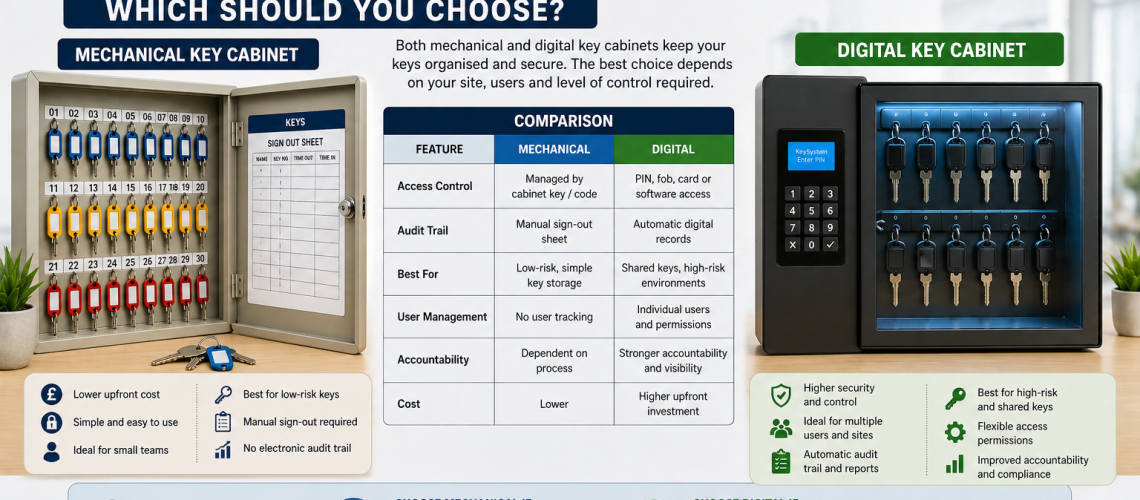
Mechanical and digital key cabinets both provide organised storage for physical keys, but they use different technologies to control access to the cabinet. Mechanical cabinets normally use a conventional key lock or mechanical combination. Digital cabinets use electronic access such as a PIN, card, fob or another configured credential.
The better option depends on how many people need access, how frequently that user group changes, whether individual credentials provide a useful benefit, what power or servicing the site can support and whether the additional electronic control justifies the extra cost.
This guide focuses specifically on the cabinet technology buying decision. It does not cover the complete key-management process.
For the overall choice between manual, electronic, centralised or departmental key control, see Key Control Systems UK. For day-to-day issue and return procedures, see Managing Keys in the Workplace UK. For individual movement records and audit trails, use Key Tracking Methods UK.
Mechanical vs Digital Key Cabinets: Quick Answer
Choose a mechanical key cabinet where access requirements are simple, the authorised user group is relatively small and stable, and there is little benefit in introducing electronic credentials.
Choose a digital key cabinet where the organisation benefits from electronic credentials, easier access changes, individual user identification or tighter control over cabinet access.
| Buying consideration | Mechanical key cabinet | Digital key cabinet |
|---|---|---|
| Typical purchase cost | Usually lower | Usually higher |
| Cabinet access | Physical key or mechanical combination | PIN, keypad, card, fob or other electronic credential |
| Power requirement | Normally none | May require batteries, mains power or another supply |
| Individual credentials | Usually limited | Available on suitable systems |
| Changing user access | May require key recovery or combination changes | Can often be changed electronically |
| Administration | Usually low | Potentially higher |
| Technical servicing | Usually straightforward | May involve batteries, electronics or software |
| Best fit | Simple and stable access requirements | Changing or more tightly controlled user groups |
Digital is not automatically better. The better cabinet is the simplest technology that provides the level of cabinet access control the site actually needs.
What Is a Mechanical Key Cabinet?
A mechanical key cabinet is a key-storage cabinet secured using a non-electronic locking method.
Common cabinet access methods include:
- a conventional key-operated lock;
- a mechanical combination lock;
- or another non-electronic locking mechanism.
The cabinet may contain numbered hooks, rails or other organised key positions, but those internal capacity arrangements are separate from the technology used to secure the cabinet door.
The main advantage of a mechanical cabinet is simplicity. It normally requires no power supply, electronic credential setup, software or network connection.
Advantages of Mechanical Key Cabinets
- lower initial cost in many cases;
- straightforward operation;
- normally no electrical supply required;
- no battery replacement;
- no software or network dependency;
- minimal technical administration;
- familiar access methods;
- and a wide choice of cabinet sizes and formats.
Mechanical cabinets often suit small offices, workshops, shops and other workplaces where only a limited group of authorised staff needs access to the complete cabinet.
Limitations of Mechanical Key Cabinets
- cabinet keys can themselves be lost;
- copies of cabinet keys can remain in circulation;
- shared mechanical combinations can become widely known;
- individual user credentials are generally unavailable;
- removing one person’s access may require recovering a key or changing a combination;
- and shared access becomes less distinct as the authorised group grows.
These limitations do not make mechanical cabinets unsuitable. They simply mean the technology works best where access requirements remain relatively simple.
Key Lock vs Mechanical Combination Cabinet
Mechanical cabinets themselves can use different access methods.
| Feature | Key-operated cabinet | Mechanical combination cabinet |
|---|---|---|
| User carries something | Yes, cabinet key | No |
| Risk of lost access item | Cabinet key can be lost | Combination can be forgotten |
| Changing shared access | Recover or replace keys where necessary | Change combination where supported |
| Power | None | None |
| Administration | Low | Low |
A mechanical combination can remove the need for a cabinet key, but a shared code is still shared access. It does not automatically provide individual user identification.
What Is a Digital Key Cabinet?
A digital key cabinet uses electronic access control instead of, or sometimes alongside, a conventional mechanical lock.
Depending on the product, access may use:
- an electronic PIN;
- a keypad;
- a proximity card;
- an RFID credential;
- an electronic fob;
- or another compatible electronic credential.
Digital key cabinets vary considerably. Some simply replace the cabinet-door key with an electronic keypad. More sophisticated systems may support different users, configurable permissions or electronically controlled access to individual key positions.
Not All Digital Key Cabinets Are the Same
The term digital key cabinet can describe products with very different capabilities.
| Digital cabinet type | Typical capability |
|---|---|
| Electronic keypad cabinet | Electronic code controls access to the complete cabinet |
| Card or fob cabinet | Electronic credential opens the cabinet |
| User-managed cabinet | Different credentials may be configured for different users |
| Electronic key-management cabinet | May control and identify access to individual key positions |
Do not assume that every cabinet described as digital provides detailed key-level control or automatic transaction reporting. Check the actual system specification.
Advantages of Digital Key Cabinets
- no ordinary mechanical cabinet key may be required;
- individual credentials may be supported;
- access permissions can often be changed electronically;
- lost staff credentials may be easier to revoke than physical cabinet keys;
- different users may be given different levels of access on suitable systems;
- larger authorised user groups can be easier to manage;
- some systems can work with staff cards or fobs where compatibility is confirmed;
- and advanced systems may provide individual key-position control.
Digital cabinets can become particularly attractive where the keys themselves are important and several authorised users require regular access.
Limitations of Digital Key Cabinets
- higher purchase cost in many cases;
- possible battery or mains-power requirements;
- electronic components require servicing;
- credential administration may be required;
- installation can be more involved;
- some systems depend on software or additional infrastructure;
- administrators may require training;
- and advanced functionality may provide little value on a simple site.
Electronic features should therefore solve a real access requirement rather than simply add specification.
Key Cabinet Access Methods Compared
| Access method | How cabinet access works | Typical fit |
|---|---|---|
| Physical key | Cabinet door opens using a conventional key | Small, stable authorised groups |
| Mechanical combination | User enters a shared mechanical code | Sites wanting keyless cabinet access without electronics |
| Electronic keypad | User enters a PIN electronically | Simple electronic cabinet access |
| Card or fob | User presents a compatible electronic credential | Workplaces with managed staff credentials |
| Managed electronic system | User access is configured electronically | Larger or more tightly controlled installations |
| Key-level electronic management | System can control access to particular keys or positions | Higher-control or frequently shared key estates |
Cabinet-Door Access vs Individual Key Control
This is one of the most important distinctions when comparing digital products.
A cabinet with an electronic keypad may control who can open the cabinet door, while every key inside remains physically accessible once the door is open.
A more advanced electronic key-management system may restrict access to individual keys or controlled key positions.
The second approach can provide much more granular control, but it also brings greater cost and technical complexity.
Decide which level of control is actually required before comparing products.
Mechanical vs Digital Key Cabinet Cost
Mechanical key cabinets usually have a lower initial purchase price because their access hardware is simpler.
Digital cabinets generally cost more because they incorporate electronic access hardware and may also require credentials, configuration, power supplies, software or technical support.
Purchase price should therefore be considered alongside the administrative benefit the technology provides.
A higher-cost electronic cabinet may make sense if individual user access or frequent permission changes remove meaningful administration.
Conversely, there is little value in paying for electronic features where two or three trusted staff members simply need access to a small cabinet.
Consider Whole-Life Cost, Not Just Purchase Price
Digital technology can introduce ongoing costs and tasks that do not exist with a simple mechanical cabinet.
- battery replacement where applicable;
- electronic servicing;
- replacement cards or fobs;
- credential administration;
- software licences on some systems;
- technical support;
- and staff time spent managing the system.
Mechanical cabinets can also create costs, particularly where cabinet keys are lost or locks need changing, but their ongoing technology requirements are usually lower.
Installation, Power and Connectivity
A mechanical cabinet generally requires only a suitable location and secure physical fixing.
A digital cabinet may require additional checks before purchase:
- Does the cabinet use replaceable batteries?
- Is mains power required?
- Is backup power provided?
- What happens if the battery or power supply fails?
- Does the cabinet require a network connection?
- Does it need local or cloud software?
- How are users or credentials configured?
- What access is needed for future servicing?
A digital cabinet that uses batteries does not necessarily need network connectivity, and an electronic cabinet does not automatically mean a fully networked key-management system.
For physical cabinet position and mounting, use Where to Install Key Cabinets.
Battery-Powered Digital Key Cabinets
Battery-powered electronic cabinets can avoid the need for mains wiring, but battery servicing becomes part of the ownership requirement.
Before ordering, check:
- battery type;
- expected replacement procedure;
- low-battery warning behaviour;
- how the battery compartment is accessed;
- what happens if batteries are completely exhausted;
- and whether an emergency override or external power method is provided.
Do not assume all electronic cabinets behave in the same way during power loss.
Electronic PIN Key Cabinets
An electronic PIN cabinet removes the ordinary cabinet key and allows access through a keypad or electronic code.
This can be useful where several staff need access and the organisation does not want to distribute physical cabinet keys.
However, a single shared PIN remains shared access. If individual accountability is important, check whether the cabinet supports separate user codes rather than one common code.
Card and Fob Key Cabinets
Some electronic cabinets allow users to gain access with a card, fob or RFID credential.
This can be useful where staff already carry compatible credentials, but compatibility should be confirmed before purchase rather than assumed.
- credential type;
- reader technology;
- enrolment requirements;
- number of users supported;
- how lost credentials are removed;
- and whether existing staff credentials can actually be reused.
A staff access card working with one building system does not prove that it will operate a proposed key cabinet.
Standalone vs Managed Digital Key Cabinets
Electronic access does not automatically mean a cabinet is networked or centrally managed.
A standalone digital cabinet may use a local PIN, keypad, card or fob without communicating continuously with external software. A managed electronic system may provide central user administration, configurable permissions, reporting or individual key-position control.
| Feature | Standalone digital cabinet | Managed electronic system |
|---|---|---|
| Electronic cabinet access | Yes | Yes |
| Continuous network connection | Not necessarily | May be required |
| Individual user credentials | Model dependent | Common on suitable systems |
| Central administration | Usually limited | Often available |
| Individual key control | Usually limited | Available on suitable systems |
| Reporting | Limited or model dependent | Often more comprehensive |
| Complexity | Lower | Higher |
If all you need is keyless access to the cabinet door, a simple electronic cabinet may be sufficient. Do not buy a more complex managed system unless its additional functions solve a real operational requirement.
When Is a Mechanical Key Cabinet Enough?
A mechanical cabinet is often the better purchase where:
- only a small group needs cabinet access;
- the authorised group changes rarely;
- individual electronic credentials would add little value;
- there is no need for electronic user administration;
- power or network infrastructure is undesirable;
- routine servicing needs to remain minimal;
- and a conventional cabinet already provides sufficient control.
Mechanical key cabinets remain a practical commercial choice. Electronic technology should not be treated as a mandatory upgrade.
When Is a Digital Key Cabinet Worthwhile?
A digital cabinet becomes more attractive when electronic cabinet access removes a genuine administrative or access-control problem.
- many authorised users need access;
- the authorised user group changes frequently;
- physical cabinet keys are difficult to administer;
- individual credentials are preferable to a shared key or code;
- access needs to be removed quickly when roles change;
- existing compatible staff cards or fobs can be reused;
- important keys justify tighter cabinet access;
- or individual key-position control is required.
The value comes from solving those requirements, not from the cabinet simply being electronic.
Mechanical or Digital Key Cabinet by Site Type
| Site or application | Technology to consider | Reason |
|---|---|---|
| Small office | Mechanical often sufficient | Small, stable authorised group |
| Workshop | Mechanical or digital | Depends on users and importance of stored keys |
| Retail premises | Mechanical or digital | Depends on staff turnover and key sensitivity |
| School or college | Mechanical, digital or mixed | Routine and restricted keys may justify different technologies |
| Warehouse or distribution site | Digital worth considering | Shift patterns can create larger changing user groups |
| Vehicle fleet | Digital worth considering | Vehicle keys may be valuable and frequently accessed |
| Facilities team | Digital worth considering | Master and restricted-area keys may justify tighter access |
| Low-risk internal storage | Mechanical often sufficient | Electronic functions may add little value |
These are starting points rather than fixed rules. The same type of organisation can have very different requirements depending on staff numbers, key sensitivity and how access is managed.
Can Mechanical and Digital Key Cabinets Be Used Together?
Yes. An organisation does not need to use the same cabinet technology for every physical key.
Routine office keys may be stored in a conventional mechanical cabinet while master keys, vehicle keys or other important key groups are stored separately behind electronic access.
This can provide tighter technology where it adds value without making routine key storage unnecessarily complex.
Capacity Is a Separate Buying Decision
A cabinet can have the correct access technology and still be the wrong purchase if it does not provide enough usable space.
Physical capacity can be affected by:
- the number of current keys;
- bulky key bunches;
- vehicle keys and remote fobs;
- duplicate and spare keys;
- future additions;
- and the internal spacing of hooks or key positions.
Detailed sizing belongs in Commercial Key Cabinet Sizes UK: How Many Keys Do You Need to Store?.
Cabinet Construction Is Also a Separate Decision
Electronic access does not automatically make a cabinet physically stronger.
Cabinet construction, door thickness, locking arrangement, fixing and resistance to physical attack are separate from whether access is provided by a key, code, card or electronic credential.
Where physical protection is the main concern, use High-Security Key Cabinets UK.
Cabinet Technology vs Key Management
Choosing between mechanical and digital cabinets is a product and technology decision. It determines how authorised users gain access to the cabinet or, on suitable advanced systems, individual key positions.
It does not determine the complete key-management process.
| Question | Guide |
|---|---|
| Which cabinet technology should we buy? | This guide |
| What overall control model should we use? | Key Control Systems UK |
| How should workplace keys be issued and returned? | Managing Keys in the Workplace UK |
| How should key movements be recorded? | Key Tracking Methods UK |
| How many key positions do we need? | Commercial Key Cabinet Sizes UK |
| What physical cabinet type should we use? | Key Cabinets Explained |
| When is reinforced key storage justified? | High-Security Key Cabinets UK |
Questions to Ask Before Buying a Key Cabinet
- How many people need cabinet access?
- Will the authorised user group change frequently?
- Is a physical cabinet key acceptable?
- Would a mechanical combination remove useful administration?
- Would individual electronic credentials provide a real benefit?
- Do users need different levels of access?
- Is control of the complete cabinet sufficient, or must individual keys be restricted?
- How sensitive or valuable are the stored keys?
- Is electrical power available where required?
- Would battery servicing be practical?
- Does the proposed system require a network connection?
- Does it depend on software or subscriptions?
- Who will administer users and credentials?
- What happens if normal electronic access fails?
- Does the additional control justify the extra purchase and ownership cost?
- Is the cabinet physically large enough for the keys being stored?
View Commercial Key Cabinets
Total Locker Service supplies commercial key cabinets for workplaces, schools, facilities teams and other organisations that need organised physical key storage.
For electronically managed key storage, view our electronic key cabinet options. For higher levels of physical cabinet protection, see our high-security key cabinets.
If you first need to establish the correct physical capacity, use Commercial Key Cabinet Sizes UK.
Mechanical vs Digital Key Cabinet FAQs
What is the difference between a mechanical and digital key cabinet?
A mechanical key cabinet uses a non-electronic access method such as a physical key or mechanical combination. A digital key cabinet uses electronic access such as a PIN, keypad, card, fob or another compatible credential.
Is a digital key cabinet better than a mechanical cabinet?
Not automatically. Mechanical cabinets can be the better choice for small, stable authorised groups. Digital cabinets become more useful where electronic credentials, changing users or tighter access control provide a genuine operational benefit.
Is a digital key cabinet more secure?
Digital access can provide tighter control over who can open the cabinet, particularly where individual credentials are supported. Physical security also depends on the cabinet construction, locking arrangement, fixing and installation.
When is a mechanical key cabinet enough?
A mechanical cabinet is often sufficient where a relatively small and stable group needs access, individual electronic credentials add little value and simple non-electronic operation meets the requirement.
Do digital key cabinets need power?
Many digital key cabinets require batteries, mains power or another electrical supply, but requirements vary by product. Power arrangements and behaviour during power loss should be checked before purchase.
Does a digital key cabinet need an internet connection?
Not necessarily. Some electronic cabinets operate independently using a local PIN, card or fob. More advanced managed systems may require network connectivity or software.
Does an electronic keypad cabinet control individual keys?
Not necessarily. A basic electronic keypad may only control access to the cabinet door. Individual key control requires a system specifically designed to restrict or monitor separate key positions.
Can a business use mechanical and digital key cabinets together?
Yes. Routine keys can be kept in a conventional mechanical cabinet while master, vehicle or other important keys use a separate digital or electronically managed cabinet.
Mechanical or Digital Key Cabinet: Which Should You Choose?
Mechanical key cabinets are usually the better choice where cabinet access is simple, stable and easy to administer. They avoid batteries, software and electronic credential management and remain suitable for many offices, workshops and commercial workplaces.
Digital key cabinets become more useful where electronic credentials, changing users, individual access or tighter control solve a genuine problem. More advanced electronic systems can extend this further by controlling access to individual keys rather than simply the cabinet door.
Choose the cabinet based on the access technology you actually need, together with purchase cost, ongoing servicing, power requirements and administrative effort.
Treat physical capacity, cabinet construction, key tracking and workplace operating procedures as separate decisions handled by their dedicated guides.
To compare available products, browse our commercial key cabinet range.
Discover more from Blog Total Locker Service
Subscribe to get the latest posts sent to your email.