Smart Locker Systems UK: Digital Locker Solutions, Software, Access Control and Workplace Integration Guide
May 8, 2026
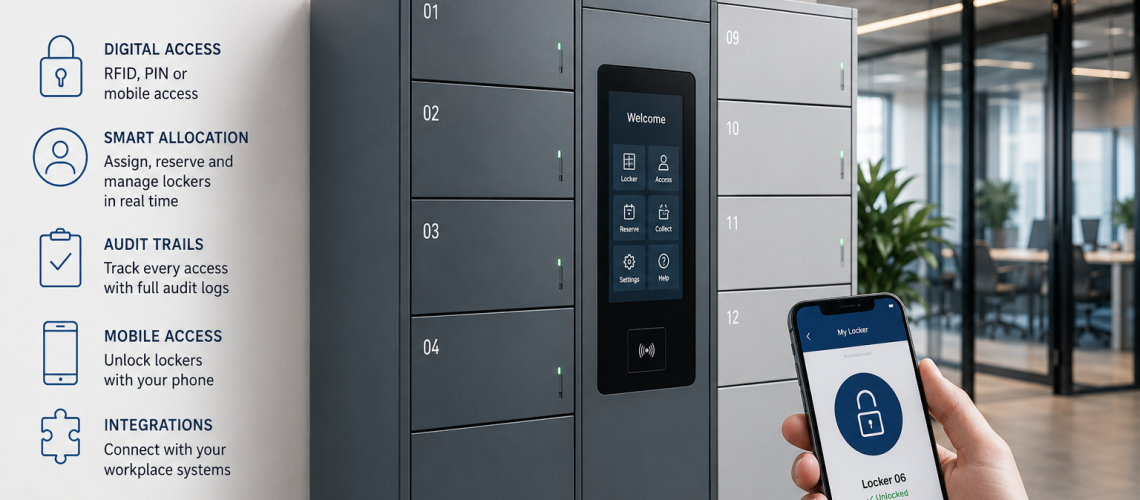
Smart locker systems combine a physical locker, electronic locking, digital credentials, controllers or connectivity, a user interface and management software to create storage that can be administered electronically.
The important distinction is that a smart locker is a system, not simply a locker with an electronic lock. The useful benefits appear when the physical cabinet, lock, credential, connectivity and software work together to solve a real operational problem.
This guide explains the complete smart locker architecture: what the system contains, how the layers interact, what power and connectivity may be required, how offline operation works, when retrofit is practical and when a conventional locker remains the simpler choice.
Smart locker system = locker + electronic lock + credential + controller/connectivity + user interface + management software.
Quick Answer: What Is a Smart Locker System?
A smart locker system is a locker installation in which electronic access, digital credentials and software-supported administration work together. Depending on the design, the system may support PIN, RFID or mobile access, remote administration, changing users, shared storage, audit records, availability information and links to other workplace or facilities systems.
Not every installation needs all of those features. A smart locker system should use only the level of technology needed for the operating model.
What This Page Owns, and What It Hands Off
- Complete smart locker system architecture: this page
- Dashboards, remote administration, APIs and software configuration: Smart Locker Management Software UK
- Key, PIN, RFID and digital access technology: Locker Access Control Systems UK
- Assigned, shared, hot and temporary operating models: Locker Allocation Systems UK
- Actual occupancy, utilisation and demand: Locker Occupancy Management Systems UK
- Temporary credential lifecycle: Temporary Locker Access Systems UK
- Who may approve, reset or override access: Locker Access Permissions & Governance UK
- Access-event records and audit trails: Locker Access Audit Systems UK
- GDPR, retention and personal-data handling: Locker Access Compliance UK
- Wider estate integration architecture: Locker Infrastructure Systems UK
- Facilities and maintenance workflows: Locker CAFM Integration UK
- Commercial investment decision: Are Smart Lockers Worth the Investment?
The Six Main Layers of a Smart Locker System
| Layer | Purpose |
|---|---|
| 1. Physical locker | Provides the storage compartment, door, hinges and structure |
| 2. Electronic lock | Controls physical opening and closing |
| 3. Credential | Identifies or authenticates the authorised user |
| 4. Controller / connectivity | Connects locks, readers or software where required |
| 5. User interface | Allows the user or administrator to interact with the system |
| 6. Management software | Provides administration, configuration, reporting and integrations |
A system does not become more useful simply by adding every layer. Some installations use standalone electronic locks with no central software. Others use fully networked controllers, cloud software and integrations. The architecture should match the required level of control.
1. The Physical Locker Cabinet
The physical locker still matters as much in a smart system as it does in a conventional installation.
- Compartment size must suit the stored items.
- Door construction must support the proposed lock.
- Hinges must remain serviceable under expected use.
- Locker material must suit the environment.
- Internal clearance must allow the electronic lock or latch to operate.
- Battery or wiring access must remain practical for maintenance.
- The cabinet condition must justify any retrofit investment.
Digital management cannot compensate for a locker that is too small, badly damaged or physically unsuitable for the environment.
2. The Electronic Lock
The electronic lock provides the physical access-control point. It may be battery powered, wired, connected to a controller or operate as a standalone unit.
- Keypad lock
- RFID lock
- Electronic combination lock
- App-enabled lock
- Networked lock
- Central-controller lock
The correct lock depends on cabinet compatibility, environment, required credential type, management method, power strategy and how often users change.
For the detailed comparison of lock and credential technologies, use Locker Access Control Systems UK.
3. User Credentials
The credential is how the system recognises or authenticates the user. A smart locker may support one or several credential types.
- PIN code
- RFID card
- Key fob
- RFID wristband
- Mobile credential
- QR code
- Application-based credential
Existing building-access cards do not automatically work with every locker system. RFID frequency, credential type, encoding, reader compatibility and software integration should be checked before specification.
4. Controllers and Connectivity
Connected smart locker systems may use local controllers, readers, wired networks, wireless communications or internet-connected gateways to link lockers with management software.
- Standalone lock with no central connection
- Local controller serving one locker bank
- Networked controller serving several banks
- Wireless-connected locks
- Cloud-connected gateway
- Hybrid architecture combining local operation with cloud administration
The connectivity layer should be understood before installation because it can affect cabling, wireless coverage, cabinet layout, IT involvement and resilience.
5. User Interface
The user interface is the point where users or administrators interact with the system.
- Keypad mounted on the locker
- RFID reader
- Touchscreen kiosk
- Mobile application
- Browser portal
- Administrator dashboard
The best interface depends on who uses the locker and how frequently they change. A simple assigned staff locker may not need a touchscreen or app, while a large shared system may benefit from self-service selection or booking.
6. Management Software
Management software is the digital administration layer. It may provide dashboards, remote actions, alerts, reporting, exports, APIs and integrations.
The software should implement the organisation’s operating model rather than define it by default.
For the software layer in detail, use Smart Locker Management Software UK.
Standalone Electronic Lock vs Full Smart Locker System
| Feature | Standalone electronic lock | Full smart locker system |
|---|---|---|
| Electronic access | Yes | Yes |
| Central administration | Usually limited | Can be available |
| Remote changes | Usually limited | Can be available |
| Multi-site management | Normally no | Possible |
| Dynamic allocation | Depends on lock mode | Can be software managed |
| Audit reporting | Limited or local | Can be centralised |
| APIs / integrations | Usually no | Possible |
| Network dependency | Low | Varies by architecture |
This distinction matters because an electronic lock can solve key-management problems without requiring a complete connected platform.
Cloud, Local and Hybrid Smart Locker Architectures
Smart locker systems can be designed in several ways.
| Architecture | Typical characteristics |
|---|---|
| Standalone | Electronic lock operates independently with local programming |
| Local | Locks connect to on-site controllers or locally managed software |
| Cloud | Management platform is hosted remotely and accessed over the network |
| Hybrid | Local lock/controller operation continues while cloud software provides central administration |
Cloud is not automatically better, and local is not automatically more resilient. The useful question is what happens when each dependency fails.
Offline Operation and Resilience
Before specifying a connected system, establish what still works if internet, network, controller, software or power is unavailable.
- Can an already-authorised user still open the locker?
- Are credentials cached locally?
- Are events stored locally and uploaded later?
- Can administrators perform essential actions locally?
- What happens to temporary credentials during an outage?
- How are queued changes reconciled?
- Is there an authorised mechanical or electronic override?
- What happens if the controller itself fails?
Resilience should be tested against the real operating requirement, not inferred from marketing terms such as “cloud”, “offline capable” or “smart”.
Power Requirements
Electronic locker systems may use replaceable batteries, rechargeable power, wired low-voltage power or a combination of methods.
- How is each lock powered?
- What is the expected battery-service interval?
- Can batteries be accessed without emptying the locker bank?
- What low-battery warning is provided?
- Can the lock be opened if the battery is depleted?
- Is external power required?
- Who owns battery replacement?
- Does the controller or reader require separate power?
Connectivity Requirements
Connected systems may require wired Ethernet, local buses, Wi-Fi, Bluetooth, proprietary wireless communication or internet access, depending on the product.
- Where must network coverage be available?
- Which components need continuous connectivity?
- Which components can operate locally?
- Who owns the network infrastructure?
- Are firewalls or segmented networks involved?
- Can the system tolerate temporary loss of communication?
- How will future software or network changes be supported?
How Smart Locker Allocation Fits Into the System
Smart systems can implement permanent, shared, hot, temporary or bookable locker models, but the system architecture should not decide which model the organisation needs.
For the operating-model decision, use Locker Allocation Systems UK. This parent page only needs to establish that smart systems can support different allocation methods.
How Occupancy Fits Into the System
Connected locker systems can provide availability or occupancy information where the hardware and software can reliably determine it.
Allocation status is not automatically the same as physical occupancy. A locker can be assigned but unused, or unavailable because of a fault. For the detailed measurement model, use Locker Occupancy Management Systems UK.
How Permissions and Audit Fit Into the System
A smart system may technically support administrator roles, remote override and event logging, but those capabilities should remain separate from the organisation’s governance rules.
- Permissions & Governance: defines who may act.
- Access Audit: defines what events should be recorded and what the evidence can show.
- Compliance: defines how personal data and access records are handled.
Use Locker Access Permissions & Governance UK, Locker Access Audit Systems UK and Locker Access Compliance UK for those specialist subjects.
Smart Locker Integrations
Larger systems may connect with existing organisational software and identity platforms.
- Identity systems
- Building access control
- HR or workforce platforms
- Visitor management
- Hybrid workplace and desk-booking systems
- CAFM and helpdesk systems
- Reporting platforms
The complete estate-integration architecture belongs in Locker Infrastructure Systems UK. Facilities fault and work-order integration belongs in Locker CAFM Integration UK.
Interoperability and Vendor Lock-In
Before selecting a smart locker system, establish which components are interchangeable and which depend on one vendor or platform.
- Can the lock work without the original cloud service?
- Can credentials be reused with replacement locks?
- Are controllers proprietary?
- Can locker and user data be exported?
- Is API access available?
- Can the software support third-party identity systems?
- Can failed electronic locks be replaced individually?
- What happens if the software platform is retired?
Interoperability does not mean every component must be generic. It means the organisation understands where dependencies exist before committing to the system.
New Smart Lockers vs Retrofit
Some existing locker estates can be upgraded with electronic or RFID locks without replacing the full cabinet, but compatibility must be checked.
- Door material
- Door thickness
- Existing lock cut-out
- Fixing-hole positions
- Cam or latch geometry
- Internal lock-body clearance
- Battery access
- Door and hinge condition
- Numbering and locker identification
- Whether wiring or controllers can be installed cleanly
A smart-lock retrofit should not preserve a locker estate that is physically unsuitable, badly damaged or nearing replacement for other reasons.
Phased Smart Locker Deployment
Organisations do not necessarily need to convert every locker at once.
- Pilot one department or building.
- Start with high-turnover locker banks.
- Target areas where key administration is difficult.
- Retain conventional lockers where they remain suitable.
- Test credentials, software and support procedures.
- Review user and administrator behaviour.
- Expand only when the operating process is stable.
For mixed conventional and smart estates, use Hybrid Locker Estates UK.
Smart Lockers for Hybrid Workplaces
Hybrid workplaces are a common smart-locker application because attendance varies and permanent allocation may leave large numbers of lockers unused on many days.
The smart system can provide the technology for shared access, booking, remote administration and availability information. The allocation model itself should still be designed separately.
Smart Lockers for Education
Schools, colleges and universities may use electronic access where user populations change frequently or where existing cards can potentially provide locker access.
Compatibility, safeguarding authority, lock durability and the physical locker requirement remain important. For the wider sector requirement, use School Lockers UK.
Smart Lockers for Healthcare
Healthcare estates may use smart locker systems for staff changing where shift patterns, temporary workers or department changes create frequent administration.
Ordinary staff lockers should not be treated as if they automatically require the same controls as medicines or clinical storage. For healthcare changing rooms, use NHS & Healthcare Changing Room Planning UK.
Smart Lockers for Industrial Sites
Industrial sites may use electronic lockers for personal storage, PPE, tools, devices or contractor use. The physical cabinet and electronic hardware must suit the actual environment, including impact, moisture, dust and heavy use where relevant.
Smart Lockers for Leisure Facilities
Leisure centres, gyms and pools may benefit from rapid user turnover, PIN or RFID access and short-term use. Where lockers are installed in wet or humid areas, the proposed locker construction and locking hardware must be suitable for those conditions.
Smart Lockers and Charging
Smart access and charging are separate functions. A locker can be electronically managed without charging devices, and a charging locker can use conventional access.
Where both are required, the complete system must consider compartment dimensions, electrical provision, cable space, ventilation where required, charger clearance and access frequency. For charging design, use Charging Lockers UK Guide.
Smart Lockers vs Conventional Lockers
| Feature | Conventional locker | Smart locker system |
|---|---|---|
| User access | Key, hasp or mechanical combination | Electronic credential |
| User changes | Usually manual | Can be administered digitally |
| Remote administration | No | Possible with connected systems |
| Availability information | Usually manual | Can be electronic where supported |
| Audit records | Manual or limited | Can be system generated |
| Power requirement | Usually none | Battery, wired power or both |
| Software dependency | None | May be significant |
| Integration capability | Minimal | Can be extensive |
| Technical complexity | Low | Higher |
When a Smart Locker System Makes Sense
- Users change frequently.
- Shared or temporary use creates significant administration.
- Physical key management is burdensome.
- Several locker banks need central administration.
- Remote changes would materially reduce support work.
- Existing credentials may be reused.
- Availability or utilisation information has a defined operational purpose.
- Integration can remove duplicate administration.
These are reasons to investigate a smart system, not automatic proof that one is justified.
When a Conventional Locker Is Better
- Each locker has one long-term user.
- User turnover is low.
- Key administration is manageable.
- No central reporting is required.
- Remote administration adds little value.
- The organisation wants minimal technical dependency.
- Software and connectivity would add complexity without solving a meaningful problem.
For many straightforward installations, a reliable keyed, hasp or mechanical combination system remains the lower-complexity option.
Whole-Life Smart Locker Requirements
A smart locker should be assessed as a complete operational system rather than by electronic-lock purchase price alone.
- Locker cabinet
- Electronic locks
- Controllers and readers
- Power infrastructure
- Network infrastructure
- Installation
- Software
- Licensing
- Integration
- Batteries
- Replacement parts
- Support
- Administrator time
- Software updates
- Future upgrades
For the commercial investment decision, use Smart Lockers UK: Are They Worth the Investment?.
Common Smart Locker System Mistakes
- Calling any electronic lock a smart locker system. A full smart system involves several connected layers.
- Choosing technology before defining the operating problem. Start with the user and storage requirement.
- Assuming RFID compatibility. Verify credentials before procurement.
- Ignoring the physical locker. Digital access does not fix unsuitable compartments or damaged doors.
- Letting software defaults define policy. Define allocation and permissions first.
- Assuming allocation equals occupancy. Use the correct occupancy model.
- Ignoring offline behaviour. Know what still works during failures.
- Ignoring battery and power servicing. Define ownership before rollout.
- Ignoring vendor dependencies. Understand export, API and replacement options.
- Over-integrating. Connect systems only where the integration removes real work or risk.
- Rolling out everywhere at once. Pilot where complexity or scale justifies it.
- Replacing good conventional lockers without evidence of benefit. Retrofit or retain where appropriate.
Smart Locker System Planning Checklist
- What needs to be stored?
- Who will use the lockers?
- How frequently do users change?
- Does the operating model genuinely need smart access?
- Which physical locker construction is appropriate?
- Which electronic lock type is compatible?
- Which credentials will users carry?
- Are existing credentials compatible?
- Is central software required?
- Is remote administration required?
- What must work offline?
- How are locks and controllers powered?
- What network or wireless connectivity is required?
- What happens during a network, cloud or controller failure?
- Can existing lockers be upgraded safely?
- Who will support the physical lockers?
- Who will support the electronic hardware?
- Who will support the software?
- Are integrations genuinely necessary?
- Can data be exported if the supplier changes?
- Would a pilot reduce implementation risk?
Where Smart Locker Questions Go Next
| Question | Next guide |
|---|---|
| How does the software platform work? | Smart Locker Management Software UK |
| Which access technology should we use? | Locker Access Control Systems UK |
| Should lockers be assigned, shared, hot or temporary? | Locker Allocation Systems UK |
| How should occupancy and utilisation be measured? | Locker Occupancy Management Systems UK |
| How should temporary access start and expire? | Temporary Locker Access Systems UK |
| Who may administer or override the system? | Locker Access Permissions & Governance UK |
| Which access events should be recorded? | Locker Access Audit Systems UK |
| How should access data be handled? | Locker Access Compliance UK |
| How should lockers connect to wider systems? | Locker Infrastructure Systems UK |
| How should faults enter facilities workflows? | Locker CAFM Integration UK |
| Are smart lockers worth the investment? | Smart Lockers UK Investment Guide |
Smart Locker Systems UK FAQs
What is a smart locker system?
A smart locker system combines a physical locker, electronic lock, user credential, controller or connectivity, user interface and management software to provide electronically managed storage.
Is an electronic locker lock the same as a smart locker system?
Not necessarily. An electronic lock can provide keyless access on its own. A full smart locker system usually combines several layers such as digital credentials, connectivity, user interfaces and management software.
Do smart lockers need continuous internet access?
No. Some systems operate as standalone or locally managed electronic lockers, while others use network or cloud connectivity. The required connection depends on the system architecture and the functions being used.
Can smart lockers use existing staff or student cards?
Sometimes. Existing RFID cards can only be reused where the credential technology and proposed locker system are compatible. Compatibility should be verified before ordering.
Can existing lockers be converted to smart access?
Some existing lockers can be retrofitted with electronic locks, but door material, thickness, lock opening, latch geometry, fixing points, internal clearance, battery access and cabinet condition should be checked first.
Are smart lockers always better than conventional lockers?
No. Smart systems are most useful where changing users, shared storage, difficult key administration, remote management or system integration solve a real operational problem. Stable assigned storage may be better served by a simpler conventional lock.
How are smart locker locks powered?
Depending on the product, electronic locker locks may use replaceable batteries, wired power or a combination of power methods. Controllers and readers may have separate power requirements.
What should happen if a smart locker system goes offline?
The answer depends on the architecture. Before selection, organisations should establish whether authorised users can still gain access, whether events are stored locally and how queued changes are reconciled when connectivity returns.
Summary
A smart locker system should stay defined at the system level: physical locker, electronic lock, credential, controller or connectivity, user interface and management software.
Keep software detail with Smart Locker Management Software, access technology with Access Control, allocation with Allocation Systems, occupancy with Occupancy Management, authority with Governance, event evidence with Access Audit, personal-data handling with Compliance and estate integration with Locker Infrastructure Systems.
Use the lowest level of technology that reliably supports the operating model. Smart lockers are valuable when they solve a genuine access, administration or integration problem; conventional lockers remain appropriate where simpler storage already works well.
For help with smart lockers, electronic locker locks or upgrades to an existing locker estate, call Total Locker Service on 01284 749211 or email sales@totallocker.co.uk.
Discover more from Blog Total Locker Service
Subscribe to get the latest posts sent to your email.