Locker Lock Identification Guide UK
May 14, 2026
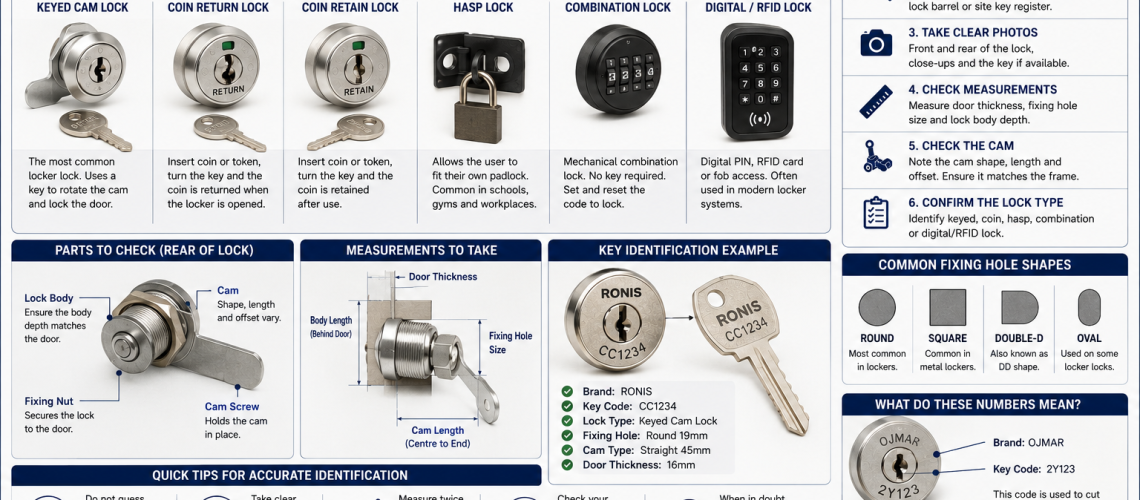
Locker lock identification means establishing exactly what lock, key series, rear mechanism, cam or latch and management-access arrangement are currently fitted before keys, locks or parts are ordered. Two locks can look almost identical from the front while using different manufacturers, key series, cams, fixings or master-key systems.
This guide owns the identification stage: what type of lock is present, what markings it carries, what key or credential it uses, what the rear mechanism looks like and what information should be recorded or photographed.
It does not decide whether a replacement will fit, how to replace the lock or whether the site should change to another access technology. Those questions belong to the dedicated Compatibility, Replacement and Access Control guides.
Identification = what is fitted. Compatibility = will another one fit. Replacement = physically swap it. Access Control = choose the technology.
Quick Answer: How Do You Identify a Locker Lock?
Start with how the locker opens, then work from the visible lock face towards the rear mechanism.
- Identify whether the locker uses a key, padlock, coin or token, mechanical combination, PIN or RFID credential.
- Photograph the front of the lock.
- Look for a key number, lock code, manufacturer name, logo or model reference.
- Photograph the existing key where available.
- Photograph the rear mechanism where it is safely accessible.
- Identify whether the lock uses a cam, latch, rod, cable or another mechanism.
- Record any master key, override key or management credential.
- Record the locker manufacturer and range where known.
- Send the photographs and identification details to Total Locker Service if the lock remains uncertain.
If you already know the correct key number and only need another key, use the replacement locker key service. If the component remains unidentified, use the locker lock and part identification service.
What This Page Owns, and What It Hands Off
- What lock, key series and rear mechanism are fitted: this page
- Finding and interpreting a key number: How to Find Your Locker Key Code UK
- Will a proposed replacement physically fit: Locker Lock Compatibility Guide UK
- How to replace a failed lock: Locker Lock Replacement Guide UK
- How to modify a locker for a different lock: Retrofit Locker Locks UK
- Changing from one access method to another: Locker Lock Upgrade Guide UK
- Choosing keyed, combination, PIN, RFID or another access technology: Locker Access Control Systems UK
- Parts, repairs and servicing: Locker Parts, Repairs and Servicing UK
1. Identify How the Locker Opens
The quickest first step is to identify the broad access method.
| What the user uses | Likely lock family |
|---|---|
| Physical key | Keyed cam lock, cylinder lock or specialist keyed locker lock |
| Separate padlock | Hasp, staple or padlock fitting |
| Coin or token | Coin-return, coin-retain or token lock |
| Number wheels, dial or buttons | Mechanical combination lock |
| PIN keypad | Electronic PIN locker lock |
| Card, fob or wristband | RFID or another electronic credential system |
This identifies the family only. Do not assume two locks in the same family are interchangeable.
2. Inspect the Lock Face
The front of the lock often contains the first useful clues.
- Manufacturer name
- Manufacturer logo
- Model or series marking
- Key number or code
- Shape and orientation of the keyway
- Round, oval, square or rectangular front face
- Coin or token marking
- Electronic keypad layout
- RFID reader markings
Photograph the complete lock face before removing anything. A lock is often easier to identify while it is still assembled on the locker.
3. Find the Key Number or Lock Code
For keyed lockers, the key number or lock code can be one of the most useful identification details.
| Where to look | What you may find |
|---|---|
| Original key | Stamped, engraved or printed key number |
| Lock face | Code beside, above or around the keyway |
| Lock barrel | Manufacturer, series or key code |
| Rear lock body | Manufacturer or part reference |
| Key tag | Recorded key number |
| Site records | Locker number linked to a key code |
| Previous invoices | Historic key or lock reference |
For the dedicated key-code process, use How to Find Your Locker Key Code UK.
Locker Number vs Key Number
The number displayed on a locker door is not automatically the key number.
| Number | Purpose |
|---|---|
| Locker number | Identifies the physical locker or compartment |
| Key number / lock code | Identifies the key or lock series |
Only use a locker number to order a key when reliable records specifically link that locker number to the correct key code.
4. Identify the Lock Manufacturer
Manufacturer identification can narrow the key range, lock series, master-key system and replacement-part family.
- Look on the lock face.
- Look on the original key.
- Inspect the side of the barrel where visible.
- Inspect the rear mechanism.
- Look for labels on electronic locks.
- Check the locker manufacturer’s label.
- Check old invoices, key records or maintenance records.
Locker locks found in UK installations include products from Lowe & Fletcher, Ojmar, Ronis, ASSA ABLOY and other specialist manufacturers and ranges.
Do not assume visually similar locks from different manufacturers use interchangeable keys, barrels, cams or management systems.
5. Inspect the Rear Mechanism
If the locker is open and the rear of the lock can be viewed safely, photograph the complete mechanism before dismantling it.
- Lock-body shape
- Threaded barrel
- Retaining nut
- Spring clip
- Fixing screws
- Mounting plate
- Cam
- Latch
- Rod or linkage
- Cable
- Coin mechanism
- Battery cover
- Override cylinder
- Management-key point
- Manufacturer markings
A photograph showing how the rear mechanism engages with the locker frame is often more useful than a close-up of one loose component.
6. Identify the Cam or Latch
Many locker locks use a cam: the metal arm on the rear of the lock that rotates into the frame or locking point.
- Is the cam straight, offset or cranked?
- Which way does it point when locked?
- Which way does it point when unlocked?
- How is it fixed to the lock?
- Is there a visible bend or offset?
- Does the lock use a latch rather than a cam?
- Is the mechanism left- or right-handed?
Exact cam dimensions belong in the Compatibility process. At identification stage, the aim is to record what type of cam or latch is actually present and how it is arranged.
7. Identify the Fixing Method
How the lock is retained to the locker door is another useful identification clue.
- Threaded nut
- Spring clip
- Rear bracket
- Front and rear screws
- Mounting plate
- Manufacturer-specific carrier
- Integrated latch assembly
Photograph the complete fixing arrangement before removing any clips, nuts or screws.
8. Record the Door Preparation Without Turning Identification Into Compatibility
The door opening can help identify the lock family, but detailed fit analysis belongs in the Compatibility Guide.
- Round hole
- Double-D or anti-rotation opening
- Square opening
- Rectangular cut-out
- Recessed mounting
- Separate fixing holes
- Existing adaptor or conversion plate
If you need to prove that a replacement will fit the existing cut-out, door thickness and rear clearance, use Locker Lock Compatibility Guide UK.
How to Identify a Keyed Cam Locker Lock
A keyed cam lock normally has a key cylinder at the front and a rotating cam at the rear.
- Record the key number.
- Record the manufacturer or logo.
- Photograph the keyway.
- Photograph the front face.
- Photograph the rear lock body.
- Photograph the cam.
- Record any master-key information.
- Record the fixing method.
If the lock is serviceable and the valid key number is known, go to the replacement locker key service.
How to Identify a Hasp or Padlock Fitting
A hasp or padlock fitting allows the locker to be secured using a separate padlock rather than an integral keyed or combination lock.
- Photograph the external fitting.
- Photograph the rear fixing.
- Record any manufacturer markings.
- Record how the fitting engages with the locker frame.
- Note whether it appears original or a later conversion.
How to Identify a Mechanical Combination Locker Lock
Mechanical combination locks may use number wheels, a dial or push buttons and require no battery for ordinary operation.
- Manufacturer
- Model
- Number of wheels or buttons
- Front layout
- Rear lock-body design
- Fixing method
- Private-use or public-use mode where known
- Reset or code-finding method where known
- Management or override key
Two combination locks can look similar while using different reset methods, mounting arrangements or management keys.
How to Identify a Coin or Token Locker Lock
Coin and token locks are common in leisure and changing-room environments and can vary considerably behind the front plate.
- Manufacturer and model
- Coin or token denomination
- Coin-return or coin-retain operation
- Door handing where relevant
- Master or service-key arrangement
- Coin box or return mechanism
- Rear latch design
- Visible wet-area or corrosion-resistant features
Photograph the rear mechanism rather than relying on the visible coin plate alone.
How to Identify an Electronic PIN Locker Lock
Electronic PIN locks normally have a keypad or push-button interface and a battery or powered rear mechanism.
- Manufacturer
- Model
- Keypad layout
- Visible model markings
- Battery position
- Private-use or public-use mode where known
- Management or override method
- Rear mechanism
- Programming tool or administrator device where used
Identification should record the system that is already fitted, not decide whether PIN access is the correct technology for the site.
How to Identify an RFID Locker Lock
RFID locker locks use contactless credentials such as cards, fobs or wristbands.
- Lock manufacturer and model
- Credential type
- Card, fob or wristband used
- Stand-alone or managed operation where known
- Private-use or public-use mode where known
- Management credential
- Battery or power arrangement
- Programming equipment
- Associated management system where relevant
Do not assume two systems are compatible simply because both use the term RFID. Compatibility and technology selection belong in the relevant dedicated guides.
Identify Master-Key and Management Access
Ordinary user access is only one part of the lock’s identity. Record any authorised management route already associated with it.
- Master key
- Sub-master key
- Service key
- Override key
- Management PIN
- RFID management card or fob
- Programming key or tool
Where the lock belongs to a master-key hierarchy, record the known group or reference. Do not assume a visually identical replacement remains within the same master system.
Identify the Locker Manufacturer as Well as the Lock
The locker manufacturer can provide useful clues where the lock itself is unbranded.
- Manufacturer label
- Product-range label
- Door construction
- Ventilation pattern
- Hinge design
- Existing door preparation
- Approximate installation age where known
Older locker estates may have been repaired or modified several times, so do not assume every locker still contains its original lock.
Take the Right Photographs
Clear photographs are one of the most useful identification tools when no reliable part number is visible.
- Complete locker or locker bank
- Complete affected door
- Close-up of the lock face
- Close-up of every visible number or logo
- Original key where available
- Rear of the complete lock
- Cam or latch
- Cam in the locked position where practical
- Cam in the unlocked position where practical
- Locker manufacturer label
- Door opening if the lock has already been removed
Keep the camera as square to the component as practical. Strongly angled photographs can make the lock shape and cam arrangement difficult to interpret.
What Measurements Are Useful at Identification Stage?
A few measurements can help distinguish similar products, but the Identification Guide should not become the full Compatibility Guide.
- Approximate door thickness
- Approximate lock-face width and height or diameter
- Approximate cam length
- Approximate fixing-hole spacing where visible
If an exact replacement fit must be proven, move to Locker Lock Compatibility Guide UK, where door cut-outs, fixing dimensions, rear clearance and cam geometry belong.
Common Locker Lock Identification Problems
| Identification problem | What to check next |
|---|---|
| No key number visible | Original key, lock face, barrel, rear body and site records |
| Original key is missing | Look for a code on the lock face, barrel or historic records |
| No manufacturer visible | Use photographs of the face, keyway, rear body and cam |
| Several visually similar locks exist | Compare manufacturer, rear fixing, key series and cam arrangement |
| Locker number is visible but no key code | Check whether site records link the locker number to a key number |
| Master key works some lockers but not others | Record which locks belong to which master group before ordering parts |
| Original lock appears obsolete | Record the existing lock fully, then hand off to Compatibility or Replacement |
| Electronic or RFID model is unclear | Photograph the front, rear, battery area, labels and management credential |
Common Mistakes When Identifying Locker Locks
- Ordering from the front appearance alone.
- Confusing the locker number with the key number.
- Ignoring manufacturer markings.
- Ignoring the rear mechanism.
- Ignoring the cam or latch type.
- Ignoring the fixing method.
- Assuming every keyed cam lock uses the same key series.
- Assuming visually similar locks belong to the same master-key group.
- Assuming all RFID systems use compatible credentials.
- Dismantling the lock before photographing the assembled mechanism.
- Turning identification into a replacement-fit decision instead of handing off to Compatibility.
- Turning identification into technology selection instead of handing off to Access Control.
Keep a Simple Identification Record
Where many lockers are involved, recording basic identification information can prevent the same investigation being repeated.
| Identification field | Purpose |
|---|---|
| Locker number / ID | Identifies the physical compartment |
| Location | Links the lock to the correct locker bank |
| Locker manufacturer | Provides context for the original installation |
| Lock type | Keyed, hasp, coin, combination, electronic or RFID |
| Lock manufacturer | Supports key and lock identification |
| Lock model | Provides the most precise product reference where known |
| Key number / series | Supports replacement-key identification |
| Cam / latch type | Records the rear locking arrangement |
| Master / management group | Records existing authorised access structure |
| Photo reference | Links the record to supporting images |
Condition scores, maintenance history, lifecycle status and replacement priority belong in Asset Management rather than this identification record.
What to Send Total Locker Service for Identification
- Photograph of the complete locker
- Close-up of the lock face
- Photograph of all visible numbers and logos
- Photograph of the existing key where available
- Photograph of the complete rear mechanism
- Photograph of the cam or latch
- Locker manufacturer where known
- Key number or code where visible
- Approximate quantity required
- Whether a master key, service key or management credential is already in use
Use the locker lock and part identification service if you cannot confidently identify the existing component.
Where Locker Lock Identification Questions Go Next
| Question | Next guide |
|---|---|
| I know the key code and need another key | Replacement Locker Keys |
| Where do I find the key code? | How to Find Your Locker Key Code UK |
| Will the proposed replacement lock fit? | Locker Lock Compatibility Guide UK |
| How do I replace the failed lock? | Locker Lock Replacement Guide UK |
| Does the locker need modifying for a different lock? | Retrofit Locker Locks UK |
| Are we changing from one access method to another? | Locker Lock Upgrade Guide UK |
| Which access technology should we use? | Locker Access Control Systems UK |
| Do we need parts or servicing? | Locker Parts, Repairs and Servicing UK |
Locker Lock Identification FAQs
How do I identify my locker lock?
Identify how the locker opens, then record the lock face, manufacturer markings, key number, rear mechanism, cam or latch, fixing method and any master or management access already in use.
Is the number on my locker the key number?
Not necessarily. The locker number usually identifies the compartment, while the key number identifies the key or lock series. Only use the locker number where reliable records link it to the correct key code.
Where can I find a locker key number?
The number may be marked on the key, lock face or barrel, shown on a key tag, or recorded in the site’s key, purchasing or maintenance records.
Can two locker locks that look the same use different keys?
Yes. Visually similar locks can use different manufacturers, key series, barrels, cams and master-key systems, so identification should not rely on appearance alone.
What photographs are useful for identifying a locker lock?
Useful photographs include the complete locker, lock face, visible markings, existing key, rear mechanism, cam or latch and locker manufacturer label.
Why should I photograph the rear of the lock?
The rear mechanism can reveal the fixing method, cam or latch, manufacturer markings, battery cover, override cylinder or other features that are not visible from the front.
Should I use this guide to decide which replacement lock to buy?
This guide identifies what is currently fitted. Use the Compatibility Guide to prove a proposed replacement fits and Access Control Systems UK to choose a different access technology.
Summary
Locker lock identification should answer one question clearly: what is fitted now?
Record the operating method, lock face, key number, manufacturer, rear mechanism, cam or latch, fixing method and existing management access. Use clear photographs before dismantling the lock and keep locker numbers separate from key numbers.
Once the lock has been identified, hand the next question to the correct owner: key supply, Compatibility, Replacement, Retrofit, Upgrade or Access Control.
Discover more from Blog Total Locker Service
Subscribe to get the latest posts sent to your email.