Smart Locker Systems UK: Electronic Access, RFID and Managed Storage
May 10, 2026
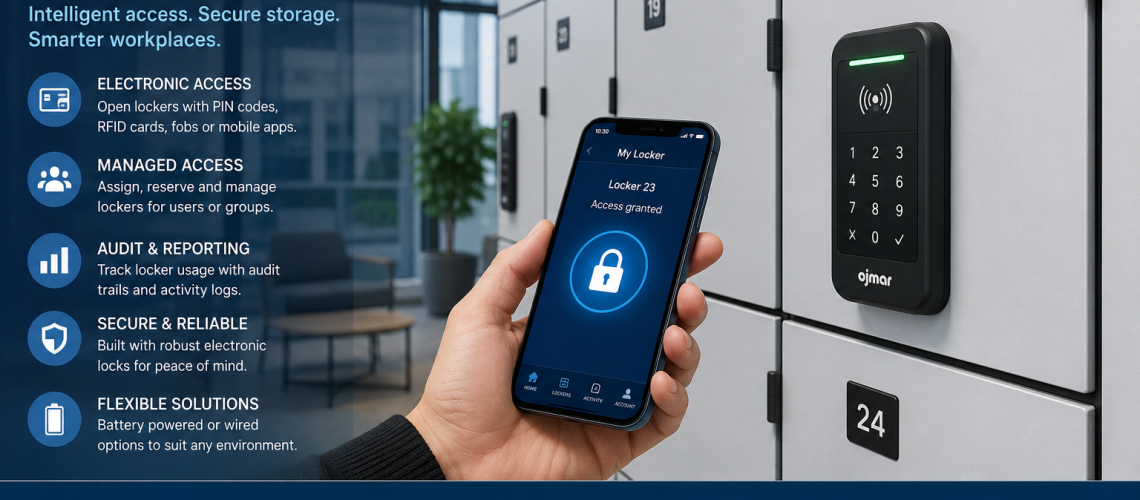
Smart locker systems use electronic locks, access control, software, allocation rules and audit trails to manage lockers more efficiently. They are used in workplaces, offices, gyms, universities, warehouses, parcel areas, charging zones and shared storage environments where standard keyed lockers are no longer enough.
This guide explains what smart locker systems are, how they work, where they are useful and when a site should move from simple locker locks to a connected locker access system.
For basic lock types, start with our locker locks UK guide. For digital and RFID lock options, see our locker electronic locks UK guide.
Quick answer: what is a smart locker system?
A smart locker system is a managed locker setup where access is controlled electronically instead of by a simple key. Users may open lockers with a code, RFID card, fob, app, PIN, staff badge or central management system. Some systems can record usage, assign lockers, release lockers, monitor access and support shared-use storage.
What makes a locker system “smart”?
A locker becomes part of a smart system when access and management are controlled by more than a basic mechanical lock. The system may include electronic locks, a control unit, software, user credentials, audit records and administrator settings.
- Electronic access: users open lockers with codes, cards, fobs, RFID, apps or staff credentials.
- Locker allocation: lockers can be assigned to users, teams, visitors or temporary users.
- Audit trails: administrators may be able to see when lockers were accessed.
- Shared-use control: lockers can reset after each use, depending on the system.
- Central management: settings can be controlled from a central point rather than at each lock.
- Integration potential: some systems can connect with workplace access, charging, asset or room booking systems.
When should you consider smart lockers?
Smart lockers are useful when locker management becomes difficult, expensive or time-consuming. They are not always needed for simple staff lockers, but they can be valuable where users change often, access needs to be monitored or keys are causing regular problems.
| Situation | Smart locker benefit |
|---|---|
| Hybrid offices | Supports flexible storage for changing staff attendance |
| Gyms and leisure centres | Helps manage short-term shared locker use |
| Universities and schools | Reduces key loss and supports managed access |
| Warehouses and factories | Controls staff, visitor or shift-based storage |
| Charging lockers | Combines secure storage with device charging access |
| Asset storage | Helps track access to shared equipment or devices |
Smart lockers vs electronic locker locks
An electronic locker lock controls access to one locker. A smart locker system controls the wider process around many lockers. That process may include allocation, reporting, user permissions, access records and remote management.
If you only need a digital keypad, RFID lock or battery-powered lock, read our locker electronic locks UK guide. If you need software, user allocation, audit trails or central management, a smart locker system may be more suitable.
Main types of smart locker access
- PIN code access: simple keyless access for shared or assigned lockers.
- RFID access: users open lockers with cards, fobs or staff badges.
- App-based access: users open lockers through a mobile device where supported.
- Staff credential access: locker access connects with existing workplace ID systems.
- Central administrator access: managers can override, release or reassign lockers.
Where smart locker systems fit in the locker locks canister
This page acts as the forward bridge from standard locker locks into wider access control and managed storage systems. It should link back to core locker lock pages and forward into future storage system pages.
- For basic lock choice, use the locker lock selection guide UK.
- For lock fitting checks, use the locker lock compatibility guide UK.
- For electronic lock options, use the locker electronic locks UK guide.
- For lifecycle costs, use the locker lock cost UK guide.
- For wider workplace storage planning, use the storage systems UK guide.
Can existing lockers be upgraded to smart locks?
Some existing lockers can be upgraded, but not all lockers are suitable. The door thickness, lock cut-out, fixing footprint, lock body depth, cam position and internal clearance all need checking before a smart or electronic lock is fitted.
Before retrofitting smart locks to existing lockers, check the locker lock compatibility guide UK and the locker lock replacement guide UK.
Benefits of smart locker systems
- Fewer lost keys: keyless access reduces replacement key issues.
- Better control: administrators can manage access more easily.
- Flexible use: lockers can support assigned, temporary or shared users.
- Improved reporting: some systems provide access records or usage data.
- Cleaner user experience: users do not need to carry a locker key.
- Future expansion: systems can support charging, assets, parcels or hybrid working.
Limitations to consider
Smart locker systems can offer strong benefits, but they need more planning than mechanical locks. Buyers should consider budget, battery maintenance, software requirements, user training, emergency access and long-term support.
- Higher upfront cost than basic keyed or cam locks.
- Battery replacement or power planning may be needed.
- Software settings must be managed correctly.
- Staff may need training.
- Retrofitting may not suit every existing locker door.
- Long-term supplier support is important.
Smart lockers and charging lockers
Smart locker systems naturally connect with charging lockers. A charging locker stores devices securely while they charge. Smart access can help control who opens each compartment, when access is allowed and how shared device storage is managed.
This makes smart lockers useful for workplaces, schools, colleges, universities, warehouses and shared device environments where laptops, tablets, scanners, radios or mobile phones need secure controlled storage.
Smart lockers for hybrid offices
Hybrid offices often need flexible storage because staff attendance changes throughout the week. Smart lockers can support temporary allocation, hot desk storage, visitor storage and team-based access. This reduces the need for every staff member to have a permanently assigned locker.
Smart lockers for asset management
Smart lockers can also support asset control. Instead of storing only personal belongings, lockers can hold shared equipment such as keys, tools, radios, laptops, scanners, tablets, PPE or controlled workplace items. Access records can help managers understand who used a locker and when.
Choosing the right smart locker system
The right system depends on the users, the environment, the level of control needed and whether the lockers are new or existing.
| Question | Why it matters |
|---|---|
| Are lockers assigned or shared? | Controls whether users need permanent or temporary access |
| How many users need access? | Affects credential, software and administration needs |
| Is audit history required? | Determines whether simple electronic locks are enough |
| Are existing lockers being upgraded? | Requires compatibility checks before ordering |
| Is the area wet, public or high-use? | Changes the lock specification and maintenance plan |
| Will the system connect to charging or asset storage? | May require a wider storage system design |
Best internal links to place from this page
Use this page to pass authority both backwards into the locker locks cluster and forwards into wider storage systems.
- Locker locks UK guide
- Locker electronic locks UK
- Locker lock compatibility guide UK
- Which locker lock should you choose?
- Locker lock cost UK
- Storage systems UK
Smart locker systems FAQ
What is a smart locker system?
A smart locker system is a locker setup that uses electronic access and management features instead of simple keys. It may include PIN access, RFID, app access, software control, allocation rules and audit trails.
Are smart lockers better than keyed lockers?
Smart lockers are better when a site needs flexible access, fewer lost keys, user tracking or shared-use control. Keyed lockers are still suitable for many simple personal storage areas.
Can smart locks be fitted to existing lockers?
Sometimes. The existing locker door must be checked for cut-out size, fixing footprint, door thickness, cam position and internal clearance before a smart lock is fitted.
Do smart lockers need software?
Some smart locker systems use software for allocation, reporting and administration. Simpler electronic locks may work without full software control.
Are smart locker systems suitable for workplaces?
Yes. Smart lockers are useful for hybrid offices, shared staff storage, visitor storage, device storage, asset control and charging locker areas.
Do smart locker systems need maintenance?
Yes. Maintenance may include battery checks, software management, lock cleaning, access testing and emergency override checks.
Conclusion
Smart locker systems are the next step beyond standard locker locks. They help organisations manage access, reduce key problems, support shared-use storage and connect lockers with wider workplace systems. They are especially useful where lockers are used by changing users, hybrid teams, visitors, members, students or staff across different shifts.
For most projects, start by choosing the right lock type, then check compatibility, cost and future access needs. If the site needs software, audit trails, flexible allocation or charging integration, a smart locker system may be the stronger long-term option.
Discover more from Blog Total Locker Service
Subscribe to get the latest posts sent to your email.