RFID Locker Locks UK: Smart, Keyless and Cashless Locker Access Guide
May 8, 2026
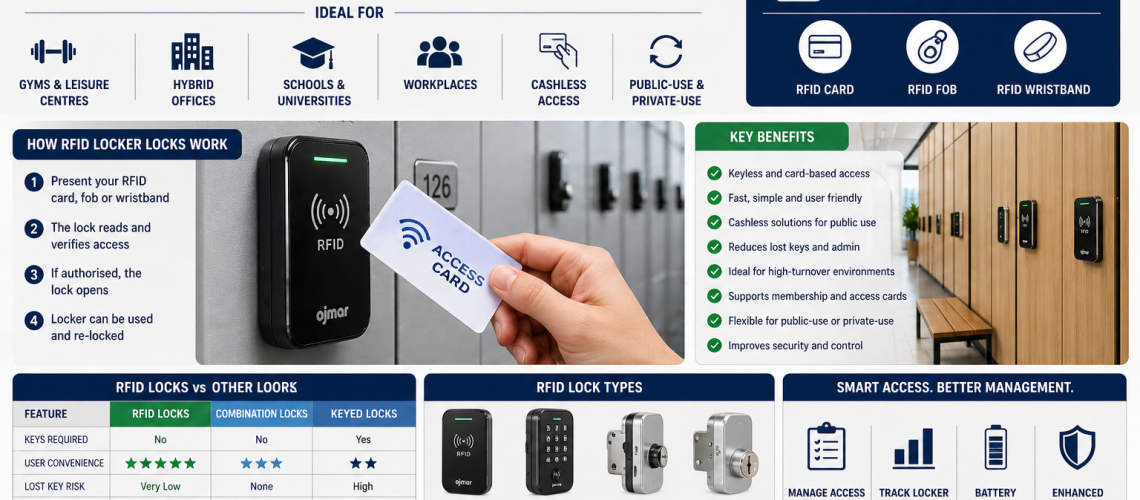
RFID locker locks provide contactless access using a compatible card, fob, wristband or other RFID credential. The important locker-level questions are whether the credential is compatible, how the lock is enrolled, whether it operates in assigned or shared mode, how management access works, how batteries are serviced and whether the lock physically suits the locker and environment.
This guide owns the RFID locker lock itself: reader, credential, lock, operating mode, local programming, management credential, battery, fault behaviour and locker-level installation checks.
It does not own central dashboards, estate-wide permissions, multi-site administration or wider system integration. For those subjects, use RFID Locker Systems UK.
RFID Locker Lock = credential-to-lock interaction at one locker. RFID Locker System = wider architecture, integration and central management.
Quick Answer: What Is an RFID Locker Lock?
An RFID locker lock is an electronic lock that recognises an authorised contactless credential. The user presents the card, fob or wristband to the reader and, if the credential is accepted, the lock releases or permits the normal opening cycle.
- Credential: card, fob, wristband or compatible tag
- Reader: detects and interprets the credential
- Electronic lock: releases or secures the locker
- Power source: commonly batteries on standalone locks
- Management credential or programming method: used by authorised staff
Existing staff, student or membership cards may work with a locker lock, but compatibility must never be assumed simply because both products are described as RFID.
What This Page Owns, and What It Hands Off
- RFID reader, credential and lock interaction: this page
- Standalone assigned/shared RFID operating modes: this page
- Credential compatibility at locker level: this page
- Local enrolment and management credentials: this page
- Battery and locker-level fault checks: this page
- Central management, integrations and system architecture: RFID Locker Systems UK
- Whether RFID should be chosen instead of key, PIN, combination or coin: Locker Access Control Systems UK
- Shared-use vs assigned-use operating model: Shared-Use vs Assigned Locker Locks UK
- Temporary credentials: Temporary Locker Access Systems UK
- Changing an existing locker to RFID: Locker Lock Upgrade Guide UK
- Physical adaptation for a different lock: Retrofit Locker Locks UK
- Wet-area specification: Locker Locks for Wet Areas UK
How an RFID Locker Lock Works
| Component | Locker-level role |
|---|---|
| RFID credential | Presents an identifier or authorised data to the reader |
| Reader | Detects the credential and checks whether it is accepted |
| Controller | Applies the lock’s programmed access rules |
| Locking mechanism | Releases, retracts or permits movement of the latch, cam or bolt |
| Power source | Powers the electronics and locking action |
| Management method | Allows authorised setup, reset or override functions |
Some products contain all of these functions within one lock. Others form part of a wider system. That architecture distinction matters because an RFID credential does not automatically imply central software or networking.
RFID Describes the Credential Technology, Not the Whole System
An RFID locker lock may be completely standalone. It may also be one part of a larger managed system.
- Standalone: programming and user access are handled locally at the lock.
- Locally managed: a programming device, app or management credential may support multiple locks without a live central connection.
- Networked or smart: the lock is part of a wider software and communications architecture.
This page stays with the first two levels. For networked permissions, dashboards, live allocation, reporting and wider integrations, use RFID Locker Systems UK or Smart Locker Systems UK.
RFID Cards, Fobs and Wristbands
RFID locker locks can work with different physical credential formats where the underlying technology is compatible.
| Credential format | What matters |
|---|---|
| Staff card | Whether the card technology and data format are supported by the lock |
| Student card | Whether the locker reader can recognise the existing credential |
| Membership card | Whether the same credential can be enrolled for locker use |
| Key fob | Technology and enrolment compatibility |
| Wristband | Compatibility plus environmental suitability for the intended site |
The physical shape of the credential does not prove compatibility. A card and a wristband can use the same RFID family, or completely different technologies.
Do Existing Staff or Student Cards Work?
Possibly, but this must be confirmed before locks are ordered.
Check:
- the existing credential technology;
- the RFID standard or family;
- the credential format;
- the proposed locker lock’s supported credentials;
- whether the lock needs only an identifier or another supported data structure;
- and whether a real sample credential has been tested successfully.
Two credentials that look identical can behave differently. “RFID” is not a sufficient compatibility specification.
Total Locker Service supplies RFID products including MIFARE-compatible options, but exact support varies by product. Use the current RFID locker lock range and confirm compatibility before ordering where an existing credential must be retained.
Assigned / Private-Use RFID Mode
In assigned mode, one user or a defined set of credentials continues to access the same locker until the programming is changed.
At locker level, the important functions are:
- enrol the authorised credential;
- confirm that it opens the intended locker;
- prevent unintended credentials from opening it;
- provide authorised management access;
- remove or replace the user credential when the assignment ends.
Whether the locker should be assigned at all belongs in Shared-Use vs Assigned Locker Locks UK.
Shared / Public-Use RFID Mode
Some RFID locks support a temporary-use mode where an available locker can be claimed by one user and later released for another.
The locker-level sequence may include:
- The locker is available.
- The user presents a compatible credential.
- The lock temporarily associates that credential with the locker.
- The same credential reopens the locker.
- The locker is released from that temporary association.
- The locker becomes available to another user.
The exact sequence varies by manufacturer. Temporary credential lifecycle beyond the single lock belongs in Temporary Locker Access Systems UK.
Credential Enrolment
Standalone RFID locks need a method for adding or authorising credentials.
- Present a management credential and then enrol a user credential.
- Use a programming card or key supplied for the product.
- Use a local programming device or app where supported.
- Use another manufacturer-specific setup process.
Before rollout, document the exact enrolment sequence for the selected lock. Staff should not have to reconstruct the process from memory every time a locker changes user.
Management Credentials Need Tighter Control Than User Credentials
A management card, programming credential or override device may allow access to multiple lockers or permit configuration changes.
- Limit who holds management credentials.
- Store spare management credentials securely.
- Record which credentials belong to the installation where appropriate.
- Define what happens if a management credential is lost.
- Keep user and management credentials clearly distinguished.
Wider permissions and governance belong in Locker Access Permissions & Governance UK.
What Happens If a User Credential Is Lost?
A lost card, fob or wristband is an access-management event.
- Confirm the user and affected locker.
- Use authorised management access if the locker must be opened.
- Remove or overwrite the lost credential where the lock supports that process.
- Enrol the replacement credential.
- Test normal user access.
- Update any local record needed for the installation.
Not every standalone RFID product handles lost credentials in exactly the same way, so the selected lock’s procedure must be understood before deployment.
Battery Management
Many standalone RFID locker locks are battery powered.
Before choosing a product, establish:
- which battery type it uses;
- where the battery compartment is located;
- whether batteries can be reached with the locker locked;
- whether the lock gives a low-battery warning;
- what emergency-access method exists if the battery is exhausted;
- who is responsible for battery replacement;
- and whether replacement batteries can be held as normal spares.
Battery servicing is part of normal lock maintenance. A low-battery warning should trigger planned action rather than waiting for user access to fail.
Common RFID Locker Lock Faults
| Symptom | Initial checks |
|---|---|
| Credential not recognised | Correct credential, enrolment, reader position, compatibility |
| Intermittent recognition | Credential condition, battery state, reader behaviour |
| Lock acknowledges credential but door stays locked | Cam/latch alignment, mechanical obstruction, door pressure |
| No response from lock | Battery condition, power connection, manufacturer emergency procedure |
| Management credential fails | Correct programming credential, enrolment state, battery condition |
| Repeated low-battery warning | Battery replacement, contacts, installation condition |
Do not assume every RFID fault is electronic. A lock can recognise the card correctly while a misaligned door or cam prevents opening.
Reader Does Not Recognise the Credential
If a credential is not recognised, check the simple causes before replacing hardware.
- Is the credential the one actually enrolled for that locker?
- Has the credential been damaged?
- Is it being presented at the correct reader position?
- Is the battery condition normal?
- Has the lock been reset or reprogrammed?
- Is the credential technology genuinely compatible?
The Lock Recognises the Credential but the Door Will Not Open
If the reader accepts the credential but the door remains closed, the problem may be mechanical rather than RFID-related.
- Check whether the door is under pressure.
- Check cam or latch alignment.
- Check for an obstructed latch.
- Check whether the locker door has dropped or distorted.
- Check whether the electronic actuator can complete its normal movement.
Separating access-recognition faults from mechanical locking faults helps avoid unnecessary replacement of working RFID electronics.
Physical Locker Compatibility Still Matters
An RFID lock can be electronically suitable and still be physically wrong for the locker.
- Door material
- Door thickness
- Existing cut-out or lock hole
- Fixing-hole pattern
- Available front footprint
- Lock-body depth
- Rear clearance
- Cam or latch geometry
- Battery access
- Shelf or divider interference
If moving from another access method to RFID, use Locker Lock Upgrade Guide UK. If the door needs cutting, drilling, adaptor plates or other physical alteration, use Retrofit Locker Locks UK.
RFID Locks in Wet Areas
RFID does not automatically mean suitable for swimming pools, showers or wet changing rooms.
- Check manufacturer environmental guidance.
- Check any stated protection rating.
- Check whether gaskets or seals are required.
- Check the locker-door material and corrosion exposure.
- Check how batteries and service access are protected.
- Check cleaning chemicals and cleaning routines.
Use Locker Locks for Wet Areas UK for the specialist environmental specification.
Do Not Assume RFID Is Better Because Users Already Carry Cards
An existing staff, student or membership card can make RFID worth investigating, but it does not prove that RFID is the correct locker access technology.
The site still needs to establish:
- whether the cards are compatible;
- whether locker access needs to be contactless;
- whether the battery and credential administration are acceptable;
- whether a simpler access method already supports the operating model;
- and whether the additional capability solves a real problem.
The technology-choice decision belongs in Locker Access Control Systems UK.
RFID Lock vs RFID System: Keep the Boundary Clear
| Topic | RFID Locker Lock | RFID Locker System |
|---|---|---|
| Credential recognition | Yes | Uses it as part of the system |
| Local enrolment | Yes, where supported | May be centrally administered |
| Assigned/shared mode at one lock | Yes, where supported | May coordinate it across an estate |
| Battery servicing | Yes | May monitor or report it depending on architecture |
| Central permissions | No | System-level topic |
| Dashboards and reporting | No | System-level topic |
| Multi-site administration | No | System-level topic |
| Integration with wider platforms | No | System-level topic |
Current RFID Locker Lock Products
Total Locker Service supplies RFID locker locks from established manufacturers. Product availability and specifications can change, so use the RFID Locker Locks page for the current range rather than relying on an old blog list.
Examples of RFID product families supplied by Total Locker Service include Codelocks KitLock, Digilock and other manufacturer options depending on the application. Where an existing credential, wet-area requirement or retrofit constraint matters, check the current product specification before ordering.
Test Before a Bulk RFID Lock Order
Where a project depends on an existing credential or a retrofit installation, a representative test is safer than assuming a large batch will work.
- Test the real staff, student or membership credential.
- Test user enrolment and removal.
- Test management override.
- Test assigned or shared mode as required.
- Test the lock on the real locker door or an accurate sample.
- Check cam or latch engagement.
- Check battery access.
- Check door opening and closing repeatedly.
- Check the intended environment.
- Document the successful configuration before bulk rollout.
Common RFID Locker Lock Mistakes
- Assuming all RFID cards are compatible.
- Choosing RFID simply because staff already carry cards.
- Confusing a standalone RFID lock with a centrally managed RFID system.
- Ignoring battery servicing.
- Failing to control management credentials.
- Assuming a credential fault when the cam or door is misaligned.
- Assuming every RFID lock is suitable for wet areas.
- Ordering large quantities before testing the real credential.
- Ignoring physical door and rear-clearance requirements.
- Letting this technology page decide whether lockers should be shared or assigned.
RFID Locker Lock Checklist
- Which RFID credential will users present?
- Has the actual credential been tested?
- Is the lock standalone or part of a wider system?
- Is assigned or shared mode required?
- How are user credentials enrolled?
- How are credentials removed?
- Who holds management credentials?
- What happens if a user credential is lost?
- What happens if a management credential is lost?
- What batteries are required?
- How are low-battery warnings handled?
- What happens if the battery is exhausted?
- Is the environment dry, humid or wet?
- Does the lock physically fit the locker door?
- Is there enough rear clearance?
- Can the battery compartment be serviced?
- Has a representative locker been tested before bulk order?
Where RFID Locker Questions Go Next
| Question | Next guide |
|---|---|
| How does the RFID lock itself recognise and use a credential? | This guide |
| How do central permissions, integrations or dashboards work? | RFID Locker Systems UK |
| Should we choose RFID instead of key, PIN, combination or coin? | Locker Access Control Systems UK |
| Should the locker be shared or assigned? | Shared-Use vs Assigned Locker Locks UK |
| How should temporary credentials be administered? | Temporary Locker Access Systems UK |
| How do we convert an existing locker to RFID? | Locker Lock Upgrade Guide UK |
| What if the door needs physical alteration? | Retrofit Locker Locks UK |
| Is the lock suitable for wet areas? | Locker Locks for Wet Areas UK |
| Where can we view current RFID products? | RFID Locker Locks |
RFID Locker Locks FAQs
What is an RFID locker lock?
An RFID locker lock is an electronic lock that recognises an authorised contactless credential such as a compatible card, fob or wristband.
Will my existing staff card work with an RFID locker lock?
Possibly, but compatibility must be confirmed. RFID covers multiple technologies and formats, so the actual credential should be identified and tested with the proposed lock before ordering.
Can RFID locker locks work with wristbands?
Yes, where the wristband uses a credential technology supported by the lock. Compatibility should still be tested rather than assumed.
Can RFID locker locks be used for shared lockers?
Some RFID locks support a temporary shared-use mode where one credential claims an available locker and releases it again after use. Exact operation depends on the product.
Can RFID locker locks be permanently assigned?
Yes. Many RFID locks support an assigned mode where one user or authorised group continues to access the same locker until the programming changes.
Do RFID locker locks require batteries?
Many standalone RFID locker locks are battery powered. The battery type, warning method, replacement access and emergency procedure should be checked for the selected product.
What if an RFID lock recognises the card but does not open?
The problem may be mechanical rather than electronic. Check the cam or latch, door alignment, pressure on the door and whether the actuator can complete its normal movement.
Are RFID locker locks waterproof?
Suitability varies by product. Check the manufacturer’s environmental specification, any stated protection rating, sealing requirements and the actual installation conditions.
Is an RFID locker lock the same as an RFID locker system?
No. The lock handles credential-to-lock access at the locker. A wider RFID locker system may add central permissions, software, integrations, dashboards, reporting or multi-site administration.
Summary
RFID locker locks should be specified at locker level first: credential, reader, operating mode, enrolment, management access, batteries, physical fit and environment.
Existing cards or wristbands can be valuable where they are genuinely compatible, but “RFID” alone does not prove compatibility and does not make RFID the correct technology for every locker project.
Keep central integration, dashboards and system-wide permissions with RFID Locker Systems UK, and keep the broader technology choice with Access Control Systems UK.
Discover more from Blog Total Locker Service
Subscribe to get the latest posts sent to your email.