How to Choose the Right Locking System for Your Lockers: Keys, Codes and Smart Access
April 9, 2026
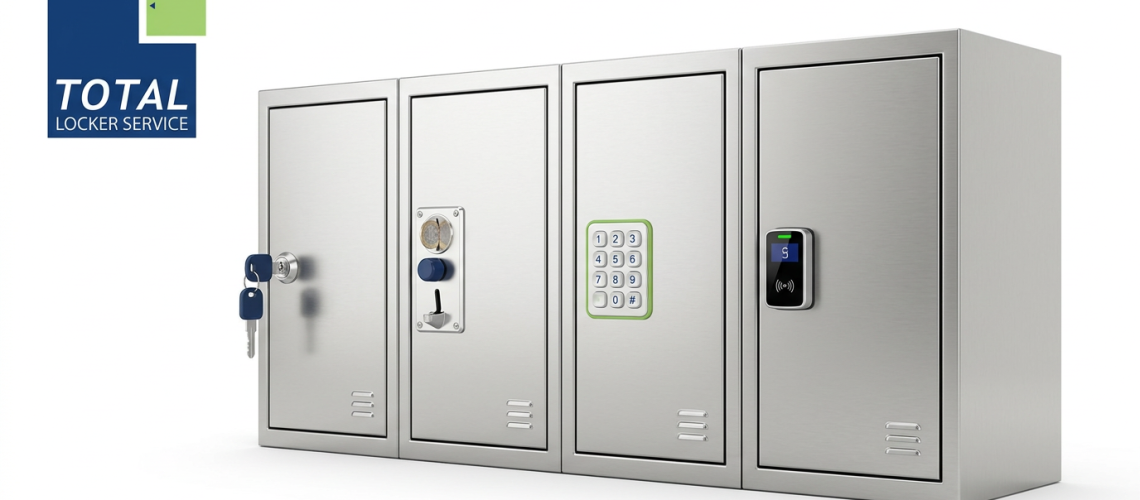
Lockers are only as useful as the locks that secure them. A strong, well‑designed locker with a poor locking system quickly becomes a liability: keys get lost, codes are forgotten, locks jam at the worst moment, and users lose confidence in the whole setup. On the other hand, the right locking system can reduce complaints, cut admin time and improve security – often without changing the lockers themselves.
This guide looks in depth at how to choose the right locking system for your lockers, covering traditional keyed locks, coin locks, padlock hasps, mechanical code locks and modern electronic or “smart” options. It is written for facilities managers, estates teams and operators in schools, workplaces, leisure centres, hospitals and industrial sites who need a practical framework to make the right choice and plan upgrades.
1. Why lock choice matters more than most people think
1.1 Security is only one part of the equation
When people think about locks, they often focus purely on security – how hard is the lock to break or pick? In practice, for most locker applications, the more important questions are:
- Can users understand and operate the lock easily?
- Can your team manage keys, codes or access rights without constant firefighting?
- Does the locking system suit how the area is used day‑to‑day?
- What happens when things inevitably go wrong?
A highly secure but confusing locking system may actually create more problems than it solves: staff prop doors open, users choose obvious codes, or lockers end up permanently out of order because nobody knows how to reset them.
1.2 The lock has to match the environment
The “right” lock in one environment may be a poor fit in another:
- In a school, you might prioritise simplicity and robustness over fine‑grained access control.
- In a gym, you might want quick turnover and a system that doesn’t require key management at reception.
- In a hospital, infection control, staff shift patterns and controlled access to specific items may matter most.
- In a warehouse or depot, durable locks that stand up to heavy use and gloves are important.
The rest of this guide works through each major lock type with these factors in mind.
2. Keyed locks: traditional, simple and widely used
2.1 What keyed locker locks are
Keyed locker locks are the classic solution: each door has a cam lock operated by a small metal key. The cam rotates behind the frame to secure the door. They are widely used in schools, offices and staff changing areas, and are often the default option with many locker systems.
Keyed locks can be supplied:
- Keyed to differ – each lock has a unique key.
- Keyed alike – a group of locks share the same key (useful for cleaning or maintenance).
- Master‑keyed – individual keys for day‑to‑day use, plus a master key that opens a whole suite.
2.2 Pros of keyed locks
- Simple to understand – most users are familiar with them.
- Low initial cost – often the cheapest option per door.
- Low tech – no batteries to run flat, no electronics to fail.
- Works for long‑term assignment – ideal when each user has a dedicated locker for months or years.
2.3 Common problems with keyed locks
Despite their simplicity, keyed systems do have recurring issues:
- Lost keys – especially in schools and busy workplaces. Replacement key cost and handling soon adds up.
- Unreturned keys – staff leaving employment or pupils moving on without handing keys back.
- Key management overhead – you need a way to log who has which key, store master keys securely, and track replacements.
- Damage from forced access – people sometimes force doors rather than report lost keys, leading to lock and door damage.
2.4 When keyed locks are a good choice
Keyed locks can work very well when:
- Each locker is assigned to a specific user long term.
- Users are generally responsible and there is a culture of reporting problems.
- There is a manageable number of lockers (or good key tracking).
- The environment is relatively low risk for deliberate abuse.
They are particularly effective in office staff lockers, low‑turnover workplaces and controlled back‑of‑house areas where the users are known and stable.
3. Padlock hasps: flexible, user‑supplied security
3.1 What a padlock hasp is
A padlock hasp is a simple fitting on the door that accepts a standard padlock. The facility provides the locker and hasp, while users bring their own padlocks. This is common in some gyms, workplaces and older school installations.
3.2 Pros of padlock systems
- Low capital cost – the hasp fitting is inexpensive, and the facility does not have to buy or manage keys.
- User flexibility – people can choose their own padlock type (keyed or combination).
- Minimal administration – no key log and no responsibility for lost keys.
3.3 Limitations and issues
- User must remember to bring a padlock – if they forget, the locker cannot be used.
- Quality varies – cheap padlocks may be easily cut or fail frequently.
- No central override – without cutting the padlock, you may have no way to open a locker if a user disappears.
- Untidy appearance – a mixture of different padlocks can make locker banks look messy.
3.4 Where padlock hasps can work
Padlock hasps are often suitable where:
- Short‑term use is common and you don’t want to manage keys (e.g. some leisure settings).
- Users accept that they are responsible for providing their own security.
- The risk of needing to open lockers without the user present is low.
They are less ideal in environments where staff need reliable access or where lockers hold critical work equipment.
4. Coin and token locks: monetising or managing access
4.1 How coin locks work
Coin locks are widely used in leisure centres, pools and some public venues. The user inserts a coin or token, which allows them to close and lock the door. The key is attached to a wrist strap or tag. There are two main variants:
- Coin return – the coin is returned when the key is inserted to open the locker.
- Coin retain – the coin is kept by the facility, either as income or to encourage users not to keep lockers long term.
Many modern coin locks can be set up to accept specific currencies or tokens and may be reconfigurable if coin denominations change.
4.2 Benefits of coin and token systems
- Encourages turnover – people are less likely to “reserve” lockers all day.
- Self‑service – no key issue desk or reception process required.
- Simple for occasional users – intuitive for visitors, especially in leisure environments.
4.3 Common problems
- Coins jammed – foreign coins, damaged coins or debris in the slot.
- Token management – you need a reliable process to distribute and retrieve tokens.
- Changing currency – if coin denominations change, older locks may require upgrades.
- Maintenance and cleaning – mechanisms must be kept clean to avoid jams.
4.4 When coin locks make sense
Coin locks are usually a strong fit when:
- You want short‑term, rotational use (e.g. leisure, pools, water parks).
- You don’t want to manage long‑term key assignment.
- A small financial “nudge” to users will improve behaviour (not keeping lockers all day).
- Staff can manage occasional jams and have access to override keys.
They are less appropriate for environments where lockers are assigned to staff or pupils long term.
5. Mechanical combination locks: keyless, battery‑free codes
5.1 What mechanical combination locks are
Mechanical combination locks (often branded as code locks or CodeLocks‑type products) use a mechanical keypad with a push‑button code. Different models support:
- Private mode – one fixed code for a locker, changed only by staff.
- Public mode – users set their own short‑term code when using the locker, then clear it on exit.
Crucially, these are battery‑free mechanical devices – the push buttons operate a mechanical internal mechanism rather than electronics.
5.2 Advantages of mechanical code locks
- No keys to lose – users remember a code instead of carrying a key.
- No batteries – less maintenance than electronic keypads.
- Flexible modes – can support both long‑term and short‑term use, depending on configuration.
- Retrofittable – many models can be fitted into existing door cut‑outs with adapter plates.
5.3 Management considerations
Mechanical code systems do introduce management requirements:
- Code setting and resetting – in private mode, staff must be able to change codes when users leave.
- Forgotten codes – you need a plan for override via master keys or procedures.
- User training – people need simple, clear instructions to avoid leaving doors locked but unused.
5.4 Where mechanical code locks are a good fit
They work particularly well when:
- There is moderate turnover of users, but you don’t want to issue or track keys.
- You want to avoid reliance on batteries and electronics.
- You have staff who can handle occasional resets or overrides.
Typical examples include staff lockers in offices, some school environments, and low‑to‑medium risk storage in workplaces.
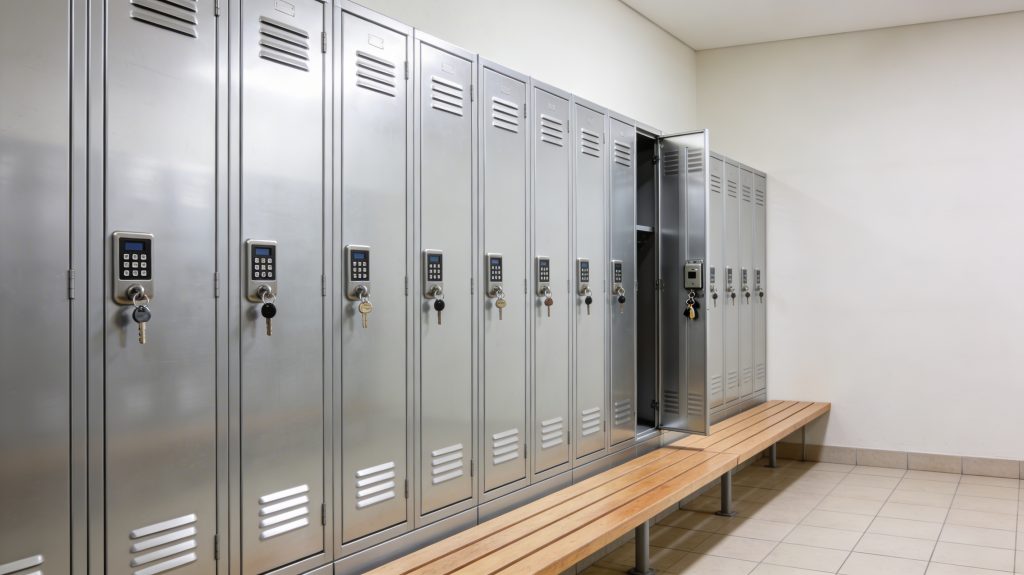
6. Electronic and “smart” locks: modern access control
6.1 Types of electronic locker locks
Electronic or “smart” locks cover a spectrum from simple battery‑powered keypad locks through to fully networked, centrally managed systems. Common types include:
- Battery keypad locks – standalone units where users enter a PIN on a keypad.
- RFID / proximity locks – operated by cards, fobs or staff ID badges.
- Bluetooth or app‑controlled locks – managed via smartphones.
- Networked smart locker systems – connected to a central controller or cloud platform, integrating with access control or booking systems.
6.2 Key benefits
- No physical keys for users to carry (or lose).
- Flexible access control – you can assign lockers to individuals or allow any free locker to be used with an ID card.
- Audit trails – in more advanced systems, you can track usage, access times and failures.
- Integration potential – linking to HR systems, building access control, or room booking where appropriate.
6.3 Challenges and trade‑offs
- Battery management – standalone keypad locks require battery replacement schedules and low‑battery alerts.
- Technical complexity – networked systems need IT involvement, connectivity and updates.
- Higher upfront cost – although lifecycle costs can be attractive in the right setting.
- User support – forgotten PINs, card issues or app login problems need clear processes.
6.4 When smart locks are worth the investment
Smart access systems shine in environments where:
- User identities are already managed electronically – for example via staff badges or student cards.
- There is a need for shared, bookable or rotational lockers linked to other systems (hot‑desking, parcel delivery, equipment issue).
- Security and auditability are important – e.g. storing high‑value items, controlled materials or IT equipment.
- You want to reduce the friction and labour involved in key management and manual assignment.
Examples include modern offices with hybrid working, parcel lockers, IT asset lockers and some healthcare applications.
7. Matching lock types to sectors and use cases
Choosing the right lock is easier if you look at sector‑specific patterns and think in terms of user behaviour and operational needs.
7.1 Schools and colleges
Key considerations:
- High volume of daily use.
- Varying levels of care and sometimes deliberate damage.
- Staff time for dealing with lost keys or forgotten codes is limited.
Typical patterns:
- Keyed locks for long‑term pupil or staff lockers, where you have a manageable number and a key policy.
- Mechanical combination locks for sixth‑form or staff lockers where you want keyless access.
- Padlock hasps in some older installations where pupils supply their own locks – but consider whether this really works in practice.
In many schools, the best results come from standardising on one or two lock types, documenting procedures for lost keys or codes, and ensuring a small stock of spare locks and keys.
7.2 Gyms and leisure centres
Here, you typically have:
- High turnover of users.
- Wet or humid environments in changing rooms.
- A strong need to avoid constant queries at reception.
Patterns that work:
- Coin return/retain locks for short‑term use, with clear instructions and wrist straps.
- Battery keypad or RFID locks where you want cashless, fully keyless access.
- Padlock hasps only where it is culturally normal for users to bring padlocks.
The goal is to minimise friction for visitors while keeping lockers turning over smoothly.
7.3 Workplaces and offices
Key considerations:
- Mix of long‑term storage (staff personal lockers) and short‑term storage (hot‑desking, temporary project teams).
- Desire to integrate with existing staff ID systems in larger organisations.
- Need to manage lockers across changing headcounts and working patterns.
Typical approaches:
- Keyed or mechanical combination locks for long‑term personal lockers.
- RFID or smart locks for hot‑desk or shared lockers linked to staff badges or booking systems.
- Electronic smart lockers for parcel delivery, IT kit or high‑value assets.
The right mix often depends on company size and IT capability; smaller organisations may prefer simple keyed or mechanical locks, while larger sites gain value from integrated smart systems.
7.4 Healthcare and hospitals
Here, the stakes can be higher:
- Staff lockers need to be reliable, often across 24/7 shift patterns.
- Infection control and cleanability of lock hardware matters.
- Some storage is for controlled drugs or sensitive materials (separate from standard staff lockers).
Patterns that work:
- Mechanical or electronic keypads for staff lockers, avoiding key management at large scale.
- RFID locks linked to staff badges where appropriate.
- High‑security locks or specialist cabinets for controlled items, separate from normal lockers.
Consistency and robustness are the priorities – with clear policies for code reset, audit and fault reporting.
7.5 Industrial and warehouse settings
In depots and warehouses:
- Users may be wearing gloves, making small keys or fiddly keypads awkward.
- Environments can be dusty, dirty or otherwise harsh.
- Lockers may hold PPE, tools or workwear essential for starting a shift.
Typical choices:
- Robust keyed locks with clear key management for long‑term staff lockers.
- Mechanical combination locks with large, easy‑press buttons if keys are a constant problem.
- Reinforced hasps where padlocks are the norm in that culture.
In these settings, it is worth investing in heavy‑duty hardware and protective plates, because the cost of downtime when staff cannot access PPE or tools is high.
8. Planning a lock upgrade or retrofit project
If you already have lockers installed, you may not want to replace everything at once. In many cases you can retrofit new lock types to existing doors.
8.1 Understand your current estate
Start by mapping:
- How many lockers you have and where they are.
- What lock types are currently used in each area.
- What the main pain points are: lost keys, jamming coins, frequent damage, user confusion.
This gives you a baseline for deciding where an upgrade will have the biggest impact.
8.2 Check compatibility and cut‑outs
Different locks require specific cut‑out sizes and door thicknesses. Before deciding on a new lock type, check:
- Door material and thickness.
- Existing lock hole shape and position.
- Space behind the door for the lock body.
Many mechanical or electronic locks are designed as drop‑in replacements for common cam lock patterns, sometimes with adapter plates to cover old cut‑outs.
8.3 Prioritise high‑impact areas
You don’t have to change everything at once. Often, you get the best return by:
- Upgrading the most problematic banks first – for example, pupil lockers in a known trouble area or staff lockers with constant key issues.
- Piloting a new lock type in one area before a wider rollout.
- Combining a lock upgrade with other improvements like new number plates or door repairs.
This reduces risk and spreads cost while visibly improving user experience.
8.4 Document and communicate
Whatever you choose, make sure you:
- Record lock types and settings (codes, modes, key suites) in a central log.
- Write simple user instructions and display them clearly near lockers.
- Provide a clear, easy fault reporting route for staff and users.
- Train relevant staff on how to reset codes, use master keys or handle typical problems.
Good documentation and clear communication are what turn a technically sound system into a robust, low‑noise one.
9. Putting it all together: how to choose
When you’re faced with a real decision – for a new project or a retrofit – work systematically:
- Define how lockers are used
– Long‑term assigned vs short‑term rotational use.
– Known user group vs public/visitors.
– Sensitivity of contents. - List your constraints
– Budget and timescale.
– IT integration options (if considering smart locks).
– Environment (wet, dry, industrial, clinical). - Shortlist 1–2 lock types per area
– Don’t mix too many lock types in one building; standardisation is your friend. - Pilot and gather feedback
– Install the shortlisted lock type on a small number of doors in a representative area.
– Ask users and frontline staff what works and what doesn’t. - Plan phased rollout and life‑cycle support
– Build in battery replacement (if electronic), spare parts, and a process for lost credentials (keys, codes, cards).
– Decide who owns the system day‑to‑day: facilities, IT, reception or local managers.
By following this process, you can choose locking systems that match the way your organisation really works, rather than fighting against it.
Summary
Lock choice is as important as the lockers themselves – the best system balances security, usability and manageability for your specific environment.
Keyed locks are cost‑effective for long‑term, stable users, but require good key management.
Padlock hasps shift responsibility onto users but limit your central control.
Coin and token locks work well in leisure settings for short‑term, rotational use.
Mechanical combination locks offer keyless access without batteries, ideal for many staff and school environments.
Electronic and smart locks add flexibility, audit and integration, at the cost of greater complexity and higher upfront spend.
Matching lock types to sector‑specific patterns (schools, gyms, workplaces, healthcare, industrial) helps avoid common pitfalls.
A planned upgrade path, with pilots and good documentation, lets you retrofit better locking systems to existing lockers without disruptive full replacement.
Discover more from Blog Total Locker Service
Subscribe to get the latest posts sent to your email.