What Can You Store in a Data Safe? USB Drives, Hard Drives and Backup Media
October 2, 2026
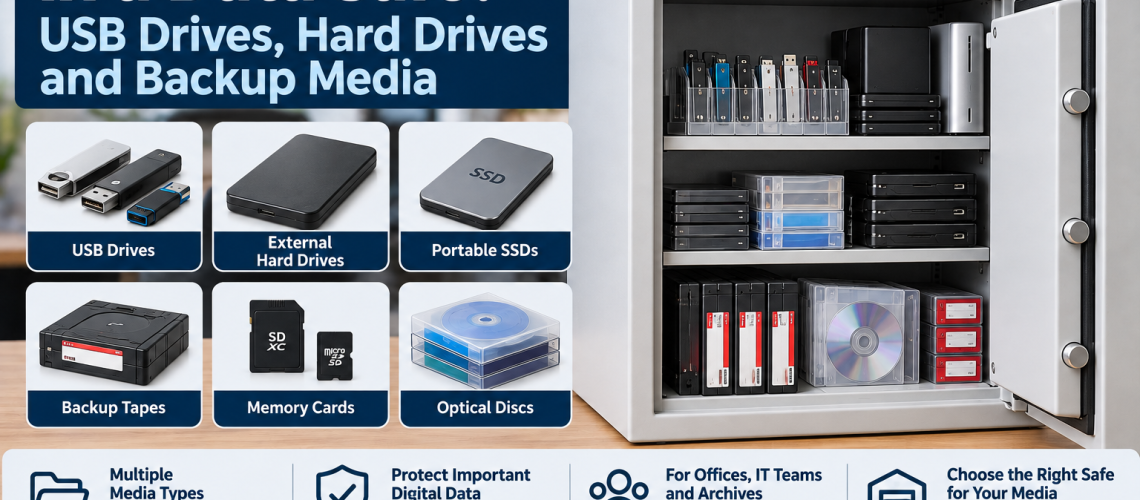
A data safe is used for heat-sensitive digital and removable media rather than ordinary paper documents. Typical contents include USB drives, external hard drives, portable SSDs, backup tapes, memory cards and other business media where the selected safe is rated for that type of storage.
This guide focuses on what you can store in a data safe. It does not repeat the broader comparison between data safes and document fire safes, detailed temperature limits, data-safe sizing or wider backup strategy.
For the wider distinction between document and digital-media protection, see Data Safes vs Fire Safes UK. If you already know you need a data safe and are choosing capacity, use What Size Data Safe Do I Need?.
Quick Answer: What Can You Store in a Data Safe?
Data safes are commonly used for USB drives, external hard drives, portable SSDs, backup tapes, memory cards, optical discs and other heat-sensitive removable media. The important point is that the exact safe specification must match the media being stored.
| Media type | Suitable for data-safe storage? | What to check |
|---|---|---|
| USB flash drives | Commonly, yes | Confirm the safe is rated for digital or data media |
| External hard drives | Commonly, yes | Check media suitability and physical shelf space |
| Portable SSDs | Commonly, yes | Confirm the product specification covers digital media |
| Backup tapes | Often a key use | Check the exact media classification and internal fittings |
| Memory cards | Commonly, yes | Store them in an organised case or tray where practical |
| Optical discs | Where appropriate | Check the safe rating and media specification |
USB Drives
USB flash drives are one of the most common forms of removable media stored in data safes. They are compact, easy to label and frequently used for recovery copies, encrypted files, archived documents and system-transfer media.
Because individual USB drives use very little space, the main issue is usually organisation rather than raw capacity. Small trays, labelled cases or grouped storage can make individual drives easier to identify and retrieve.
Do not assume that an ordinary document fire safe protects USB drives simply because it provides fire resistance. For the specific USB question, see Can You Store USB Drives in a Fire Safe?.
External Hard Drives
External hard drives are bulkier than USB drives and often need more shelf depth, width and clearance around protective cases or cables.
- store drives so labels remain visible;
- avoid stacking them so deeply that individual units are difficult to remove;
- allow enough shelf space for protective cases where they are used;
- check the data safe has sufficient usable internal depth.
If several external drives need to be stored together, capacity can become more important than the number of individual media items. Use the Data Safe Sizes UK guide for capacity planning.
Portable SSDs
Portable solid-state drives are also suitable candidates for specialist data-safe storage where the chosen safe is specified for the relevant digital media.
SSDs are generally compact, so a relatively small amount of internal space can hold several devices. However, cases, labels and separation between current and archived drives can increase the practical space required.
Backup Tapes
Backup tapes are a traditional and important use for specialist data safes. Larger organisations may hold substantial tape collections, and these can require dedicated trays or structured internal storage.
- group tapes by system, date or archive set;
- use suitable trays or dividers where available;
- leave room for future additions;
- avoid overfilling the safe to the point that individual media cannot be identified easily.
Where the tape collection is large, a higher-capacity commercial data safe may be more practical than a compact unit designed around a small number of portable drives.
Memory Cards
Memory cards use very little physical space, but their small size makes organisation important. Loose cards can be difficult to identify and easy to misplace inside a larger safe.
- use labelled cases or card holders;
- group cards by system or department;
- keep current and archive cards separate where useful;
- avoid storing unidentified loose media.
Optical Discs
CDs, DVDs and other optical media may also be stored in a data safe where the product specification is suitable for that media type.
Disc cases use more space than the media itself, so a collection that appears small by item count can consume a significant amount of shelf capacity. Slim cases, organised sleeves or dedicated storage may improve space efficiency where appropriate.
Can You Store Mixed Media in One Data Safe?
Yes, a data safe can be used for mixed media where the product is suitable for all of the media types being stored and the internal layout works for the collection.
| Mixed-media example | Practical approach |
|---|---|
| USB drives and portable SSDs | Use labelled trays or cases to separate the smaller media |
| External HDDs and USB drives | Use shelves for drives and smaller containers for USB media |
| Backup tapes and portable drives | Separate tape trays from larger drive storage |
| Memory cards, USB drives and discs | Use clearly labelled groups so small media are not lost among larger items |
What Should Not Automatically Be Stored in a Data Safe?
A data safe is not a universal storage cabinet. The fact that a product provides specialist media protection does not mean every item belongs inside it.
- Large volumes of active paper records: a fire-resistant filing cabinet may be more practical.
- Cash or high-value valuables: check the relevant security and cash rating rather than assuming a data safe provides the required theft protection.
- Hazardous substances: use storage designed for the specific hazard.
- Medical items or medicines: use appropriate medical or medicines storage.
- Any media not covered by the safe specification: check the manufacturer’s stated suitability before relying on the safe for protection.
If the choice is between a fire safe, data safe and filing cabinet, use Fire Safe vs Data Safe vs Filing Cabinet.
Why the Exact Media Rating Still Matters
Different media can require different protection conditions. A safe should therefore be selected by the media classification and product specification rather than by the generic phrase “data safe” alone.
- check what media types the manufacturer says the safe protects;
- check the tested protection specification;
- check any internal fittings supplied for the media;
- check that the usable capacity suits the number and type of items being stored.
Detailed media-temperature comparisons are covered separately in Data Safes vs Fire Safes UK.
Practical Office Examples
| Office use | Typical media | Storage approach |
|---|---|---|
| Small office recovery set | USB drives and portable SSDs | Compact data safe with labelled cases |
| Accounts or payroll archive | Encrypted USB drives or external HDDs | Organised shelf storage with clear labels |
| Departmental archive | Mixed portable drives and discs | Separate media groups within the same suitable data safe |
Practical IT Team Examples
- USB recovery drives for system rebuilds;
- portable SSDs containing controlled recovery copies;
- external hard drives used for local archive or recovery media;
- backup tapes arranged by rotation, date or system;
- mixed removable media grouped by department or application.
For larger IT collections, usable internal capacity and media-tray arrangement become increasingly important. See the Data Safe Sizes UK guide.
Practical Archive Examples
Archive storage can involve older tapes, discs, portable drives and other retained media that are accessed infrequently but still need to be identifiable and organised.
- separate archive generations by date;
- keep media labels visible;
- use trays or shelves appropriate to the media format;
- allow room for future additions where the archive is still growing.
Commercial Data Safes for Digital Media
Total Locker Service supplies specialist Phoenix data safes for commercial digital-media storage. Choose the range according to the media type, usable capacity and internal arrangement required.
- Phoenix DS2000 DataCare – compact and medium options for smaller media collections.
- Phoenix DS2500 Data Combi – larger commercial data-safe storage.
- Phoenix DS4620 Data Commander – high-capacity specialist storage for larger media collections.
- View all Data Safes – compare the current specialist data-safe range.
What Can You Store in a Data Safe? FAQs
Can you store USB drives in a data safe?
Yes, where the safe is specified for the relevant digital or data media. USB drives are a common use for specialist data-safe storage.
Can you store external hard drives in a data safe?
External hard drives can be stored in a suitable data safe. Check the media specification and allow enough internal shelf depth and capacity for the drives and any protective cases.
Can you store SSDs in a data safe?
Portable SSDs can be stored in a data safe where the product specification confirms suitability for the relevant digital media.
Can you store backup tapes in a data safe?
Yes, backup tapes are a common reason for using specialist data-safe storage. For larger collections, consider a model with suitable trays and enough spare capacity for future media.
Can you store different types of media in the same data safe?
Yes, provided the safe is suitable for every media type being stored and the internal layout keeps the different media organised and accessible.
Can you store paper documents in a data safe?
Some data safes may also protect paper, but the product specification should be checked. For larger volumes of paper, a document fire safe or fire-resistant filing cabinet may be more practical.
Conclusion: Match the Data Safe to the Media
A data safe can protect a wide range of removable and digital media, including USB drives, external hard drives, SSDs, backup tapes, memory cards and optical discs where appropriate. The exact media rating still matters, so always check the selected model against the contents being stored.
Keep smaller media organised, allow enough shelf space for bulkier drives and choose a larger data safe where tape or archive collections need more structured storage.
Related Data Safe Guides
- Data Safes vs Fire Safes UK – compare digital-media and document fire protection.
- What Size Data Safe Do I Need? – plan usable capacity for USB drives, hard drives and backup media.
- Can You Store USB Drives in a Fire Safe? – focused USB and removable-media guidance.
- Fire Safe vs Data Safe vs Filing Cabinet – compare the main protected-storage formats.
- View Data Safes – compare commercial digital-media safes.
Discover more from Blog Total Locker Service
Subscribe to get the latest posts sent to your email.