What Size Data Safe Do I Need? Capacity Guide for USB Drives, Hard Drives and Backup Media
October 2, 2026
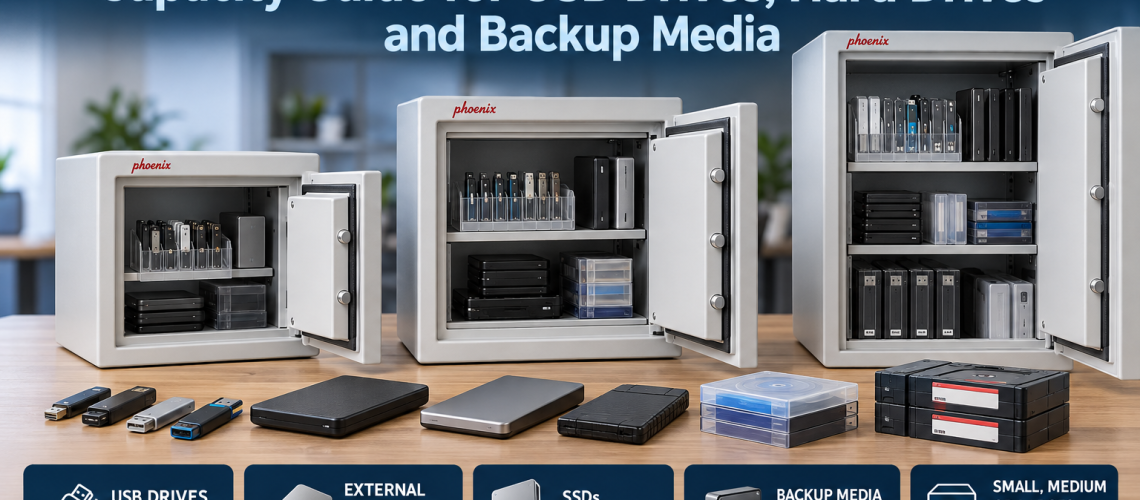
Choosing the right data safe size is mainly a capacity problem: what media you need to store now, how bulky each item is, how the shelves or media trays will be arranged and how much spare capacity you want for future growth.
This guide focuses on data safe sizing and usable capacity for USB drives, portable SSDs, external hard drives, backup tapes and other business media. It does not repeat the wider fire-safe comparison, USB survivability question or detailed media-temperature guidance covered elsewhere.
For the wider distinction between document and data protection, see Data Safes vs Fire Safes UK. For USB-specific guidance, see Can You Store USB Drives in a Fire Safe?.
Quick Answer: What Size Data Safe Do I Need?
Choose a data safe that comfortably holds the media you need to protect today while leaving enough usable space for organisation and future growth. Small safes suit limited quantities of USB drives and portable media, medium safes suit larger mixed collections, and high-capacity models suit organisations storing substantial volumes of backup tapes, external drives or archived media.
| Storage requirement | Typical sizing direction | Main consideration |
|---|---|---|
| Small number of USB drives or portable SSDs | Compact data safe | Avoid buying a large cabinet for a very small media set |
| Mixed USB drives, external HDDs and backup media | Medium-capacity data safe | Allow room for shelves, cases and future additions |
| Large quantities of backup tapes or archived media | High-capacity data safe | Prioritise internal organisation and expansion space |
| Growing IT or archive requirement | Size above today’s minimum | Avoid replacing the safe simply because the media collection expands |
Start with Usable Internal Capacity
External dimensions do not tell you how much media the safe will actually hold. Fire-resistant construction takes up wall thickness, so internal dimensions and usable capacity are more important when comparing data safe sizes.
- check the internal height, width and depth;
- check the stated internal capacity where supplied;
- allow for shelves, trays and internal fittings;
- allow space around bulky drives or cases;
- do not assume every litre of internal volume will be usable for media.
Size the Safe Around the Media Type
Different media use internal space very differently. A collection of USB memory sticks can fit into a compact area, while external hard drives, protective cases and backup tapes use substantially more volume.
| Media type | Space requirement | Sizing implication |
|---|---|---|
| USB flash drives | Low individually | Organisation may matter more than raw volume |
| Portable SSDs | Low to moderate | Allow room for protective cases and labelling |
| External hard drives | Moderate | Check shelf depth and usable internal width |
| Backup tapes | Can become high in volume | Media trays and structured storage become increasingly important |
| Mixed media | Variable | Choose internal flexibility rather than sizing to one item type only |
When a Small Data Safe Is Enough
A compact data safe can be appropriate where the protected media set is small and unlikely to grow rapidly.
- a small number of USB recovery drives;
- several portable SSDs;
- a limited set of local business backups;
- compact office or departmental use;
- media that can be organised without multiple trays or extensive shelving.
The Phoenix DS2000 DataCare range includes compact models such as the DS2001 and larger DS2002. The current TLS specification lists approximately 7 litres for the DS2001 and 18 litres for the DS2002, with internal dimensions and media capacities varying by model.
When to Move to a Medium-Capacity Data Safe
A larger safe becomes worthwhile when different types of media need to be stored together or when the current collection already fills most of a compact unit.
- multiple external hard drives;
- mixed USB, SSD and tape storage;
- separate current and archive media sets;
- several departments contributing protected media;
- a requirement for more structured shelf or tray organisation.
The Phoenix DS2500 Data Combi range is designed for larger-capacity commercial data storage and is available in several physical sizes with key, electronic or fingerprint locking. TLS currently lists external sizes from approximately 640 × 500 × 500 mm up to 1160 × 655 × 560 mm, depending on model.
When a Large Data Safe Makes Sense
Large data safes are intended for organisations that need to protect substantial volumes of backup or archive media rather than a handful of portable drives.
- large tape libraries;
- central IT or records-room storage;
- multiple media trays;
- department-wide backup collections;
- long-term archive growth.
The Phoenix DS4620 Data Commander range is the higher-capacity option in the current TLS data-safe offering. TLS identifies the DS4621 at 143 litres, with larger DS4622 and double-door DS4623 models intended for greater storage volumes and multiple media trays.
Shelf and Media-Tray Arrangement Matters
Two safes with similar headline capacity can be very different in practical use. Internal fittings can determine whether the media is easy to organise or ends up stacked inefficiently.
- use shelves for larger drives and cases;
- use media trays where they suit tapes or smaller items;
- avoid stacking drives so deeply that labels are hidden;
- keep frequently accessed media easy to reach;
- leave enough clearance to remove items without disturbing the whole shelf.
The DS2003 can be fitted with optional pull-out media trays, while the DS2500 and DS4620 ranges provide larger-format internal arrangements suited to higher media volumes.
Allow Spare Capacity for Growth
Buying a data safe that is exactly full on day one usually creates a capacity problem later.
- allow room for additional backup sets;
- allow for larger replacement drives;
- allow for archive retention increasing over time;
- allow for additional departments or systems;
- allow enough free space to keep the internal layout usable.
There is no universal percentage that every business should add. The better approach is to estimate likely growth over the next few years and avoid choosing a model that is already close to full.
Count the Media, Not Just the Litres
Litres are useful for comparing overall capacity, but an item count is often more practical when the media type is consistent.
- count USB drives;
- count external hard drives and SSDs;
- count backup tapes or cartridges;
- include protective cases;
- include planned future media rather than today’s count alone.
The DS2000 specification is a useful example because it publishes approximate media capacities for LTO, DAT, DLT and CD-ROM storage as well as litres. That makes it easier to compare the physical media load with the internal space.
Compact Office Use vs Higher-Volume Archive Use
| Environment | Typical requirement | Likely direction |
|---|---|---|
| Small office | Limited USB drives and portable backup media | Compact DS2000-type solution |
| Growing business | Mixed external drives and increasing backup sets | Larger DS2000 or DS2500-type solution |
| IT department | Multiple systems, archive media and structured storage | DS2500-type solution |
| Records room or large organisation | Substantial quantities of backup tapes or archived media | DS4620 Data Commander-type solution |
Do Not Oversize Without a Reason
Extra capacity is useful, but a much larger safe also takes more floor space, weighs more and may create more demanding delivery and positioning requirements.
- match the safe to realistic media growth;
- check external dimensions as well as internal capacity;
- check the final installation position;
- consider door opening and access;
- consider delivery access for heavier models.
Common Data Safe Sizing Mistakes
- Choosing from external dimensions. Fire-resistant construction can make the internal space much smaller than expected.
- Buying for today’s media only. Backup and archive collections often grow.
- Ignoring shelf or tray space. Internal fittings affect usable capacity.
- Assuming all media use space efficiently. External drives and cases can create unused gaps.
- Moving straight to the largest model. Capacity should justify the increased footprint, weight and handling requirements.
Data Safe Size Checklist
- What media types will be stored?
- How many items are there now?
- How much physical space does each item use?
- Are protective cases included?
- Will shelves or media trays reduce usable volume?
- How much growth is expected?
- Does the room have enough space for the external dimensions?
- Can the safe be delivered and positioned safely?
- Would a larger model improve organisation enough to justify its footprint?
Data Safe Sizes from Total Locker Service
Total Locker Service supplies compact, medium and high-capacity Phoenix data safe ranges for commercial digital-media storage.
- Phoenix DS2000 DataCare – compact and medium data-safe options for smaller media collections.
- Phoenix DS2500 Data Combi – larger commercial data-storage options with several cabinet sizes.
- Phoenix DS4620 Data Commander – high-capacity storage for substantial media collections and archive use.
- View all Data Safes – compare the full specialist data-safe range.
Data Safe Size FAQs
What size data safe do I need for USB drives?
A compact data safe may be enough for a small number of USB drives, but allow space for labels, cases, organisation and future additions rather than sizing only to the current number of devices.
What size data safe do I need for external hard drives?
Measure the drives and any protective cases, then compare them with the safe’s internal dimensions and shelf layout. External hard drives usually require more usable shelf space than USB drives.
Should I buy a data safe larger than I currently need?
Usually some spare capacity is sensible where the media collection is expected to grow. Avoid choosing a safe that is already close to full, but do not oversize so far that the footprint and handling requirements become unnecessary.
When should I consider a DS2500 Data Combi safe?
A DS2500-type solution is useful when a compact data safe no longer provides enough room for mixed media, external drives or growing commercial backup storage and a larger cabinet format is justified.
When should I consider a DS4620 Data Commander safe?
The DS4620 range is intended for higher-capacity commercial use, including organisations storing substantial quantities of backup tapes or archived data media.
Conclusion: Choose Capacity Around the Media, Not the Cabinet Exterior
The right data safe size depends on the physical media, usable internal dimensions, shelf or tray arrangement and expected growth. Start by counting and measuring what you need to store, then choose a safe with enough working space to keep the media organised without paying for unnecessary capacity.
Compact DS2000-type models suit smaller media sets, DS2500-type models provide a larger commercial step up, and DS4620 Data Commander models are intended for substantially higher storage volumes. Always confirm the exact dimensions and internal fittings of the model before ordering.
Related Data Safe Guides
- Data Safes vs Fire Safes UK – compare digital-media and document fire protection.
- Can You Store USB Drives in a Fire Safe? – focused guidance for removable media.
- Fire Safe vs Data Safe vs Filing Cabinet – compare the main protected-storage formats.
- View Data Safes – compare commercial data-safe ranges.
Discover more from Blog Total Locker Service
Subscribe to get the latest posts sent to your email.