Data Safes for Business Backup Storage UK: Protecting Local Recovery Media
October 2, 2026
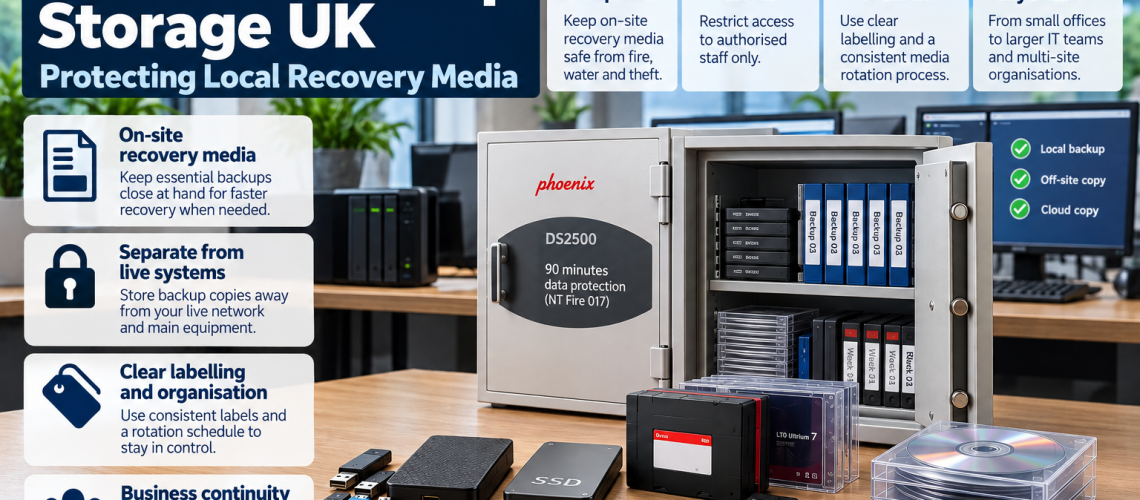
Many businesses still keep local backup media on site, even where cloud or off-site copies are also used. A data safe provides physical protection for USB drives, external hard drives, SSDs, backup tapes and other removable recovery media that may be needed after a fire or other incident.
This guide focuses on how businesses use data safes for local backup and recovery media. It does not replace a wider backup or disaster-recovery plan, and it does not repeat detailed fire ratings, data-safe sizing or media-temperature guidance covered elsewhere.
For fire-rating interpretation, see Data Safe Fire Ratings Explained. For capacity planning, use What Size Data Safe Do I Need?. For the types of media that can be stored, see What Can You Store in a Data Safe?.
Quick Answer: When Does a Business Need a Data Safe for Backups?
A business should consider a data safe when important local recovery media is stored on site and losing that media in a fire would make recovery more difficult. The safe protects the physical copy; it does not replace separate off-site, cloud or additional backup arrangements.
| Business situation | Typical media | Data-safe role |
|---|---|---|
| Small office with local recovery copies | USB drives or portable SSDs | Protect important on-site media in a compact safe |
| Departmental backup storage | External HDDs, SSDs or mixed media | Keep recovery media physically separated and controlled |
| IT team managing rotating backup sets | Backup tapes and portable drives | Provide organised, protected storage between rotations |
| Large archive or central IT store | Multiple tapes, drives or archive media | Use higher-capacity specialist data-safe storage |
Why Businesses Still Keep Local Backup Media
Cloud services and off-site backup can reduce reliance on local media, but many organisations still retain removable recovery copies for practical reasons.
- rapid local recovery of selected systems or files;
- portable recovery media for system rebuilds;
- rotating backup sets;
- archive copies kept for operational or retention reasons;
- separate copies of important business data that are not left connected to live systems.
The important distinction is that the data safe protects the removable media itself while it is stored on site.
How a Data Safe Fits into Physical Backup Protection
A data safe provides a protected location for removable media when it is not in use. It can help separate recovery copies from desks, unlocked drawers, server-room shelving and other everyday storage locations.
- keeps removable media in a defined protected location;
- supports controlled access to recovery copies;
- helps keep live equipment separate from stored recovery media;
- provides fire protection appropriate to the selected media where the product rating matches the contents;
- makes it easier to organise labelled or rotating backup sets.
For the difference between data protection and ordinary document fire protection, use Data Safes vs Fire Safes UK.
Separate Live Systems from Recovery Media
Backup media is most useful when it is not treated as another part of the live system. Leaving a portable drive permanently connected to the same workstation, server or power environment can expose both the live data and the recovery copy to the same incident.
A data safe provides a physical place for removable media after the backup or recovery copy has been created and disconnected.
| Media state | Typical location | Role |
|---|---|---|
| Live data | Server, workstation or active system | Everyday operational use |
| Local removable recovery copy | Suitable data safe | Protected on-site recovery media |
| Separate off-site or cloud copy | Different physical or hosted location | Reduces dependence on one site |
This is a storage distinction rather than a complete backup design. The wider choice of backup frequency, software, cloud platform and recovery process remains an IT decision.
USB Drives in Business Backup Storage
USB drives are common for small recovery sets, encrypted file copies and portable system-recovery media. Their small size makes them easy to store but also easy to misplace.
- label each drive clearly;
- use cases or trays rather than loose storage;
- separate current and retired media;
- restrict access where the data is sensitive;
- store important drives in a safe rated for the relevant media type.
For the narrow question of whether USB drives are protected in an ordinary fire safe, see Can You Store USB Drives in a Fire Safe?.
External HDDs and SSDs in Business Use
External hard drives and portable SSDs are often used where a business needs larger local recovery copies than a USB flash drive can conveniently provide.
They require more physical space, so shelf depth, protective cases and usable internal capacity become important. A compact data safe may suit a few portable SSDs, while a larger safe may be required for several external hard drives or mixed media sets.
For capacity rather than business workflow, use the Data Safe Sizes UK guide.
Backup Tapes and Rotating Media Sets
Backup tapes remain important in some commercial and IT environments, particularly where several generations or rotating media sets are retained.
- separate media by rotation or backup set;
- label tapes with system, date or reference information;
- use trays or dividers where available;
- keep returned media in the protected storage location between uses;
- allow enough capacity for additional generations where the archive is growing.
Data Safes for Small Businesses
A small business may only need to protect a limited set of local recovery media, such as several USB drives, a portable SSD or one or two external hard drives.
- keep the media in one defined protected location;
- avoid buying a large cabinet for a very small media set;
- allow enough spare space for modest future growth;
- choose access control that suits the number of authorised users.
A compact Phoenix DS2000 DataCare-type solution can suit this sort of requirement where the model capacity and media rating match the contents.
Data Safes for Offices and Departments
Departments may hold more mixed media than a very small office, particularly where finance, payroll, administration or management teams keep local recovery copies of important information.
| Office requirement | Typical media | Storage approach |
|---|---|---|
| Limited recovery set | USB drives and SSDs | Compact data safe |
| Several systems or departments | Mixed portable drives | Medium-capacity safe with organised shelving |
| Growing archive | External HDDs, tapes and mixed media | Larger commercial data safe |
Data Safes for IT Teams
IT teams often need more structured storage because they may manage recovery media for several systems, departments or sites.
- group media by system or service;
- separate active rotation sets from archive media;
- use labels that remain readable without removing every item;
- record who is authorised to remove recovery media;
- choose enough capacity for foreseeable archive growth.
Where several external drives, tape sets or media trays are required, a DS2500 Data Combi-type solution may provide a more practical step up from a compact safe.
On-Site Recovery Media vs Off-Site or Cloud Copies
An on-site data safe and an off-site or cloud copy solve different physical-location problems.
| Copy type | Main advantage | Main limitation |
|---|---|---|
| On-site removable media in a data safe | Local physical access to a protected recovery copy | Still located at the same site |
| Off-site physical copy | Separated from the primary building | May take longer to retrieve |
| Cloud or hosted backup | Remote storage and access | Depends on the chosen service, connectivity and recovery process |
This page does not prescribe a particular backup architecture. The key point is that a data safe can protect the removable copy that remains on site, while separate copies can reduce dependence on one physical location.
Control Access to Backup Media
Backup media can contain sensitive business, customer, financial or operational information. Physical access should therefore be limited to the people who need it.
- define who can open the data safe;
- control keys, codes or credentials;
- change access when staff roles change;
- avoid leaving removable media outside the safe after use;
- record issue and return where operationally useful.
Label and Rotate Removable Media Clearly
Physical protection is more useful when the correct recovery media can be identified quickly.
- label the media with a clear reference;
- include date or rotation information where useful;
- separate current, previous and archive sets;
- remove obsolete media from the active section of the safe;
- keep the internal arrangement consistent so staff know where each set belongs.
When Is a Compact Data Safe Enough?
A compact safe may be enough when the business has a small, controlled collection of removable recovery media and does not expect rapid growth.
- a handful of USB drives;
- several portable SSDs;
- one or two external recovery drives;
- limited departmental backup media.
For exact capacity planning, see What Size Data Safe Do I Need?.
When Do DS2500 or DS4620-Type Solutions Make Sense?
Larger commercial data safes become more appropriate as the media collection becomes harder to organise in a compact cabinet.
DS2500 Data Combi-type use
- several external hard drives or SSDs;
- mixed recovery media;
- multiple departments or systems;
- growing commercial backup storage;
- a need for more usable shelving than a compact unit provides.
DS4620 Data Commander-type use
- large tape collections;
- central IT archive storage;
- substantial media-tray requirements;
- larger organisations retaining significant volumes of recovery media.
Practical Business Continuity Examples
| Business | Local recovery media | Data-safe role |
|---|---|---|
| Small accountancy office | Encrypted USB and portable SSD copies | Compact protected storage for selected local recovery media |
| Medium-sized office | Several external drives for departmental recovery | Central controlled storage away from desks and live systems |
| IT department | Rotating tapes and portable recovery drives | Organised storage between backup rotations |
| Large organisation | High-volume tapes and archive media | Higher-capacity protected storage with structured internal organisation |
Common Business Backup Storage Mistakes
- Leaving recovery drives beside the live system: both copies remain exposed to the same physical incident.
- Storing removable media in ordinary drawers: organisation and basic security may be provided, but specialist fire protection is not.
- Keeping unlabelled media: recovery sets become harder to identify under pressure.
- Allowing unrestricted access: sensitive recovery media should not be available to every member of staff.
- Choosing the safe only by capacity: the media rating still needs to match the contents.
- Treating the data safe as the entire backup plan: it protects the physical on-site copy, not every recovery risk.
Commercial Data Safes for Business Backup Media
Total Locker Service supplies Phoenix data safes for small offices, departments, IT teams and higher-volume commercial media storage.
- Phoenix DS2000 DataCare – compact and medium solutions for smaller recovery-media collections.
- Phoenix DS2500 Data Combi – larger commercial storage for mixed media and growing backup collections.
- Phoenix DS4620 Data Commander – high-capacity storage for substantial backup-tape and archive-media requirements.
- View all Data Safes – compare the current specialist data-safe range.
Business Data Safe FAQs
Why would a business keep backup media in a data safe?
A data safe provides a protected location for important local recovery media such as USB drives, external hard drives, SSDs or backup tapes when those copies are not in use.
Does a data safe replace cloud backup?
No. A data safe protects removable media stored on site. Cloud, off-site and other backup arrangements solve different recovery and location risks.
Should backup drives be kept disconnected from live systems?
Removable recovery media can be physically separated from live systems when not in use. A data safe provides a protected storage location after the media has been disconnected.
What size data safe does a small business need?
A compact model may be enough for a small number of USB drives, portable SSDs or external drives. The exact choice depends on usable internal capacity, future growth and the media rating required.
When should a business consider a larger DS2500 or DS4620 data safe?
Larger models make sense when the business needs to store several external drives, mixed media, rotating tape sets or a substantial archive that is difficult to organise in a compact safe.
Conclusion: Protect the Local Recovery Copy
A data safe is useful when a business keeps important removable recovery media on site. It provides a defined, controlled and fire-protected location for USB drives, external hard drives, SSDs, backup tapes and other media where the selected safe is rated for those contents.
Use a compact safe for a small controlled media set, move to a DS2500-type solution as the collection becomes larger or more mixed, and consider a DS4620 Data Commander-type solution where high-volume tape or archive storage justifies the additional capacity.
Keep the wider backup plan separate: the data safe protects the physical on-site copy, while other arrangements deal with off-site, cloud and broader recovery requirements.
Related Data Safe Guides
- Data Safes vs Fire Safes UK – compare document and digital-media protection.
- What Size Data Safe Do I Need? – plan usable capacity for business media.
- What Can You Store in a Data Safe? – identify suitable removable and digital media.
- Data Safe Fire Ratings Explained – understand duration, standards and media classifications.
- Can You Store USB Drives in a Fire Safe? – focused USB-media guidance.
- Fire Safe vs Data Safe vs Filing Cabinet – compare protected-storage formats.
- View Data Safes – compare commercial data-safe ranges.
Discover more from Blog Total Locker Service
Subscribe to get the latest posts sent to your email.