Electronic Locker Override Keys UK – Replacement and Compatibility
March 2, 2026
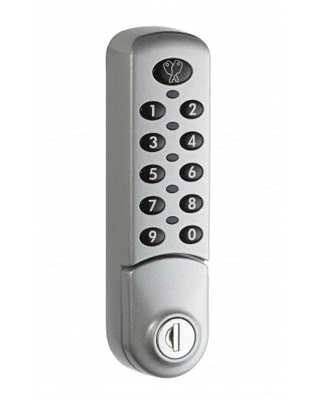
Need a replacement electronic locker override key? Total Locker Service can help identify compatible mechanical override keys, electronic management devices and administrator credentials for digital locker locks. The correct replacement depends on the exact lock model and configuration.
For an authorised replacement enquiry, use our locker key and lock identification service. This guide explains compatibility, management functions and when a new key is not the solution.
Quick answer: there is no universal electronic locker override key. Confirm the manufacturer, exact model and management-access method before ordering. Emergency power alone does not normally grant access, and a management opening does not necessarily clear the previous user’s credential.
In this guide
- Override methods
- When override access is needed
- Compatibility
- Master keys versus override keys
- Opening, resetting and programming
- Emergency power
- Replacement identification
- Fault assessment
- Security
- Repair or replacement
- FAQs
What Is an Electronic Locker Override Key?
The term can describe a physical emergency key or an electronic management device. The correct meaning depends on the lock design. Some electronic locks have no physical key override at all.
| Method | Purpose | Limitation |
|---|---|---|
| Mechanical override key | Authorised mechanical opening on supported models | May work independently of batteries; does not necessarily change electronic settings |
| Electronic management key | Supported management functions through a compatible device | May require power, programming or association |
| Management card or credential | Authorised electronic management access | Depends on compatible credential technology and configured permissions |
| Administrator PIN or software command | Supported local or connected management function | Requires appropriate authority and functioning equipment |
| Emergency power | Temporarily powers compatible equipment | Not an access credential by itself |
When Is an Override Key Needed?
- Forgotten user PIN or unavailable credential, where management opening is supported.
- Battery failure, where a supported mechanical or power-recovery option exists.
- Authorised maintenance, inspection or emergency access.
- A user leaves without returning access equipment.
- A system malfunction requires authorised assessment.
First establish entitlement and the purpose of the opening. A failed lock or obstructed door may require a service engineer rather than another credential.
Are Override Keys Universal?
No. Compatibility may depend on the manufacturer, model, generation, keying reference, management device type and installation configuration. Similar-looking locks do not necessarily use the same override method. Never force an incompatible key.
| Manufacturer or product family | Information to confirm |
|---|---|
| Digilock | Exact product family, generation and management device |
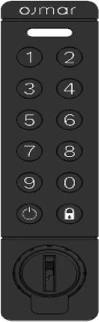
| Ojmar | Model and supported management-access method |
| Lowe & Fletcher | Lock series and override configuration |
| Codelocks / KitLock | Exact model and supported management functions |
| RONIS | Series and credential technology |
| ASSA ABLOY | Product family and management-access configuration |
These are identification prompts, not claims that every model supports a physical override key. Check the applicable manufacturer instructions or ask the supplier to confirm compatibility. Contact our identification service if the model or management device is uncertain.
Master Key vs Override Key
A conventional mechanical master key operates a defined group of compatible mechanical locks. An electronic locker override method provides a secondary management route according to the particular lock design. A mechanical override key on an electronic lock may operate multiple compatible locks, but this does not establish a conventional multi-level master-key hierarchy. See Master Key Locker Systems UK.
Management Opening, Resetting and Programming
| Function | Meaning |
|---|---|
| Management opening | Authorised access to the compartment |
| User PIN reset | Changes or clears a user code where supported |
| Credential removal | Removes an existing user association |
| Locker release | Ends the current use session where supported |
| Programming | Changes supported lock settings |
| Factory reset | Restores specified defaults; may remove configuration |
| Emergency power | Restores temporary electrical power |
These functions are not interchangeable. Confirm the required outcome before using a management device. After opening, verify the user association, compartment condition and availability separately. A reset may affect settings or records; follow the model-specific instructions and authorised change process.
Battery Failure and Emergency Power
An unresponsive battery-powered lock may have exhausted batteries, poor electrical contact or another fault. Some models support external emergency power; others provide mechanical override or a different recovery method. Use only the manufacturer-specified supply and procedure. Do not improvise electrical connections or assume a particular voltage is universal.
Restoring power may still require an authorised credential. Following access recovery, replace batteries as specified, check normal operation and confirm whether user settings remain intact. See battery-powered and hardwired electronic locker locks for wider power and maintenance considerations.
How to Identify and Order a Replacement Override Key
- Confirm manufacturer and exact lock model.
- Record generation, serial or identification reference where relevant.
- Identify the existing override or management device type and reference.
- Confirm which management functions are required and whether association or programming is necessary.
- Explain whether the original device is damaged, missing or potentially compromised.
- Provide clear photographs of the lock and identification label privately to the authorised supplier; avoid publishing sensitive codes or key-cut details.
- Confirm ordering authority and compatibility before purchase.
For a quotation, also state the quantity required and whether the equipment serves one site or several. Do not order by locker number, appearance or brand alone. Availability and any programming requirements must be confirmed before purchase.
Electronic Locker Fault Assessment
| Reported problem | Initial authorised assessment |
|---|---|
| Forgotten PIN | Confirm entitlement and supported management procedure |
| Unresponsive lock | Check power condition and manufacturer recovery guidance |
| Credential rejected | Check compatibility, status and permissions |
| Credential accepted but door remains closed | Check whether release was confirmed and arrange inspection of alignment or mechanical engagement |
| Management device rejected | Confirm model compatibility and required association |
| Door opens but session remains active | Check whether a separate release or reset is required |
| Repeated battery failure | Review approved batteries, usage, mechanism resistance and service guidance |
| Door remains stiff | Arrange inspection of door, cam or bolt alignment |
A successful credential indication does not prove that the mechanism released or that the door opened. Do not force a door or repeatedly operate a binding mechanism. Isolate faulty compartments from reissue and arrange competent repair. Record the symptom and the confirmed outcome rather than assuming an electronic failure.
Security Considerations
- Limit management access to authorised personnel and defined lock groups.
- Store physical override devices securely; see key cabinets.
- Record issue, return and authorised management openings separately.
- Escalate a missing device promptly and establish its actual access scope.
- Where supported, revoke electronic management credentials and verify the change at the equipment. A missing mechanical key cannot be remotely disabled.
- Consider rekeying or replacement where a missing physical key retains unacceptable access; obtaining another copy does not invalidate the original.
For custody procedures see locker key management; for opening authority see access permissions and governance; for evidence see locker access audit systems. An issue record alone does not prove an opening occurred.
When to Replace the Entire Electronic Lock
A missing management device does not automatically justify replacing the lock. Assess compatible replacement equipment first. Where a mechanical override key is compromised, consider supported rekeying or replacement; where electronics are obsolete or irreparable, assess a compatible replacement lock. Battery faults and door alignment problems require separate diagnosis.
Before replacement, confirm door material and thickness, fixing and cut-out dimensions, cam or bolt geometry, rotation and clearance, operating mode, power requirements and compatibility with existing management equipment. Test normal and authorised management operation before returning the locker to service. See locker lock compatibility guidance.
Browse locker locks, electronic combination locker locks and RFID locker locks for replacement options.
Common Mistakes When Replacing Override Keys
Avoid ordering an override device before checking the exact model, assuming a management opening resets the user credential, or treating emergency power as access authority. Before returning a locker to service, verify normal access, authorised management operation and the compartment’s allocation status.
Frequently Asked Questions
Can I order an override key without knowing the model?
In most cases the exact model and override reference are needed. The supplier may help identify the lock from photographs and markings before an order is placed.
Do all digital locker locks have override keys?
No. Some use mechanical keys, others electronic management devices, administrator credentials or alternative recovery arrangements.
Are electronic locker override keys universal?
No. Compatibility depends on the manufacturer, model, generation and configuration.
Can an electronic locker be opened when its batteries fail?
Some models support mechanical override or external emergency power. Check the specified recovery method; not every lock supports both.
Does a management opening reset the user PIN?
Not necessarily. Opening, resetting and releasing a session can be separate functions.
Do electronic management keys require programming?
Some devices require association or programming, while others do not. Confirm the requirements for the exact model.
What happens when an electronic override key is lost?
Escalate the loss, identify affected locks and assess revocation, rekeying or replacement according to the device type and risk.
Why does a locker remain locked after accepting a credential?
Credential acceptance does not necessarily confirm mechanical release. A power, mechanism or alignment fault may require competent inspection.
Replacement Override Keys and Electronic Locker Locks
Total Locker Service can assist with identifying compatible replacement keys and locker locking equipment. Provide the manufacturer, model, existing management device reference and required function so that the appropriate options can be assessed before ordering.
Send your authorised enquiry to sales@totallocker.co.uk or call 01284 749211. For conventional keyed locks, browse our replacement locker keys.
Discover more from Blog Total Locker Service
Subscribe to get the latest posts sent to your email.