
Codelocks KL1200 Electronic Keypad Locker Lock
KL1200 Electronic Keypad Locker Lock
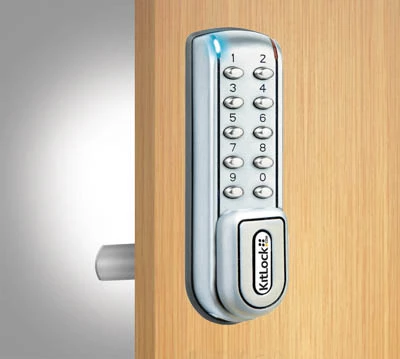 Click to enlarge
Features
Codelocks KL1200 Electronic Keypad Locker Lock
The Codelocks KL1200 is a standalone electronic keypad lock for lockers, cabinets and cupboards. It provides convenient keyless access without requiring users to carry a mechanical key, access card or RFID credential.
The KL1200 can be configured for lockers assigned to regular users or for shared lockers used by different people throughout the day. It is suitable for new storage installations and compatible upgrades from conventional locker cam locks.
Benefits of KL1200 Keypad Locker Access
Keypad operation reduces the administration associated with issuing, collecting and replacing locker keys. Authorised users enter a code at the lock, while management access can be retained by the organisation responsible for the lockers.
- Keyless access without issuing cards, fobs or mechanical keys
- Suitable for permanently assigned and short-term shared lockers
- Separate access levels for users, managers and maintenance personnel
- Multiple authorised users can operate the same allocated locker
- Automatic release options can support shared-locker policies
- Dual-authorisation capability for applications requiring two users
- Standalone operation without mains wiring or central access control
- Suitable for new installations and compatible retrofit projects
- Optional alternative latch arrangements for selected applications
- Management programming is completed directly at the lock
Private and Public Locker Functions
The KL1200 can be configured according to whether the locker is allocated to a regular user or shared between different users.
| Function | How the locker is used | Typical applications |
|---|---|---|
| Private function | An authorised user enters a programmed code whenever access is required. The locker normally remains allocated to the same person, department or group. | Employee lockers, personal storage, office cabinets, school lockers and departmental equipment cupboards. |
| Public function | A user selects a personal code when securing an available locker. The same code reopens the locker and is then cleared, leaving it ready for the next user. | Leisure centres, gyms, hot-desking areas, visitor lockers, changing rooms and other shared storage facilities. |
Public function can help reduce locker-key administration in facilities with a high turnover of users. Private function is more appropriate where access must remain assigned to known users.
Managed User and Maintenance Access
Different access levels allow routine locker use to be separated from programming and maintenance responsibilities. This means normal users do not need to be given the primary administrative code.
| Access role | Purpose | Recommended use |
|---|---|---|
| Site administrator | Controls the main lock configuration and authorised access settings. | Facilities managers, security managers or nominated locker administrators. |
| Local manager | Provides limited administration without sharing full control of the lock. | Department managers, reception staff or local supervisors. |
| Maintenance access | Allows authorised personnel to inspect or open shared lockers without unnecessarily cancelling the current user's access. | Facilities teams, locker-service personnel and approved contractors. |
| Normal user | Provides routine access according to the selected private or public locker function. | Employees, students, members, visitors and other locker users. |
Administrative codes should be changed before the lockers enter service and retained securely by authorised personnel. Site records should identify who is responsible for programming, maintenance and emergency access.
Automatic Release for Shared Lockers
Automatic unlocking can help prevent a public-use locker from remaining occupied indefinitely after a user has left the site or forgotten their code.
Depending on the lock version and configuration, a locker can be set to release after a defined period or at a selected time. This can support facilities where lockers must be cleared at closing time, at the end of a shift or before the next group of users arrives.
- Discourage unauthorised overnight locker occupation
- Release lockers after the permitted usage period
- Prepare shared lockers for the next shift or booking
- Reduce the need for staff to inspect every locker manually
- Support clearly defined temporary-storage policies
Users should be informed of any automatic release policy before placing belongings in a locker. The exact settings available must be confirmed against the programming instructions supplied with the lock.
KL1200 Locker and Cabinet Applications
The KL1200 is suitable for managed indoor storage where users need convenient keypad access and the organisation wants to reduce its reliance on physical locker keys.
- Employee and workplace lockers
- Factory and warehouse staff lockers
- School, college and university lockers
- Gym and leisure-centre lockers
- Office hot-desking storage
- Visitor and contractor lockers
- Healthcare staff lockers
- Retail staff storage
- Equipment cupboards
- Office and workshop cabinets
Suitability depends on the door construction, installation environment, required latch arrangement and the site's access-management procedure.
Replacing an Existing Locker Cam Lock
The KL1200 can replace many compatible cam locks fitted to lockers, cupboards and cabinets. It can also be fitted to suitable doors that do not currently have a locking device.
Retrofit compatibility should not be assumed from the existing lock type alone. Before drilling or ordering a larger quantity, check:
- Door material and total thickness
- Size and position of the existing cam-lock aperture
- Required additional fixing positions
- Available clearance behind the door
- Movement and alignment of the locking cam
- Position of the locker frame or strike
- Whether the door is left-handed, right-handed or vertically configured
- Whether marks from the previous lock will remain visible
A cover plate, alternative cam or different latch arrangement may be required for some replacement installations. Photographs and measurements should be provided where compatibility is uncertain.
Is the KL1200 the Right Locker Lock?
| Access requirement | KL1200 suitability |
|---|---|
| Repeated access by allocated users | Suitable. Private function provides repeat access using programmed user codes. |
| Short-term shared lockers | Suitable. Public function allows each temporary user to select a personal code. |
| Several authorised users per locker | Suitable where the required number of user codes is supported by the selected lock version. |
| Two-person access control | Suitable where dual authorisation is correctly configured and supported by the site's operating procedure. |
| Temporary codes generated remotely | Select the KL1200 NetCode version rather than the standard KL1200. NetCode requires separate setup and service arrangements. |
| Card, fob or wristband access | Select an RFID locker lock instead of a keypad-only model. |
| Live central monitoring and remote unlocking | Consider a networked locker-locking system rather than a standalone KL1200. |
| Operation without batteries | Select a mechanical combination locker lock rather than the electronic KL1200. |
Check the KL1200 Version Before Programming
KL1200 programming sequences and available settings can differ according to the lock's production date, orientation and product version. Do not assume that instructions downloaded for another KL1200 will use the same factory codes or programming commands.
Before commissioning or resetting a lock, identify the exact model and use the installation and programming instructions supplied with that version. Retain a copy of the correct instructions with the site's locker-management records.
Information to Check Before Ordering
Providing accurate details helps confirm whether the KL1200 and its selected locking arrangement are suitable for the door.
- Number of locks required
- Private, public or mixed locker operation
- Standard KL1200 or KL1200 NetCode requirement
- Need for dual authorisation
- Required automatic locker-release policy
- New installation or replacement of an existing lock
- Locker or cabinet manufacturer, where known
- Door material and thickness
- Existing aperture and fixing-hole measurements
- Available clearance behind the door
- Door orientation and handing
- Required cam or alternative latch arrangement
For retrofit enquiries, provide clear photographs of the front and rear of the existing lock, the door edge, the frame and the current locking cam.
Call 01284 749211 or email sales@totallocker.co.uk for compatibility and ordering assistance.
Specification
Specification sheetKL1200 Electronic Locker Lock Technical Specification
The KitLock KL1200 by Codelocks is a battery-powered electronic keypad lock for compatible locker, cabinet and cupboard doors. The technical specification below applies to the standard vertical KL1200 manufactured after April 2024, unless stated otherwise. Earlier locks, including the right-hand version, must be checked against their own fitting and programming documentation.
| Manufacturer | Codelocks |
|---|---|
| Product range | KitLock by Codelocks |
| Model | KL1200 |
| Lock type | Standalone electronic keypad locker and cabinet lock |
| Standard locking mechanism | Rotating cam |
| Optional locking mechanism | Slam-latch accessory, available separately and fitted in place of the standard cam |
| Keypad | Stainless-steel push buttons with separate programming bar |
| Maximum User Codes | Up to 20 four-digit User Codes on the post-April-2024 model |
| Master Code | One eight-digit Master Code |
| Sub-Master Code | One eight-digit Sub-Master Code |
| Technician Code | One six-digit Technician Code |
| User Code length | Four digits |
| Incorrect-code protection | Three consecutive incorrect code entries activate a temporary penalty period |
| Power supply | 2 × 1.5 V AAA batteries |
| Maximum stated operations | Up to 100,000 operations on the post-April-2024 model, depending on batteries and operating conditions |
| Low-battery warning | The red LED flashes three times before the normal unlocking indication |
| Battery-failure override | Temporary external battery power can be applied through the contacts on the front of the lock |
| Memory | Non-volatile memory retains programmed codes and settings |
| Ingress protection | IP55 on the post-April-2024 model, when correctly fitted with the specified gasket |
| Operating temperature | 0°C to 55°C |
| Installation orientation | Vertical |
| Alternative orientation | Right-hand KL1200 versions are also listed; confirm the exact model, fitting guide and published ratings before ordering |
| Fixing arrangement | Dual fixing points for improved stability on compatible doors |
| Standard finish | Brushed Steel |
Battery performance depends on battery quality, usage frequency, temperature, door alignment and the force required to move the locking cam or latch. The KL1200 brochure linked above describes an earlier generation and therefore quotes different figures. See the version comparison below.
KL1200 Code Levels and Permissions
Separate code levels allow normal access, maintenance and full administration to be assigned to different authorised users.
| Code level | Code length | Quantity | Technical permissions |
|---|---|---|---|
| Master Code | 8 digits | 1 | Provides full programming authority, access management and control of the main lock configuration. |
| Sub-Master Code | 8 digits | 1 | Provides limited administration without allowing the holder to change or delete the Master Code. |
| Technician Code | 6 digits | 1 | Provides maintenance access. In public function, it can open the lock without deleting the active temporary User Code. |
| User Code | 4 digits | Up to 20 | Provides routine access according to the lock's programmed configuration. |
The same numeric code should not be assigned to more than one access level. The factory Master and User Codes must be changed before the locker enters service.
KL1200 Battery and Emergency Power Information
| Condition | Lock indication | Required action |
|---|---|---|
| Normal battery condition | Normal keypad, LED and locking-mechanism operation | Continue routine operation and include the batteries in the site's planned maintenance checks. |
| Low battery | The red LED flashes three times before the lock opens | Replace both AAA batteries as soon as practical. |
| Battery failure | The keypad does not respond normally or the lock cannot complete the unlocking cycle | Apply the specified temporary external battery supply to the front contacts and enter an authorised management code. |
| Batteries removed | Programmed information remains in non-volatile memory | Fit two matching replacement batteries and test the lock before returning the locker to service. |
Replace both batteries together. Do not mix old and new batteries, different battery chemistries or different brands within the same lock.
External battery override provides temporary power only. It does not recharge the installed AAA batteries and is not intended to act as a permanent power supply.
KL1200 Installation Requirements
| Installation detail | Requirement |
|---|---|
| Installation template | Use the correct template for the standard vertical or right-hand lock version. |
| Template scale | Print at 100% actual size and confirm the printed measurements with a ruler before drilling. |
| Door construction | The door must be strong enough to support both fixing points and resist movement during operation. |
| Rear clearance | Allow sufficient space for the lock body, battery compartment, cam movement and any selected latch accessory. |
| Cam alignment | The cam must secure and release without binding against the locker frame or strike. |
| Slam-latch installation | The optional slam latch replaces the standard cam and must be aligned with the appropriate strike. |
| Environmental gasket | Use the gasket and fitting instructions for the actual lock. The later vertical model is rated IP55; older versions were specified as IP54 with the gasket. |
| Battery access | Ensure the lock can be removed or accessed as required for future battery replacement. |
| Commissioning | Test all authorised code levels, locking movement, low-resistance door operation and emergency power before handover. |
Do not use the motorised locking mechanism to pull a distorted, overloaded or misaligned door into position. Adjust the hinges, door and strike so the locking mechanism can move freely.
Identify the KL1200 Version Before Programming
KL1200 programming sequences, factory codes and operating figures vary between production versions. In particular, the older KL1200 brochure linked automatically above gives different IP and battery-life figures from Codelocks' guidance for locks manufactured after April 2024.
| Specification | Earlier KL1200 brochure | KL1200 after April 2024 |
|---|---|---|
| Ingress protection | IP54 with rubber gasket | IP55 with the specified gasket |
| Battery operations | Up to 50,000 | Up to 100,000 |
| Batteries | 2 × 1.5 V AAA | 2 × AAA |
| Published orientation | Vertical and separate right-hand versions | Vertical in the current manufacturer guide |
| Overall dimensions | 143 × 41 × 37 mm, to the top of the handle | Check the fitting drawing for the supplied model |
| Door thickness | Up to 25 mm in the earlier brochure | Check the installation instructions for the supplied model |
These are generation-specific published figures, not a promise that every KL1200 variant has the same dimensions or rating. For the newer model, use Codelocks' KL1200 programming and operating instructions . The PDF supplied above the specification describes the older version. The standard vertical model and right-hand model can also require different programming instructions.
| Check | Why it matters |
|---|---|
| Production version | Later models support additional functions and a greater number of User Codes than some earlier versions. |
| Vertical or right-hand model | The keypad layout, factory codes and programming commands can differ. |
| Standard or NetCode version | NetCode models require separate initialisation, account and programming instructions. |
| Cam or slam latch | The locking mechanism affects the installation layout and rear clearance required. |
| Correct documentation | Using instructions for another version may reset the wrong settings or prevent the lock from being programmed correctly. |
Retain the correct installation and programming instructions with the site's locker-maintenance records.
KL1200 Inspection and Maintenance
| Component | Recommended check |
|---|---|
| AAA batteries | Replace both batteries when the low-battery indication appears. |
| Keypad buttons | Confirm that each button responds correctly and remains secure and legible. |
| External battery contacts | Keep the contacts clean and free from coatings, dirt and corrosion. |
| Handle and locking mechanism | Check for smooth movement without excessive resistance or play. |
| Cam or slam latch | Confirm correct alignment and unrestricted engagement with the locker frame or strike. |
| Fixings | Confirm that both fixing points remain secure without overtightening or distorting the door. |
| Environmental gasket | Check that the gasket remains correctly positioned and undamaged. |
| Management codes | Review authorised code holders when staff or maintenance responsibilities change. |
| Version records | Keep the model, orientation and correct programming guide recorded for each installation. |
KL1200 Technical Documentation and Support
The product-page template displays the configured KL1200 specification document above this technical section. Use the programming and installation instructions that correspond to the exact lock version and orientation.
When requesting technical assistance, provide the product model, production version where known, door orientation, photographs of the front and rear units and a description of the LED, keypad or locking-mechanism behaviour.
Technical advice, replacement-lock identification and installation support are available through Locker Parts and Service .
KL1200 Technical FAQs
Is the KL1200 a mechanical or electronic locker lock?
The KL1200 is an electronic keypad locker and cabinet lock. It is powered by two AAA batteries and operates a motorised locking mechanism. It should not be confused with a battery-free mechanical combination lock.
How many User Codes can the KL1200 store?
The current KL1200 can store up to 20 four-digit User Codes. Earlier production versions may support fewer codes, so the exact model and programming guide should be checked.
What batteries does the KL1200 use?
The KL1200 uses two 1.5 V AAA batteries. Replace both batteries together using matching batteries of the same type and brand.
How many operations can the KL1200 provide?
Codelocks specifies up to 100,000 operations for the standard KL1200 manufactured after April 2024. The older brochure quotes up to 50,000. Actual battery performance depends on usage, temperature, door alignment and battery quality.
What indicates a low battery on the KL1200?
The red LED flashes three times before the normal unlocking indication. Both AAA batteries should be replaced as soon as practical after this warning appears.
How can the KL1200 be opened after battery failure?
Temporary external battery power can be applied to the contacts on the front of the lock. An authorised management code is then entered so the locker can be opened and the internal AAA batteries replaced.
Does the KL1200 retain its codes when the batteries are removed?
Yes. The KL1200 uses non-volatile memory, so programmed codes and settings are retained when the batteries are removed. The lock should still be tested after replacement batteries are fitted.
Is the KL1200 suitable for damp environments?
The post-April-2024 KL1200 is rated IP55 when correctly installed with the specified gasket. Earlier versions were documented as IP54 with a gasket. Neither rating makes the complete locker suitable for every wet or outdoor environment; the enclosure and installation must also be assessed.
Can the KL1200 use a slam latch instead of a cam?
Yes. A compatible slam-latch accessory is available separately and is fitted in place of the standard cam. The door and strike arrangement must be suitable for the selected latch.
Are all KL1200 programming instructions the same?
No. Programming commands and factory codes differ between some production versions and between the standard vertical and right-hand models. Always use the instructions supplied for the exact lock.
Why might a KL1200 fail to lock or unlock correctly?
Possible causes include low batteries, incorrect programming, door misalignment, pressure against the cam, a poorly aligned slam latch or loose fixings. Check the batteries and mechanical alignment before replacing the lock.
Where can I get help identifying a KL1200 version?
Send photographs of the front and rear of the lock, the locker door and any model labels to Total Locker Service. Identification and technical assistance are available through Locker Parts and Service .
Why does the older KL1200 brochure state IP54 and 50,000 operations?
That brochure describes an earlier generation. Codelocks' guidance for KL1200 locks manufactured after April 2024 specifies IP55 with the correct gasket and up to 100,000 operations. Check the actual lock version before applying either set of figures.
Delivery
Delivery Information
The approximate lead time is 10 Days.
Standard delivery is available to mainland UK addresses, Monday to Friday between 8:00 am and 5:00 pm.
Deliveries are kerbside only. Products may be delivered by a third-party pallet or specialist carrier using a suitable commercial vehicle.
The customer is responsible for providing suitable personnel and equipment to unload the delivery safely.
Please tell us before ordering about restricted access, specific delivery dates or times, FORS requirements or other special delivery arrangements. These may be available at an additional cost.